
3
Design Placement
The Virtuoso Placer supports two placement types - automatic and assisted.
- Automatic placement is performed by the Virtuoso Placer.
- Assisted placement is the process of placing devices semi-automatically. Depending on the complexity of your design and your placement needs, you can choose to perform complete assisted placement of your design or use the assisted placement options to refine the placement after running the Virtuoso Placer.
You can use the options in the Placement Options form to customize the assisted and automatic placement features.
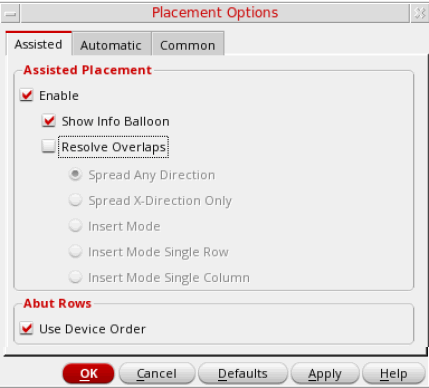
The Placement Options form has the following tabs:
- Assisted, which provides options for assisted move commands and specifies assisted placement settings. This tab is displayed by default.
- Automatic, which specifies automatic placement settings.
- Common, which includes options that are relevant for both assisted and automatic placement.
Both, assisted and automatic placement methods support snapping of individual objects and object groups to grids.
Virtuoso Placer honors the Net Priority routing constraint set on nets. The Net Priority constraint defines the order of priority when routing a net. You can specify the priority of nets in the -128 to 128 range, where -128 is the lowest priority. The higher the priority, the closer the placer places the instances attached to the associated net.
Related Topics
Setting the Assisted Placement Options in the Placement Options Form
Setting Automatic Placement Options in the Placement Options Form
Setting Common Options in the Placement Options Form
Return to top