
Single Rail Cells
Single rail cells are custom cells. These can be custom standard cells, an unimplemented sub-block, or a complex hierarchical custom logic having a single primary power and ground supplies. Usually, a Liberty model does not exist for such cells. Consequently, the single rail cell registration enables blackboxing of any hierarchical sub-block so that the extractor recognizes it as a leaf cell. All ports connected to a single rail cell (directly or through some elements) are mapped according to the port definitions as defined in standard cell registration.
Single rail devices commonly used have the following features:
- Single rail device registration can be done with global attributes set at the cell level for multiple cells. In addition, the registration can also be done explicitly for a single cell.
- Defining the global supply values is optional.
- By default, all non-supply and non-bias pins are considered to be data pins. These data pins are related to the supply pins (RPP/RPG) and the bias pins (RBP).
- Single rail cells are also supported for bias supplies, which might be different from primary supplies.
On the Device tab in the Power Manager Setup form, when you click  after selecting the
 singleRailCell device type, the singleRailCell Attributes form opens. Additionally, you can view the form by selecting any cell registered as a single rail cell device.
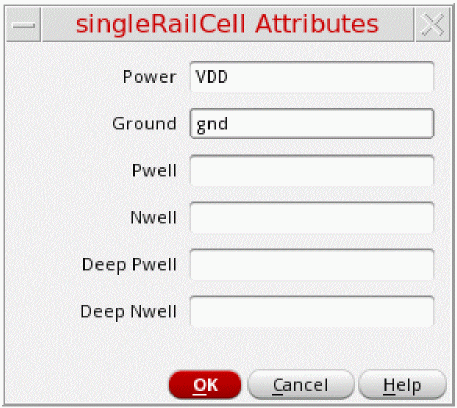
In a setup file, the singleRailCell registration is represented as shown below:
singleRailCell ( nil
cells (
("myLib" "aBuf*" nil)
( nil "bBuf*" nil)
("myLib" "cBuf*" nil
(nil
power "VDD"
ground "VSS"
pwell "VPP"
nwell "VNN"
deeppwell "VPPP"
deepnwell "VNNN"
)
)
)
power "VDD"
ground "VSS"
pwell "VPP"
nwell "VNN"
deeppwell "VPPP"
deepnwell "VNNN"
)
Related Topics
Backtrace Enable Signals of Special Cells
Terminal Name Registration for Devices
Return to top