
Registering Supply Set and Power Domain
A power domain is a part of the design that operates at a specific voltage. While capturing the power intent, you need to specify the power domains for the top level of the design. There can be a single or multiple power domains associated with the different sections of the design addressed by a specific supply set.
During automatic extraction, Power Manager identifies a power net and a ground net from the pair defined explicitly in the setup as a supply set in the Export tab of the Power Manager Setup form. It associates the supply set with the power domain as specified in the setup.
You can specify a supply set as a primary supply set for the power domains mentioned in the setup. In addition, you can also define the supply set for the power and ground that cannot be paired by traversing the design hierarchy or parsing the Liberty file.
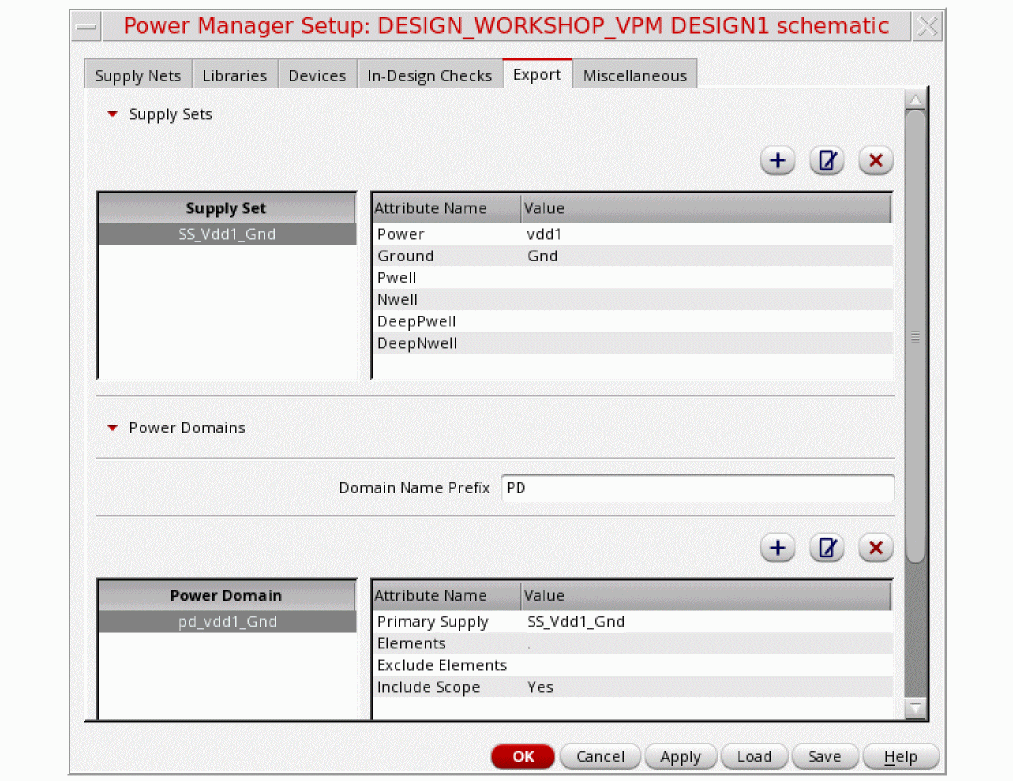
To register supply set and power domain:
-
Click
 to add,
  to modify, and
  to remove the supply set and power domain information.
It opens the Add Supply Set and Add Power Domain forms, respectively. - Click OK.
The Supply Set field is automatically populated if the field is found blank or the user-defined names are in the SS<delimiter>XYZ<delimiter>ABC format. The automatically generated supply set names follow the <SS><delimiter><powerSupply><delimiter><groundSupply> format.
The Power Domain field is automatically populated if the field is found blank or the user-defined names are in the PD<delimiter>XYZ format. The automatically generated power domain name follows the <domainPrefix><delimiter><supplySetName> format.
In the following example, the power net VDD and VSS are registered as a supply set, also a top-level power domain is registered as PD_TOP, which is associated with this supply set having power nets and ground nets as VDD and VSS, respectively.
;;; Supply Sets
supplySets (
(nil
supplySetName "SS_VDD_VSS"
power "VDD"
ground "VSS"
)
(nil
supplySetName "SS_VDDA_VSSA"
power "VDDA"
ground "VSS"
)
)
;;; Power Domains
powerDomains (
( nil
domainName "PD_TOP"
elements "."
primarySupplySet "SS_VDD_VSS"
includeScope t
)
( nil
domainName "PD_LS"
elements "I0"
primarySupplySet "SS_VDDA_VSS"
)
)
If you do not register power net and ground net pairs, the ground net associated with a power net is automatically traced, consequently, creates a supply set and an associated power domain. Consequently, all the other supply sets are created. This is possible only when there exists a path from a power net to a ground net through a network of transistors and/or two terminal devices. In other cases, you need to register the supply set.
Related Topics
Registering Supply Set and Power Domain
Return to top