
Using Tapers
Tapering is needed when pins cannot be accessed due to one of the following conditions:
- The wire is wider than the width of the pin.
-
The
validRoutingViasfor a net are so large that they will cause a DRC violation when accessing a pin. - Spacing requirements cannot be met in the pin area because the pins are too close together.
Virtuoso Space-based Router automatically attempts to taper when one of these conditions exists. You can customize tapers or use the default taper settings.
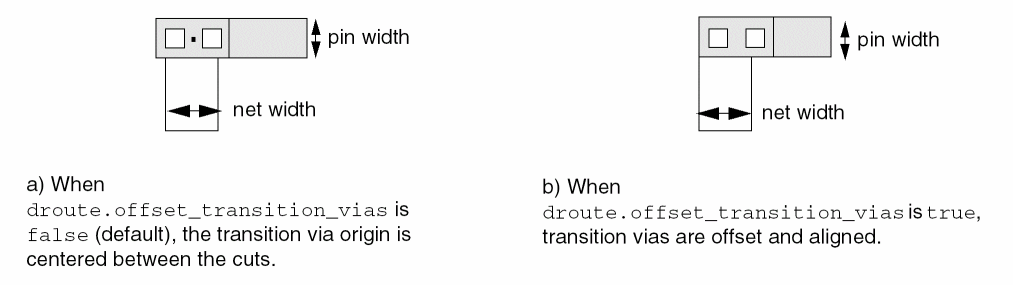
Transition vias are created dynamically, as needed, for tapering between metal layers. When double cut vias are required (minNumCut constraint value is 2), the default via origin is at the center of the cuts. When the droute.offset_transition_vias environment variable is set to true, double cut transition vias will be offset and aligned, as shown in the following figure.
Default Taper Settings
-
All non-default route specs taper to the global net default route spec (for example,
LEFDefaultRouteSpec). This route spec will typically specify foundry constraints, such asminWidthandminSpacing, and smallervalidRoutingViasthat make it easier to complete the routing to/from the pin. The search order for taper constraints is described in Taper Constraints. - When needed, tapering starts within a distance of 10 tracks from the pin.
Custom Tapers
For custom tapers, you can set constraints or issue commands to do the following:
- Taper to the width of pins on a net.
- Assign a route spec as the taper route spec and customize taper parameters (width, spacing, vias, and the maximum distance from the pin where tapering must start) for nets or terms.
Force tapering by specifying minTaperWindow on the taper route spec. Even if tapering is not needed, setting this constraint forces tapering within this distance from the pin.
Related Topics
Setting Pin Width-based Tapering
Return to top