create_map_tile
create_map_tile
-pattern s_patternName
[ -line
   {horizontal [ -alignment {center | top | bottom} ]
 | {vertical   [ -alignment {center | left | right} ]}
   [ -lineStyle {solidline | dashedline | dottedline | dashdottedline
              | dashdotdottedline} ]
   [ -lineWidth i_pixel ]
| [ -rect
      [ -fillStyle {solid | nofill | crosshatch | diagcrosshatch
                 | negdiaghatch | posdiaghatch | horizhatch | verthatch} ]
      [ -scaleFactor f_multiplier ] ]
[ -opacity i_0to255 ]
Description
Creates and sets parameters for a map tile which determines whether a line or a rectangle will be used to represent the status of cells. If neither -line nor -rect is given, a solid rectangle of the cell size is used.
Arguments
|
-fillStyle s_style
|
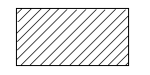
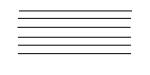
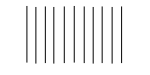
Used with -rect and specifies the fill style for the rectangle tiles as one of the following:
|
|
|
solid
|

|
|
|
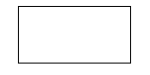
nofill
|
|
|
|
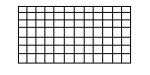
crosshatch
|
|
|
|
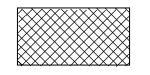
diagcrosshatch
|
|
|
|
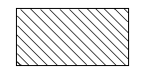
negdiaghatch
|
|
|
|
posdiaghatch
|
|
|
|
horizhatch
|
|
|
|
verthatch
|
|
|
-line {horizontal | vertical} [ -alignment s_alignment]
|
|
|
Chooses a line as the pattern type. The line direction must be horizontal or vertical and determines the valid choices for the alignment of the line with respect to the cell. By default, the line is drawn through the center of the cell.
|
|
|
Line Direction
|
Valid choices:
|
|
|
horizontal
|
center, bottom, top
|
|
|
vertical
|
center, left, right
|
|
-lineStyle s_style
|
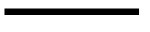
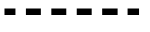
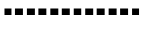
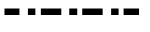
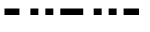
Chooses the style for the line tile from the following:
|
|
|
solidline
|
|
|
|
dashedline
|
|
|
|
dottedline
|
|
|
|
dashdottedline
|
|
|
|
dashdotdottedline
|
|
|
|
By default, a solid line is used.
|
|
-lineWidth i_pixel
|
Specifies the width for a line tile.
|
|
-opacity i_0to255
|
Chooses the opacity for a tile where 0 is transparent and 255 is fully opaque.
|
|
-pattern s_patternName
|
|
|
Specifies the name to assign to this color map tile pattern. To use this tile pattern in a color map, specify this name for the -tile argument in display_color_map.
|
|
-rect
|
Chooses a rectangle as the tile type. Must be used with the -fillStyle argument.
|
|
-scaleFactor f_multiplier
|
|
|
Sizes the rectangle tile using the multiplier value. If the value is less than 1, the tile area is scaled down from the size of the cell. If the value is greater than 1, the tile area is scaled up from the cell size. By default this value is 1.
|
Examples
The following command creates a map tile named tilevl that is a vertical dashed line on the left side of the cell.
create_map_tile -pattern tilevl -line vertical -alignment left -lineStyle dashedline
Related Topics
Color Map Display Commands
display_color_map
Return to top
