
create_fill
create_fill
[ -all | -region {f_xlo f_ylo f_xhi f_yhi} ]
[ -boundary {f_xlo f_ylo f_xhi f_yhi} ]
[ -lpp {s_layerlpp …} ]
[ -window_size f_userunit ]
[ -step_size f_userunit ]
[{[ -fill_width {f_min f_max} ]
  [ -fill_length {f_min f_max} ]
  [ -fill_step_size f_userunit ]}
 | -fill_dimensions {{f_width f_length}…} ]
[ -fill_blockage_spacing f_userunit ]
[ -fill_boundary_spacing f_userunit ]
[ -fill_clock_spacing f_userunit ]
[ -fill_direction {preferred | nonpreferred | any} ]
[ -fill_fill_spacing f_userunit ]
[ -fill_keepout_lpp {s_lpp…} ]
[ -fill_lpp_spacing {{s_layerlpp f_userunit}…} ]
[ -fill_minarea f_userunit ]
[ -fill_pg_spacing f_userunit ]
[ -fill_shape {square | rectangle | both} ]
[ -fill_signal_spacing f_userunit ]
[ -fill_style {dense | distributed | regular | greedy} ]
[ -fill_type {floating | OPC} ]
[ -fill_via_spacing f_userunit ]
[ -fill_wire_spacing f_userunit ]
[ -ignore_illegal_lpp [ true | false ] ]
[ -max_density f_percent ]
[ -max_diff_density f_percent_0_to_1 ]
[ -min_density f_percent ]
[ -density_range {f_minpercent f_maxpercent} ]
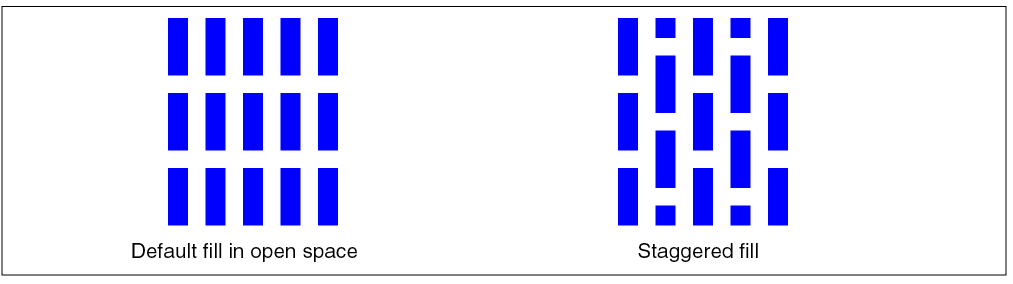
[ -staggered [ true | false ] ]
[ -target_density f_percent ]
[ -blockage_density f_percent ]
[ -boundary_interior_halo {f_x f_y} ]
[ -boundary_interior_halo_min_density_hole_mult f_multiplier ]
[ -boundary_interior_halo_target_density f_percent ]
[ -use_grid {mfg | route} ]
[ -max_effort [ true |false ] ]
[ -effort_level {1 | 2 | 3 | 4 | 5 | 6 | 7 | 8 | 0 | 10} ]
[ -threads i_threads ]
[ -verbose | -silent ]
Description
Checks the metal density for layers in a given area and adds metal fill to achieve optimum metal density required by a specific manufacturing process.
Arguments
|
Specifies the blockage percentage to consider when creating fill. By default, the target density is used. If a percentage of 0 is given, then blockages are treated as if there is no metal in the blockage area for density calculations, but the blockage area is still honored when placing fill shapes. |
||
|
Specifies an alternate boundary for the design. |
||
|
Specifies a band (given by x and y offsets) inside the boundary in which a modified target density can be specified using |
||
|
Multiplies the |
||
|
Specifies the target density percentage (0-100) to use within the boundary halo given by |
||
|
Specifies the minimum and maximum density percentage to use as lower and upper limits. By default, |
||
|
Specifies the amount of searching to do when looking for open areas in which to place fill shapes. The larger the number, the more searching is done, and the longer the runtime. Default: 1 |
||
|
Specifies the minimum spacing between a fill shape and a blockage. The default value is the fill-signal spacing value. |
||
|
Specifies the minimum spacing between a fill shape and the design boundary. Defaults to the |
||
|
Specifies the minimum spacing between a fill shape and a clock route. The default value is the fill-signal spacing value. |
||
|
Specifies a list of fill shape width/length pairs to use for fill shape dimensions. Only fill shapes with dimensions in the list will be created. |
||
|
Specifies how fill shapes should be oriented relative to the layer’s preferred routing direction. |
||
|
(Default) Fill is aligned with the layer’s preferred routing direction. |
||
|
Fill is aligned perpendicular to the layer’s preferred routing direction. |
||
|
Specifies the minimum spacing between two fill shapes. The default is taken from the technology file ( |
||
|
Prevents fill from being added that would touch any shape on the given layer purpose pairs. |
||
|
Specifies the minimum and maximum fill length. The default is the |
||
|
Specifies the minimum spacing between fill shapes and shapes on the given layers, layer purpose pairs, or purposes. The format of the argument values is:
{
|
||
|
Specifies the minimum area for a fill shape. The default value is 0, unless specifies in the technology file ( |
||
|
Specifies the minimum spacing between a fill shape and a power or ground route. The default value is the fill-signal spacing value. |
||
|
Only fill having unequal width and length (non-square) will be created. |
||
|
Specifies the spacing between a fill shape and a signal route. The default is taken from the technology file ( |
||
|
Specifies the increment to use between the minimum and maximum values for width and length when building fill shapes. Defaults to 1. |
||
|
Places fill as tightly as possible in each check window. Results will tend to have clusters of fill shapes at regular intervals. This typically runs the fastest of all fill styles. |
||
|
(Default) Places fill more randomly throughout each check window. |
||
|
Places fill as tightly as possible in each check window. Results will tend to have clustering in the lower-left corner of each check window. |
||
|
Specifies the purpose that new fill is added to as |
||
|
Specifies the minimum spacing between a fill shape and a via shape on the |
||
|
Specifies the minimum and maximum fill width. The defaults are the |
||
|
Specifies the minimum spacing between a fill shape and a wire on the |
||
|
When
Default: ( |
||
|
Specifies the layers and/or layer purpose pairs to process. By default, all routing layers are processed. |
||
|
Specifies the maximum density allowed. Defaults to the |
||
|
Specifies the maximum density difference allowed between adjacent, non-overlapping check windows. Defaults to the |
||
|
When true, any windows, in which the minimum density (or target density, if minimum density is not given) cannot be achieved, are processed a second time with the highest effort level possible (every grid location is checked). Defaults to |
||
|
Specifies the minimum density allowed. Defaults to the |
||
|
Specifies the boundary of the area to process, given the lower left and upper right coordinates. |
||
|
When
Default: ( |
||
|
Specifies the window step as a single value for X and Y, or as two values ({X Y}). If the value given is larger than the current design, then the window step will automatically be reduced to the bounds of the region/design.
Default: One-half of the window size ( |
||
|
Specifies the desired density. Fill shapes will be added to reach a density equal to or greater than the target density, or the maximum density possible if the target density cannot be met. The default is the minimum density from the technology file. |
||
|
Specifies the number of threads or processors to use in parallel to run this command. By default, if multi-threading has been enabled (enable_multithreading), the session threads are used, otherwise, one processor is used. |
||
|
Specifies the grid to use for shape placement from the following choices: |
||
|
Specifies the window size as a single value for X and Y, representing a square window, or as two values ({X Y}). If the value given is larger than the current region or design, then the window will automatically be reduced to the bounds of the region/design.
Default: The window size given by the |
||
Examples
The following example checks the metal density for the metal1 layer using a window size of 100 um, a step size of 50 um, and attempts to add fill shapes in window areas with a metal density less than 50%. Only fill shapes with dimension 4x4 are created.
create_fill -lpp metal1 -fill_width {4 4} -fill_length {4 4} -target_density 50 -window_size 100
The following example adds fill shapes of dimensions 1x2, 3x4 and 0.5x1.5.
create_fill -lpp metal1 -fill_dimensions {1 2 3 4 0.5 1.5} -target_density 50 -window_size 100
The following example adds fill shapes of dimensions 1x1, 1.5x1, 2x1. 1x1.5, 1.5x1.5, and 2x1.5.
create_fill -lpp metal1 -fill_width {1 2} -fill_length {1 1.5} -fill_step_size 0.5 -target_density 50 -window_size 100
Related Topics
Return to top