|
-columns {i_columns…}
|
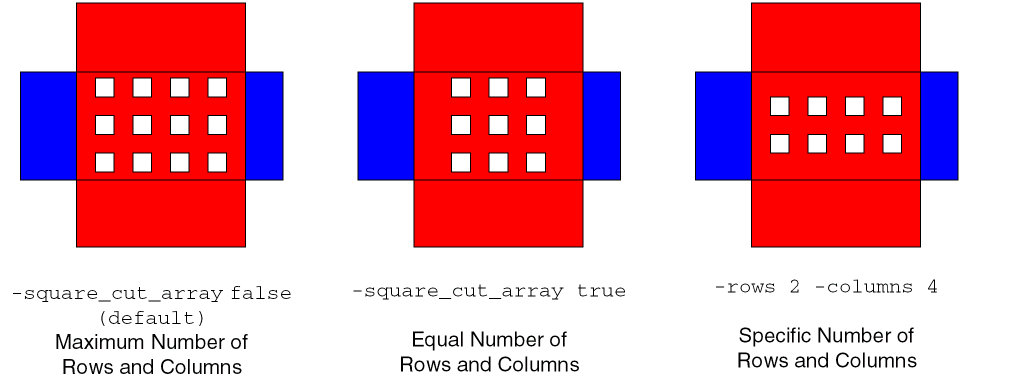
Specifies the number of columns in the cut array for all vias. If a single value is given, it applies to all cut layers. If a list is specified, there must be one value given for each cut layer between -from_layer and -to_layer, and the first value refers to the lowest cut layer. If the cut array with these dimensions cannot fit within a via area, no via is created for that metal intersection. Both arguments, -rows and -columns, must be given.
|
|
-connect_top_level_pins [ true | false ]
|
|
|
Specifies whether top-level pins are included in stripe-to-pin connections. By default, top-level pins are excluded.
If neither -set nor -instances is given, adds vias between stripes and top-level pins. No other connections are made.
|
|
-conservative_cut_space [ true | false ]
|
|
|
If true and minAdjacentViaSpacing is set, uses this larger cut spacing in one dimension. By default, if false, or if minAdjacentViaSpacing is not set, uses the appropriate cut spacing (minSpacing or minSameNetSpacing) for each via.
|
|
-cut_height {f_height…}
|
|
|
Specifies the Y dimension of each cut. A single value applies to all cut layers. If a list is specified, there must be one value given for each cut layer between -from_layer and -to_layer, and the first value refers to the lowest cut layer. Both arguments, -cut_height and -cut_width, must be given.
|
|
-cut_width {f_width…}
|
Specifies the X dimension of each cut. A single value applies to all cut layers.If a list is specified, there must be one value given for each cut layer between -from_layer and -to_layer, and the first value refers to the lowest cut layer. Both arguments, -cut_height and -cut_width, must be given.
|
|
-from {core_ring | block_ring | stripes | cell_row_straps | all}
|
|
|
Connects only from this rail type.
Default: all
|
|
-from_layer s_layerName
|
|
|
Must be given with -to_layer to limit processing to the cut layers between -from_layer and -to_layer. Cannot be used with -set or -instance.
Default: all layers
|
|
-from_set d_setObj
|
Connects only from objects in the given set.
|
|
-ignore_obstacles [ true | false ]
|
|
|
When true, ignores all obstacles and creates power segments without regard to rule violations. This is useful to get a quick preliminary power layout or when it is known that there are no obstacles, such as on an empty layer.
Default: false
|
|
-ignore_purposes {s_purposeName…}
|
|
|
Similar to -ignore_obstacles, ignores objects on the given purposes. By default, no purposes are ignored.
|
|
-ignore_rail_orientation [ true | false ]
|
|
|
When true, ignores relative rail orientation and permits vias to be inserted between rails of the same orientation. When false, only adds vias between orthogonal rails of differing orientation.
Default: false
|
|
-include_narrow_pins [ true | false ]
|
|
|
When set to true, allows vias on pins that are narrower than one via.
Default: true
|
|
-include_straps [ true | false ]
|
|
|
When set to true, vias are inserted to connect straps to standard cell pins. When set to false, vias are not inserted on standard cell pins.
Default: false
|
|
-instances {all | {s_instName…}}
|
|
|
Adds only vias between stripes and either the pins of all instances or the pins of the instances in the list. No other connections are made.
If neither -set, -instances, nor -connect_to_top_level_pins is given, vias are added at intersections of rings, rails, straps and stripes. No pin connections are made.
|
|
-layers {s_layerName…}
|
|
|
(Same as -pin_layers) Used with -set or -instances, and/or -connect_to_top_level_pins to limit stripe-to-pin connections to the pins of the selected/listed instances and/or top level pins on the given layers.
|
|
-max_layer s_layerName
|
|
|
Specifies the highest metal layer to be connected. The default is the top metal layer.
|
|
-max_msg_count i_count
|
|
|
Specifies the maximum number of message for each message type to output.
Default: 10
|
|
-min_layer s_layerName
|
|
|
Specifies the lowest metal layer to be connected. The default is the bottom metal layer.
|
|
-nets {s_netName…}
|
Specifies the nets to route.
|
|
-observe_rectilinear_prBoundary [ true | false ]
|
|
|
When true, only adds vias within the design’s rectilinear prBoundary. When false, vias can be added outside the design boundary.
Default false
|
|
-pin_layers {s_layerName …}
|
|
|
(Same as -layers) Used with -set or -instances, and/or -connect_to_top_level_pins to limit stripe-to-pin connections to the pins of the selected/listed instances and/or top-level pins on the given layers.
If neither -set, -instances, nor -connect_to_top_level_pins is given, vias are added at intersections of rings, rails, straps and stripes. No pin connections are made.
|
|
-power_only [ true | false ]
|
|
|
If true (default), only power and ground nets are allowed. If false, signal nets are also allowed.
|
|
-routing_area {f_xlo f_ylo f_xhi f_yhi}
|
|
|
Limits the via insertion to the region given.
|
|
-rows {i_rows…}
|
Specifies the number of rows in the cut array for all vias. If a list is specified, there must be one value given for each cut layer between -from_layer and -to_layer, and the first value refers to the lowest cut layer. If the cut array with these dimensions cannot fit within a via area, no via is created for that metal intersection. Both arguments, -rows and -columns, must be given.
|
|
-set d_setObj
|
Adds only vias between stripes and the pins of the selected instances. No other connections are made.
If neither -set, -instances, nor -connect_to_top_level_pins is given, vias are added at intersections of rings, rails, straps and stripes. No pin connections are made.
|
|
-silent [ true | false ]
|
|
|
When true, no messages are output. When false, all message types are output.
Default: false
|
|
-skip_via_checks {[same_net][diff_net][min_area][num_cuts]
[extensions][min_edge ][stack_limit]}
|
|
|
If running the checker (-use_checker true/default), skip the via checks in the given list.
|
|
-square_cut_array [ true | false ]
|
|
|
If true, specifies a square cut array for each via, with an equal number of rows and columns. However, the cut array might not be square in size, depending on spacing rules. If the minAdjacentViaSpacing constraint is set, then the spacing of the cuts can be different in the X and Y directions, producing a cut array that is rectangular in dimension.
The default is false, and does not require an equal number of rows and columns for the cut array.
|
|
-tap_to_depth i_tapToDepth
|
|
|
Adds vias at the top level for interlayer connections between top-level shapes, and between top-level and lower-level shapes for each level of the hierarchy down to and including the specified depth.
Default: Vias are added only at the top level for interlayer connections at the top level.
|
|
-threads i_count
|
Specifies the number of threads or processors to use for checking. By default, if multi-threading has been enabled, the session threads are used, otherwise, a single processor is used.
|
|
-to {core_ring | block_ring | stripes | cell_row_straps | all}
|
|
|
Connects only to this rail type.
Default: all
|
|
-to_layer s_layerName
|
|
|
When used with -from_layer, connects only from the -from_layer metal layer to this layer.
When used with -pin_layers or -layers, connects only from the given pin layers to this layer.
Default: Connects to all layers
|
|
-to_set d_setObj
|
Connects only to objects in the given set.
|
|
-undoable [ true | false ]
|
|
|
Permits this command to be undone. Default is the current setting for the proute.undoable environment variable which defaults to false on startup.
|
|
-use_checker [ true | false ]
|
|
|
If true, runs the checker on new vias. If false, no checking is performed.
Default: true
|
|
-use_valid_routing_vias [ true | false ]
|
|
|
If true, use the validRoutingVias constraint for vias to use. If false, create standard vias.
Default: false
|
|
-via_through [ true | false ]
|
|
|
If true, adds vias from bottom-most to top-most rail layer. If false, first adds vias between adjacent rail layers.
Default: false
|