add_tree
add_tree
-set d_setObj | -net s_netName | {-bus s_busName [ -bits i_count:i_count]}
-segA true
-layerA s_layerName
[ -dirA [ vertical | horizontal ] ]
[ -widthA f_userunit ]

-segC [ true | false ]
-layerC s_layerName
[ -dirC [ vertical | horizontal ] ]
[ -widthC f_userunit ]

[ -segB [ true | false ]
  -layerB s_layerName
  [ -dirB [ vertical | horizontal ] ]
  [ -widthB f_userunit ]
  [ -segB_from {LMOST | RMOST | BMOST | TMOST}
    [ -segB_offset i_tracks ]
    [ -segB_multiplier i_tracks ] ]

{-from {LMOST | RMOST | BMOST | TMOST | LBOUND | RBOUND | TBOUND | BBOUND}
    [ -from_x f_x | -from_y f_y]
|-from_pin s_pinName
|-from_loc {f_x f_y} [ -from_offset i_tracks ]}

{-to {LMOST | RMOST | BMOST | TMOST | LBOUND | RBOUND | TBOUND | BBOUND}
    [ -to_x f_x | -to_y f_y ]
| -to_pin s_pinName
| -to_loc {f_x f_y} [ -to_offset i_tracks ] }

[ -check [ true | false ]
[ -convert_to_pin [ true | false ] ]
[ -deviation f_userunit ]
[ -fix_violation [ true | false ] ]
Description
Creates segments for nets in a set or for bits in a bus to form two-segment or three-segment trees.
Two-segment trees are typically L-shaped, using arguments for segments A and C, given by layerA and layerC. Configurations for two-segment trees are shown in the following figure.
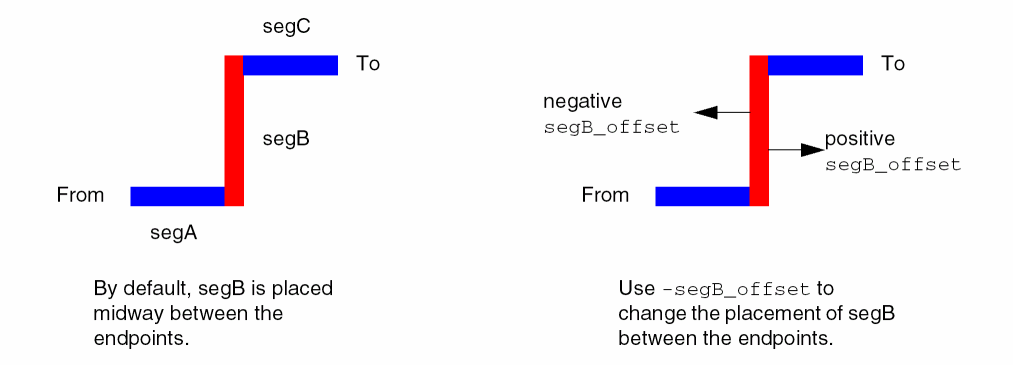
Three-segment trees are typically Z-shaped, using arguments for segments A, B, and C, given by layerA, layerB, and layerC. Configurations for three-segment trees are shown in the following figure.
You must specify the layer to use for each segment, and the from and to location for the tree. You can specify the from and to locations using any of these methods:
-
Pin name
-
Coordinates
-
Relative pin position (
TMOST for topmost, BMOST for bottommost, LMOST for leftmost, RMOST for rightmost) -
Relative boundary position (
TBOUND for topmost, BBOUND for bottommost, LBOUND for leftmost, RBOUND for rightmost)
By default, the preferred direction (horizontal or vertical) for the first segment layer is used, with the opposite direction used for next segment, and so on. You can override these settings using the -dirA, -dirB, and -dirC arguments.
The following figure illustrates the placement of the middle segment of a three-segment tree.
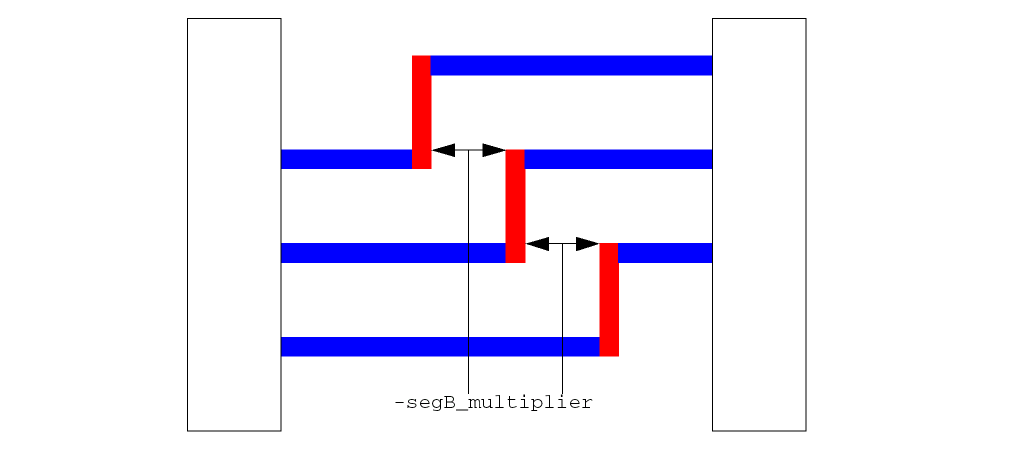
To add three-segment trees for bits of a bus, use the -segB_multiplier to specify the spacing (in trunks) between nets.
The add_tree command is typically used after power routing to route critical nets, and before routing other signals. After the segments are added, connecting vias can be added using add_via, p2p_route, or detail_route.
Arguments
|
-bits i_count:i_count
|
Creates segments for the specified bits of the bus, given by the range of bit numbers. Must be used with the -bus argument.
|
|
-bus s_busName
|
Creates segments for the given bus. If -bits is given, segments are created for the given range of bits, otherwise, segments are created for all bits of the bus.
|
|
-check [ true | false ]
|
|
|
Checks whether the addition of a segment causes DRC violations. Default is true.
|
|
-convert_to_pin [ true | false ]
|
|
|
Converts the added segments to pin shapes.
Default: false
|
|
-deviation f_userunit
|
Specifies the maximum deviation from the given destination that the segment can be moved to prevent a DRC violation. The default value is one track.
|
|
-dirA [ horizontal | vertical ]
|
|
|
Specifies the direction for the first segment.
|
|
-dirB [ horizontal | vertical ]
|
|
|
Specifies the direction for the second segment of a three-segment tree.
|
|
-dirC [ horizontal | vertical ]
|
|
|
Specifies the direction for the second segment of a two-segment tree, or the third segment of a three-segment tree.
|
|
-fix_violation [ true | false ]
|
|
|
This argument applies only when -check is true.
|
|
|
true
|
If the added segment will cause a DRC violation, the segment will be moved to the nearest DRC clean location subject to the bounds given by -deviation. This is the default.
|
|
|
false
|
The segment will be added at the given location only if it does not cause a DRC violation.
|
|
-from {LMOST | RMOST | BMOST | TMOST | LBOUND | RBOUND | TBOUND | BBOUND}
|
|
|
Specifies the relative position (pin or boundary) to use for the first segment.
If a relative boundary is given, then an x- or y- coordinate (-from_x for TBOUND or BBOUND; -from_y for LBOUND or RBOUND) must also be given.
|
|
|
BMOST
|
Bottommost pin
|
|
|
LMOST
|
Leftmost pin
|
|
|
RMOST
|
Rightmost pin
|
|
|
TMOST
|
Topmost pin
|
|
|
BBOUND
|
Bottommost boundary
|
|
|
LBOUND
|
Leftmost boundary
|
|
|
RBOUND
|
Rightmost boundary
|
|
|
TBOUND
|
Topmost boundary
|
|
-from_loc {f_x f_y}
|
Specifies the absolute location for the first segment.
|
|
-from_offset i_tracks
|
Specifies, in tracks, the offset to use for the first segment. Must be used with -from_loc. By default, this value is 0.
|
|
-from_pin s_pinName
|
Specifies the name of the pin to use for the first segment.
|
|
-from_x f_x
|
Specifies the x-coordinate for the first segment. Use this argument with -from TBOUND or -from BBOUND.
|
|
-from_y f_y
|
Specifies the y-coordinate for the first segment. Use this argument with -from LBOUND or -from RBOUND.
|
|
-layerA s_layerName
|
Specifies the layer for the first segment.
|
|
-layerB s_layerName
|
Specifies the layer for the middle segment.
|
|
-layerC s_layerName
|
Specifies the layer for the last segment.
|
|
-net s_netName
|
Adds segments for the given net.
|
|
-segA true
|
Includes the first segment of the tree.
|
|
-segB true
|
Includes the second segment of the tree.
|
|
-segB_from {TMOST|BMOST|LMOST|RMOST}
|
|
|
Specifies the pin to use for relative positioning of the middle segment.
|
|
|
BMOST
|
Bottommost pin
|
|
|
LMOST
|
Leftmost pin
|
|
|
RMOST
|
Rightmost pin
|
|
|
TMOST
|
Topmost pin
|
|
-segB_multiplier i_tracks
|
|
|
Specifies the offset, in tracks, for spacing between multiple nets or bus bit routing.
|
|
-segB_offset i_tracks
|
Specifies, in tracks, the offset for the middle segment, from the midpoint of the endpoints. By default, this value is 0.
You must specify this argument if you are routing multiple trees to stagger the placement of the middle segments for the nets.
|
|
-segC true
|
Includes the last segment of the tree.
|
|
-set d_setObj
|
Adds segments for nets in the given set.
|
|
-to {LMOST | RMOST | BMOST | TMOST | LBOUND | RBOUND | TBOUND | BBOUND}
|
|
|
Specifies the relative location (pin or boundary) to use for the last segment.
|
|
|
BMOST
|
Bottommost pin
|
|
|
LMOST
|
Leftmost pin
|
|
|
RMOST
|
Rightmost pin
|
|
|
TMOST
|
Topmost pin
|
|
|
BBOUND
|
Bottommost boundary
|
|
|
LBOUND
|
Leftmost boundary
|
|
|
RBOUND
|
Rightmost boundary
|
|
|
TBOUND
|
Topmost boundary
|
|
|
If a relative boundary is given, then an x- or y- coordinate (-to_x for TBOUND or BBOUND; -to_y for LBOUND or RBOUND) must also be given.
|
|
-to_loc {f_x f_y}
|
Specifies the absolute location for the endpoint of the last segment.
|
|
-to_offset i_tracks
|
Specifies, in tracks, the offset to use for the last segment. Must be used with -from_loc. By default, this value is 0.
|
|
-to_pin s_pinName
|
Specifies the name of the pin to use for the last segment.
|
|
-to_x f_x
|
Specifies the x-coordinate for the last segment. Use this argument with -to TBOUND or -to BBOUND.
|
|
-to_y f_y
|
Specifies the y-coordinate for the last segment. Use this argument with -to LBOUND or -to RBOUND.
|
|
-widthA f_userunit
|
Specifies the width of the first segment. By default, the segment width is the minWidth of the route spec for the net.
|
|
-widthB f_userunit
|
Specifies the width of the middle segment. By default, the segment width is the minWidth of the route spec for the net.
|
|
-widthC f_userunit
|
Specifies the width of the last segment. By default, the segment width is the minWidth of the route spec for the net.
|
Examples
The following command adds an L-tree from the leftmost pin of the net in the selected set to an absolute location {20 40}.
add_tree -set [get_selection_set] -segA true -dirA horizontal -layerA Metal3 -segC true -dirC vertical -layerC Metal2 -from LMOST -to_loc {20 40}
The following command adds a Z-tree from the topmost pin to the bottommost pin for the nets in the selected set with a spacing of 10 trunks between nets, and the middle segment of the first net offset by one trunk from the midpoint between the endpoints.
add_tree -set [get_selection_set] -segA -dirA horizontal -layerA Metal3 \
-segB true -dirB vertical -layerB Metal2 -segB_offset 1 -segB_multiplier 10 \
-segC true -dirC horizontal -layerC Metal3 -from TMOST -to BMOST
Guides will be created at the intersections of the route segments and can be added using add_via or detail_route.
The following commands create a bus from a set of nets, then create trees for bits 2 through 4.
replace_set -set1 [find_net -name Bus* -ignore_case true -no_wildcard false ] \
-set2 [get_selection_set]
create_group -name myBus -set [get_selection_set] -type net_bundle
add_tree -bus myBus -bits "2:4" -segA -dirA horizontal -layerA Metal3 \
-segB true -dirB vertical -layerB Metal2 -segB_offset 1 -segB_multiplier 10 \
-segC true -dirC horizontal -layerC Metal3 -from TMOST -to BMOST
Related Topics
Specialty Route Commands
add_segment
add_via
Return to top