
Product Documentation
Virtuoso Space-based Router Command Reference
Product Version IC23.1, September 2023

check_extensions

check_extensions 
-lpp1 s_layerlpp 
-lpp2 s_layerlpp 
[ -output_lpp s_lpp ] 
[ -region {f_xlo f_ylo f_xhi f_yhi} ] 
[ -annotate [all | none | dim | rect] ] 
[ -annotation_limit i_count ] 
[ -clear_annotations ] 
[ -top_level_only ] 
[ -error_limit i_count ] 
[ -silent | -verbose ] 
[ -trim_corners ] 
[ -min_bound_extent [f_userunit] ] 
[ -min_extent1 [f_userunit] ] 
[ -max_extent1 [f_userunit] ] 
[ -min_extent2 [f_userunit] ] 
[ -max_extent2 [f_userunit] ] 
[ -coincident_allowed1 [ true | false ] ] 
[ -coincident_allowed2 [ true | false ] ] 
[ -subtotals [ true | false ] ] 

Description

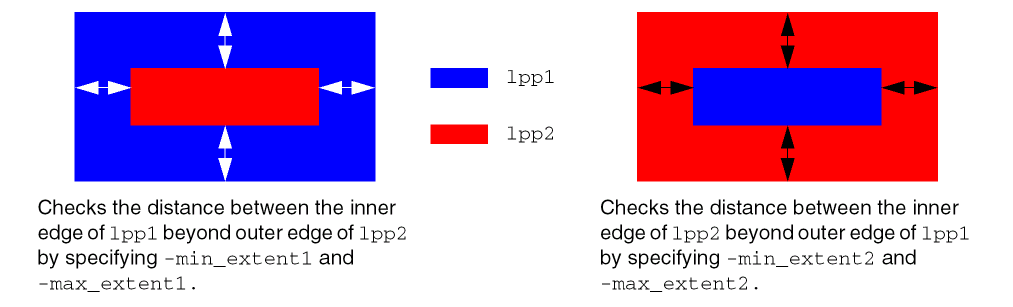
Checks enclosures by measuring the distance between the outside edge of one shape and the inside edge of another shape, or between the outside edge of a shape and the PRBoundary. Specify the appropriate argument for the check that you want to perform (max_extent1, max_extent2, min_extent1, min_extent2, min_bound_extent).
Arguments

-annotate [all | none | dim | rect]

Specifies the annotations to use to mark violations.

all

(Default) Creates rectangle and dimension annotations where violations occur.

none

Prevents annotations from being created.

dim

Creates only dimension annotations to show measurements where violations occur.

rect

Creates only rectangle annotations where violations occur.

The annotations are added to the annotation:violation purpose of the given layers and are listed by layer under Minimum Extension or Maximum Extension in the Violations page of the Annotation Browser.

-annotation_limit i_count

Specifies the maximum number of violations to create annotations for. By default, annotations are created for up to 1000 violations. Specify -annotation_limit -1 to choose no limit.

-clear_annotations

Removes existing violation annotations of the same check type and input layers before performing this check. If not specified, existing violations are not cleared.

-coincident_allowed1 [ true | false ]

When set to true, allows coincident edges when checking the layer purpose given by -lpp1 extending beyond the layer purpose given by -lpp2. Default is true,

-coincident_allowed2 [ true | false ]

When set to true, allows coincident edges when checking the layer purpose given by -lpp2 extending beyond the layer purpose given by -lpp1.

-error_limit i_count

Specifies the maximum number of errors for each of minExtension and maxExtension to detect before stopping.

-lpp1 s_layerlpp

Checks shapes on this layer (optionally restricted to a specified purpose). Defaults to the extended layer.

-lpp2 s_layerlpp

Checks shapes on this layer (optionally restricted to a specified purpose). Defaults to the unextended layer.

-max_extent1 [f_userunit]

Checks the maximum extension rule of the layer purpose given by -lpp1 beyond the layer purpose given by -lpp2 be. If a value is given, it is used for the check instead of the maxExtension constraint.

-max_extent2 [f_userunit]

Checks the maximum extension rule of the layer purpose given by -lpp2 beyond the layer purpose given by -lpp1 be. If a value is given, it is used for the check instead of the maxExtension constraint.

-min_bound_extent [f_userunit]

Checks the minimum extension rule of the layer purpose given by -lpp1 beyond the PRBoundary. If a value is given, it is used for the check instead of the minBoundaryExtension constraint.

-min_extent1 [f_userunit]

Checks the minimum extension rule of the layer purpose given by -lpp1 beyond the layer purpose given by -lpp2 be. If a value is given, it is used for the check instead of the minExtension constraint.

-min_extent2 [f_userunit]

Checks the minimum extension rule of the layer purpose given by -lpp2 beyond the layer purpose given by -lpp1 be. If a value is given, it is used for the check instead of the minExtension constraint.

-output_lpp s_lpp

Adds violating shapes to the specified output layer purpose.

-region {f_xlo f_ylo f_xhi f_yhi}

Specifies the boundary points for the area to check. If not specified, the entire design in the active artwork window is checked.

-silent

Turns off detailed messages during checking.

-subtotals [ true | false ]

When set to true, outputs a Tcl list with violation counts reported separately (refer to Processing Tcl Lists) in this order: min_extent1, max_extent1, min_extent2, and max_extent2. By default, the return value is the total number of violations found.

-top_level_only

Specifies that only top-level shapes should be checked (against all levels). By default, all shapes are checked.

Cell-to-cell placement errors will not be caught if this flag is set.

-trim_corners

Specifies that corners be trimmed for checking.

-verbose

Outputs a message for each error found during the check.

Value Returned

i_count

Indicates the number of extension check failures found for the given criteria.

i_min_extent1_errors i_max_extent1_errors
i_min_extent2_errors
i_max_extent2_errors

Tcl list with the number of min_extent1, max_extent1, min_extent2, and max_extent2 violations found. This is the output format when -subtotals is given.

-1

The command did not run due to a syntax error or a missing required argument.

Examples

The following command reports occurrences of Metal4 shapes extending less than 0.05 beyond Metal3 shapes.

check_extensions -lpp1 Metal4 -lpp2 Metal3 -min_extent1 0.05

Related Topics

Verify Commands


Return to top
 ⠀
X