
check_min_edge_length
check_min_edge_length
-lpp {s_layerlpp…}
[ -output_lpp s_layerlpp ]
[ -region {f_xlo f_ylo f_xhi f_yhi} ]
[ -annotate [ true | false ] ]
[ -annotation_limit i_count ]
[ -clear_annotations ]
[ -error_limit i_count ]
[ -no_sync ]
[ -silent|-verbose ]
[ -top_level_only ]
[ -trim_corners ]
[ -threads i_threads ]
Description
Checks shapes for Optical Pattern Correction (OPC) suitability by determining whether each shape meets the following constraints: minEdgeAdjacentDistance, minEdgeLength, minEdgeMaxCount, and oaMinEdgeAdjacentLength. Only constraints that have been set will be checked.
The GUI equivalent for this command is Verify—Shapes.
Arguments
Value Returned
|
Indicates the number of shapes that violate the rule for the given criteria. |
|
|
The command did not run due to a syntax error or a missing required argument. |
Examples
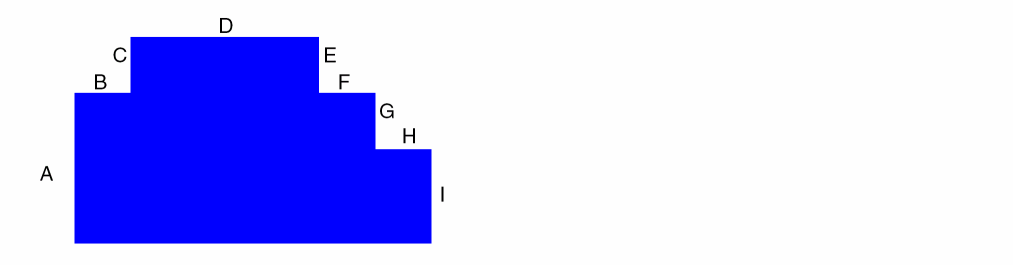
The following figure is used for the examples in this section.
Case 1—Using minEdgeMaxCount
set_constraint_parameter -name maxLength -Value 0.4
set_layer_constraint -layer M2 -constraint minEdgeMaxCount -IntValue 2
check_min_edge_length -lpp M2 -clear_annotations
Flags any sequence of more than two segments that are less than 0.4 in length. For example, if segments B, C, E, F, G and H are all less than 0.4 in length, then B and C are not violating since there are only two consecutive short segments. However, E-G and F-H are in violation because there are more than two consecutive short segments.
Case 2—Using minEdgeAdjacentDistance
set_constraint_parameter -name length -Value 0.4
set_constraint_parameter -name count -IntValue 2
set_layer_constraint -layer M2 -constraint minEdgeAdjacentDistance -Value 1.0
check_min_edge_length -lpp M2 -clear_annotations
Flags a violation if the length of segment D is less than 1.0 and at least segments B, C, E, and F are all less than 0.4 in length. For this example, the rule is triggered when there are two sets of edges, each with at least two (count) consecutive edges that are less than or equal to length in length.
Case 3—Using minEdgeLength
set_layer_constraint -layer M2 -constraint minEdgeLength -Value 0.4
check_min_edge_length -lpp M2 -clear_annotations
Flags an error if any edge is less than 0.4 in length.
Case 4—Using minEdgeLength with lengthsum parameter
set_constraint_parameter -name lengthSum -Value 1.0
set_layer_constraint -layer M2 -constraint minEdgeLength -Value 0.4
check_min_edge_length -lpp M2 -clear_annotations
Flags the same violations as case 3. However, if the sum of the consecutive segments that are less the 0.4 in length is less than 1.0, then there is no violation.
Case 5—Using oaMinEdgeAdjacentLength
set_constraint_parameter -name maxLength -Value 0.4
set_layer_constraint -layer M2 -constraint oaMinEdgeAdjacentLength -Value 1.0
check_min_edge_length -lpp M2 -clear_annotations
Flags a violation if any minimum length edge (length less than or equal to 0.4) is adjacent to an edge that is less than 1.0 in length. In the example, all shorter edges would be in violations.
Related Topics
Return to top