|
-all
|
Operates on the entire design in the active artwork window.
|
|
-annotate [ true | false ]
|
|
|
Chooses whether to mark route quality problems with annotations. By default, annotations are added. Existing route quality annotations are automatically cleared for the selected checks when this command is run. New annotations are added to the annotation:violation purpose of the layer and are listed in the Violations page of the Annotation Browser, under the name of the check type, followed by the name of the net.
|
|
-annotation_limit i_count
|
|
|
Specifies the maximum number of violations to create annotations for. By default, annotations are created for up to 1000 violations. Specify -annotation_limit -1 to choose no limit.
|
|
-centerline [ true | false ]
|
|
|
(Applies only to port short and crossing checks) Determines whether the centerline (stick) representation or the physical representation is checked. By default, route segments are considered crossed if their centerlines cross.
If set false, the physical intersection of the shapes is checked. For example, a crossing at a corner can flag a violation, even when the centerlines do not cross.
|
|
-checks {s_checkType…}
|
|
|
Specifies the route quality checks (s_checkType) to perform:
|
|
|
closeVia
|
Checks for two vias that are closer than the via_proximity_threshold distance.
|
|
|
crossing
|
Checks for a crossing of two non-adjacent shapes on the same net. Shapes are adjacent if they are neighbors in the same route, if they intersect at a Steiner point, or if they intersect at the same port of a pin.
|
|
|
hook
|
Checks the path distance between two shapes and flags a violation when the path distance greatly exceeds the physical distance between them. The path distance between two points is the sum of the lengths of the route segments connecting the two points.
|
|
|
portShort
|
Is a special type of crossing involving a route segment or via shape and a port on a pin.
|
|
|
preferredLayer
|
Occurs when a net does not adhere to its preferred layer rule. If no rule exists, the check is not performed. If a net has a preferred layer rule, then any wire that is not on a preferred layer is a violation. An exception is made if the violating wire is sufficiently close to a pin, and might be needed for pin access.
|
|
|
robustPinConnection
|
|
|
|
Checks for the length of the diagonal of the intersection rectangle between a wire or via and a pin. This must be greater than or equal to either:
-
The width of the wire/via
-
The longest edge of the pin
|
|
|
routeSpecLayer
|
Occurs when a route segment on a layer is not in the route’s route spec (assigned route spec or inherited) as determined by the validRoutingLayers constraint.
|
|
|
routeSpecVia
|
Checks for route vias that are not in the route’s route spec (assigned route spec or inherited) as determined by the validRoutingVias constraint.
|
|
|
routeSpecWidth
|
Checks for segments with a width that does not match the route’s route spec (assigned route spec or inherited) as determined by the minWidth constraint.
|
|
|
ruleChange
|
Occurs when the routing rule for a section of a net does not conform to the net’s routing rule.
|
|
|
softFence
|
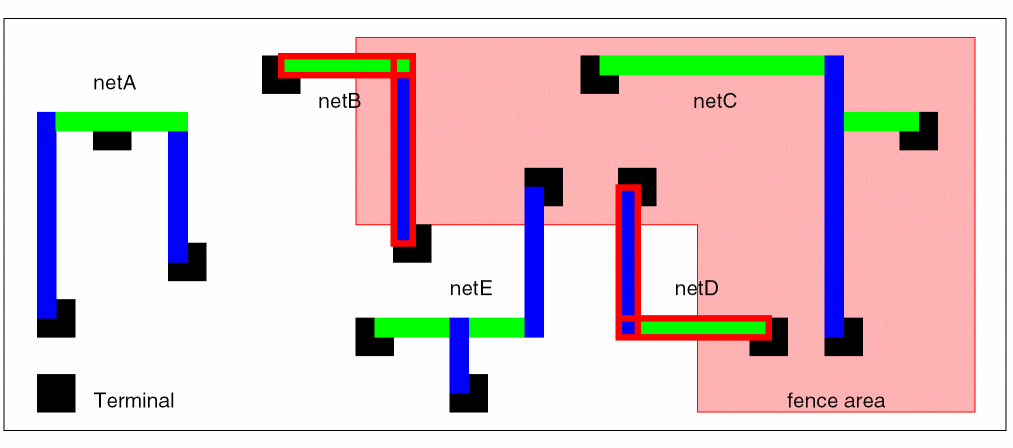
Checks for nets with routes within a fence boundary without any terminals in it. If all terminals of a net are within a fence boundary, the entire net must be routed within the fence boundary.
|
|
|
softSpace
|
Checks for soft spacing rule adherence by layer and by net and reports the percentage of adherence.
|
|
|
taperFuse
|
Checks for terminals with more than one taper route, or steiner points with more than two taper routes. These are not necessarily fuses but they do have the potential to be due to tapering.
|
|
|
wrongWay
|
Checks for wires whose orientation is perpendicular to the preferred routing direction of the layer. This is not illegal, but it can block routing resources on the layer.
|
|
-error_set d_setObj
|
Specifies the set to add nets with route quality problems to.
|
|
-hard [ true | false ]
|
Applies when the routeSpecWidth check is performed. When set to true, segment widths are compared with the hard width value, rather than the preferred (soft) rule.
|
|
-hook_ratio_threshold f_distance
|
|
|
(Applies only to hook checks) Ignores hooks with a path distance/physical distance less than this value. By default, a value of 3.0 user units is used.
|
|
-ignore_crossing_threshold f_distance
|
|
|
(Applies only to crossing checks) Ignores crossings with minimum intersection dimension less than the threshold value. The default is 0.0.
|
|
-ignore_nets {s_netName…}
|
|
|
Excludes the specified nets from processing. This argument is ignored if -net is given.
|
|
-ignore_power_ground [ true | false ]
|
|
|
Excludes power and ground nets from processing. This argument is ignored if -net is given. By default, power and ground nets are excluded.
|
|
-ignore_route_segments [ true | false ]
|
|
|
Ignores power/ground route segments when checking crossings or port shorts. Default is false.
|
|
-ignore_route_shape_crossing f_factor
|
|
|
Ignores crossings where both dimensions of the crossing intersection are less than the product of the factor and the minimum width of the crossing’s layer. The default is 0.0.
|
|
-ignore_segment_in_pin
|
(Applies only to crossing checks) Ignores segments entirely embedded within metal of a pin. The default is false.
|
|
-ignore_segment_in_via
|
(Applies only to crossing checks) Ignores segments entirely embedded within metal of a via. The default is false.
|
|
-net s_netName
|
Specifies the name of the net to check.
|
|
-region {f_xlo f_ylo f_xhi f_yhi}
|
|
|
Limits the check to the area given by the boundary points. By default, the -all, -set or -net argument determines the nets to check, with no boundary limits.
|
|
-set d_setObj
|
Operates only on the nets in the given set.
|
|
-taper_threshold f_userunit
|
|
|
(Applies only to rule change checks) If the threshold is set, then route segments that connect directly with a pin and have a length less than or equal to the given taper threshold are considered to be allowed pin tapers and will not be flagged by the rule change check. By default, the taper threshold is set to 0.0.
|
|
-taper_threshold_default f_userunit
|
|
|
Sets the default taper length around terminals for the preferredLayer check. Defaults to 0.
|
|
-use_term_taper [ true | false ]
|
|
|
Uses the terminal’s maxTaperWindow constraint for the preferredLayer check. The default is false.
|
|
-via_proximity_threshold f_distance
|
|
|
Specifies the distance from a via to check for the presence of another via for a closeVia check. Defaults to 0.
|
|
-window_based_taper_check
|
|
|
(Applies only to rule change checks) Routes connected to a pin within the taper window (maxTaperWindow) must have the same rulespec as the pin. Default is true.
|
|
-wrong_way_distance_threshold f_distance
|
|
|
Ignores wrong-way segments that are shorter in length than this value. Defaults to 0.
|