
minCutRoutingClearance
Specifies the minimum clearance between specific cut classes and metal shapes. For rectangular cut classes, the clearance can optionally be enforced only between the short ends of the cut and metal shapes. Additionally, the clearance can optionally be between a cut shape and the concave corner of the wire that contains the cut.
minCutRoutingClearance Quick Reference
Value Type
Optional Parameters
|
Specifies the cut class width and length.
Type: |
|
|
Applies only when a rectangular cut class is specified by the
Type: |
|
|
Specifies the vias for which this constraint does not apply, based on their connectivity. When
Type: |
|
|
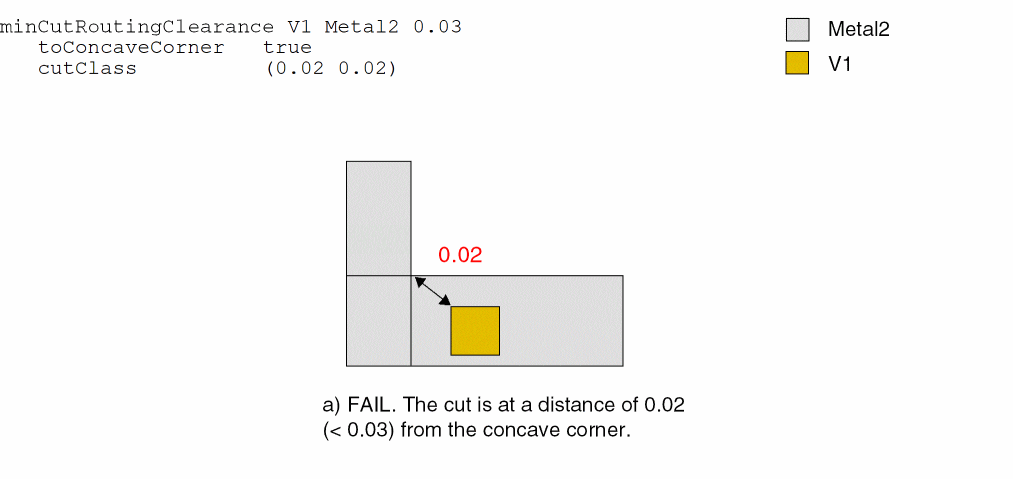
Specifies that the spacing between the cut shape and a concave corner of the metal shape in which the cut shape is placed must be greater than or equal to the constraint clearance value.
Type: |
|
|
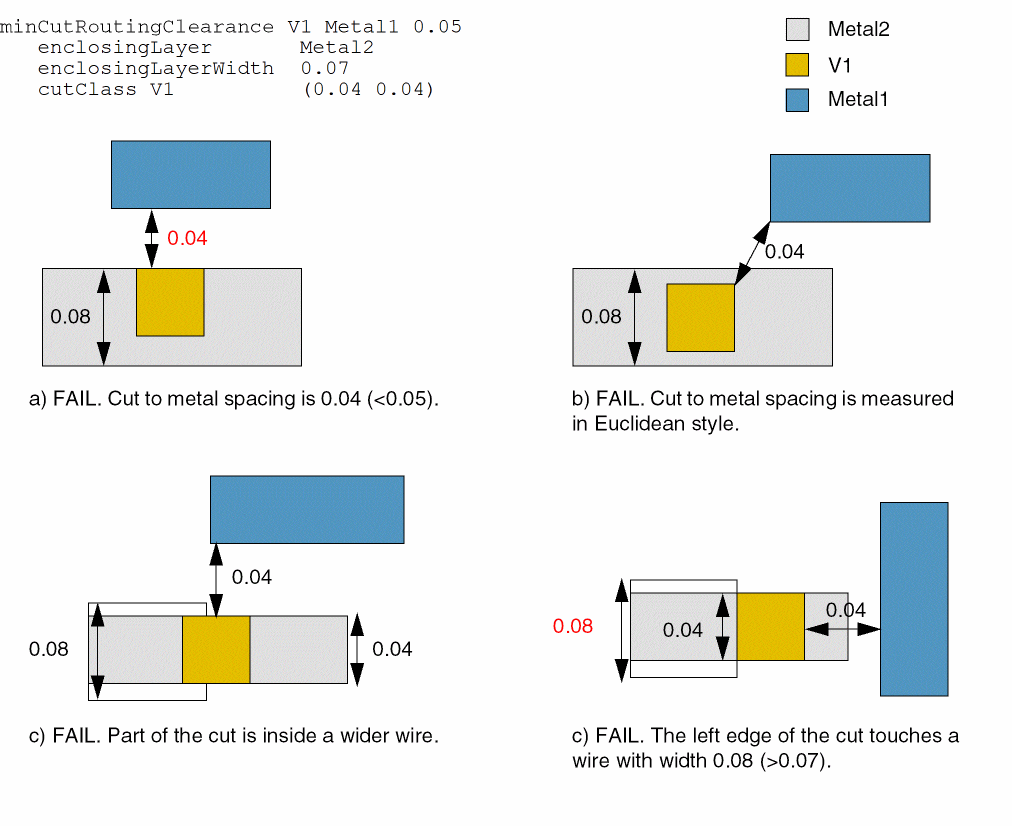
Specifies that the constraint applies if the shape that encloses the cut on
Type: |
|
|
Specifies that the constraint applies if the width of the shape that encloses the cut on
Type: |
|
|
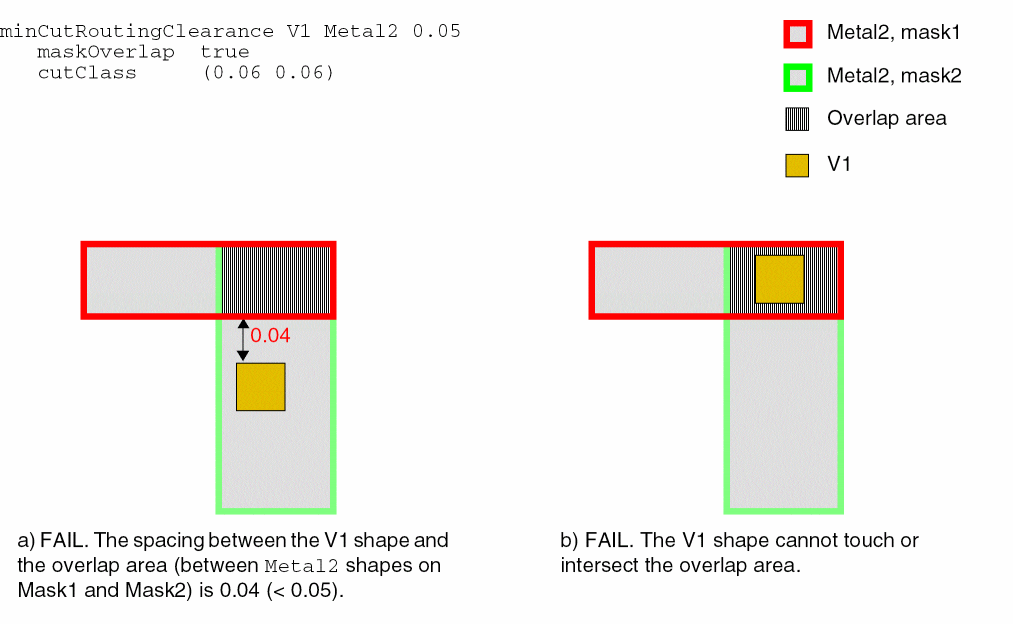
Requires that the minimum spacing be applied to the distance between cuts on layer1 and the overlap area between routing shapes on two different masks of layer2. The overlap area is created when shapes are stitched together. Cuts cannot touch or intersect the overlap area.
Type: |
|
|
Represents the direction in which the constraint applies.
Type: |
|
|
Specifies that the constraint applies only if a cut has an extension less than this value on any two opposite sides.
Type: |
|
|
Specifies that the constraint applies only if a cut has zero extension on two opposite sides and an extension less than this value on the other opposite sides.
Type: |
|
|
Specifies that the constraint applies only if a cut with zero extension on two opposite edges has neighbors on both metal layers within this distance.
Type: |
|
|
Specifies that the constraint applies only if the parallel cut edge has an extension that is less than this value.
Type: |
|
|
Specifies that the constraint applies only if a cut with zero extension on two opposite edges has neighbors on both metal layers, with parallel run greater than this value.
Type: |
|
|
Specifies that the constraint applies only when an edge of a concave corner has width less than or equal to the given value.
Type: |
|
|
Specifies that the constraint applies only when an orthogonal edge to the edge with width less than or equal to the given width has length greater than or equal to the given value.
Type: |
|
Examples
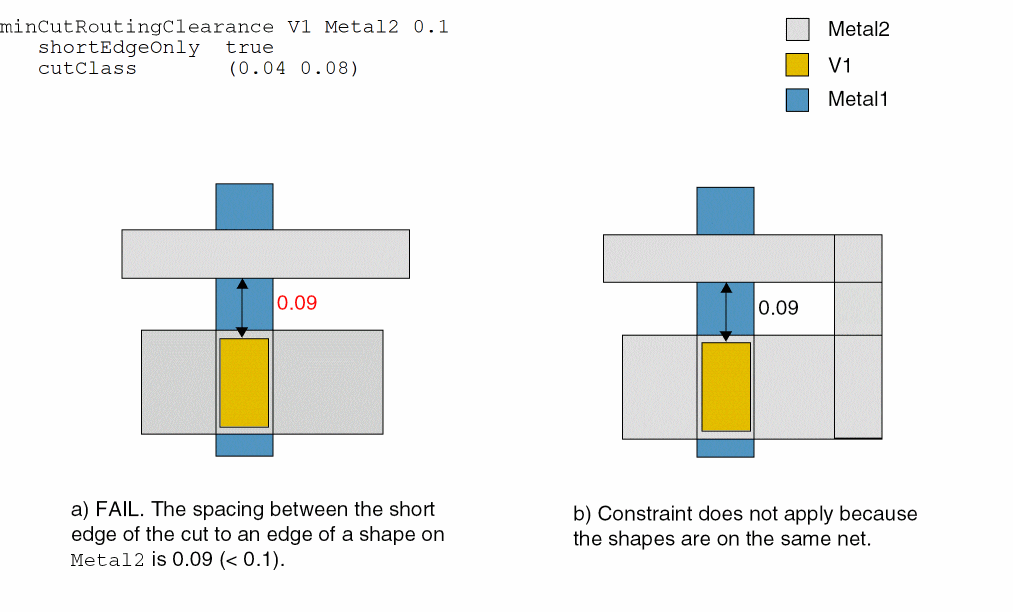
Example 1: minCutRoutingClearance with cutClass and shortEdgeOnly
Sets the minimum clearance between the short end of 0.04 x 0.08 V1 cuts and Metal2 shapes to 0.1 user units.
set_constraint_parameter -name cutClass -DualValue { 0.04 0.08 }
set_constraint_parameter -name shortEdgeOnly -BoolValue true
set_layerpair_constraint -constraint minCutRoutingClearance \
  -layer1 V1 -layer2 Metal2 -Value 0.1
Example 2: minCutRoutingClearance with toConcaveCorner
Sets the minimum clearance between 0.02 x 0.02 V1 cuts and Metal2 shapes to 0.03 user units. The spacing between 0.02 x 0.02 V1 cuts and concave corners of enclosing Metal2 shapes must be greater than or equal to 0.03 user units.
set_constraint_parameter -name cutClass -DualValue {0.02 0.02}
set_constraint_parameter -name toConcaveCorner -BoolValue true
set_layerpair_constraint -constraint minCutRoutingClearance \
  -layer1 V1 -layer2 Metal2 -Value 0.03
Example 3: minCutRoutingClearance with enclosingLayerWidth and enclosingLayer
Requires that the minimum clearance between cut class VA and metal shape Metal1 must be greater than or equal to 0.5 user units, and the width of the shape that encloses the cut on the enclosing layer, Metal2, must be greater than or equal to 0.07 user units.
set_constraint_parameter -name className -StringValue VA
set_constraint_parameter -name cutClass -layer V1 \
  -DualValue {0.04 0.04}
set_constraint_parameter -name enclosingLayerWidth -Value 0.07
set_constraint_parameter -name enclosingLayer -LayerValue Metal2
set_layerpair_constraint -layer1 V1 -layer2 Metal1 \
  -constraint minCutRoutingClearance -Value 0.5
check_layerpair_space -lpp1 V1 -lpp2 Metal1 -diff_net -same_net
Example 4: minCutRoutingClearance with cutClass and maskOverlap
Sets a minimum clearance of 0.05 user units between a 0.06 x 0.06 V1 cut and the overlap area between Metal2 shapes on mask1 and mask2.
set_constraint_parameter -name cutClass -DualValue {0.06 0.06}
set_constraint_parameter -name maskOverlap -BoolValue true
set_layerpair_constraint -constraint minCutRoutingClearance \
  -layer1 V1 -layer2 Metal2 -Value 0.05
Related Topics
Return to top