
maxDensity
Specifies the maximum percentage of the total design area the metal in the specified layer may occupy (density = metal layer area/total design area). The constraint can be given as a fixed value that applies to the entire design, or as a table of values that apply to areas of the design, as you step through them, and are based on the step size.
The minDensity constraint is used in conjunction with the maxDensity constraint to ensure that the metal density is neither too dense nor too sparse.
maxDensity Quick Reference
Value Types
maxDensity constraints have the following value types:
-
FltValue
Specifies the maximum percentage of the design area that the metal on the specified layer may occupy over the entire area. The density percentage is calculated as the metal area divided by the total design area. Valid values: 0 to 100 -
Flt1DTblValue
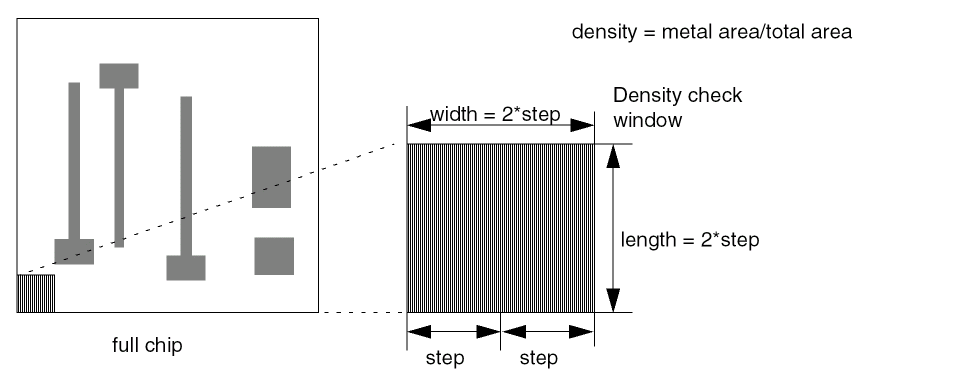
The lookup key (“step”) represents the step size and the value represents the maximum density percentage for a check window. Check windows are square with equal height and width.-
If
windowStepSizeis not given, the check windows are 2*step size. -
If
windowStepSizeis given, the window size that corresponds with the given step size is used.
Density checking starts with the check window in a corner of the design, then the check window is moved across the design incrementally, by step size, each time validating that the density percentage in the check window is less than or equal to the maximum allowed percentage.
-
If
Parameter
-
windowStepSize(OneDTblValue, optional) The lookup key (“step”) represents the step size and the value represents the window size. This table is used only whenmaxDensityis aFlt1DTblValueto look up the window size associated with a given step size.
Examples
-
Fixed Value
Sets the maximumMetal2density to 70%.Format Example set_layer_constraint -constraint maxDensity \
-layer Metal2 -Value 70.0LAYER METAL2
MAXIMUMDENSITY 70.0 ;spacings (
( maxDensity "Metal2" 70.0)
) -
1D Table: Index step size
Sets the maximumMetal2density based on the step size of the check window.
Related Topics
Return to top