
allowedBoundaryDimensions
Specifies the allowed ranges for PR boundary and virtual hierarchy area boundary dimensions in the specified direction. You can optionally specify that the dimensions must be an exact multiple of a specified stepSize. These restrictions are required by certain methodologies to ensure that cells are placeable and flippable.
allowedBoundaryDimensions Quick Reference
Value Type
|
Specifies the allowed ranges for the PR boundary dimensions. |
Required Parameters
|
Specifies the measurement direction. The constraint applies only to dimensions measured in this direction.
Type: |
Optional Parameters
|
Specifes legal dimensions for a PR boundaries measured in the specifies
The set of legal dimensions is computed as the lower bound (LB) of each range (inclusive) plus a multiple of the
If LB is not included in the range specification, the computation is still performed from LB, but the first value calculated (LB itself) is not considered a legal value. The first legal value would be
LB + stepSize.
If the PR boundary is rectilinear, all dimensions in the given direction must meet the constraint. Specifically, the distance between facing edges perpendicular to spacing direction must meet the constraint. When multiple ranges are specified,
If
Type: |
Examples
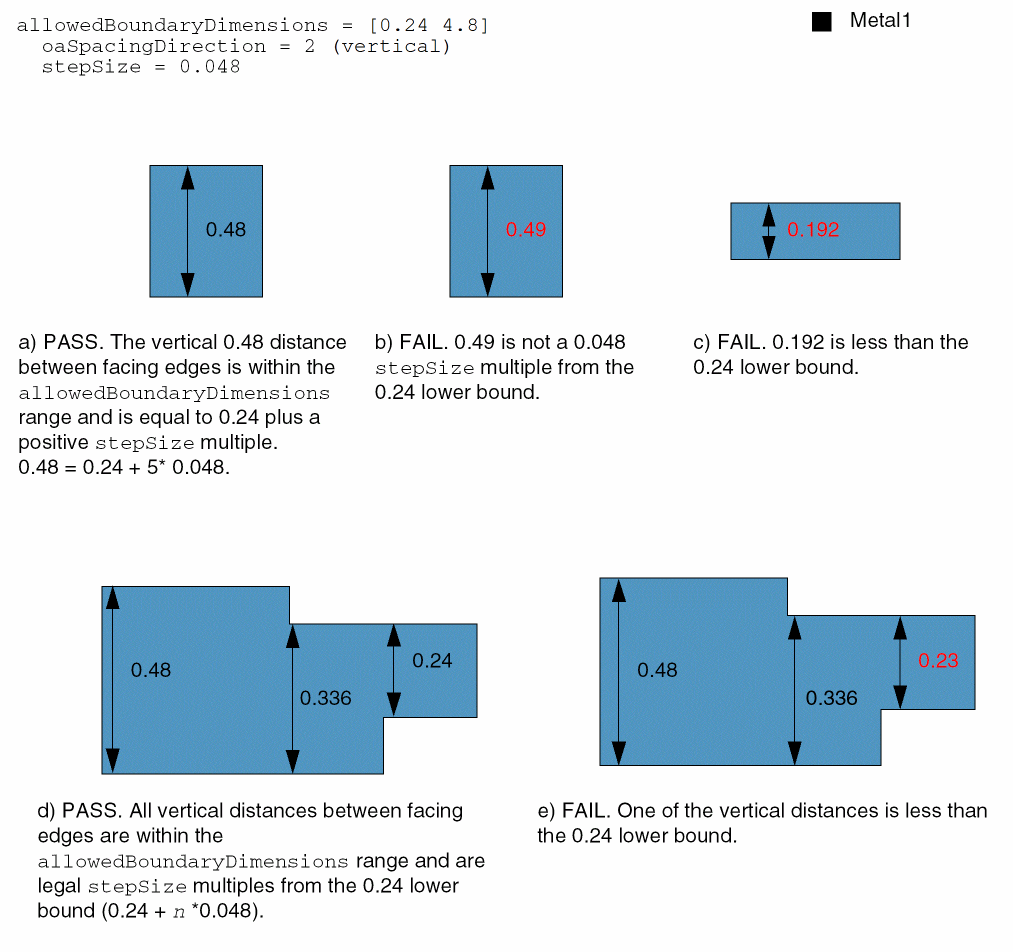
Specifies that the vertical distance between two facing edges must be greater than or equal to 0.24 and less than or equal to 4.8, and must be 0.24 plus a positive integer multiple of stepSize. In other words, it must be 0.24+n*0.048 and within the given range.
set_constraint_parameter -name oaSpacingDirection -IntValue 2
set_constraint_parameter -name stepSize -FltValue 0.048set_constraint -constraint allowedBoundaryDimensions -RangeArrayValue {[0.24 4.8]}
Related Topics
Return to top