
allowedLengthRange
Specifies the allowed length ranges for rectangular shapes on a layer. Non-rectangular shapes are ignored.
allowedLengthRange Quick Reference
Value Types
|
Specifies a width index and the allowed length ranges for the width on the layer. The widths in this table must be specified in an |
|
Examples
Example 1: allowedLengthRange Using RangeArrayValue
Permits three Metal1 length ranges (0.1, 0.2, and >=0.35).
set_layer_constraint -layer Metal1 -constraint allowedLengthRange \
  -RangeArrayValue { "[0.1 0.1]" "[0.2 0.2]" ">= 0.35" }
Example 2: allowedLengthRange Using RangeArray1DTblValue
-
From
allowedWidthRangesettings, valid widths are 0.3, 0.4, and 0.5. -
From
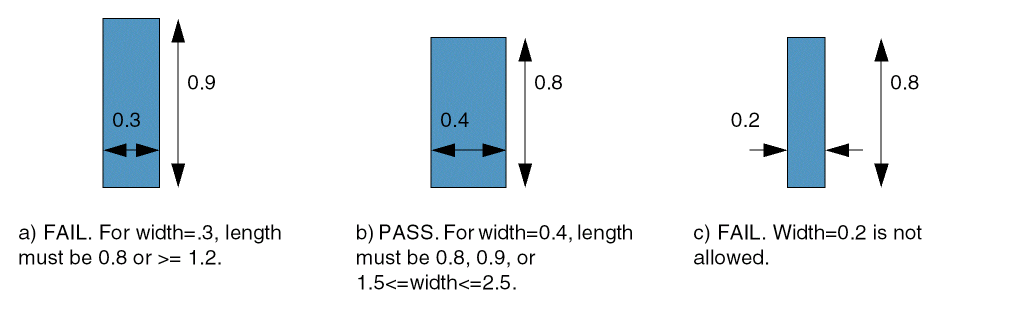
allowedLengthRange, find the first row for which the statement is true:
set_layer_constraint -constraint allowedWidthRange -layer Metal1 \
  -RangeArrayValue {"[0.3 0.3]" "[0.4 0.4]" "[0.5 0.5]"}
set_layer_constraint -layer Metal1 -constraint allowedLengthRange \
  -row_name width \
  -RangeArray1DTblValue { \
    0.3 2 "[0.8 0.8]" ">= 1.2" \
    0.4 3 "[0.8 0.8]" "[0.9 0.9]" "[1.5 2.5]" \
    0.5 1 ">= 3.0" } \
  -row_interpolation snap_down \
  -row_extrapolation {snap_up snap_down}
Related Topics
Return to top