
The Mismatch Contribution Table
The results of mismatch contribution analysis are displayed in a table on the Mismatch Contribution tab of the Sensitivity Analysis-MonteCarlo.N form.
- Each row represents an instance of the design. For example, /I0/AmpOut/M6.
- Each column represents an output specification.For example, Current and Voffset.
- Each cell shows the contribution (in percentage) of an instance towards the variance of the corresponding specification. All the contributions are normalized to 100%.
By default, the tool computes the proportions of a Monte Carlo sample variation by using a linear model. This is indicated by the R^2 (R squared) value in the column headers. The tooltip for column headers also shows how these proportions are calculated.

R^2 (Goodness of Fit) reports how much of the total variance is explained by the model. If the R^2 value is lower than the threshold value of 90%, the results of the linear model might not be useful. Therefore, in such cases, the tool automatically switches to the quadratic model to calculate variance data for a particular specification more accurately. The column header is also updated to indicate this change.
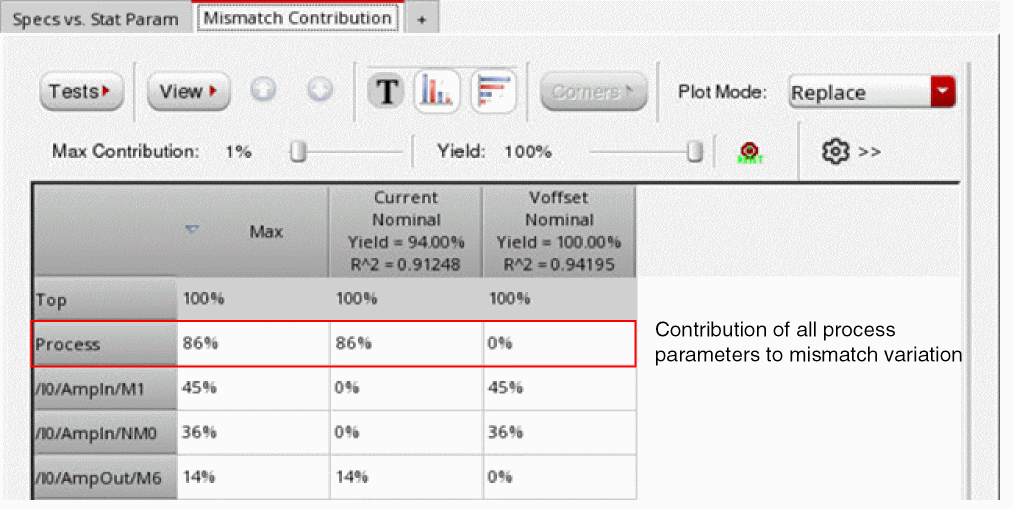
If you run the mismatch contribution analysis by selecting All as Variation on the Monte Carlo form, an additional Process row is displayed in the mismatch contribution results, as shown in the following figure. This row shows the contributions of all the process parameters to mismatch variation.
Related Topics
Mismatch Contribution Analysis
Viewing Results of Mismatch Contribution Analysis
Toolbar of the Mismatch Contribution Tab
Return to top