
Viewing Results of Mismatch Contribution Analysis
To view the results of mismatch contribution analysis, do one of the following:
-
Click Mismatch Contribution (
 )on the toolbar of the Results tab in ADE Assembler.
 - In the History tab on the Data View assistant, right-click a history name and then choose Mismatch Contribution.
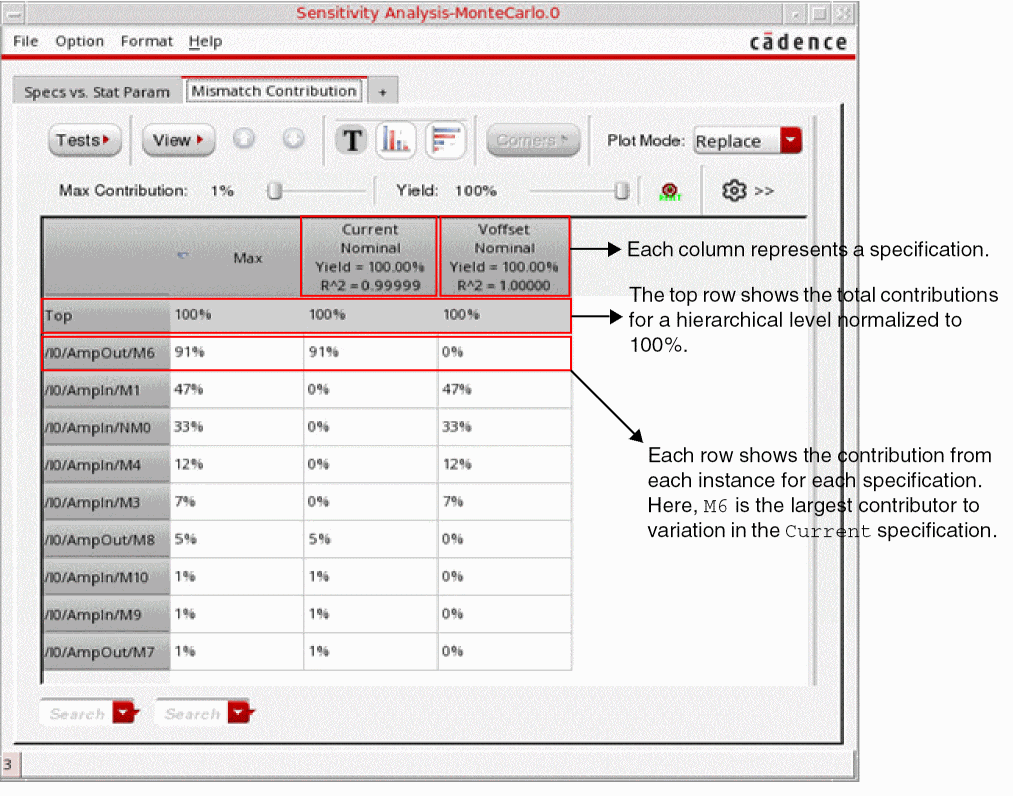
The Sensitivity Analysis-MonteCarlo.N form appears, displaying the results in the Mismatch Contribution tab.
Related Topics
Mismatch Contribution Analysis
Running Mismatch Contribution Analysis
The Mismatch Contribution Table
Return to top