
Abutment Event 3
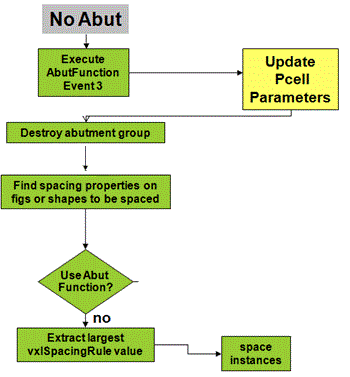
Event 3 is called to perform unabutment, which can be triggered due to one of the following:
- A layout editor command, such as Move, which moves an abutted instance relative to another instance to which it is abutted. Or, due to a parameter update of the abutted Pcell instances using commands such as Update Layout Parameters, or during a manual parameter update of the Pcell instance using the Property Editor or a stretch handle.
-
The abutment engine needs to unabut a partially completed abutment that cannot proceed further. For example, if Event 2 returns
nilor the shapes returned by the event are pin figures on different nets.
In Event 3, the abutFunction retrieves the original parameter values that were stored by the function during Abutment Event 2 and Abutment Event 5. These values are then used to update the Pcell parameters to return the Pcell to its preabutment state.
If unabutment occurs due to the parameter update of Pcell instances, re-abutment is triggered immediately after the unabutment using the figIDs stored on the current abutment group. The abutment engine is now enhanced to store the figIDs that had triggered the abutment during Abutment Event 5 or Abutment Event 2, as required.
Having the figIDs of the originally abutted shapes available ensures that re-abutment can be performed using the same figIDs and in the same manner as the original abutment. Re-abutment is performed even if the abuttable shapes do not physically overlap after the parameter update.
To determine if explicit re-abutment will be triggered after unabutment, the PDK abutment SKILL Event 3 can call the Boolean SKILL function, dbAbutIsReAbutGroup. If the SKILL function returns true, the PDK SKILL function can store the relevant information, if needed, from the current abutment group. The stored information could be required later during re-abutment of the Pcell instances to achieve abutment with the same settings as before.
Return to top