
Net Name Filtering
Name filtering lets you selectively display the net name labels on the canvas. You can choose an appropriate filtering mode to selectively display net name labels on the canvas, or hide them. Alternatively, you can use the netNameDisplayFilterMode environment variable to specify the filter mode to use.
You can type in and add the names of the nets on which the name filter needs to be applied. Or, you can remove nets from an already existing filter list to keep them out of the filtering options applied. You can also specify a default filter list using the netNameDisplayFilterDefaultList environment variable, if no information is already saved in the design.
By default, name filtering is OFF. But, when enabled, the Options toolbar icon that controls the net name display functionality, looks slightly different,  , also displaying a filter symbol.
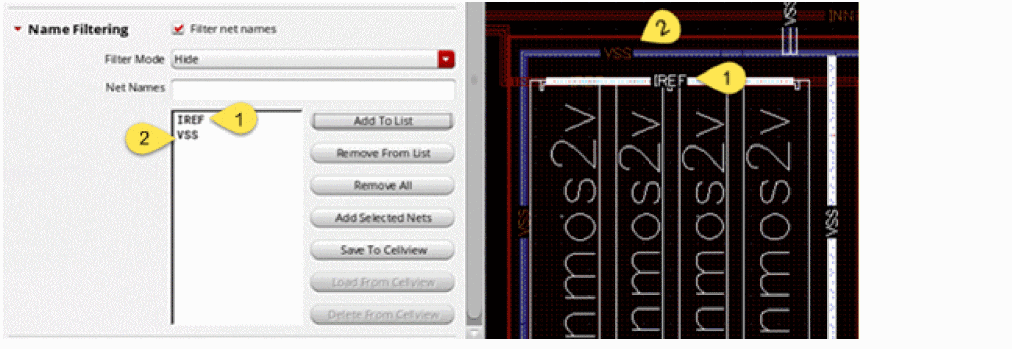
Let us consider the scenario represented by the figure below to explore how the Name Filtering options can be used to control the selective display of net name labels.
In the figure below, net name filtering is enabled and the filter mode is set to Hide. This implies that the net name labels for only the specified nets, IREF and VSS, are hidden. All other nets will have their net name labels displayed on the canvas.
If the filter mode was set to Show, only the nets in the specified filter list would have their net name labels displayed.
Related Topics
Return to top