
Viewing a Mosaic Instance in the Navigator Assistant
A mosaic instance appears in the Navigator assistant along with the other layout instances. You can use any of the instance filters to view the mosaic instances in the design. A mosaic instance can be differentiated from a regular layout instance by its name.
A mosaic instance name carries information about the number of its rows and columns in the (row x column) format. For example, the mosaic instance M1 in the figure below indicates that it is a (1x2) mosaic with 1 row and 2 columns.
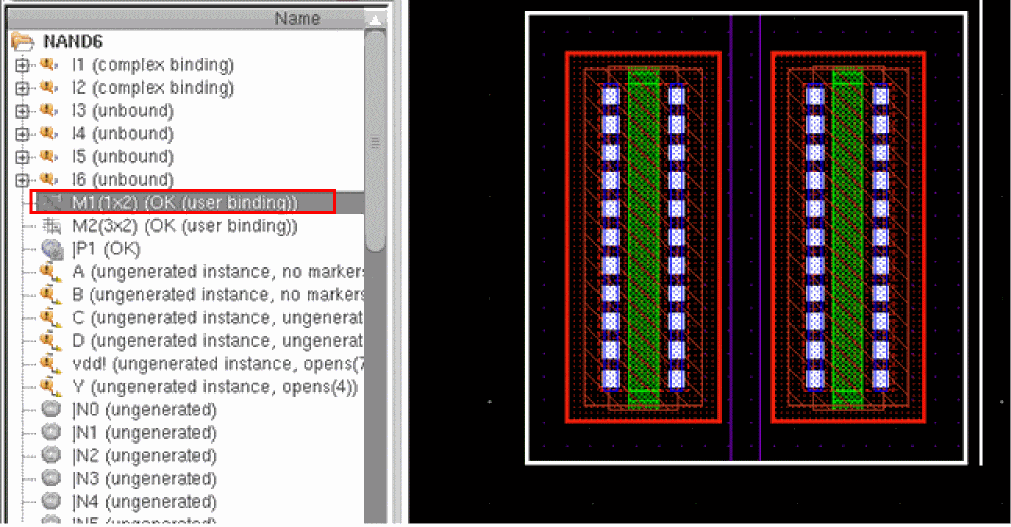
A mosaic instance can also be differentiated in the Navigator assistant by its unique icon,  .
.
However, for the mosaic icon to appear visibly in the Navigator assistant, the mosaic instance must be bound OK, with no reported differences.
The binding of a mosaic to a schematic instance is reported as OK if the size of the mosaic is equal to the mfactor of the schematic instance. Else, the binding is reported as complex binding.
To help place and route mosaics in the layout view, Layout XL displays flightlines, if enabled, to the closest element of the mosaic.
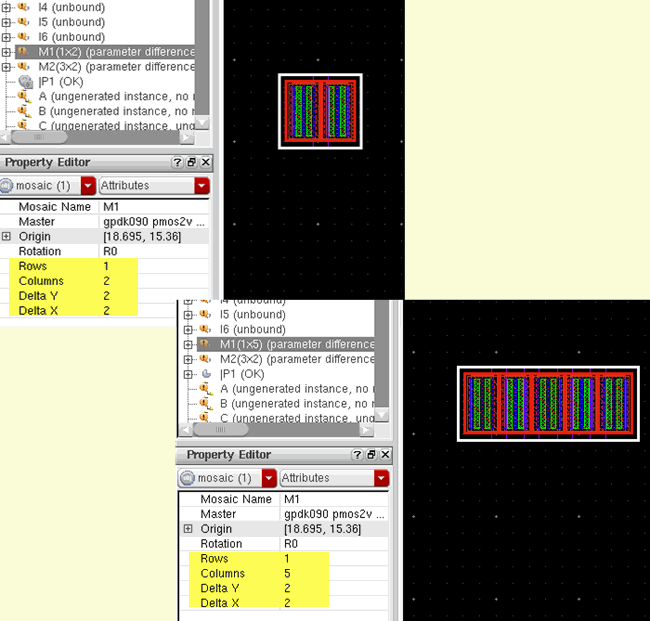
As in the case of regular layout instances, you can use the Property Editor assistant to interactively update the properties of a mosaic instance, including the number of rows and columns it supports. Any changes you make to the mosaic properties are instantly reflected in the layout canvas and the Navigator assistant, as displayed in the figure below.
Related Topics
Return to top