
Generate Folded Devices Form
Use the Generate Folded Devices form to control interactive folding. You can divide the following into two or more folds:
- an individual transistor or a chain of transistors
- an already folded transistor or a chain of folded transistors
- an individual FinFET device or a chain of devices
- a multi-fingered device or transistor.
See Folding a Multi-fingered Device to Create Split Fingers.
Generate Folded Devices form also enables dividing an individual FinFET device or a chain of devices into two or more folds. Folding lets you change the aspect ratios of the devices in your design while retaining the original orientation. The devices to be folded need not be bound to a schematic instance. If the disableFolding environment variable is set and the folding threshold for the component type is set to 0, folding is disabled.
If FinFET devices are driven for folding by Number of fins, the Generate Folded Devices form displays Transistor Fins. If folding for the selected FinFET devices is driven by the Width parameter, the form displays Transistor Width.
| Field | Description |
|---|---|
|
Shows the name of the transistor that will be folded. If you have selected more than one transistor, use the Next and Previous buttons to move through the selected set. |
|
|
Specifies the value of the width property of the selected device, indicating also whether the value is taken from the schematic or the layout view or is user-defined. When Ignore mfactor is ON, the value shown is the effective width in the schematic, which is the product of mfactor and schematic gate width. If required, you can type in a value to override the effective schematic width. Alternatively, you can use the bindkey Ctrl + Scroll Up or Down operation to increase or decrease the transistor width value. |
|
|
Shows the value of the Number of fins parameter of the selected FinFET device, also indicating whether the value is taken from the schematic or the layout view. |
|
|
Lets you type in the number of folds to be generated for the selected device, which may be already folded. Alternatively, use the bindkey Shift + Scroll Up/Down operation to increase or decrease the number of folds. When refolding, the number of generated folds may change based on the new number of folds you specify. Specifying a Number of Folds value greater than one displays the Distribute button, which evenly distributes the transistor width across the available folds. Alternatively, you can manually modify the width of each fold.
Such a distribution is also applicable for FinFET devices that are set for folding based on the Width parameter.
For example, if the total device width is 3u, clicking Distribute splits the width evenly across two folds such that the width of each fold is 1.5u. If you specify multiple folds to be generated for the device, the width value displayed for each fold is controlled by the environment variable, lxGetSignifDigits. If the environment variable is not set, the width of each fold defaults to six significant digits. For example, if the transistor width is 4u and you specify that three folds be created, then depending on the state of the lxGetSignifDigits environment variable, the width of the folds varies as follows:
If you specify more than 500 folds to be added and click Distribute, a warning message displays prompting for confirmation to proceed with the folding.
Environment variable: foldsLimit |
|
|
For FinFET devices, folding is driven by the Number of fins value. Clicking Distribute divides the total fins across all the folds such that each fold gets a whole number of fins.
The Fins field accepts only integer values for fins. If you type in a non-integer value, Layout XL automatically reverts to the last integer value. |
|
|
Specifies if the Folding Threshold value should be used to fold the selected devices in the layout. When the option is selected, the Number of Folds value is calculated based on the transistor width or the folding threshold value. Otherwise, the Number of Folds value is specified by the user. |
|
|
Specifies the maximum width beyond which the selected devices are automatically folded. |
|
|
Ignores the schematic multiplication factor when generating folded devices. The Transistor Width is set to the effective width in the schematic; that is, the product of mfactor and schematic gate width. |
|
|
Specifies Layout XL to chain the resultant folds together, where possible. The command deletes all existing folds except the ones that are selected. The first fold from the retained set is then used to create the new folds. Environment variable: chainFolds |
|
|
Controls the alignment of the device selected for folding. You can choose one of the following values: Top, Center, or Bottom.
|
|
|
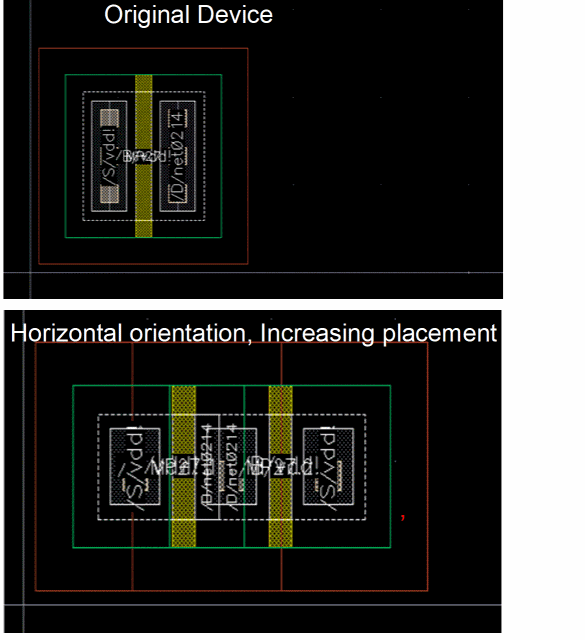
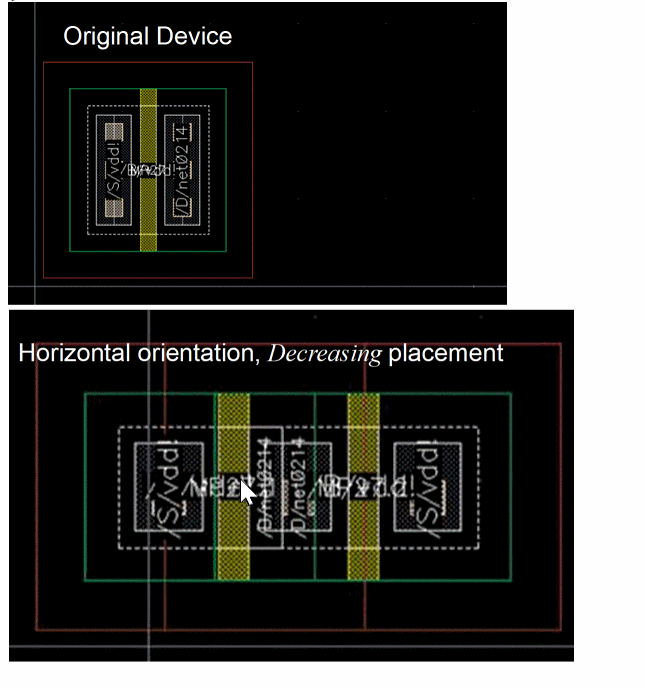
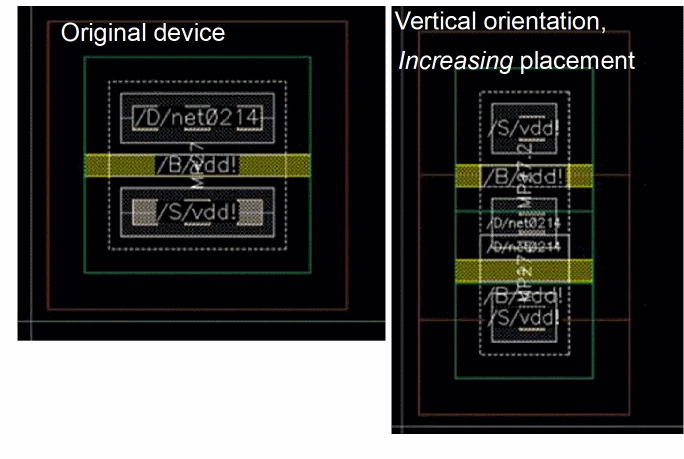
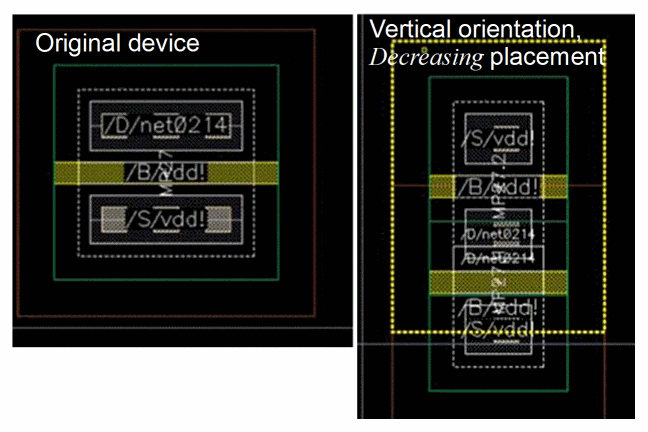
Creates the device folds at the same location in the layout canvas as the original device in a row region when at least one of the selected instances is on a row region. If the original instance is at an orientation, such as R90, that can place the folds vertically, the Create In Place option can be used to create the new folds above or below the original instance. Choose between Increasing or Decreasing to specify how the new folds are positioned. The positioning of the folds also varies depending on the placement orientation - horizontal or vertical. |
|
|
Shows the total value of all the fold widths displayed in the Width fields at the bottom of the form.
If you set a width with no unit, the unit is automatically updated with the default value of the CDF width parameter. For example, if the default CDF value is As in the case of individual fold widths, the value displayed in the Total Width field is controlled by the lxGetSignifDigits environment variable. If, for example, the environment variable is set to 4 significant digits, the value in the Total Width field displays up to four significant digits. If the environment variable is not set, the Total Width field displays up to six significant digits. Irrespective of the original width of the transistor, the Total Width field displays the sum of the width values of the various folds. For example, if the original width of the transistor is 4u and the sum of the fold widths is calculated at 3.999u, the Total Width field displays the width as 3.999u instead of rounding off the value to 4. If the difference between the Total Width and the original transistor width exceeds the tolerance value set by using the paramTolerance environment variable, a warning message is displayed indicating that the sum of the folded widths is not equal to the original transistor width. |
|
|
For FinFET devices that are set to fold based on Number of fins, the Total Width field is replaced by Total Fins. Total Fins is the sum of the fins in each fold of a FinFET device. The values considered for Add Fold, Distribute, and Delete are also specified in terms of number of fins. |
Related Topics
Ignoring Schematic Mfactor during Folding
Generating All Components from Source
Placement Modes for Generating Selected Components from Source
Return to top