
Net Name Display Options Form
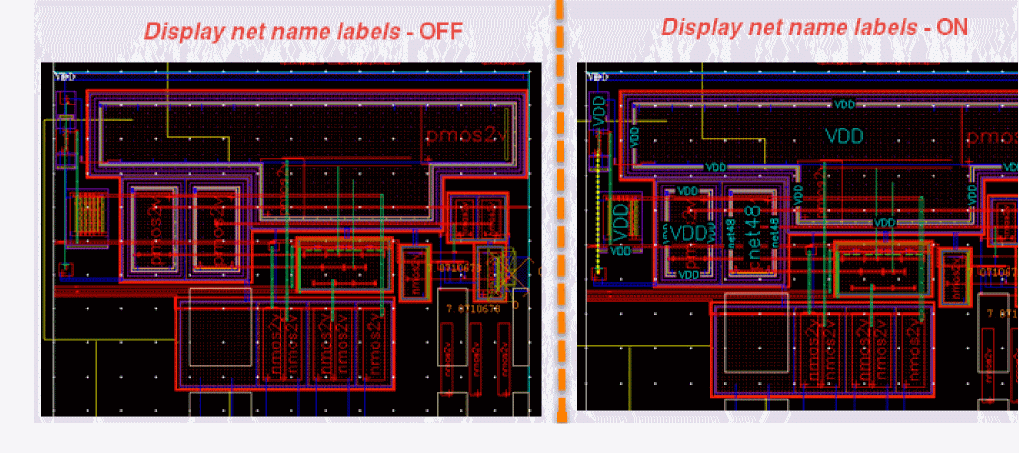
Use the Net Name Display Options form to control the display of net name labels on layout shapes. The net name labels are displayed in the layout canvas for those shapes that are big enough to display these labels.
| Field | Description |
|---|---|
|
Controls whether net name labels are displayed in the layout canvas.
Environment variable: |
|
|
Sets how many levels of the hierarchy are the nets displayed in.
Environment variable: |
|
|
Displays the net name of an object when you drag the object during the move, copy, or stretch operation.
Environment variable: |
|
Controls the display of net names on shapes, vias, instance pins and Pcell pins. |
|
|
Controls the display of net names on shapes. By default, the option is ON, which means net names are displayed in the layout canvas.
Environment variable: |
|
|
Controls the display of net names on vias.
Environment variable: |
|
|
Controls the display of net names on instance pins.
Environment variable: |
|
|
Controls the display of net names on Pcell pins.
Environment variable: |
|
|
Controls the display of terminal names on shapes.
Environment variable: |
|
|
Controls the display of terminal names on instance pins.
Environment variable: |
|
|
Controls the display of terminal names on Pcell pins.
Environment variable: |
|
|
Displays the net names on top of all the shapes, which can help make the labels more visible. The labels are displayed on top of the shapes after the design is first fully drawn. This ensures that the labels are actually drawn on top of the shapes, making them more prominent.
Environment variable: |
|
|
Displays the label background along with the label text. Displaying the label background makes the label appear prominently on the canvas. The color of the background is controlled by the
Environment variable: |
|
|
Selects a color for the label from the drop-down color palette.
Environment variable: |
|
|
Displays each net name label in the same color as the shape with which it is associated.
Environment variable: |
|
|
Displays each net name label in a user-specified color. You can select the color from the drop-down list. |
|
|
Specifies the size of the label on the net. The slider lets you choose the size of the label on the net.
Environment Variable: |
|
|
Creates a label with the maximum size that can cover the net.
Environment Variable: |
|
|
Chooses the thickness of the label on the net. You can choose from Thin, Medium, Thick, or Custom. When you select Custom, you can choose the thickness from the drop-down list. |
|
|
This section lets you selectively display the net name labels. You can use an appropriate filtering mode to selectively display or hide net name labels.
By default, name filtering is OFF. But when enabled, the Options toolbar icon that controls the net name display functionality, looks slightly different, |
|
|
Enables you to be selective in displaying (or hiding) the nets for which name labels are displayed in the canvas. By default, all shapes that are big enough to display a label, have a net name label displayed. But, you can select the Filter net names option to display (or hide) the net name labels only for a specified net (or nets).
Environment variables: |
|
|
Enables you to choose whether to show (or hide) the net name labels for the specified net (or nets).
Environment variable: |
|
|
Specifies a net (or nets) on which the selected Filter Mode must apply. If the selected Filter Mode is Show, only the specified net names have their labels showing or displaying in the layout canvas.If the selected Filter Mode is Hide, only the specified net names have their labels hidden in the layout canvas. |
|
|
Adds the specified nets to a list on which the selected filter mode applies. |
|
|
Removes a selected net (or nets) from the existing filter list. |
|
|
Removes the entire filter list.NNEven with the Filter net names option selected, if the entire filter list is removed; all net name labels are displayed in the canvas because there are no net names available for filtering. |
|
|
Adds nets to the filter list by selecting the nets in the Navigator assistant or from the layout canvas. This option can be used when a large number of nets need to be added to the filter list. Typing in the names to add to the list can be time consuming when the number of nets to be added are too many. |
|
|
Saves the current filtering options to the cellview such that the same settings can be reloaded later when the cellview is relaunched. The Save To Cellview option is enabled only when the current cellview is editable. |
|
|
Enables you to revert to the filtering options previously saved for the cellview even when the cellview is opened in a different window. |
|
|
Enables you to delete the net name filter settings already saved for the cellview. |
|
|
Enables you to be selective in specifying the layers for which net name is not displayed.
Environment variable: |
|
|
Lets you specify the name of layers for which net name is not displayed. You can specify multiple layer names by separating them with a space.
Environment variable: |
|
|
Reverts the saved settings to the values defined in the associated environment variables: |
 , also displaying a filter symbol.
Related Topics
Return to top