
vxlInstSpacingDir Property
vxlInstSpacingDir list (left right top bottom)
Description
Assigns automatic spacing properties to pins of instances.
If these pins are on different nets or the pins cannot abut for any reason (for example, they are not assigned abutment properties), the software automatically separates the instances by the distance and in the direction you specify.
If one of the devices is in any type of group (including a synchronous clone), the other device must be in the same group for automatic spacing to occur.
| Symbol master Add Property form | |
|---|---|
| Add CDF Parameter form | |
|---|---|
If you want automatic spacing to apply to Cadence® SKILL language or technology file parameterized cells (Pcells), you can enter these properties in SKILL to add the spacing properties to the pins.
If you want automatic spacing to apply to standard cells, you can enter properties on the pins.
If the vxlInstSpacingRule Property value is different for two pins affected by Space components, the larger of the two values is used; if the value is defined for only one of two pins affected by Space components, the defined value is used.
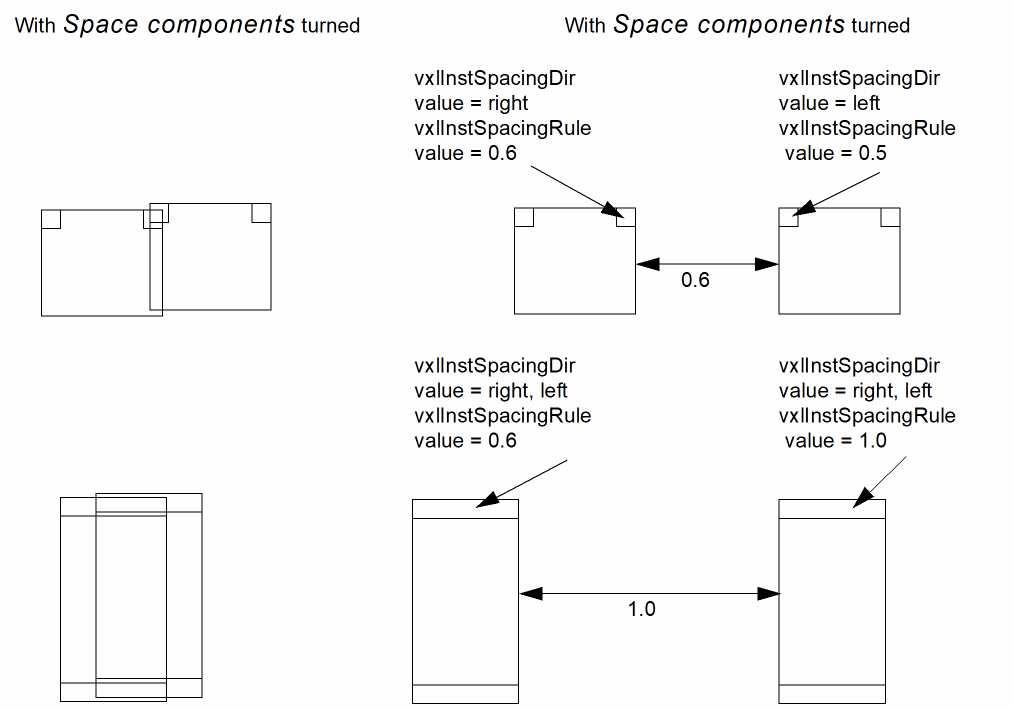
- To activate automatic spacing, turn on the Space components option in the Generation form.
Use the Layout XL user interface to enter properties on the pins in the same way that you enter the permuteRule properties.
To add the access direction to the pin:
property             value type       valid values
-----------------    ----------       ----------------------------
vxlInstSpacingDir    SKILL list       one or more of the following
                                      strings in the list:
                                      "left" "right" "top" "bottom"
Related Topics
Return to top