
Virtuoso Performance Warning Messages
Virtuoso performance warning messages are displayed depending on the following measurement criteria, and their related environment variable settings:
Low Memory Warnings
Virtuoso performance warning messages related to low memory measurements are displayed depending on the current memory status of the system and the Virtuoso sub-version.
When available system memory reduces so that it reaches or crosses the highest or the middle memory warning thresholds, or both, the following warning dialog is displayed:
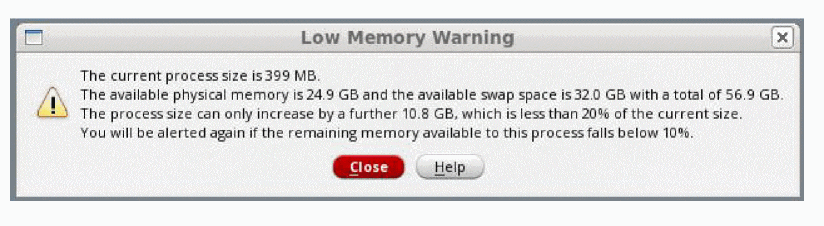
You can view memory usage details, such as the theoretical maximum size for a Virtuoso process and the process size in the CDS.log file under Maximum memory size and process size, respectively.
If the Maximum memory size changes by 2% or more, it is logged.
When the lowest memory threshold is reached or exceeded, then the following warning message is displayed:
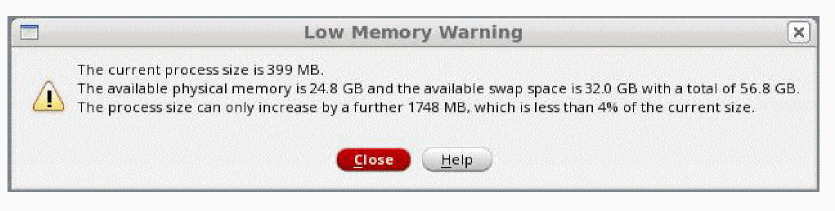
Note the following in relation to low memory warning message display:
-
Display of low memory warning messages do not log a command to the
CDS.logfile, and are not replayable. - Comment lines are logged when the low memory warning is displayed.
- Low memory messages are not displayed in the replay mode, but the low memory comment lines are logged if any thresholds are crossed.
-
For the graphical replay that does not cause
Virtuosoto exit, the low memory warning messages are displayed, as appropriate, once the session enters or re-enters the interactive mode. -
In the interactive
nographmode, a warning message is output when low memory settings are reached or crossed.
Swap Activity Warnings
Virtuoso performance warning messages related to page swap activity measurements are displayed dependent on the current settings of the swapActivity environment variables.
You can use the CDS_MEMPERF_WARNLOG shell environment variable to run user-specified executables. For example, the following command makes the executable file /usr/local/warnIssued to run asynchronously in the background and provided with the argument SwapActivityDialog.
setenv CDS_MEMPERF_WARNLOG="WHEN=SwapActivityDialog SCRIPT=/usr/local/warnIssued"
Output, including failures to launch the application, is displayed in the terminal window from where Virtuoso was launched.
- Value consists of several pairs of name and value. Any unrecognized names are ignored.
-
WHENSpecifies when the program should run. -
WHEN=SwapActivityDialogIndicates the provided script runs when the Swap Activity Warning dialog box is displayed. -
Any unrecognized value of
WHENis silently ignored. -
SCRIPTSpecifies the program which is used and can be specified only once. The associated value consists of one or more alpha-numeric, underscore, hyphen, period, or forward-slash characters (no whitespace or characters which are special to the shell).
Some facts about the swap activity warning messages:
-
These messages do not log a command to the
CDS.logfile and are not replayable. - Comment lines are not logged.
- The messages are not displayed in replay mode
- The swap activity comment lines are not logged if any thresholds are reached or crossed.
-
If you are performing graphical replay, and the replay does not cause
Virtuosoto exit, then the swap activity warning messages are displayed, after the session enters or re-enters interactive mode. -
In interactive
nographmode, a warning message is displayed when the swap activity settings are reached or crossed.
Additionally, because it is not possible to respond to a message in interactivenographmode, the message for the repeat display states that: Another warning will be output after X minutes if the condition persists or recurs.
Related Topics
Return to top