Task Viewer
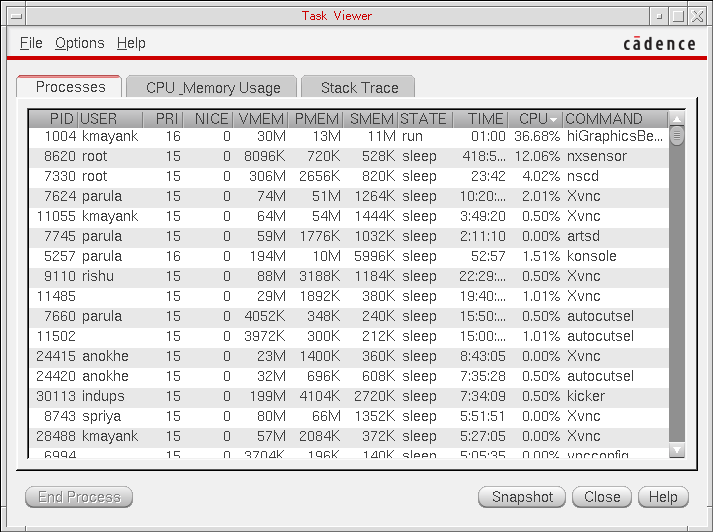
In the Graphics Performance Benchmark window, choose Tools – Task Viewer, to display the Task Viewer window. The Task Viewer automatically updates after every 2 seconds.
In the Task Viewer, you can view the Processes that are currently being run to determine which processes are going to impact the performance analysis results, and also the CPU_Memory Usage, X Resources, and the Stack Trace.
The information contained on the Processes and X Resources tabs can be sorted (the virtuoso and X resource processes are always highlighted).
Additional features of the Task Viewer include:
-
The ability to end or kill a process in the Processes tab by selecting the process ID (PID) of the required process, and then selecting the End Process button.
The End Process button is active only when a process is selected in the Processes tab. -
The ability to capture the information displayed by taking a Snapshot. You can use a snapshot for reporting purposes.
When a snapshot is taken, a time tag is attached to the file name so that you can determine when the snapshot was taken (for example, snapshot@16:52:05).
To save the snapshots, choose Options – Set Snapshot Folder/Name and then specify the name and storage location in the displayed Set Snapshot Folder and Name form.
The snapshot file is saved in the ASCII format and contains the following details:-
All the processes listed on the Processes tab, with their current states.
-
The stack trace at the moment the snapshot was taken.
-
The X server configuration file, if it exists.
-
The X server log file, if it exists.
-
The X display information.
-
The ability to set the Memory Unit displayed on the CPU_Memory Usage tab.
Choose Option – Memory Unit, and then choose to display results in either 2G (default) or 1G unit format.
The Memory Unit option is active only when the CPU_Memory Usage tab is selected. -
The ability to record preferred settings by choosing Option – Remember Settings.
Performance Benchmarks
REDRAW ON WINDOW
|
Benchmark
|
%
|
Description
|
|
SolidSegment100
|
5
|
random lines in length of 100 pixels
|
|
HorizontalSegment100
|
15
|
horizontal lines in length of 100 pixels
|
|
VerticalSegment100
|
15
|
vertical lines in length of 100 pixels
|
|
StippleRect100(17x15)
|
10
|
stippled rectangle with size of 100 pixels and a 17x15 stipple
|
|
StippleRect100(32x32)
|
10
|
stippled rectangle with size of 100 pixels and a 32x32 stipple
|
|
StippleRect100(16x16)
|
10
|
stippled rectangle with size of 100 pixels and a 16x16 stipple
|
|
StippleRect100(8x8)
|
10
|
stippled rectangle with size of 100 pixels and a 8x8 stipple
|
|
StippleRect100(4x4)
|
10
|
stippled rectangle with size of 100 pixels and a 4x4 stipple
|
|
SolidRect100
|
5
|
solid rectangle with size of 100
|
|
SolidRect50
|
5
|
solid rectangle with size of 50
|
|
Points
|
5
|
2048 random points
|
REDRAW ON PIXMAP
|
Benchmark
|
%
|
Description
|
|
SolidSegment100
|
5
|
random lines in length of 100 pixels
|
|
HorizontalSegment100
|
20
|
horizontal lines in length of 100 pixels
|
|
VerticalSegment100
|
15
|
vertical lines in length of 100 pixels
|
|
StippleRect100(17x15)
|
10
|
stippled rectangle with size of 100 pixels and a 17x15 stipple
|
|
StippleRect100(32x32)
|
10
|
stippled rectangle with size of 100 pixels and a 32x32 stipple
|
|
StippleRect100(16x16)
|
10
|
stippled rectangle with size of 100 pixels and a 16x16 stipple
|
|
StippleRect100(8x8)
|
10
|
stippled rectangle with size of 100 pixels and a 8x8 stipple
|
|
StippleRect100(4x4)
|
10
|
stippled rectangle with size of 100 pixels and a 4x4 stipple
|
|
SolidRect100
|
5
|
solid rectangle with size of 100
|
|
SolidRect50
|
5
|
solid rectangle with size of 50
|
PLANE COPY
|
Benchmark
|
%
|
Description
|
|
Pixmap2Bitmap500
|
40
|
from pixmap to bitmap in size of 500
|
|
Bitmap2Pixmap500
|
5
|
from bitmap to pixmap in size of 500
|
|
Bitmap2Window500
|
5
|
from bitmap to window in size of 500
|
|
Pixmap2Bitmap200
|
40
|
from pixmap to bitmap in size of 200
|
|
Bitmap2Pixmap200
|
5
|
from bitmap to pixmap in size of 200
|
|
Bitmap2Window200
|
5
|
from bitmap to window in size of 200
|
AREA COPY
|
Benchmark
|
%
|
Description
|
|
Pixmap2Pixmap500
|
20
|
pixmap to pixmap copy in size of 500
|
|
Pixmap2Window500
|
15
|
pixmap to window copy in size of 500
|
|
Window2Pixmap500
|
10
|
window to pixmap copy in size of 500
|
|
Window2Window500
|
5
|
window to window copy in size of 500
|
|
Pixmap2Pixmap200
|
20
|
pixmap to pixmap copy in size of 200
|
|
Pixmap2Window200
|
15
|
pixmap to window copy in size of 200
|
|
Window2Pixmap200
|
10
|
window to pixmap copy in size of 200
|
|
Window2Window200
|
5
|
window to window copy in size of 200
|
MASKED AREA COPY
|
Benchmark
|
%
|
Description
|
|
Pixmap2Pixmap500M
|
20
|
pixmap to pixmap copy in size of 500
|
|
Pixmap2Window500M
|
15
|
pixmap to window copy in size of 500
|
|
Window2Pixmap500M
|
10
|
window to pixmap copy in size of 500
|
|
Window2Window500M
|
5
|
window to window copy in size of 500
|
|
Pixmap2Pixmap200M
|
20
|
pixmap to pixmap copy in size of 200
|
|
Pixmap2Window200M
|
15
|
pixmap to window copy in size of 200
|
|
Window2Pixmap200M
|
10
|
window to pixmap copy in size of 200
|
|
Window2Window200M
|
5
|
window to window copy in size of 200
|
IMAGE OPERATION
|
Benchmark
|
%
|
Description
|
|
BlendImage500
|
10
|
alpha blending in size of 500
|
|
SmhBlendImage500
|
10
|
alpha blending in size of 500 with XSHM
|
|
PutImage500
|
20
|
copy image to window in size of 500
|
|
SmhPutImage500
|
20
|
copy image to window in size of 500 with XSHM
|
|
GetImage500
|
20
|
grab image from window in size of 500
|
|
ShmGetImage500
|
20
|
grab image from window in size of 500 with XSHM
|
COMBINED OPERATIONS
|
Benchmark
|
%
|
Description
|
|
ColorDrag400
|
15
|
color dragging of a 400x400 rectangle
|
|
ColorDrag200
|
15
|
color dragging of a 200x200 rectangle
|
|
ColorStretch
|
10
|
color stretching with a rectangle
|
|
MonoColorDrag400
|
10
|
mono-color dragging of a 400x400 rectangle
|
|
MonoColorDrag200
|
10
|
mono-color dragging of a 200x200 rectangle
|
|
MonoColorStretch
|
10
|
mono-color stretching with a rectangle
|
|
Blinking500
|
10
|
blinking operation with X calls
|
|
Blinking500Hi
|
10
|
blinking operation with Hi calls
|
|
ColorHighlight
|
10
|
highlighting operation
|
Related Topics
Graphics Performance Benchmarks Window Form
Return to top