
Automatic Diagnostic Log Submissions in Virtuoso
In Virtuoso, a crash log is generated when an application fails or crashes. This crash log automatically records an abridged version of the crash data, including command logs and stack traces. The hang report is generated by the Health Monitor tool, when you terminate Virtuoso using the tool. The Health Monitor tool collects the output of the UNIX top command and generates a high-level summary from 10 seconds of callstacks. This information is automatically appended to the CDS.log file and copied to hangReport*.log.CDS.log.
This information can subsequently assist in the debugging of critical software problems and can also provide a means of tracking essential data that can be useful when attempting to identify key failure trends across specific applications (as well as Virtuoso itself).
Virtuoso automatically stores diagnostic logs (crash logs and hang logs) in a directory specified by CDS_ERRORLOG.
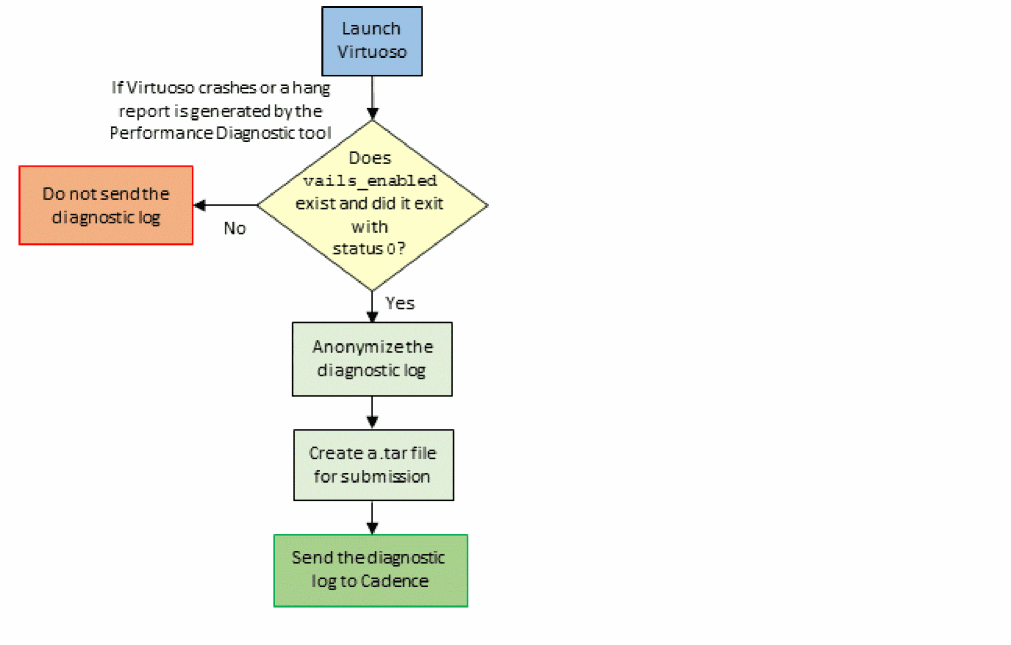
Virtuoso Analysis of Interaction Learning System (VAILS) provides the additional capability of automatically sending these logs to Cadence. When VAILS is enabled, diagnostic logs are:
- Automatically collected from your system.
- Anonymized and made ready for submission to Cadence as a .tar file based on the criteria you set.
- Sent to Cadence using the Amazon Web Services (AWS) Simple Storage Service (Amazon S3).
The following flowchart depicts the VAILS flow:
Related Topics
Anonymization of Diagnostic Logs
Return to top