
Searching a File for Specific Text
To search a file for a specific text string:
-
Choose Edit – Find.
The Search form appears.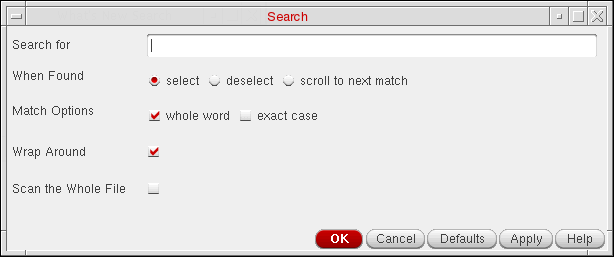
- In the Search For field, type the search string.
- (Optional) Select a desired option from When Found.
- (Optional) Select one or more of the Match Options.
- (Optional) Select Wrap Around to search wrap around text.
- (Optional) Select Scan the Whole File to highlight all occurrence of the search string in the whole file.
-
Click Apply to the occurrences of the specified search string.
- If the specified search string can be found in the text window, the located string is highlighted. Each time you click Apply, the next occurrence of the specified string in highlighted until either the end of the text file is reached (if you selected no for Wrap Search) or you click OK (the next step).
- If the specified search string cannot be found in the text window, or if you selected no for Wrap Search and you are at the end of the text window and there are no more occurrences of the specified search string, a Pattern not found message appears in the CIW output area.
The Search form remains open. - Click OK to close the form.
Related Topics
Return to top