
AMS Designer in ADE Explorer FAQ
This page contains the answers to customer’s most frequently asked questions about the interface to the Spectre AMS Designer and Xcelium Mixed-Signal in ADE and ADE Explorer. For more information, see the Virtuoso ADE Explorer User Guide.
The frequently asked questions are organized under the following sections:
- General FAQ on the AMS Designer Interface in ADE Explorer
- General FAQ on the AMS UNL Netlister
- FAQ on xrun
- FAQ on Migration from SpectreVerilog to AMS Designer
- FAQ on the AMS UNL Netlisting Flow
- UNL Netlister FAQ
- Miscellaneous FAQ on AMS Designer Interface in ADE and ADE Explorer
General FAQ on the AMS Designer Interface in ADE Explorer
- Which AMS netlisters are available in ADE Explorer to netlist my mixed-signal design?
- Which simulation mode is available in ADE Explorer to simulate the netlist created by the AMS UNL netlister flow?
- Does AMS Designer support multi-threading capability?
- How to compile user defined connect modules?
Which AMS netlisters are available in ADE Explorer to netlist my mixed-signal design?
ADE Explorer provides the AMS Unified Netlister (AMS UNL) to run your mixed-signal designs.
Which simulation mode is available in ADE Explorer to simulate the netlist created by the AMS UNL netlister flow?
If you create the netlist using the AMS UNL flow, ADE Explorer will simulate the design using the xrun executable from the AMS Designer simulator.
Does AMS Designer support multi-threading capability?
Yes, AMS Designer supports multi threading capability with Spectre solver. You can enable multithreading by passing the following options to xmsim or xrun:
xmsim -spectre_args +mt=<number_of_threads>
xrun -spectre_args +mt=2
xrun -spectre_args +mt // Simulator automatically chooses the number of threads
If you are running APS solver from ADE Explorer, you can enable/disable multithreading using the High-Performance Simulation Options form under the Setup menu. You can choose from the following options:
- Disable - On selection, disables multithreading.
- Auto - On selection, enables multithreading and automatically chooses the number of threads.
- Manual - On selection, enables multithreading and allows you to specify the number of threads
How to compile user defined connect modules?
In order to compile user defined connect modules, you need to do the following:
-
Create 5x hierarchy for connect modules, as shown below:
ncvlog -ams -use5x -work libName module_file -
Create a connectRules.il file under libname, as shown below:
cd libName
All the connect modules in the connectRules.il file will be listed in the Built-in rules groupbox of ADE Explorer Select Connect Rules form.genConnRulesFile -lib $workLib */*/*.vams -destpath .
General FAQ on the AMS UNL Netlister
- What is the AMS UNL flow?
- What is UNL Verilog-AMS netlister?
- How can I set the AMS UNL netlister in ADE Explorer?
- What is the name of the netlist file created by the UNL netlister, and where is it located?
- Does the UNL netlister also create cellview-level netlists?
- Does the UNL netlister also need the implicit/explicit temporary library or writable design library?
- Can I save OCEAN scripts for the UNL netlister and run them later?
- Is there a command-line executable for the UNL netlister?
What is the AMS UNL flow?
UNL stands for Unified Netlister. It is the final AMS netlisting solution culminating many years of development and lessons learned from past AMS Netlisting flows. Its purpose is to support complex text natively in AMS designs of today. Also, it is meant to replace all previous AMS Virtuoso flows including SpectreVerilog, AMS Cell-based, and AMS OSSN with one "unified" solution supporting all aspects of complex AMS designs. It is still a partially OSS-based netlister utilizing the OA side of hierarchical netlisting.
What is UNL Verilog-AMS netlister?
The UNL Verilog-AMS netlister is a Verilog-AMS netlister integrated into ADE and ADE Explorer. It translates schematics and layout cellviews into a Verilog-AMS structural netlist for compilation, elaboration, and simulation.
How can I set the AMS UNL netlister in ADE Explorer?
On the ADE Explorer window, choose Simulation - Netlist and Run Options. On the resulting form, select AMS Unified netlister with xrun.
Alternatively, do one of the following:
-
Add the following entry in your
.cdsinitfile:envSetVal("ams.envOpts" "netlisterMode" 'string "AMS-UNL")
-
Add the following entry in your
.cdsenvfile:ams.envOpts netlisterMode string "AMS-UNL"
What is the name of the netlist file created by the UNL netlister, and where is it located?
The UNL netlister creates a netlist.vams file in the netlist directory.
Does the UNL netlister also create cellview-level netlists?
No. The UNL netlister creates a single netlist of all the schematics. However, this netlist does not contain all the design information needed by the simulator. Several other files such as textInputs file, simulator control file and probe Tcl file that contain design information are also passed to the simulator.
Does the UNL netlister also need the implicit/explicit temporary library or writable design library?
No. The UNL netlister creates the netlist in the netlist directory and all compiled text and netlist in the xrun INCA_libs directory for every run. Hence, it does not need any external temporary library or writable design library.
Can I save OCEAN scripts for the UNL netlister and run them later?
Is there a command-line executable for the UNL netlister?
The command-line executable for the UNL netlister is called runams.
FAQ on xrun
- What is xrun?
- What is the advantage of xrun over ncverilog?
- What is the advantage of single step simulation (xrun) over 3-step simulation (ncvlog, xmelab, xmsim)?
-
I want to pass a pre-compiled lib but xrun is not reading
cds.libfrom the project directory, what should I do?
What is xrun?
xrun is an executable available in your IUS release. It allows you to compile, elaborate, and simulate your design using a single command. xrun is the replacement for ncverilog.
xrun can simulate Verilog, SystemVerilog, VHDL/VHDL-AMS, Verilog-AMS, Verilog-A, C, C++, SPICE, compiled object, dynamic library, and PSL files for Verilog/VHDL/SystemC.
xrun uses file extension to determine file type, and automatically compiles them using the appropriate compiler. After compilation, xrun automatically invokes xmelab to elaborate the design, and then xmsim to simulate.
What is the advantage of xrun over ncverilog?
ncverilog can simulate only Verilog and Verilog-AMS, whereas xrun can simulate Verilog, SystemVerilog, VHDL, Verilog-AMS, C, C++, SPICE, compiled object, dynamic library, and PSL files for Verilog, VHDL and SystemC.
What is the advantage of single step simulation (xrun) over 3-step simulation (ncvlog, xmelab, xmsim)?
Single step simulation is faster than 3-step simulation because of the following reasons:
-
xrunuses file extension to determine file type and automatically compiles them using the appropriate compilers. After compilation,xrunautomatically invokesxmelabto elaborate the design, and thenxmsimto simulate. - No 5x library structure is needed for compilation.
- In 3-step simulation, users need to call different compilers for different file types. So, 3-step simulation takes more time and needs more effort from users.
-
xruncan also run in a multi-step mode usingxrun -compile,xrun -elaborate, andxrun -r. This mode is the most efficient for AMS regression flows where compilation and elaboration are not required for every simulation.
I want to pass a pre-compiled lib but xrun is not reading cds.lib from the project directory, what should I do?
Use -reflib to pass the pre-compiled library.
FAQ on Migration from SpectreVerilog to AMS Designer
- I am using SpectreVerilog and want to migrate to AMS Designer. Which netlister should I use?
- I am using SpectreVerilog and want to migrate to AMS Designer. Will my existing design configuration view work with the UNL netlister?
- Will the Verilog Library files (-v) and the Verilog Library directories (-y) fields that I use with SpectreVerilog netlister work in the same way with the UNL netlister?
I am using SpectreVerilog and want to migrate to AMS Designer. Which netlister should I use?
We recommend you to use the AMS UNL netlister. The use model is similar to that of SpectreVerilog and you will be able to use your existing PDKs without any modification.
I am using SpectreVerilog and want to migrate to AMS Designer. Will my existing design configuration view work with the UNL netlister?
Yes. All your SpectreVerilog netlister design configuration views will work with the UNL netlister without modification.
Will the Verilog Library files (-v) and the Verilog Library directories (-y) fields that I use with SpectreVerilog netlister work in the same way with the UNL netlister?
You can use these fields to pass Verilog library files and directories using the -v and -y options to xrun. These fields are available on the Main tab page of the AMS Options form (Simulation – Options – AMS Simulator).
FAQ on the AMS UNL Netlisting Flow
- How does the UNL netlister compile Verilog-A files?
- Why can't I use SimVision for debugging Verilog-A files when I use the UNL netlister?
How does the UNL netlister compile Verilog-A files?
The UNL netlister flow utilizes support for Verilog-A buses, complex port connectivity, and instance and occurrence-based cellview bindings through a new xrun feature enabling auto generation of Verilog-AMS-wrappers around the ahdl_include veriloga source.
The Verilog-A files are spectre parsed through ahdl_include for better performance (ahdlCMI compiled Verilog-A) and consistency with Spectre flow.
ahdl_include statements specify the path of the Verilog-A text file. This behavior is same across the Spectre and SpectreVerilog netlisters.As the Verilog-A files are compiled by the analog solver, SimVision or NC debug cannot take place as it can for Verilog-AMS source code.
Why can't I use SimVision for debugging Verilog-A files when I use the UNL netlister?
The UNL netlister compiles Verilog-A files using the analog solver (ahdl_include with Spectre or APS). This gives you improved performance and consistency with Spectre.
However, the disadvantage is that you cannot use SimVision to debug Verilog-A files. If you need to debug Verilog-A, a workaround is to rename the veriloga.va files to verilog.vams. xrun will then compile the file using ncvlog and you will be able to debug it in SimVision. This is essentially what happens when you use the Cellview-based netlister.
UNL Netlister FAQ
- How can I use Verilog text files?
- How can I use VHDL text files?
- Can I use VHDL-AMS text with the UNL netlister?
- Can the UNL netlister create a VHDL-AMS netlist?
- How does the UNL netlister pass the HDL text files to xrun?
- Are the values of -incdir, -v, -y and -f options relative to the current working directory, or relative to netlist directory?
- Where are the model files searched?
- I chose the Spectre solver, but I see both Spectre control file (amsControlSpectre.scs) and UltraSim control file (amsControlUltraSim.scs) in the netlist directory. Why?
- My design has two instances of the same library and cell, one bound to verilog view, and the other to Verilog-A view. Will the UNL netlister netlist and bind the instances correctly?
- My design has two instances of the same cell, one bound to verilog view, and the other bound to verilogams view. Will UNL netlister netlist the instances correctly?
- My design has two instances of same cell but they are bound to different views (schematic and verilog). Will the UNL netlister netlist the instances correctly?
- I see xmelab CUVMUR errors; model name in instance definition is incorrect. What is the solution?
- Why do I get SFE-23 errors during UNL Netlisting Step?
- What does the Clean snapshot and pak files check box in the Netlist and Run Options form do? When should I use it?
- How does the UNL netlister print inherited connections in the netlists?
- Where can I find basic information on how to use inherited connections with Cadence tools?
- Can the UNL netlister print inherited connections as pseudo ports, like the Spectre and SpectreVerilog netlisters?
- Do sideways inhconn netSets work with the UNL netlister?
How can I use Verilog text files?
There are five ways to use Verilog text with the UNL netlister.
- Import the Verilog text file using Verilog In
-
Open and save the Verilog text file in a text editor using CV2CV text import from DFII. This will import the Verilog text into the 5x library (library:cell:view) structure. The path of the Verilog text file is printed in the
textInputsfile (located in the netlist directory) and passed toxrunusing the-foption. -
Another way, typically used by SpectreVerilog and UltraSimVerilog users, is to use the symbol view as an HED stopping view and pass the Verilog text file separately using the
-vor-yoption. You can use the Verilog Library files (-v) and the Verilog Library directories (-y) fields in the Main tab page of the AMS Options form (Simulation – Options – AMS Simulator) for this purpose. - Use the new HED Set Cell View binding property called Mark As External HDL Text. This mimics the same symbol stopping view behavior intended to blackbox a cellview to HED and netlisting visibility pointing to external text outside of the DFII environment.
-
The most common import step for text within the AMS flow is to perform a command line
ncvlog -use5xcompilation of the text source code. This results in creating the HED 5x library.cell:view structure so as to register the text for use in HED view switching.
How can I use VHDL text files?
If your design configuration uses VHDL text files, both the entity view and the architecture view should exist. If you do not have the entity and architecture views already in DFII, use traditional DFII text import (CV2CV) to import the VHDL text file. VHDL import will create an entity view and an architecture view. The name of the architecture view will be the same as the name of the architecture defined in the VHDL file. The entity/vhdl.vhd file will have the entity definition, while the <architecture>/vhdl.vhd file will have the definition of that particular architecture.
For the design configuration view in the Hierarchy Editor (HED), you should bind the instance to the architecture view, and not to the entity view. You must also add the created architecture names to the HED view-list as valid architecture views to bind to.
Both the entity view vhdl.vhd and the architecture view vhdl.vhd files are sent to xrun (the filepaths are printed in the textInputs file present in the netlist directory).
Can I use VHDL-AMS text with the UNL netlister?
Can the UNL netlister create a VHDL-AMS netlist?
The netlister creates a Verilog-AMS netlist only.
How does the UNL netlister pass the HDL text files to xrun?
The UNL netlister traverses the design and obtains a list of cells that have the following DFII imported view-types:
- Verilog (Verilog text)
- VHDLAMSText (VHDL-AMS text)
- systemVerilogText (SystemVerilog text)
- VerilogAMSText (Verilog-AMS text)
- vhdl (VHDL text)
- Veriloga (Verilog-A text)
These are considered white-box design units (WDU) due to their visibility in HED and accessibility to cellview switching
The HDL filenames are then printed in the textInputs file which is located in the netlist directory. The textInputs file is passed to xrun using the -f option.
Are the values of -incdir, -v, -y and -f options relative to the current working directory, or relative to netlist directory?
The value that you specify for the -incdir, -v, -y, and -f options are relative to the current working directory (CWD) from where you started the Virtuoso workbench.
Where are the model files searched?
Model files are searched in the directories specified in the Include Paths field in the Simulation Files Setup form (Setup – Simulation Files).
You can specify individual model files in the Model Library Setup form (Setup – Model Libraries) or specify the directory that contains model files in the Include Path field in the Simulation Files Setup form (Setup – Simulation Files).
The paths to model files specified in the Model Library Setup form are passed to xrun using the spiceModels.scs file, while the value of the Include Path field is passed using the -modelincdir option.
-modelpath option has been deprecated and is replaced by another mechanism called amsd_subckt_bind=yes settings which reside in the spiceModels.scs file.I chose the Spectre solver, but I see both Spectre control file (amsControlSpectre.scs) and UltraSim control file (amsControlUltraSim.scs) in the netlist directory. Why?
Although you chose either the Spectre or the UltraSim analog solver, ADE Explorer create the AMS control files for both the analog solvers. This is done with the assumption that you might later change the solver, and as the control files for both the solvers are available, netlisting and simulation will take lesser time.
However, the AMS control file of only the analog solver that you chose is passed to xrun. If you read the runSimulation file in the netlist directory, you will see the correct AMS control file specified against the -analogControl option.
My design has two instances of the same library and cell, one bound to verilog view, and the other to Verilog-A view. Will the UNL netlister netlist and bind the instances correctly?
My design has two instances of the same cell, one bound to verilog view, and the other bound to verilogams view. Will UNL netlister netlist the instances correctly?
The UNL netlister uses the powerful AMS xrun binding engine (BIND2) specifically created to perform all types of cellview bindings possible within a config. Full support exists for cell, instance, occurrence, library, same cell from different libraries. All combinations of text and schematic are supported in any hierarchical configuration.
My design has two instances of same cell but they are bound to different views (schematic and verilog). Will the UNL netlister netlist the instances correctly?
I see xmelab CUVMUR errors; model name in instance definition is incorrect. What is the solution?
CUVMUR is an error mnemonic from the ncvlog and xmvhdl compilers. It means that the elaborator could not resolve or find the cell or module to elaborate. In other words, the module was not compiled, therefore was unresolved for elaboration. Check the xrun.log for proper compilation of the module before elaboration.
For example, if you see the following xmelab error in xrun.log:
vpulse #(0.05, 0.05) V0 ( .PLUS(net019), .MINUS(cds_globals.\gnd! ));
xmelab: *E,CUVMUR (./netlist.vams,133|24): instance 'verilogtesttop.V0' of design unit 'vpulse' is unresolved in 'worklib.verilogtesttop:vams'.
The instance definition of V0 in netlist is:
vpulse #(0.05, 0.05) V0 ( .PLUS(net019), .MINUS(cds_globals.\gnd! ));
In the schematic, V0 is an instance of vpulse. Hence, instead of model name, the cell name has been printed.
Further, the parameter name-value pairs in the instance definition are not printed either.
A common reason for this problem is that you are using a configuration in which the instances are bound to symbol view. The UNL netlister treats instances bound to symbol view with symbol view in HED stoplist as digital stopping views. Consequently, the netlister does not read the spectre CDF simulation information, prints incorrect model name, and does not print the parameter name-value pairs in the instance definition.
While netlisting, you would have got the following pop-up window with the following message:
The following cells will be netlisted without using the spectre CDF simulation information, because they are bound to view symbol:
< list of cells>
To use the spectre CDF simulation information, do one of the following
Open your configuration in Hierarchy Editor and replace "symbol" with "spectre" in the view list and stop list.
Choose Simulation->Options->Netlister and add "symbol" in the "Netlist using spectre CDF simInfo" field.
As specified in the message, the solution is to either edit the configuration, or add symbol in the Netlist using spectre CDF simInfo field on the Netlister tab page of the AMS Options form (Simulation – Options – AMS Simulator) to have symbol view act as an analog stopping view.
Renetlist the design, and check that the netlist has the correct model name and all the parameter name-value pairs.
Why do I get SFE-23 errors during UNL Netlisting Step?
ERROR (SFE-23): "analog/input.scs" 36: The instance `I153|NM0' is referencing an undefined model or subcircuit, `nmos25
The error refers to the portion of the UNL netlisting step which calls Spectre to parse the model cards could not resolve the definition of the analog primitive model nmos25.
UNL Netlisting requires that the model libraries for analog primitives be setup prior to netlisting. The path of the model file will be either missing or incorrect. Open the Model Library Setup form (Setup - Model Libraries) and correct the value.
Same setup requirement applies for Design Variables. These must be defined prior to UNL netlisting.
What does the Clean snapshot and pak files check box in the Netlist and Run Options form do? When should I use it?
The Clean snapshot and pak files check box appears in the Netlist and Run Options form (Simulation – Netlist and Run Options) when you select AMS Unified netlister with xrun.
By default, this check box is deselected. If you select this check box, the INCA_libs directory inside the netlist directory is deleted before calling xrun. The INCA_libs directory contains the simulation snapshot and the .pak files. Hence, if you choose to delete the INCA_libs directory, it essentially will lead to re-compilation, and hence re-elaboration and re-simulation of the design.
If you select the Clean snapshot and pak files check box, the -clean option is passed to xrun.
How does the UNL netlister print inherited connections in the netlists?
The UNL netlister prints the inherited connections (net expression wire labels and netSet properties) using the cds_net_set compiler attribute.
Consider a module that has a wire segment with the following net expression label: @n3vdd:%:vdd!
For this net expression, the netlist will have the following definition:
wire (*
integer inh_conn_prop_name = "n3vdd";
integer inh_conn_def_value = "cds_globals.\\vdd! ";*)
cdsNet0;
Somewhere in the design hierarchy, a netSet property is defined on an instance. The netSet property appears as follows in the instance definition:
<modelName> (* integer cds_net_set
[0:2] = { "n3vdd","n2vdd","n2gnd" };
integer n3vdd = "cds_globals.\\s_vdd! ";
*) <instName>…
Where can I find basic information on how to use inherited connections with Cadence tools?
A tutorial on how to use inherited connections with various Cadence tools in the design flow is available at <your installation directory>/tools/dfII/samples/tutorials/inhconn. You can refer to the Inherited Connections Flow Guide on the
To understand how to set net expression wire labels and netSet properties in Virtuoso Schematic Editor, read the Inherited Connections section in the Virtuoso Schematic Editor User L Guide.
Can the UNL netlister print inherited connections as pseudo ports, like the Spectre and SpectreVerilog netlisters?
The UNL netlister uses the cds_net_set compiler attribute to print the inherited connections.
Do sideways inhconn netSets work with the UNL netlister?
As the UNL netlister uses compiler attributes to print netSet and net expressions in the netlist, sideways netSet works. This is particularly useful when your design uses inherited connection connect modules with built-in net expression attributes used for multiple supply designs.
Miscellaneous FAQ on AMS Designer Interface in ADE and ADE Explorer
- How can I get more information on an error from the simulator?
- I defined a new value for a variable in the CIW and clicked on the Netlist and Run icon. However, I still see the same incorrect netlist. What is wrong?
- I do not have xrun in my older IUS release, but I have the ncverilog executable. Can I use ncverilog with the UNL netlister?
How can I get more information on an error from the simulator?
Select Simulation – Output Log – Error Explanation. You will see a list of error mnemonics in the All Error Messages pull-down menu. These are the error mnemonics reported by xrun when you simulated your design. The software reads all error mnemonics in the xrun.log file and populates the pull-down menu with those mnemonics.
Select the mnemonic for which you want to read the explanation, and click Explain.
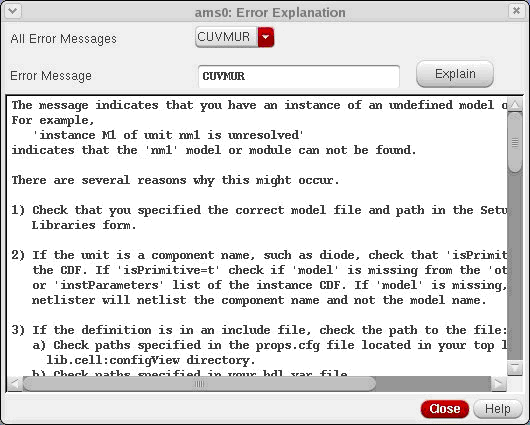
You can also type any error mnemonic (not necessarily reported by xrun in the last simulation) in the Error Message field and click Explain to view the explanation.
You can also find the error mnemonic from nchelp command line by doing the following:
nchelp xmelab ERROR_MNEMONIC
I defined a new value for a variable in the CIW and clicked on the Netlist and Run icon. However, I still see the same incorrect netlist. What is wrong?
If you have defined a variable, you need to recreate the netlist, that is, choose Netlist – Recreate. Then you can either choose Simulation - Netlist and run or click the Netlist and Run button.
I do not have xrun in my older IUS release, but I have the ncverilog executable. Can I use ncverilog with the UNL netlister?
The UNL netlister supports simulation with only xrun. If your IUS release does not have the xrun executable, you will see the following error message:
Failed to create the netlist because either the xrun executable is not in a directory listed in the 'path' variable or you are running IUS 8.X in an unsupported platform.
Correct the value of the 'path' variable or move to a supported platform and then try again.
Return to top