Design Intent Report
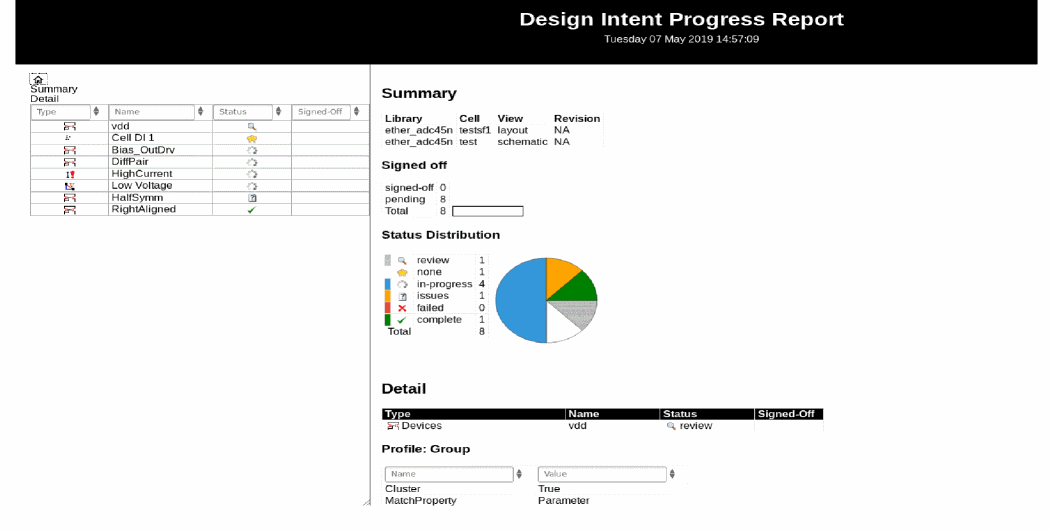
The progress of all the design intent implementation on a design can be checked at any point using a high level report generated from Schematics XL or Layout XL. The report provides a summary of the design intent within a design, reporting the implementation status of each design intent with the associated notes capturing the communication between the layout and schematic designers. It is useful to keep abreast of the latest design changes and to review the progress of the project as a whole.
The report displays the date and time the report was generated and is divided with a navigation pane on the left and a pane containing the report content on the right.
The Signed Off option is located on the Edit Design Intent form and is enabled only in Schematics XL for design intents with a status of complete  or review
  . Selecting this option validates that the design intent has been implemented in Layout XL and confirms that the design goal has been satisfactorily achieved within the design.
On the navigation pane:
|
Field
|
Description
|
|
Summary
|
Displays the design intent summary in the report pane.
|
|
Detail
|
Displays the Detail section at the top of the report pane. The Detail table summarizes the status of each design intent. All the columns are filterable and selecting any item on a row, displays that design intent at the top of the report pane. Each row includes the following information:
-
Type: A pictorial symbol for the design intent type.
-
Name: The name of each design intent.
-
Status: The current implementation status of each design intent.
-
Signed Off: The current stage of validation for each design intent.
|
On the report pane:
|
Field
|
Description
|
|
Summary
|
-
Library
/
Cell
/
View
/
Revision:
Details the library, cell, view, and revision from which the design intent information is sourced.
-
Signed Off:
Provides an overview of the number of design intents currently pending validation or validated as having been achieved in Schematic XL.
-
Status Distribution:
Provides an overview of the implementation progress of all design intent into the design.
|
|
Detail
|
Lists the following information for each design intent, if available
-
Type: Displays the type of design intent.
-
Name: Displays the name of the design intent.
-
Status: Displays the current implementation status of the design intent.
-
Signed Off: Displays the Sign-off status of the design intent. A tick denotes that the design intent is completed in Layout XL and validated in Schematic XL as having been achieved in the design.
-
Profile
displays the property configurations assigned to the design intent.
-
Members Information:
Displays the objects on which the design intent applies and the voltage or current that has been specified for each category.
-
Design
Notes:
Displays the schematic designer’s design goals and any additional comments. This is the information entered in the Notes field of the middle section of the Edit Design Intent form.
-
Implementation Notes:
Displays the progress or strategy used by the layout designer to implement the design intent. This is the information entered in the Notes field of the lower section of the Edit Design Intent form.
|
|
Implementation Constraints
|
Displays the constraints defined for the design intent.
|
Related Topics
Signed Off
Reviewing and Editing a Design Intent Created in Layout XL
Signing off Design Intent Reports
Notes
Return to top

 status icon is automatically given to design intents that are created or objects that are added or removed in Layout XL. Each requires to be reviewed and validated in Schematics XL before they are signed off.