
Yes, simulation driven interactive routing supports over-device routing.
With FinFET technology, the routing density is more important than other criteria. Devices (especially MOS) have a different structure than before and are less sensitive to over-device routes. Therefore, simulation-driven interactive routing supports over-device routing, which is automatically enabled when a trunk is over device pins.
To automatically route over devices:
- Choose Create – Wiring – Wire.
- Select a location in line with the instance to start creating a wire.
- While creating a wire, route over the device. The trunk is automatically connected to the device pins by adding vias.
If both sides of the channel are connected, the connections to the devices that are not overlapped are removed. In addition, the current from them is ignored.
Similarly, when you run the Create Stranded Wire command, the trunk is automatically connected to the device pins by adding vias. - Hold the
Ctrl+Shiftkeys and move the mouse pointer to a different current position. The wire is automatically switched between the channel routing and the over-device routing.
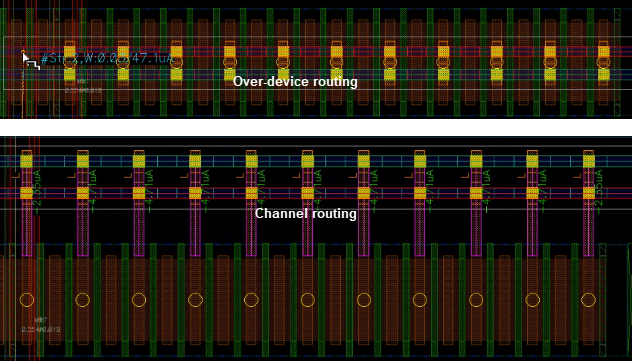
Similarly, you can switch between channel routing and over-device routing when the Create Stranded Wire command is used.
Related Topics
How do I identify the net connections that either consume or generate the most current?
How do I perform a current density check in interactive SDR?
How do I perform resistance-driven interactive routing?
How do I connect twigs in interactive SDR?