
Use the tapering feature to show how each segment can be optimized by SDR.
Note: Tapering is available only in Enforce checker mode for all current estimation modes.
To adjust the width and taper each segment independently:
- Select a net from the Navigator Assistant or the EAD Browser.
- Choose Create – Wiring – Wire.
Note: The tapering is available only for the Create Wire command. - Select an instance from where you want to start creating the wire. By default, the taper mode is noTaper. This means that the wire width remains constant even after connecting the pins.
- To enable tapering, press
}.
When tapering is enabled, the width of each segment is independently adjusted to match the estimated current value. The following figure shows how a wire width is adjusted when tapering is enabled.
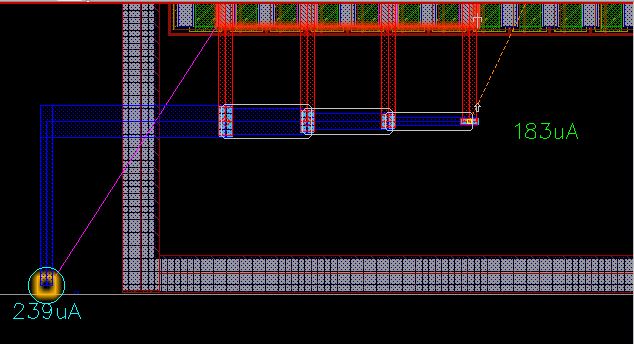
When there are no additional connected shapes for the edited wire and you continue to move the mouse pointer in the same direction, then after crossing the last target, the tapering of the wire moves in the opposite direction.
Related Topics
How do I identify the net connections that either consume or generate the most current?
How do I perform a current density check in interactive SDR?
How do I perform resistance-driven interactive routing?
How do I connect twigs in interactive SDR?
Does simulation driven interactive routing supports over-device routing?