
Bin Preferences for Abstract Generation
Bins are like buckets for placing cells. Each cell in a library is always contained in one bin. Each bin is associated with certain options, which allows the cells in a library to be distributed into mutually exclusive sets for processing. For example, Abstract Generator uses the option settings for binA to determine how to treat the cell cellA in binA.
There are essentially two types of bins, systems bins and user bins.
-
System Bins: There are five system bins, one for each of the four main types of cells — Core, IO, Corner, Block and one to store any cells that you do not want to process at a particular time —Ignore. Any cells placed in the Ignore bin are not deleted but are excluded from the set of cells to be processed.
-
User Bins: If you require bins of any given type in addition to the systems bins, you can create user bins. For example, you might want to create additional bins so that you can experiment with different option settings on two or more sample sets of cells. Or you might want to divide the core cells in your library into two separate sets to process some cells using slightly differing option settings and compare the results generated. You can do this up by creating a user bin and specifying its type as Core, and then applying option settings to it different from those of the Core bin.
User bins differ from system bins only in that you can delete and rename user bins, while system bins are permanent and cannot be renamed or deleted.
When you select a bin, you see the contents of that bin listed in the Cell pane.If you select two or more bins simultaneously, the contents of all the selected bins are displayed in the Cell pane. This gives you complete flexibility in defining the set of cells to be processed without compromising on the different options set for the cells.
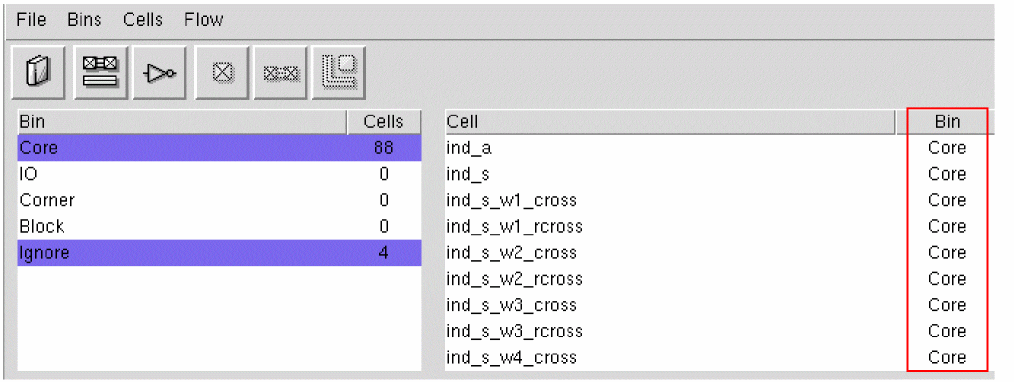
When you select multiple bins, you can use the Bin column in the Cell pane to recognize the bin to which a cell belongs.
The Bins menu contains commands to perform the following tasks:
- Creating a User Bin in Abstract Generator
- Adding a User Bin in Abstract Generator
- Renaming a User Bin in Abstract Generator
- Deleting a User Bin in Abstract Generator
- Setting Bin Options in Abstract Generator
Related Topics
Cell Preferences for Abstract Generation
Return to top