
Cell Preferences for Abstract Generation
The Cell pane lists the cells contained in the selected bins and reports the status of those cells. You can use the Cells pane to perform sophisticated selection operations like the cell name, height, properties, and view status. When a cell library containing physical or logical information is imported into Abstract Generator, the
Abstract Generator uses the following 5.x library format cellviews:
-
layoutfor layout views -
logicalfor logical views -
abstract.pinfor Pins views -
abstract.extfor extracted views -
abstractfor abstract views
The Cell pane is divided into a number of columns, one for each of the views handled by Abstract Generator: Layout, Logical, Pins, Extract, and Abstract. A symbol in any of these columns indicates the presence of that view for the selected cell.
The symbol displayed indicates the status of that view, as summarized in the following table.
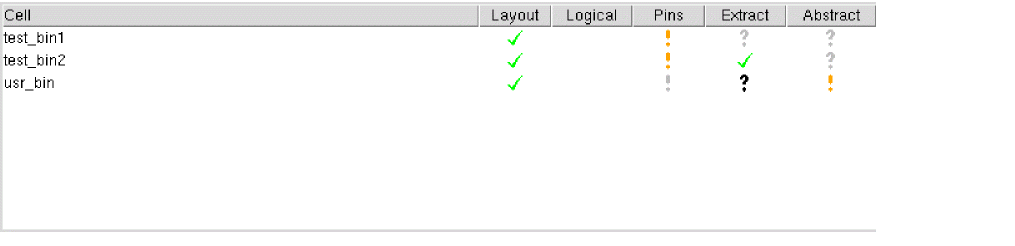


There is also a grayed-out version of each symbol, which indicates that the cellview in question has been rendered invalid, typically because of a change to one of the option settings or because of the regeneration of a predecessor view when an earlier step in the flow is re-run.
For example, a gray cross against a cell means that the view in question was originally generated with errors but has now been rendered invalid.
The Cells menu contains commands to perform the following tasks:
- Selecting Cells Based on a Criteria in Abstract Generator
- Selecting All Cells
- Deselecting All Cells
- Revalidation of Cells with Invalid Views in Abstract Generator
- Sorting Cells in Abstract Generator
- Distributing Cells into Bins in Abstract Generator
- Moving Cells Across Bins in Abstract Generator
- Viewing and Editing Cell Properties
- Viewing and Editing Cell Terminal Properties in Abstract Generator
- Viewing a Cell Status Report in Abstract Generator
- Editing Cellviews in Virtuoso Layout Editor in Abstract Generator
Related Topics
Return to top