
Importing Logical Data in Abstract Generator
The Import Logical form creates cellviews from existing logical information, typically represented in Liberty or Verilog® formats.
-
Select File – Import – Logical or click the Logical button in the toolbar.
This displays the Import Logical form.
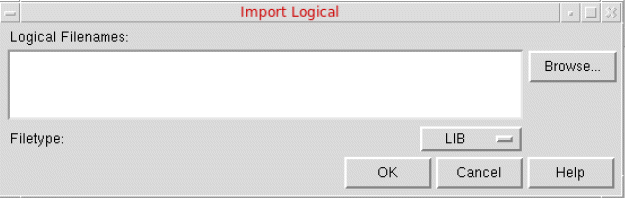
- In Logical Filenames, specify the names of one or more files you want to import, or use the Browse button to help locate the file and add it to the selection.
- You can filter the search by using the Filetype list.
- Choose the required file format, and click OK to import the selected file.
Abstract Generator creates cells with logical views in the current library directory. If the cell already exists, Abstract Generator does not create a new cell but adds logical view information to the other views present for the cell.
If you import logical information after you have run the Pins step, Abstract Generator confirms that the layout and logical views match before extracting terminal properties from the logical view. Cells that have only a logical view go to the Ignore bin by default.
You cannot import Verilog or Liberty information if you have set the global option to pick up logical information from a
schematic or symbol view.Related Topics
Specifying Global Options in General Options form
Return to top