
The connect module instances table is similar to profiling and it helps you to sort and compare all the connect modules in the design. Each mixed net listed in the sidebar displays the logical and electrical connect modules associated with it on the right pane. The following table lists the most commonly referred variables in the connect module instance table on the right pane.
| Feature | Variable | Description |
|---|---|---|
| X State Check |
|
The last time when the digital port signal went into the X state. |
|
|
The maximum duration for which the digital port signal stayed in the X state. |
|
| Event Number |
|
Number of d2a events from the digital port of IE, covering all possible toggling among 0, 1, X, Z. |
|
|
Number of a2d events to the digital port of IE, covering all possible toggling among 0, 1, X, Z. |
|
| Exceed Value |
|
Flags |
|
|
Flags |
Consider the following example screenshot. When the table is sorted by the num_d2a_events column, you can see that the most busy connect module is the one connected with the sclk_L2E_2_electrical instance.
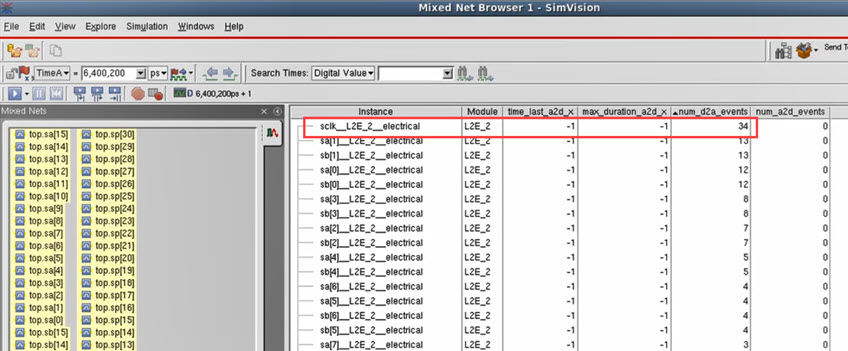
This kind of profiling and sorting lets you analyze variables values of the connect modules in the table and evaluate if any of them is not working as expected or is slowing down the test.