
The several methods for specifying disciplines allow you to fine-tune the discipline resolution process. The following table lists how to apply these methods appropriately for different design configurations.
|
If the design... |
Then... |
|---|---|
|
Uses digital blocks with transistors at the leaf level |
Turn off discipline resolution completely by specifying |
|
Has clearly defined boundaries between analog and digital |
Turn off discipline resolution where it is not required by specifying |
|
Does not have clearly defined boundaries between analog and digital |
Run discipline resolution on the complete design and specify disciplines where required by specifying |
For example, you might have a design that contains a SPICE or Verilog-AMS block sandwiched between two digital blocks with known and clearly-defined boundaries between analog and digital.
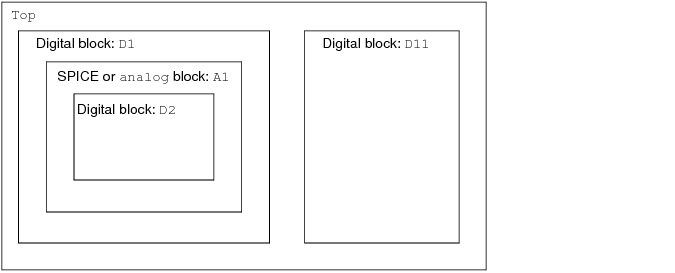
Using ordinary discipline resolution without scopes, analog disciplines might propagate into domainless nets within the digital blocks. The following scoped options restrict such movement and allow the elaborator to insert connect modules at the well-defined boundaries.
If top.D1.A1 is an analog behavioral block, such as Verilog-AMS, you might use the following options to specify a discipline of electrical for domainless nets in A1 and to specify discrete disciplines for domainless nets in D1 and D2.
 -setdiscipline "no_dr inst-Top.D1- logic1"
-setdiscipline "no_dr inst-Top.D1.A1- electrical"
-setdiscipline "no_dr inst-Top.D1.A1.D2- logic2"
If top.D1.A1 is a SPICE block introduced through an amsd block or a modelpath setting, there is no need to specify the discipline because the use of the amsd block or modelpath setting indicates that the SPICE or Verilog-A block is an analog block of the electrical discipline. In this case, you need to specify settings only for the digital blocks.
 -setdiscipline "no_dr inst-Top.D1- logic1"
-setdiscipline "no_dr inst-Top.D1.A1.D2- logic2"
To turn off discipline resolution completely, you might use the no_dr value at the top scope of the design. You can achieve the same effect by using the -disres none option.
 -setdiscipline "no_dr cell-Top- logic1"
-setdiscipline "no_dr inst-Top.D1- logic1"
-setdiscipline "no_dr inst-Top.D1.A1- electrical"
-setdiscipline "no_dr inst-Top.D1.A1.D2- logic2"
Turning off discipline resolution speeds up elaboration but leaves you with the responsibility of identifying the partitions that require connect module insertion.
Notes on Specifying Disciplines for Mixed Verilog-AMS/VHDL-AMS Designs
For the INST form,
-setdiscipline "INST-hierarchical_instance_name - discipline_name"
you can use : or . to delimit each unit in the hierarchical_instance_name such that the following two statements have the same effect:
-setdiscipline "inst-top.vh.ve.vh.ve- logic2"
-setdiscipline "inst-top:vh:ve:vh:ve- logic2"
When VHDL-AMS is the top-level instance, you can use : to represent the top-level entity (instead of its name). For example, if you had a Verilog-AMS instance, ve_1 , in a VHDL-AMS top-level entity, VHDL_TOP , you specify the full path as :ve_1 or .ve_1 :
-setdiscipline "inst-:ve_1- logic2"
-setdiscipline "inst-.ve_1- logic2"
Scope matching rules depend on the language for each level of the hierarchy: For VHDL-AMS, scope matching rules are case-insensitive; for Verilog-AMS, scope matching rules are case-sensitive. In the following example, scope matching rules are case-insensitive because vh is a VHDL-AMS instance that contains Verilog-AMS instances ve1 and ve2 , so both of these paths are the same:
top.vh.VE1.vh2.VE2 // case-insensitive scope matching rules (vh is VHDL)
top.vh.ve1.vh2.ve2 // these two paths are the same
In the following example, scope matching rules are case-sensitive because the top-level unit is Verilog-AMS, so these two paths are not the same:
top.vh.VE1.vh2.VE2 // case-sensitive scope matching rules (Verilog-AMS top)
top.VH.ve1.vh2.ve2 // these two paths are not the same (vh is different from VH)
For the CELL form,
"CELL- lib_name. cell_name : view_name - discipline_name "
"CELL- lib_name. cell_name - discipline_name "
"CELL- cell_name - discipline_name "
You must use a dot character (.) between the library and cell names, and colon (:) to delimit the view name. (The colon and dot characters are only interchangeable for the INST form.) As with the INST form, scoping rules depend on the language of the parent design unit. For example, the following two cell specifiers are the same because the parent design unit is VHDL-AMS, so case-insensitive scope matching rules apply:
WORKLIB.VHDL_ENTITY:ARCH // case-insensitive scope matching rules apply
worklib.vhdl_entity:arch // so these two cells are the same
The following two cell specifiers are not the same because the parent design unit is Verilog-AMS, so case-sensitive scope matching rules apply:
WORKLIB.VE_TOP:MODULE // case-sensitive scope matching rules apply
worklib.ve_top:module // so these two cells are not the same