
You can enable incremental elaboration in low-power mixed-signal designs with SV-RNM datatypes. For example:
xrun tb.sv top.sv -primtop top -lps_ams_connect_supply -lps_ams_sim -lps_1801 dut.upf
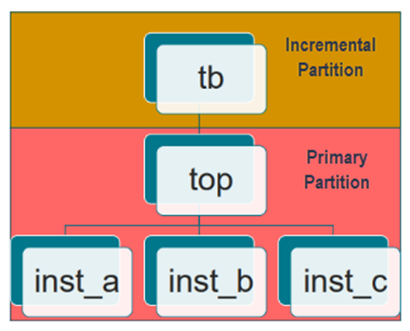
Currently, SVRNM power-intent is supported only in the primary partition as illustrated in the following figure. This means that the modules for which power intent is defined in the UPF file should always be in the primary partition and there must always be a top module before the module that has power-intent specified in UPF file.
Power intent inside primary can include the followings low-power mixed-signal features:
- SV-wreal power supply net
- SV-UDN power supply net
- Power smart interface elements
- LP VPI tasks driving UPF supply net
- Mixed-signal driving UPF supply net
The following are the limitations of enabling incremental elaboration in low-power mixed-signal designs:
- Limitations from dual snapshot simulation (DSS) + Real Number Modeling (RNM)
- Limitations from monolithic Low-power + RNM
- Any SV-RNM power connection across the partition.
- Power intent in incremental (-lps_idss)
The following is an example of a low-power mixed-signal design with SV-RNM datatypes. The module, top_wrapper has power intent for this module defined in the UPF file. And, top_wrapper module is instantiated in the module tb. Module top_wrapper is specified as the primary partition and module tb must be in the incremental partition.
#####tb.sv#####module tb (); top_wrapper top_wrapper (); endmodule
module top_wrapper (); top top (); endmodule
######top.sv#########
`timescale 1ns / 100psimport EE_pkg::*;module top ();
initial begin #200 $supply_on("VDD", 1.0); $supply_on("VSS", 0.0); #200 $supply_off("VDD"); $supply_off("VSS"); end
drvr idrvr (); load iload ();endmodule
module drvr (vdd, vss); output vdd, vss; EEnet vdd, vss; real v1, v2, r;
initial begin v1 = 0.0; v2 = 0.0; r = 10000000;
#100 v1 = 1.8; r = 200; #200 v1 = 1.5; #200 v1 = 0.0; r = 10000000; #100 $finish(); end
assign vdd = '{V:v1, I:`wrealZState, R:r}; assign vss = '{V:v2, I:`wrealZState, R:r};endmodule
module load (vdd, vss); input vdd, vss; EEnet vdd, vss; EEnet evdd, evss; assign evdd = vdd; assign evss = vss;endmodule
---------wrapper.upf----------------upf_version 2.0set_design_top tb/top_wrapper -testbenchset_design_top topset_scopecreate_supply_net VDDcreate_supply_net VSScreate_supply_set SSD -function {power VDD} -function {ground VSS}create_power_domain PDD -supply {primary SSD} -include_scopeconnect_supply_net VDD -ports {idrvr/vdd}connect_supply_net VSS -ports {idrvr/vss}connect_supply_net VDD -ports {iload/vdd}connect_supply_net VSS -ports {iload/vss}
----------command line---------------
xrun -clean $CDS_INST_DIR/tools/affirma_ams/etc/lpms/UPF_EEnet.svams tb.sv top.sv -access rwc -timescale 1ns/100ps -auto_config_svams_ie -lps_1801 wrapper.upf -lps_ams_connect_supply -lps_ams_sim -lps_ams_supply_ie -lps_dut_top top_wrapper/top -primtop top_wrapper -dms_rnm_upf_dss -rnm_dmsie_msie -svams_2019