
minOppExtension
orderedSpacings( ( minOppExtensiontx_layer1 tx_layer2['cutClass {f_width| (f_width f_length) |t_name} ['endSide]] ['widthHorizontal | 'widthVertical] ['cutDistancef_cutDistance['noSharedEdge | 'hasParaRunLength]] ['lengthf_length| 'extraCut ['extraOnly] | 'redundantCutWithinf_distance] ['stepSizePair (f_val1 f_val2)] ['areaf_area] ['horizontal | 'vertical] ['insideLayers (tx_layer3 tx_layer4 … tx_layerN) ['insidePurposes (t_purpose1 t_purpose2 … t_purposeN)] | 'outsideLayers (tx_layer3 tx_layer4 … tx_layerN) ['outsidePurposes (t_purpose1 t_purpose2 … t_purposeN)] ] ['distanceWithinf_distance'nearbyLayertx_layer] ['otherLayertx_otherLayer'otherWidthf_otherWidth{'withinHorizontal | 'withinVertical} 'parallelWithinf_parallelWithin['otherExtensionf_otherExtension] ] ['alignedLayerg_layer'alignedHorizontal | 'alignedVertical] (f_extf_oppExt) ['coincidentAllowed] )
) ;orderedSpacings
spacingTables( ( minOppExtensiontx_layer1tx_layer2(( "width" nil nil ) ['widthHorizontal | 'widthVertical] ['cutClass {f_width| (f_width f_length) |t_name} ['endSide ['offCenterline]] ] ['cutDistancef_cutDistance['noSharedEdge | 'hasParaRunLength | 'hasExactPrlf_hasExactPrl] ] ['lengthf_length| 'extraCut ['extraOnly ['exactPrlf_exactPrl]] | 'redundantCutWithinf_distance] ['exceptCutMetalEdgeExt | 'useMinWidth] ['stepSizePair (f_val1 f_val2)] ['horizontal | 'vertical] ['includeAbutted] ['minCorner] ['jogLengthOnlyf_jogLength['treatLAsJog] {'horizontalJog | 'verticalJog} 'jogWireWidthf_jogWireWidth] ['hollowHorizontalf_horiLength| 'hollowVerticalf_vertLength['hollowOffsetf_offset]] ['insideLayers (tx_layer3 tx_layer4 … tx_layerN) ['insidePurposes (t_purpose1 t_purpose2 … t_purposeN)] | 'outsideLayers (tx_layer3 tx_layer4 … tx_layerN) ['outsidePurposes (t_purpose1 t_purpose2 … t_purposeN)] ] ['distanceWithinf_distance'nearbyLayertx_layer] [f_default] ['alignedLayerg_layer'alignedHorizontal | 'alignedVertical] ) (g_table) ['coincidentAllowed] )
) ;spacingTables
Specifies the minimum extension of a shape on layer1 past a shape on layer2. Typically, layer1 is a metal layer and layer2 is a cut layer.
The constraint specifies a pair of extension values, of which one applies to one set of opposite sides/edges of the layer2 shape and the other applies to the other set of opposite sides/edges of the layer2 shape. For example, if the first value is used to evaluate the extensions in the horizontal direction, the second value is used to evaluate the extensions in the vertical direction. Moreover, the extension values can apply in a different direction for different shapes on the specified layer.
Optionally, the minOppExtension constraint can be set to apply only in a certain direction. In this case, the extensions in the specified direction must satisfy the first constraint value, and the extensions in the perpendicular direction must satisfy the second constraint value. The constraint can also be used to specify multiple pairs of extension values that are applied based on the width of the layer1 shape.
In some processes, the constraint can be applied only to rectangular cut shapes that do not collide with the centerline of the wire. Additionally, for rectangular cut classes, the first extension value can be applied to the short edges and the second extension value can be applied to the long edges.
This constraint definition is not symmetric, which means that the minimum extension of a shape on layer1 past a shape on layer2 is not the same as the minimum extension of a shape on layer2 past a shape on layer1. Therefore, if you specify the minOppExtension constraint for a layer pair, you should not specify the minExtension constraint for that layer pair.
Multiple minOppExtension constraints can be defined in a precedence constraint group. In such a constraint group, the constraints are ordered first by width and cut distance, then by width, and finally by length. Members in the group that do not specify width have the lowest precedence.
An OR constraint group should contain settings for only the same constraint, with different parameters. If any of the settings is satisfied, the constraint requirement is met. An exception is made for minOppExtension, minQuadrupleExtension, and minExtensionDistance constraints, which can be bound together in an OR group, and if any of these constraints is satisfied, the extension requirement is met.
Values
Parameters
|
The cut class to which the constraint applies, specified by width, by width and length, or by name (as defined in a |
|
|
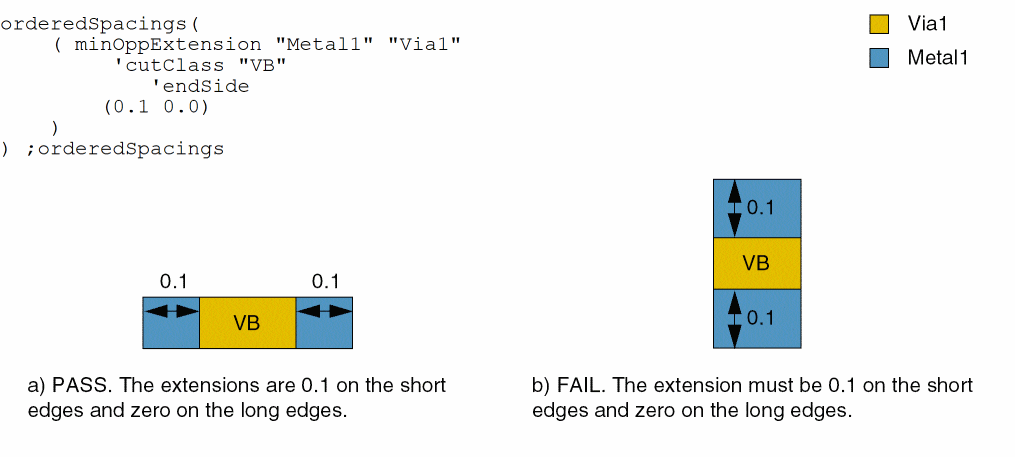
The first extension pair is applied to the short edge of the cut shape and the second extension pair is applied to the long edge of the cut shape (applies only to rectangular cut shapes). |
|
|
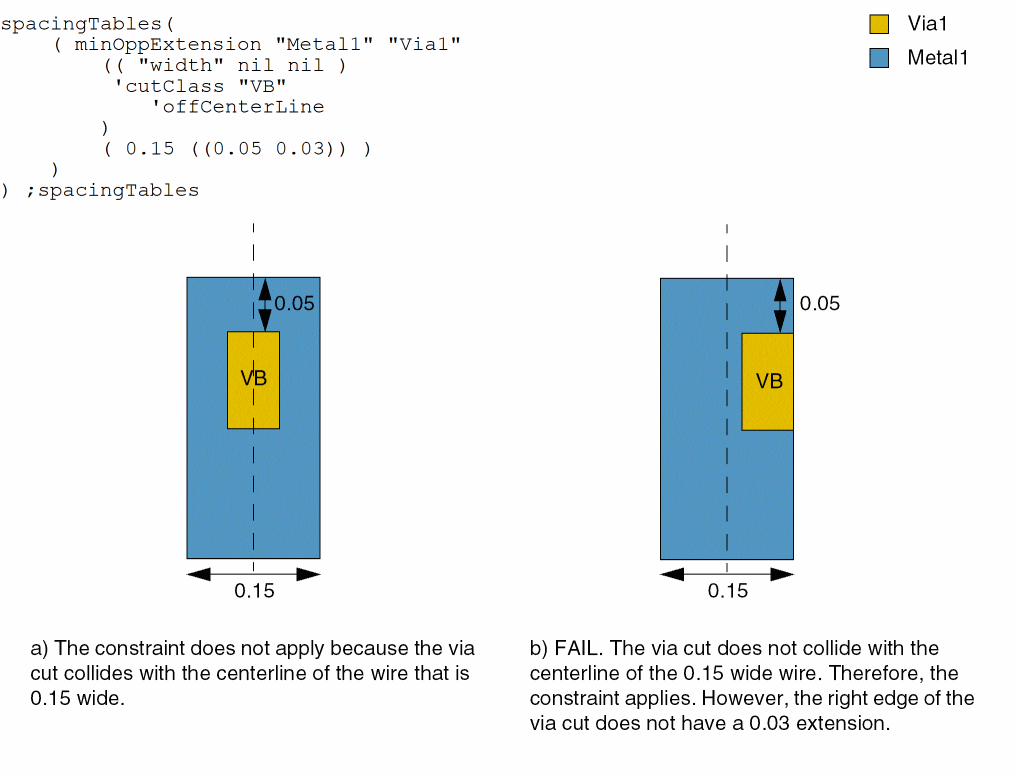
The constraint applies only to rectangular cut shapes that do not collide with the centerline of the enclosing shape. |
|
|
The constraint does not apply if a cut shape has a neighboring cut shape at a distance less than or equal to this value. |
|
|
The constraint does not apply if the two cut shapes that satisfy In other words, if the two cut shapes are placed along the same edge of the enclosing shape, the extra cut shape along the edge is not counted and the constraint applies. |
|
|
The constraint does not apply to cut shapes that are at a distance less than or equal to cutDistance if cut edges opposite all failing cut edges (edges that do not satisfy the minimum extension requirement) share a parallel run length greater than zero with neighboring cut shapes. |
|
|
(Virtuoso Advanced Node for Layout Standard) The constraint does not apply to cut shapes that are at a distance less than or equal to cutDistance if the parallel run length between the cut shapes is equal to this value. |
|
|
The constraint applies only if the length of the enclosing shape is greater than or equal to this value. |
|
|
The constraint applies only if two or more cut shapes overlap a contiguous same-metal shape.
For via cuts, |
|
|
(Virtuoso Advanced Node for Layout Only) If a |
|
|
(Virtuoso Advanced Node for Layout Standard) The constraint applies to a via with two or more cuts only if the cuts have parallel run length equal to this value. |
|
|
The constraint applies only if the cut shape is at a distance less than or equal to this value from a cut shape that satisfies another The constraint defined with this parameter has smaller enclosure requirements. |
|
|
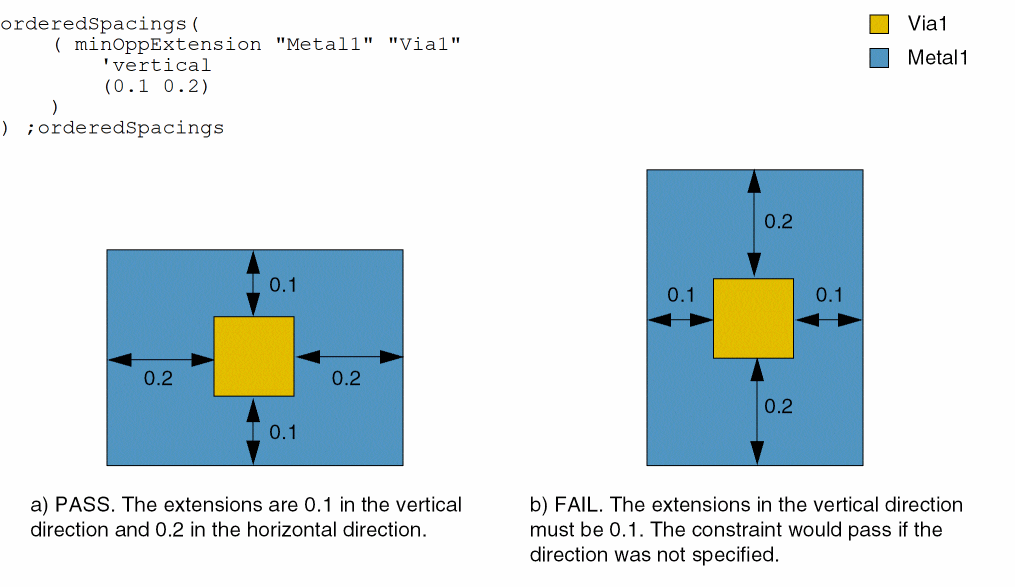
(Virtuoso Advanced Node for Layout Standard) The first extension pair is measured in the given direction; the second extension pair is measured in the direction perpendicular to the given direction. If direction is not specified, the extension pairs are measured in any direction. |
|
|
(Virtuoso Layout Suite EXL and higher tiers) Only widths of metal shapes in the specified direction are considered for the corresponding width-based extension lookup. |
|
|
When the
Alternatively, use the |
|
|
(Virtuoso Advanced Node for Layout Standard) The constraint applies only if the cut shape abuts a wider shape. |
|
|
The constraint does not apply if the area of the enclosing shape is greater than this value. |
|
|
(Virtuoso Advanced Node for Layout Standard) The extensions are applied as multiples of these two values. The order of the two |
|
|
(Virtuoso Advanced Node for Layout Only) The constraint applies only if a cut shape overlaps with a wrong-way jog—with edge length less than jogLength and width equal to jogWireWidth—sandwiched by two right-way wires with projected parallel run length less than zero in the wrong-way direction in a 'Z' shape. |
|
|
(Virtuoso Advanced Node for Layout Only) The constraint also applies to an L-shaped jog. |
|
|
(Virtuoso Advanced Node for Layout Only) The direction in which the length of the jog is measured. |
|
|
(Virtuoso Advanced Node for Layout Only) The constraint applies only if the width of a Z-shaped jog is equal to this value. |
|
|
|
|
|
(Virtuoso Advanced Node for Layout Only) The portion of the via cut that does not require an extension. |
|
|
(Virtuoso Layout Suite EXL and higher tiers) The exact offset for the hollow portion to be misaligned from the center of the via. The default is |
|
|
|
|
|
(Virtuoso Advanced Node for Layout Standard) Determines if the constraint applies, based on the presence or absence of one or more layers.
For more information, see |
|
|
(Virtuoso Advanced Node for Layout Standard) The |
|
|
(Virtuoso Advanced Node for Layout Standard) The |
|
|
The constraint applies only if the distance between the layer1 shape (metal shape) and the layer shape, in Euclidean measurement, is less than or equal to distance. |
|
|
|
|
|
(Virtuoso Advanced Node for Layout Only) The constraint applies only if there is a shape on layer tx_otherLayer with width greater than f_otherWidth within f_parallelWithin measured in direction (Virtuoso Layout Suite EXL and higher tiers) The f_otherExtension value specifies the enclosure on the opposite side of a cut edge that faces the wire fulfilling the f_otherWidth condition. 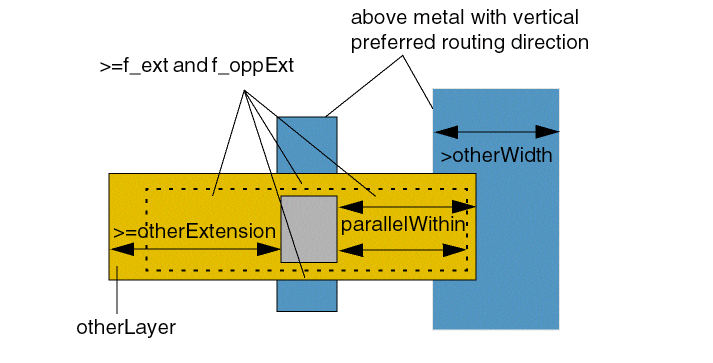 |
|
|
The edges of a cut shape can coincide with the edges of the enclosing shape. Otherwise, the cut shape must meet the extension requirement. |
|
|
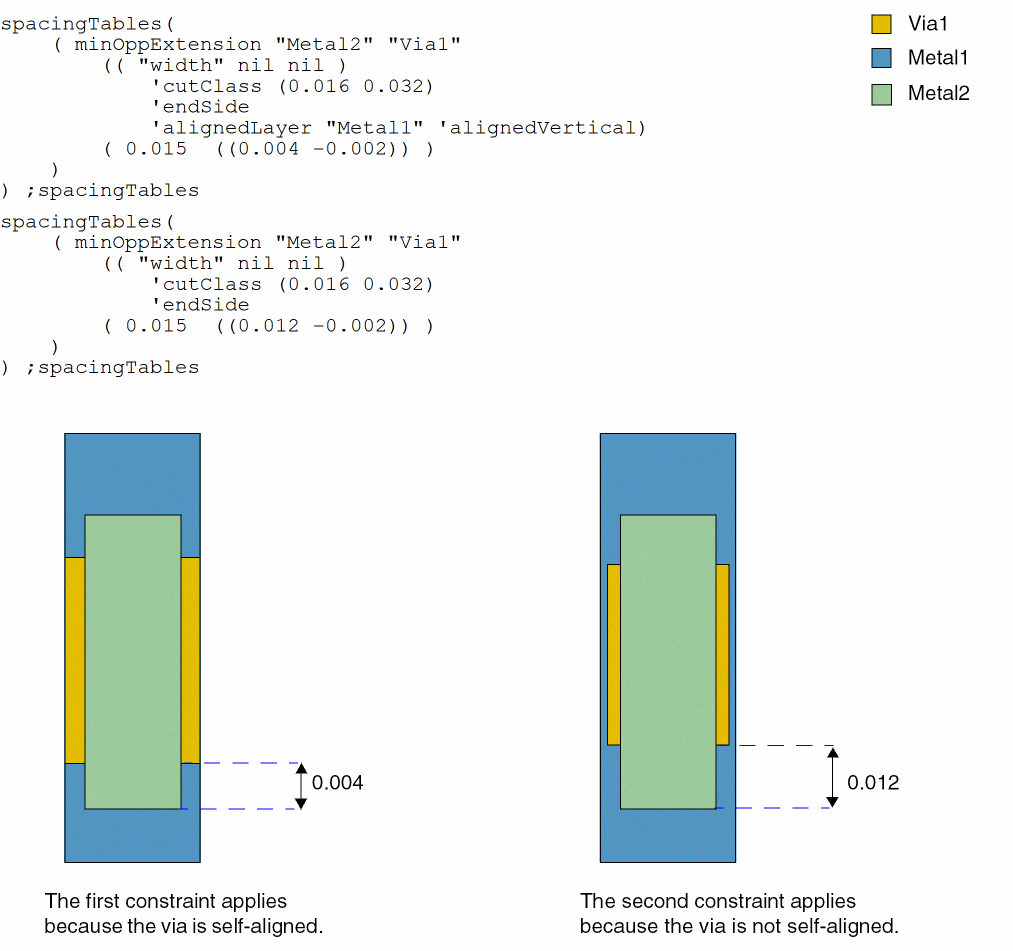
(Virtuoso Advanced Node for Layout Standard) The layer for which the alignment of the via with the shape is to be checked. Alignment is checked in the direction specified. |
|
Examples
- Example 1: minOppExtension with endSide
- Example 2: minOppExtension with vertical
- Example 3: minOppExtension with offCenterline
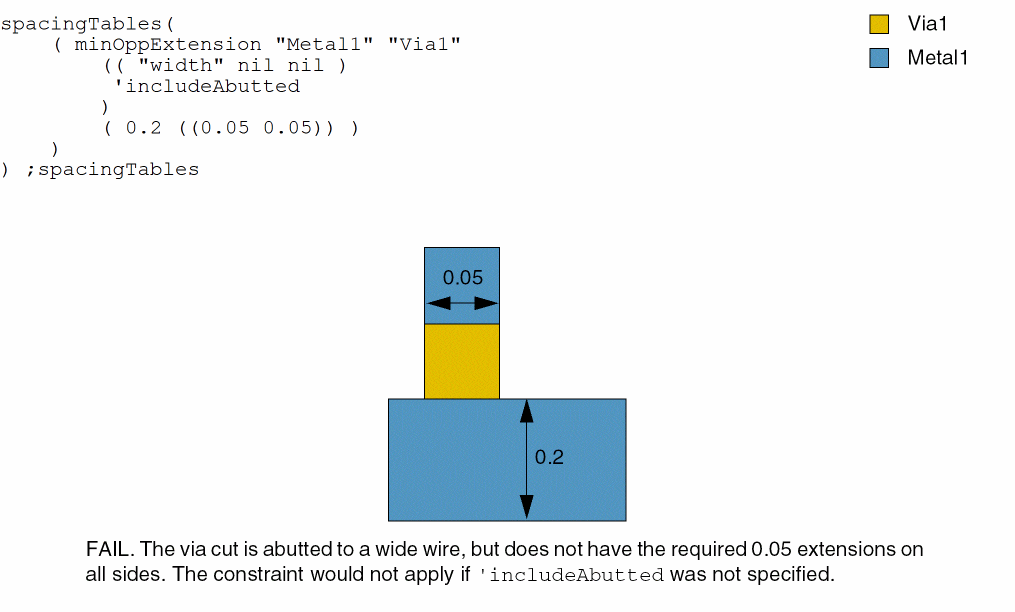
- Example 4: minOppExtension with includeAbutted
- Example 5: minOppExtension with cutDistance
- Example 6: minOppExtension with cutDistance and noSharedEdge
- Example 7: minOppExtension with cutDistance and hasParaRunLength
- Example 8: minOppExtension with extraCut
- Example 9: minOppExtension with redundantCutWithin
- Example 10: minOppExtension with exceptCutMetalEdgeExt
- Example 11: minOppExtension with length
- Example 12: minOppExtension with jogLengthOnly, verticalJog, and jogWireWidth
- Example 13: minOppExtension with hollowHorizontal and hollowOffset
- Example 14: minOppExtension with distanceWithin and nearbyLayer
- Example 15: minOppExtension with otherExtension
- Example 16: minOppExtension with widthHorizontal and widthVertical
- Example 17: minOppExtension with alignedLayer
Example 1: minOppExtension with endSide
A Via1 via cut of type VB (0.4x0.6) enclosed by a Metal1 wire must have 0.1 extensions on the short edges and 0.0 extensions on the long edges of the enclosing wire.
Example 2: minOppExtension with vertical
A Via1 via cut enclosed by a Metal1 wire must have 0.1 extensions in the vertical direction and 0.2 extensions in the horizontal direction.
Example 3: minOppExtension with offCenterline
A Via1 via cut of type VB (0.4x0.6) enclosed by a Metal1 wire must have 0.05 extension in one direction and 0.03 extension in the perpendicular direction if the width of the Metal1 wire is greater than or equal to 0.15, provided the via cut does not collide with the centerline of the wire.
Example 4: minOppExtension with includeAbutted
A Via1 via cut enclosed by a Metal1 wire with width greater than or equal to 0.2 must have 0.05 extensions in both directions if it abuts a wider wire.
Example 5: minOppExtension with cutDistance
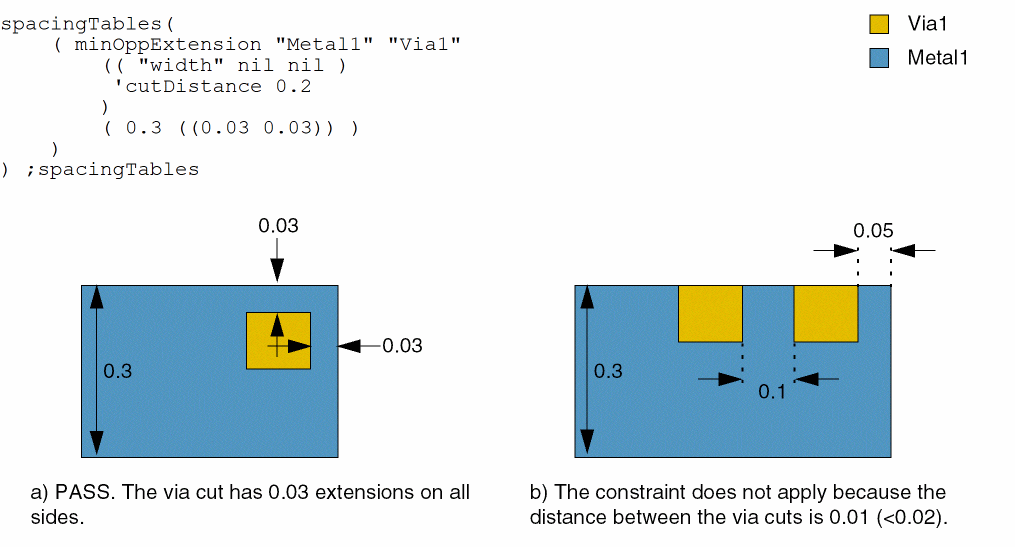
A Via1 via cut enclosed by a Metal1 wire with width greater than or equal to 0.3 must have 0.03 extensions on all sides. If two via cuts are less than 0.2 apart, the constraint does not apply.
Example 6: minOppExtension with cutDistance and noSharedEdge
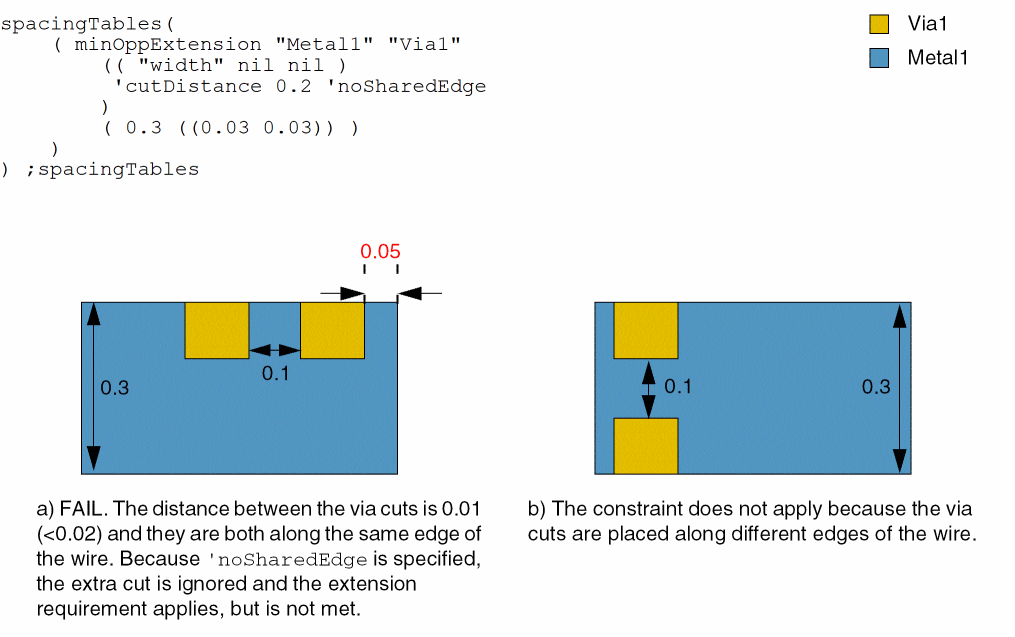
A Via1 via cut enclosed by a Metal1 wire with width greater than or equal to 0.3 must have 0.03 extensions on all sides. If two via cuts are less than 0.2 apart and are placed along different edges of the wire, the constraint does not apply.
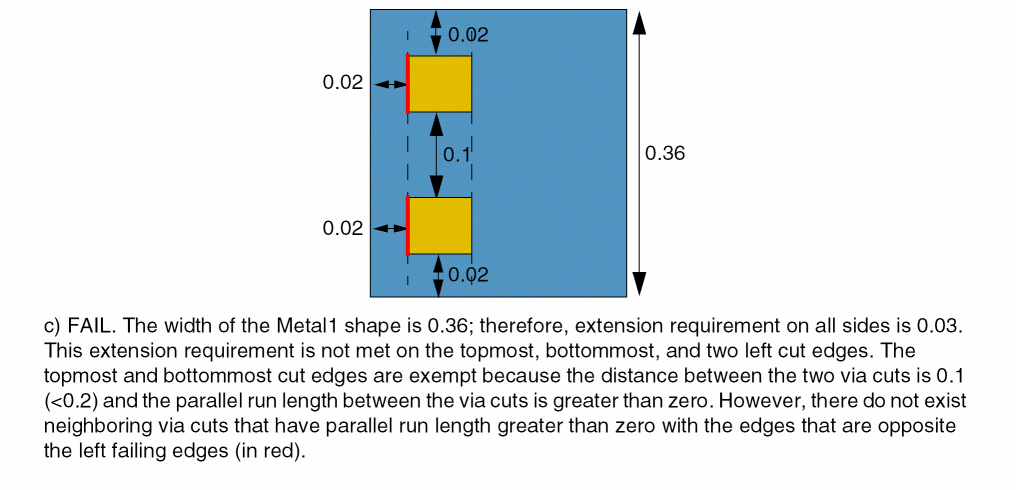
Example 7: minOppExtension with cutDistance and hasParaRunLength
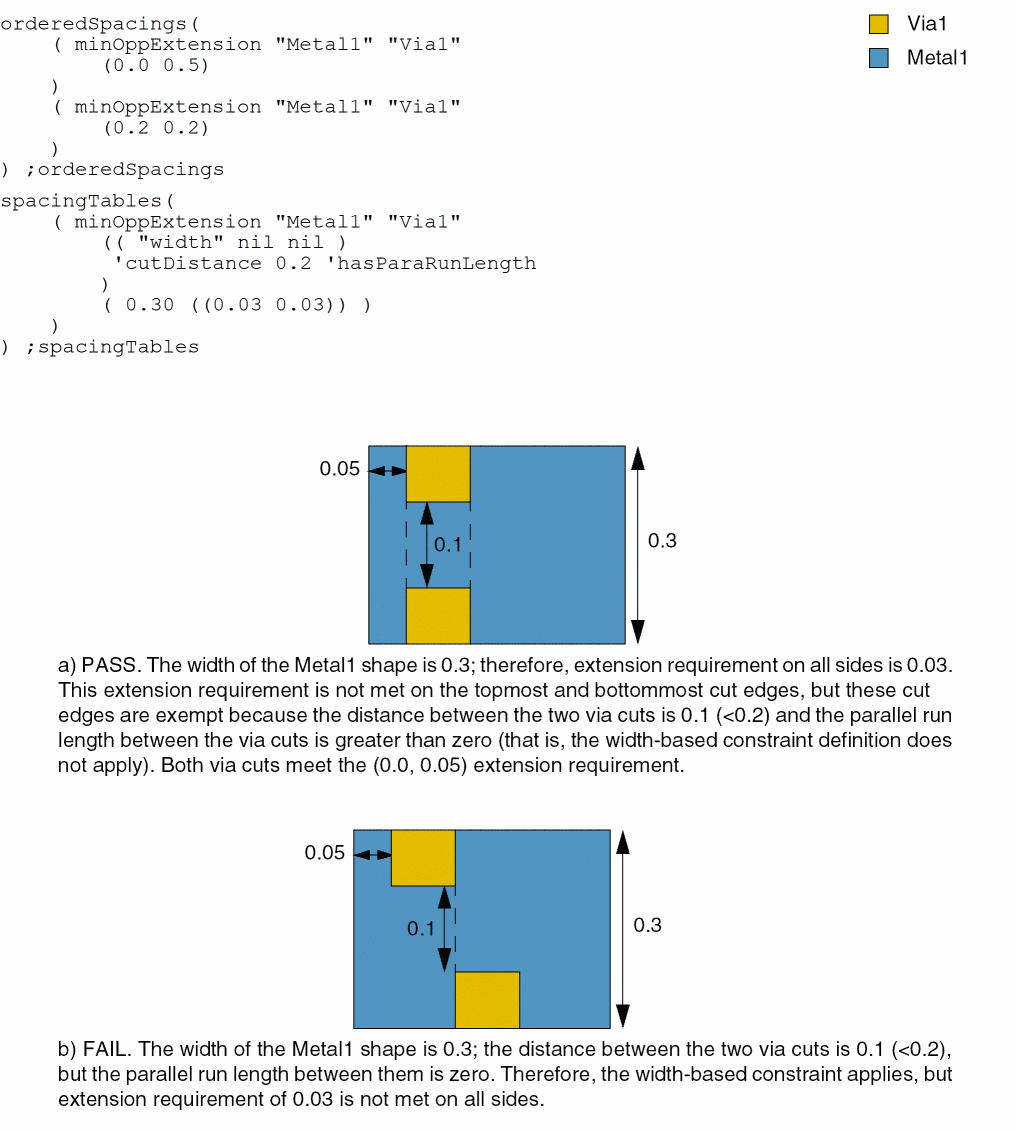
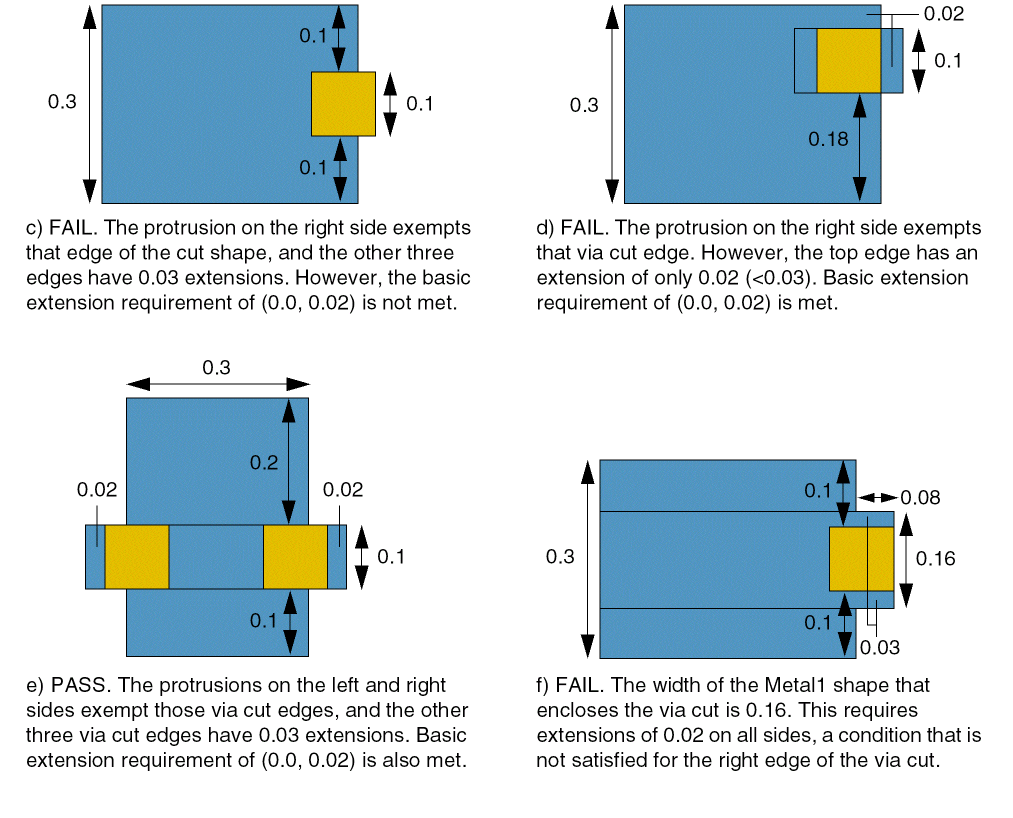
If the width of a Metal1 shape is greater than or equal to 0.3, Via1 via cuts must have 0.03 extensions on all sides. This width-based constraint definition does not apply if:
- The distance between two via cuts is less than 0.2.
- The cut edges that do not meet the extension requirement have parallel run length greater than zero with neighboring via cuts on the opposite side.
When the width-based constraint does not apply, an extension requirement of (0.0, 0.05) or (0.2, 0.2) must be met.
Example 8: minOppExtension with extraCut
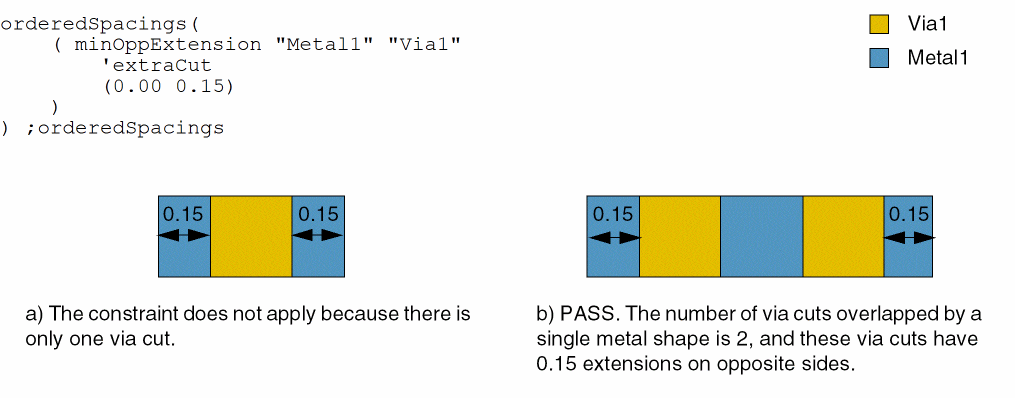
If two or more Via1 via cuts overlap a contiguous Metal1 shape, the via cuts must have 0.0 extension in one direction and 0.15 extension in the perpendicular direction.
Example 9: minOppExtension with redundantCutWithin
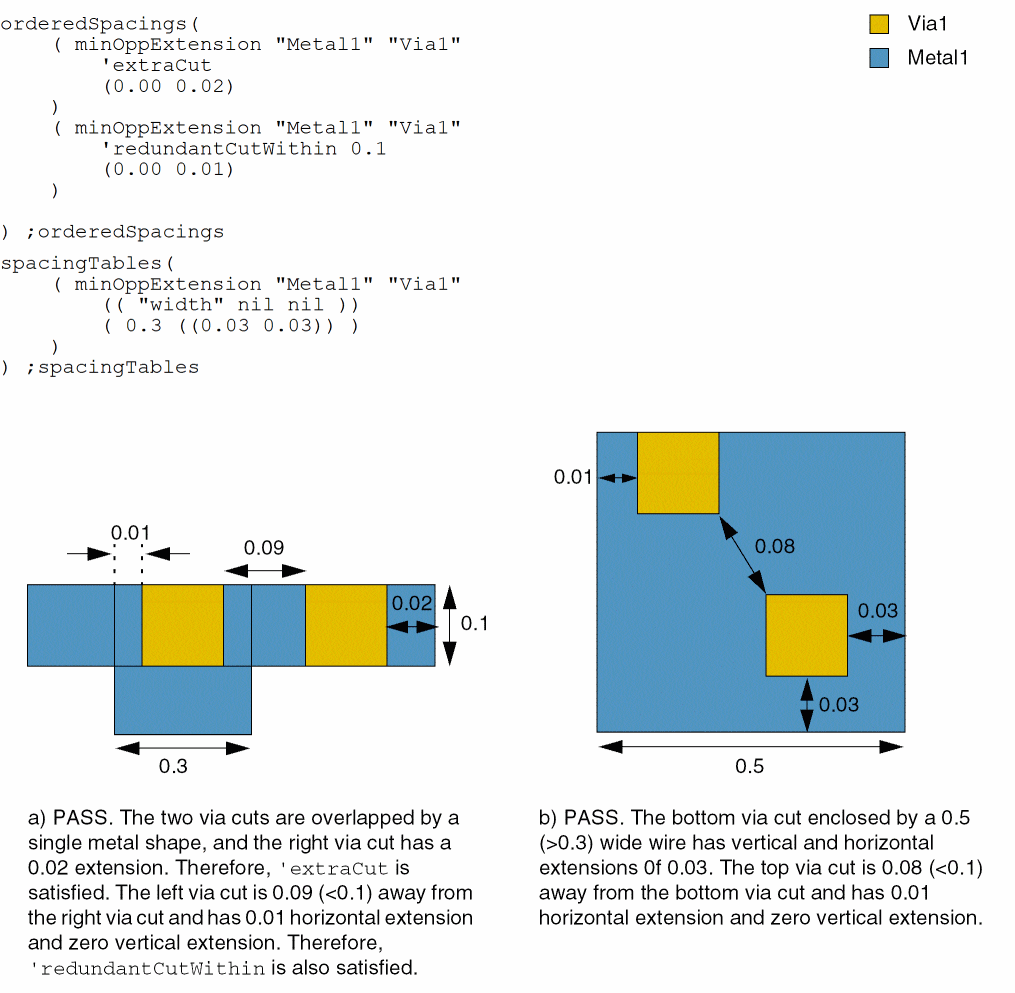
A Via1 via cut enclosed by a Metal1 shape with width greater than or equal to 0.3 must have 0.03 extensions on all sides. If two or more via cuts overlap a contiguous Metal1 shape, the via cuts must have 0.0 extension in one direction and 0.02 extension in the perpendicular direction. Additionally, a via cut placed less than 0.1 apart from another via cut must have 0.0 extension in one direction and 0.01 extension in the perpendicular direction.
Example 10: minOppExtension with exceptCutMetalEdgeExt
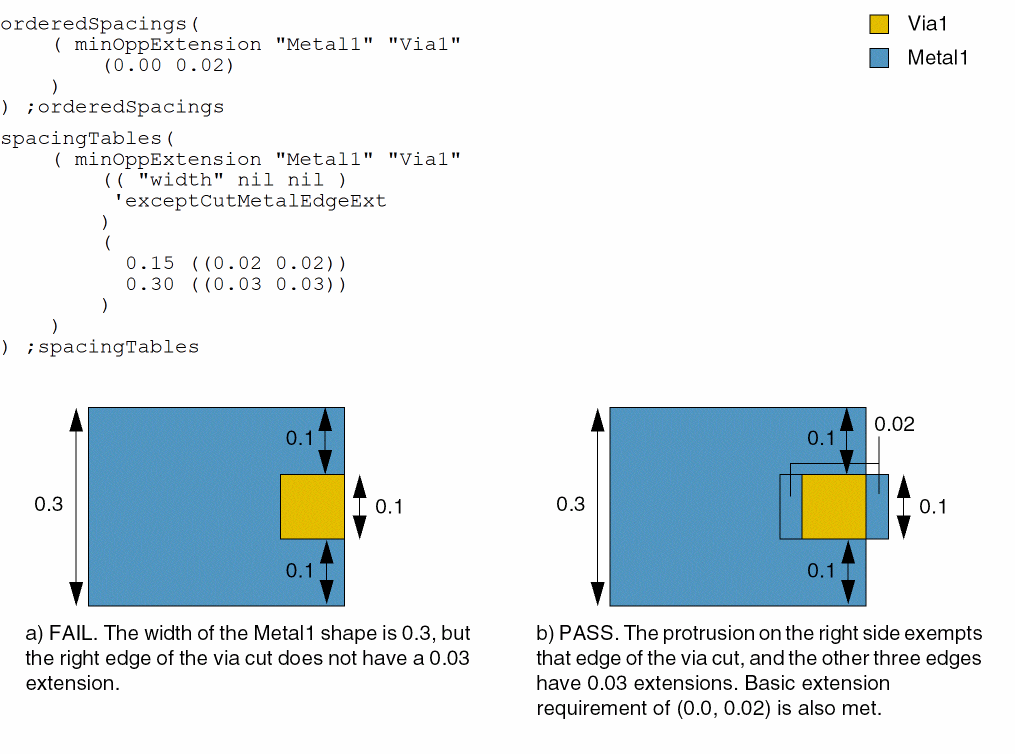
If an edge of a Via1 via cut or an edge of a Metal1 shape enclosing the via cut protrudes over a wide wire, it is exempted from the extension requirement. The following are the extension requirements based on width:
- A via cut enclosed by a Metal1 shape with width greater than or equal to 0.3 must have 0.03 extensions on all sides.
-
A via cut enclosed by a Metal1 shape with width greater than or equal to 0.15 must have 0.02 extensions on all sides.
Example 11: minOppExtension with length
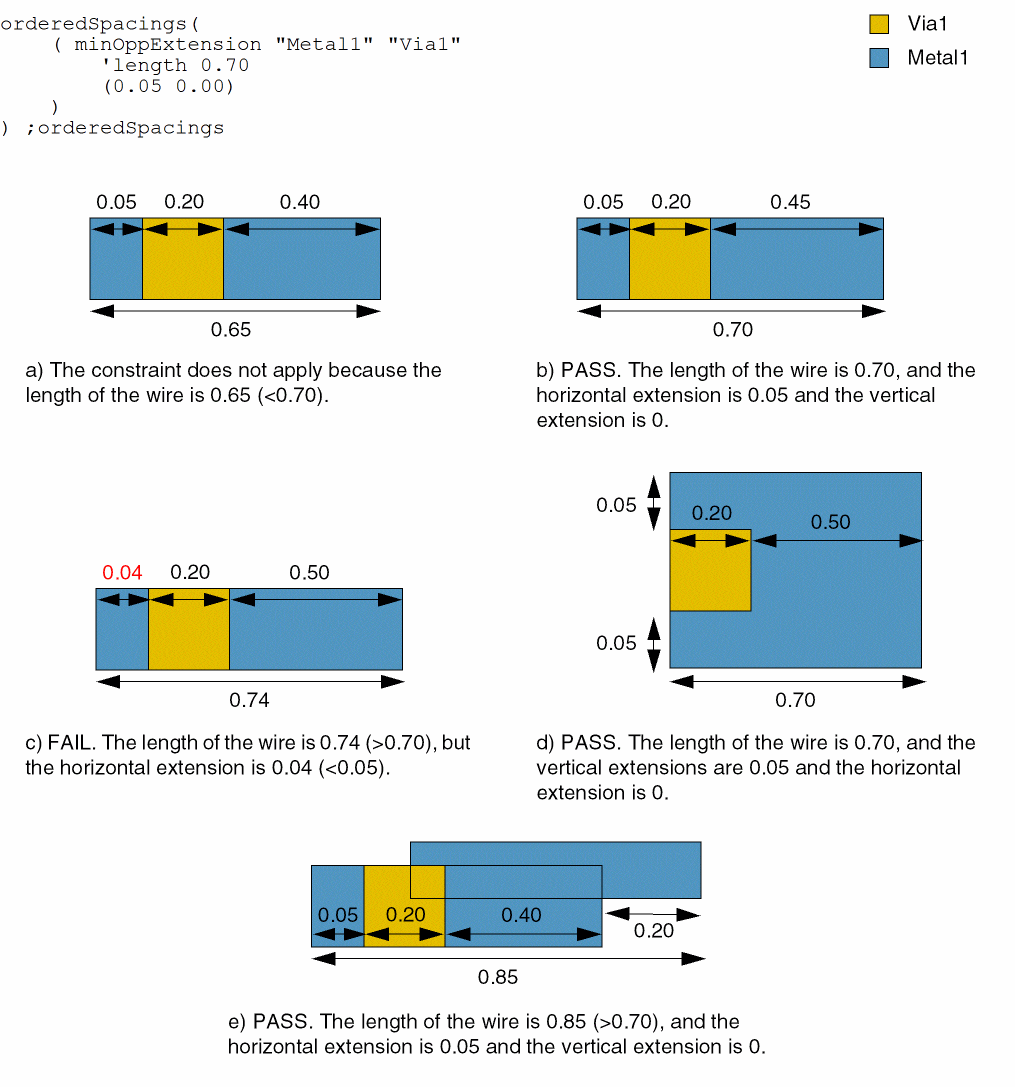
A Via1 via cut enclosed by a Metal1 wire with length greater than or equal to 0.70 must have 0.05 extension in one direction and 0.00 extension in the perpendicular direction.
Example 12: minOppExtension with jogLengthOnly, verticalJog, and jogWireWidth
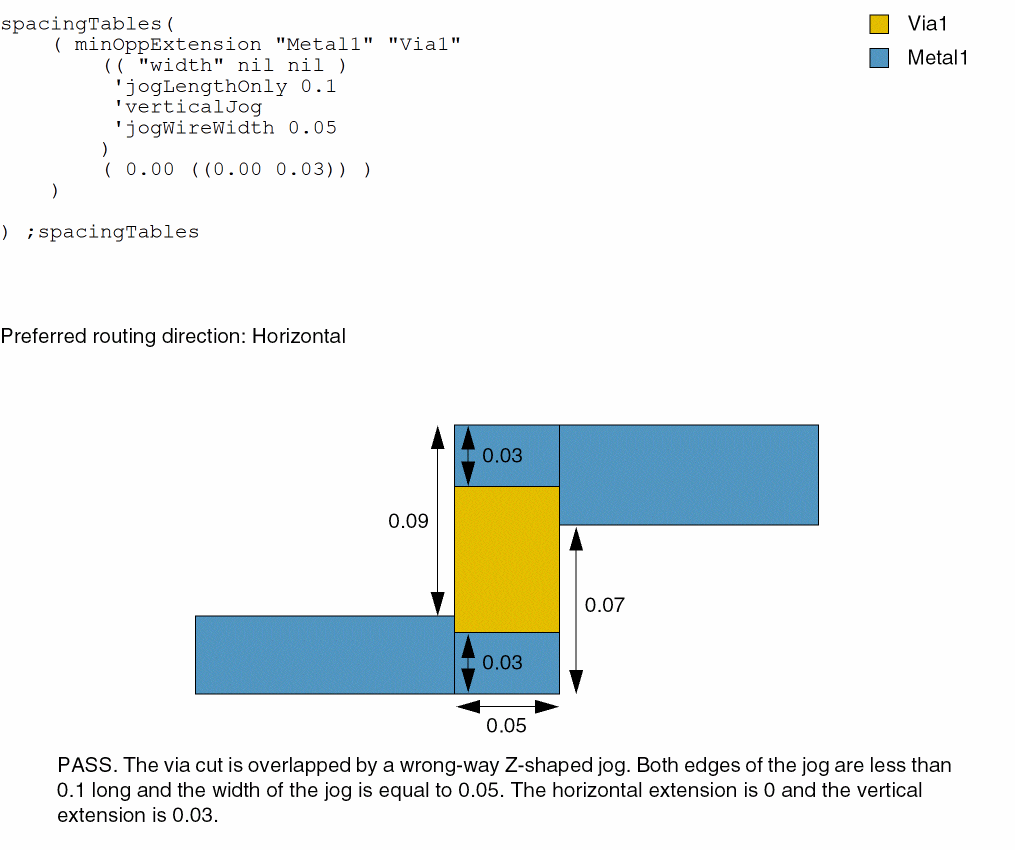
A Via1 via cut enclosed by a Metal1 wrong-way Z-shaped jog with edges less than 0.1 long and width equal to 0.05 must have 0.03 extension in one direction and 0.00 extension in the perpendicular direction.
Example 13: minOppExtension with hollowHorizontal and hollowOffset
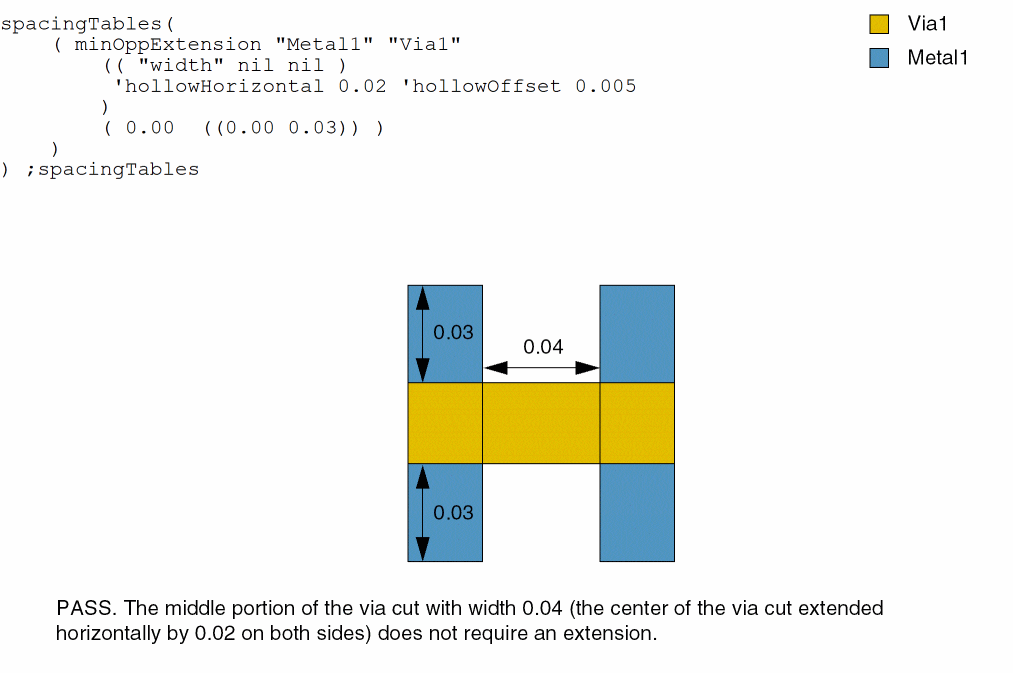
A Via1 via cut enclosed by a Metal1 shape must have 0.03 extension in one direction and 0.00 extension in the perpendicular direction. The center of the via cut extended horizontally by 0.02 on both sides, with an offset of 0.005, does not require an extension.
Example 14: minOppExtension with distanceWithin and nearbyLayer
A V1 via cut enclosed by an M1 shape must have 0.1 extension in both directions if the distance between the M1 shape and a nearby MIMCAP shape is less than or equal to 15.0. Otherwise, the extension in both directions must be 0.05.
orderedSpacings(
    ( minOppExtension "M1" "V1"
     (0.05 0.5)
 )
 ( minOppExtension "M1" "V1"
  'distanceWithin 15.0 'nearbyLayer "MIMCAP"
  (0.1 0.1)
 )
) ;orderedSpacings
Example 15: minOppExtension with otherExtension
The constraint applies to a Via1 cut shape enclosed by Metal1 when a vertical Metal2 shape of width 0.015 or greater is within 0.025 of the cut shape. The extension must be at least 0 in one direction and 0.02 in the other direction. In addition, the extension in the direction away from the Metal2 wire must be 0.023.
orderedSpacings(
    ( minOppExtension "M1" "V1"
     'otherLayer "Metal2"
  'otherWidth 0.015
  'withinHorizontal
  'parallelWithin 0.025
  'otherExtension 0.023
  (0.0 0.02)
 )
) ;orderedSpacings
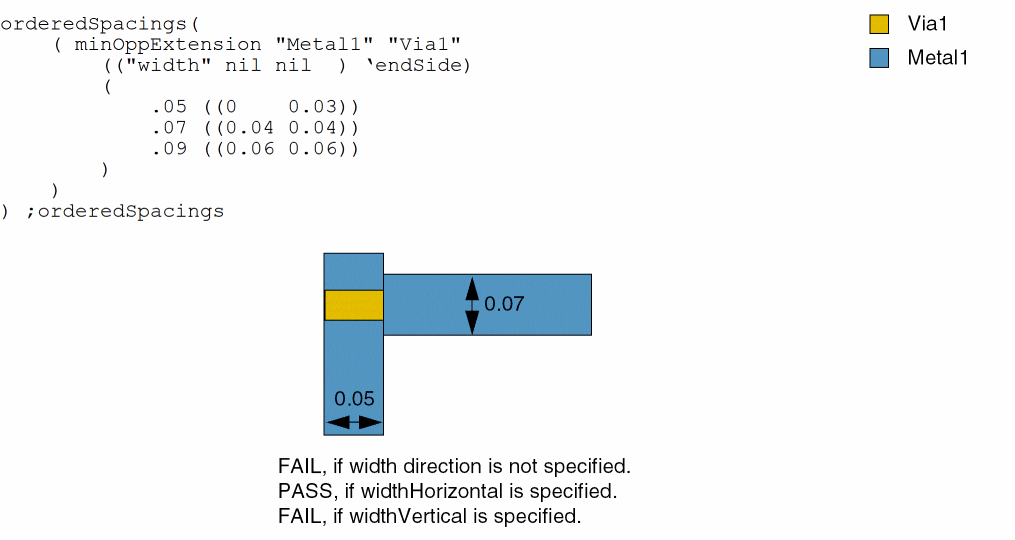
Example 16: minOppExtension with widthHorizontal and widthVertical
Consider the following constraint when width directions are specified or not specified.
Example 17: minOppExtension with alignedLayer
Consider the following constraints specified in an OR group, where only the first constraint specifies alignedLayer.
Return to top