
rectShapeDir
spacings( ( rectShapeDirtx_layer['extendByf_extendBy['widthRanges (g_ranges)]] ['insideLayers (tx_layer1tx_layer2…tx_layerN) ['insidePurposes (t_purpose1t_purpose2…t_purposeN)] | 'outsideLayers (tx_layer1tx_layer2…tx_layerN) ['outsidePurposes (t_purpose1t_purpose2…t_purposeN)] ] [['exceptViaLayertx_viaLayer'exceptViaSize (f_viaSize1f_viaSize2) 'exceptExactSize (f_exactMetalSize1f_exactMetalSize2)] | 'exceptViaEdgeAligned |'exceptVia ] ['exceptEdgeLengthf_maxLength'widthf_maxWidth['twoSides]] ['exceptRanges (g_exceptRanges)] ['exceptNonCorePins] ['exceptWidthf_width{'widthHorizontal | 'widthVertical}] ['partialTracks] ['onlyOne] {"any" | "horizontal" | "vertical"} )
) ;spacings
spacingTables( ( rectShapeDirtx_layer(( "width" nil nil ) ['extendByf_extendBy['widthRanges (g_ranges)]] [['exceptViaLayertx_viaLayer'exceptViaSize (f_viaSize1f_viaSize2) 'exceptExactSize (f_exactMetalSize1f_exactMetalSize2) |'exceptViaEdgeAligned |'exceptVia ] ] ['exceptEdgeLengthf_maxLength'widthf_maxWidth['twoSides]] ['exceptRanges (g_exceptRanges)] ['exceptNonCorePins] ['exceptWidthf_width{'widthHorizontal |'widthVertical}] ['partialTracks] ['onlyOne] [ "any" | "horizontal" | "vertical" ] ) (g_table) )
) ;spacingTables
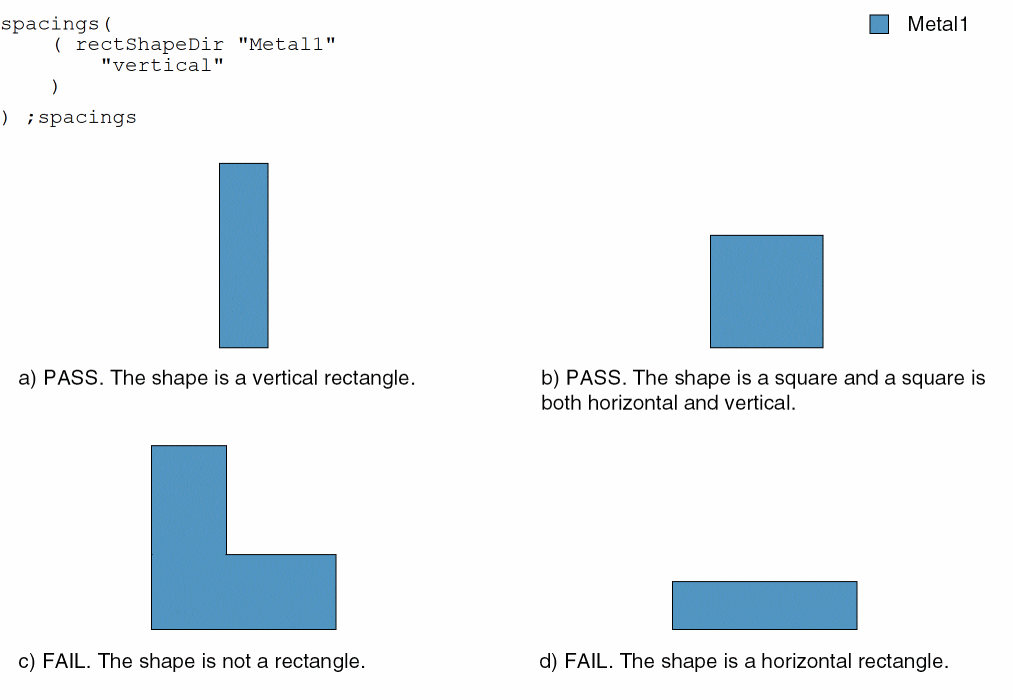
Specifies that the shapes on a layer must be rectangular. Depending on their width, these shapes can be restricted to a certain direction. A square shape is both horizontal and vertical. Optionally, narrow rectangular shapes can have small jogs.
Additionally, this constraint is used with the allowedWidthRanges constraint to specify a set of discrete widths for a layer. The allowedLengthRanges constraint must also specify a minimum length greater than or equal to the minimum width to avoid ambiguity while determining the direction.
Values
Parameters
|
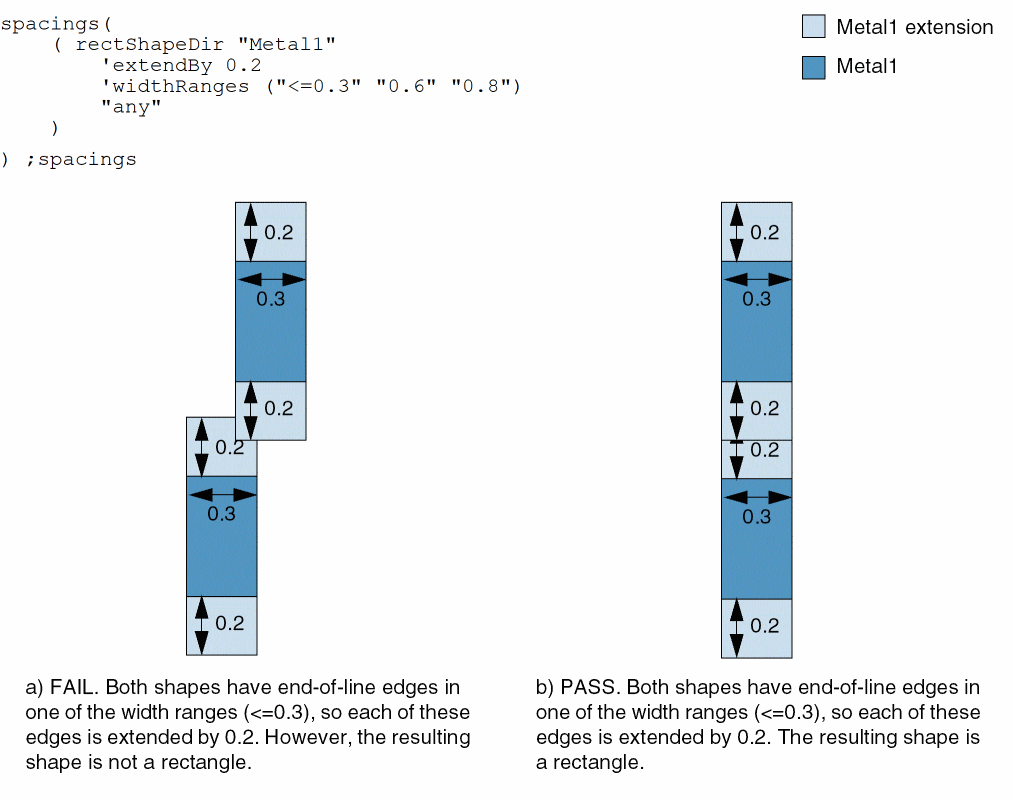
(Virtuoso Advanced Node for Layout Standard) All end-of-line edges must be extended by this value before the constraint is applied. |
|
|
(Virtuoso Advanced Node for Layout Standard) The
Type: Floating-point values specifying a |
|
|
|
|
|
(Virtuoso Advanced Node for Layout Standard) Determines if the constraint applies, based on the presence or absence of one or more layers.
For more information, see |
|
|
(Virtuoso Advanced Node for Layout Standard) The |
|
|
(Virtuoso Advanced Node for Layout Standard) The |
|
|
|
|
|
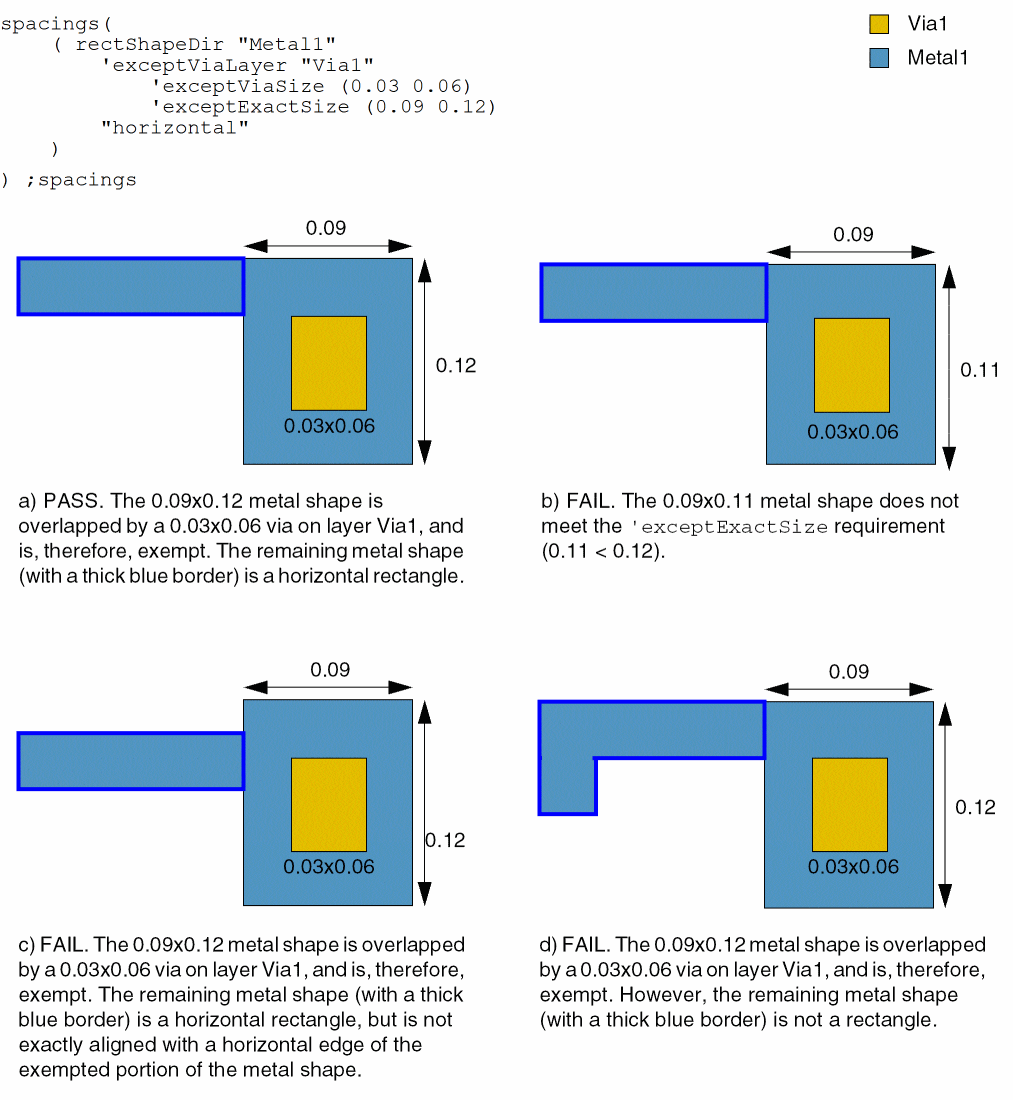
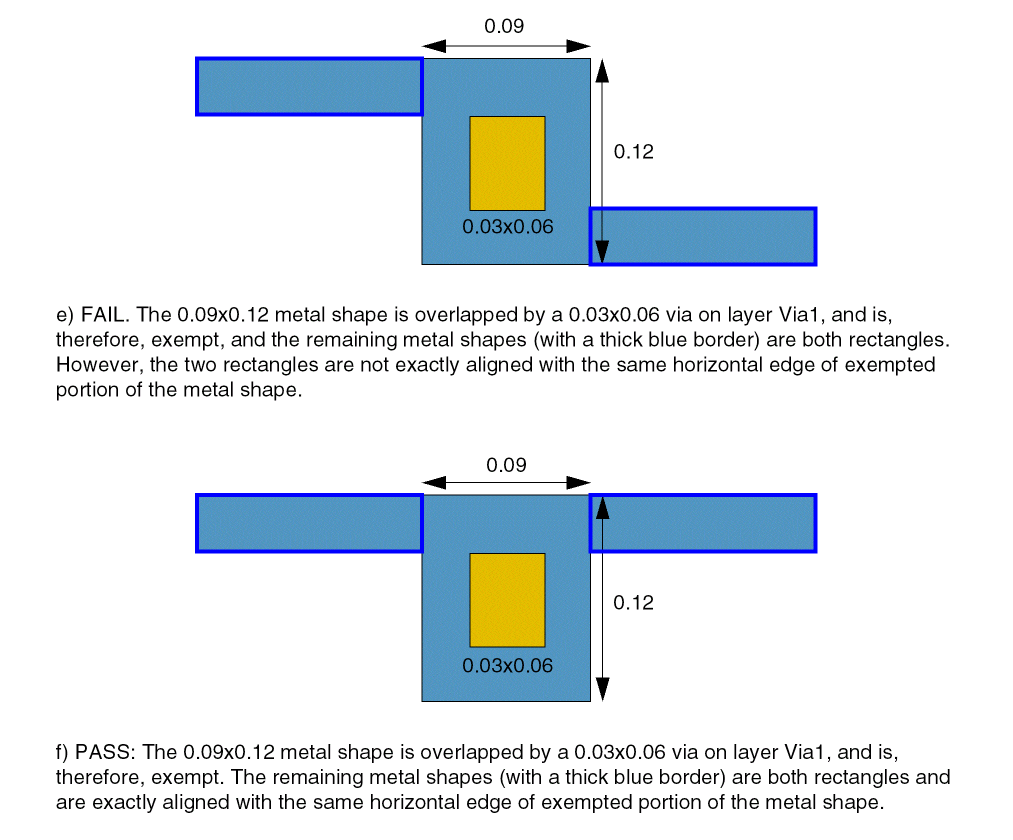
(Virtuoso Advanced Node for Layout Standard) The constraint does not apply to a metal shape with dimensions exactMetalSize1 and exactMetalSize2 if a via with dimensions viaSize1 and viaSize2 placed on viaLayer overlaps it. The metal shape left after subtracting such a shape must either be a rectangle or multiple exactly aligned rectangles. Moreover, this exemption applies only if an edge of this metal shape in the direction of the constraint is exactly aligned with an edge of such rectangles.
(Virtuoso Layout Suite EXL and higher tiers) The Type: String (layer name) or Integer (layer number); Float
(Virtuoso Layout Suite EXL and higher tiers) The |
|
|
(Virtuoso Advanced Node for Layout Standard) The constraint does not apply if the rectangular shape has a jog with width less than or equal to this value. |
|
|
(Virtuoso Advanced Node for Layout Standard) The constraint does not apply if the width of the shape with the maxLength wide jog is less than or equal to this value. |
|
|
(Virtuoso Advanced Node for Layout Standard) The constraint does not apply if the rectangular shape has maxLength wide jogs on both sides. Additionally, the two jogs must not have a vertical offset. |
|
|
The constraint does not apply if a rectangle has width in this range.
Type: Floating-point values specifying a |
|
|
(Virtuoso Advanced Node for Layout Standard) The constraint does not apply to the connections to non-standard cell pins. In other words, the connection of a default-width wire to a wide I/O pad or a block pin is allowed. |
|
|
(Virtuoso Layout Suite EXL and higher tiers) The constraint does not apply if the width in the direction specified by |
|
|
(Virtuoso Layout Suite EXL and higher tiers) The rectangular shape checking applies only to specific tracks. |
|
|
The constraint allows only one shape on the specified layer. |
|
Examples
- Example 1: rectShapeDir with vertical
- Example 2: rectShapeDir with exceptViaLayer, exceptViaSize, and exceptExactSize
- Example 3: rectShapeDir with extendBy and widthRanges
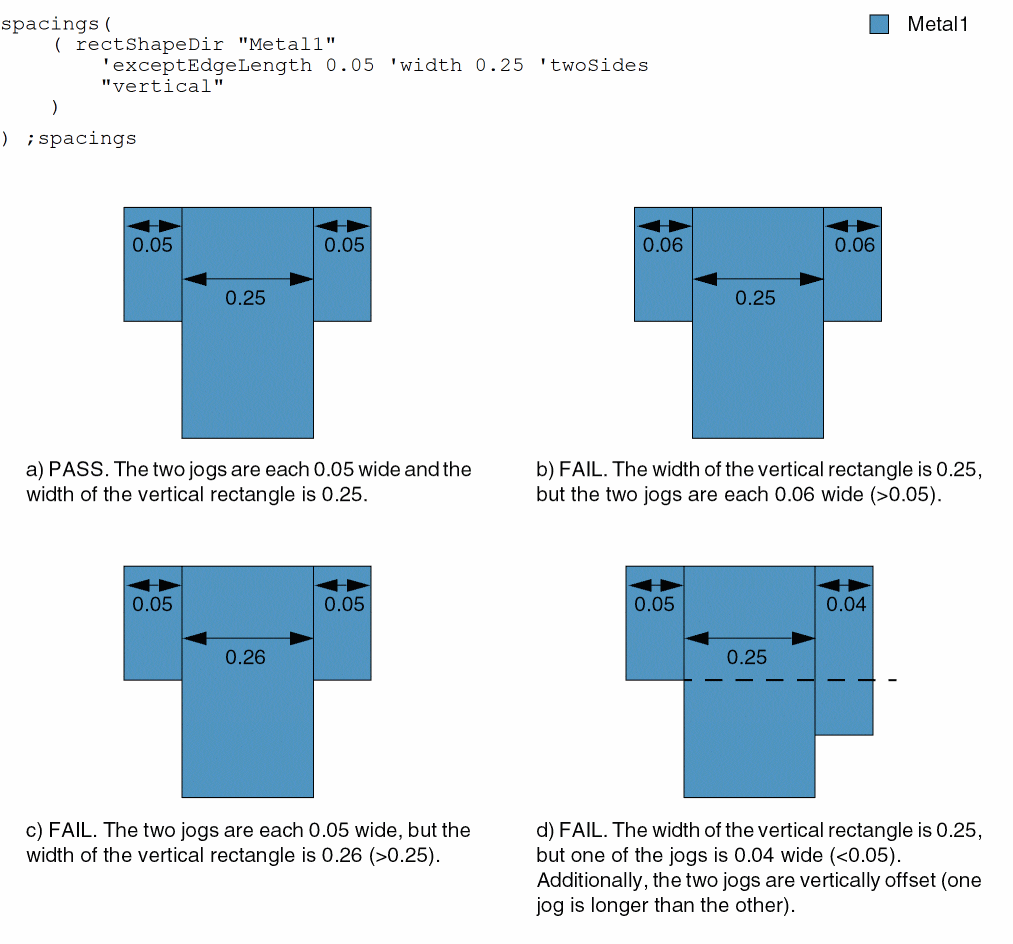
- Example 4: rectShapeDir with exceptEdgeLength, width, and twoSides
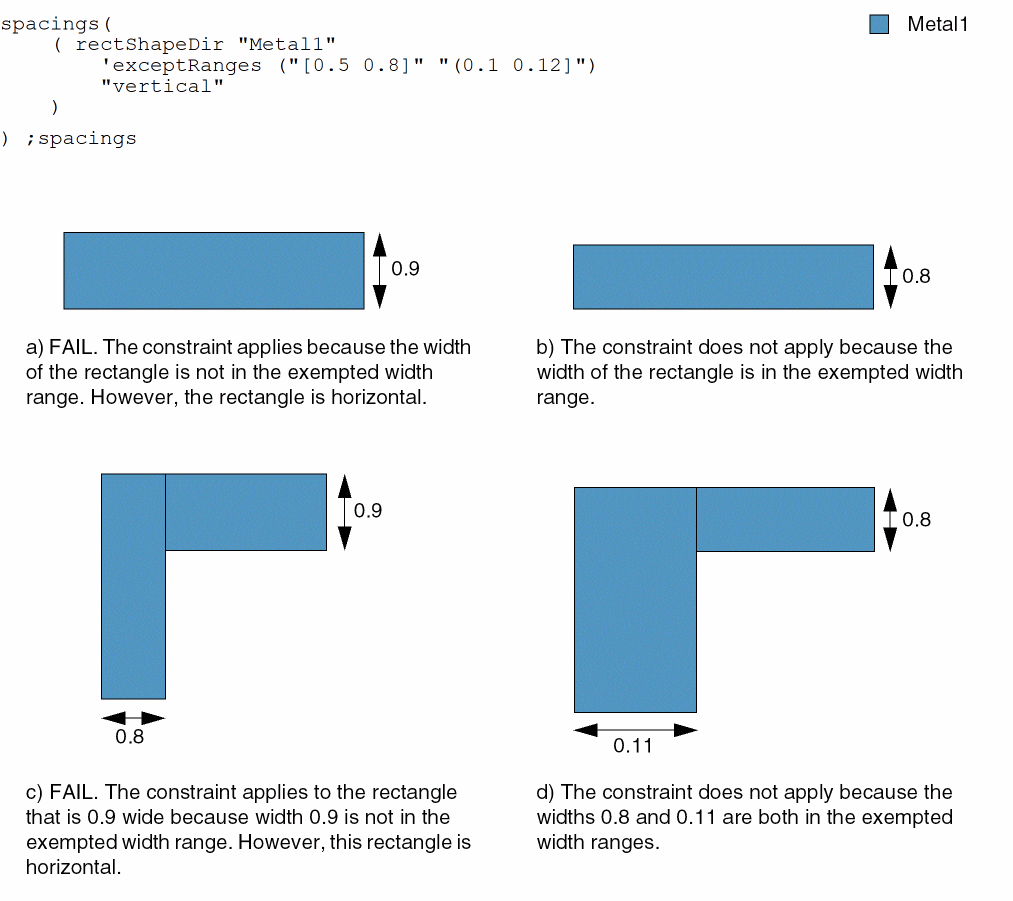
- Example 5: rectShapeDir with exceptRanges
Example 1: rectShapeDir with vertical
A shape on layer Metal1 must be a rectangle in the vertical direction.
Example 2: rectShapeDir with exceptViaLayer, exceptViaSize, and exceptExactSize
A Metal1 shape with dimensions 0.09x0.12 is overlapped by a 0.3x0.06 via. The constraint is met if the remaining portion of the metal shape is a horizontal rectangle, exactly aligned with a horizontal edge of the exempted portion of the metal shape.
Example 3: rectShapeDir with extendBy and widthRanges
When the edges of a rectangular Metal1 shape with width less than or equal to 0.3 or equal to 0.6 or 0.8 wide are extended by 0.2, the resulting shape must also be rectangular.
Example 4: rectShapeDir with exceptEdgeLength, width, and twoSides
A vertical rectangle on layer Metal1 with width 0.25 must have 0.05 wide jogs on both sides.
Example 5: rectShapeDir with exceptRanges
All rectangles on layer Metal1 must be vertical. However, the constraint does not apply if a rectangle has width in one of the following ranges:
-
Greater than or equal to
0.5and less than or equal to0.08 -
Greater than
0.1and less than or equal to0.12
Return to top