
trimShape
spacings( ( trimShapetx_layer'exactWidthf_exactWidth['maxLengthf_maxLength] ['exceptSpacingf_spacing] ['exceptWidthf_width] ['gapMergedg_gap] ['rowBoundaryMaxLengthf_rowBoundaryMaxLength] ['extensionf_extension['metalEdge]] ['mask1 | 'mask2 | 'mask3 | 'mask4] ['metalMask1 | 'metalMask2 | 'metalMask3 | 'metalMask4] ['insideLayers (tx_layer1tx_layer2…tx_layerN) ['insidePurposes (t_purpose1t_purpose2…t_purposeN)] | 'outsideLayers (tx_layer1tx_layer2…tx_layerN) ['outsidePurposes (t_purpose1t_purpose2…t_purposeN)] ] ['adjacentWidthExtension (f_adjWidth f_adjExtension)] ['keepoutRegion (f_offset1 f_offset2)] {"adjacentTrack" | "midTrack" | "extension"} )
) ;spacings
(Virtuoso Advanced Node for Layout Only) Determines how shapes are formed on a trim metal layer at the line-ends of wires.
Shapes are always formed at the line-ends of wires.
Values
|
The layer on which the constraint is applied. Type: String (layer and purpose names) or Integer (layer number) |
|
Parameters
|
The width of the shape formed on the trim metal layer must be equal to this value. |
|
|
The length of the shape formed on the trim metal layer must be less than or equal to this value. |
|
|
No shape is formed on the trim metal layer if the spacing between the line-ends of two wires is greater than or equal to this value. |
|
|
No shape is formed on the trim metal layer if the width of the line-end of a wire is greater than this value. |
|
|
(Virtuoso Layout Suite EXL and higher tiers) Perfectly aligned trim shapes with gap length less than or equal to the given value are merged. |
|
|
(Virtuoso Layout Suite EXL and higher tiers) Specifies a different trim max length value when trims overlap with any cell row boundaries. |
|
|
The trim metal shape must extend by this value on either side from the center of the metal that it trims. This parameter is used only when the constraint value is |
|
|
The trim metal shape must extend from the edges of the metal that it trims. |
|
|
The mask of the trim layer to which the constraint is applied. This is used only for multi-patterned trim layers. |
|
|
(Virtuoso Layout Suite EXL and higher tiers) The mask of the trimmed metal layer to which the constraint is applied. |
|
|
|
|
|
Determines if the constraint applies, based on the presence or absence of one or more layers.
For more information, see |
|
|
The |
|
|
The |
|
|
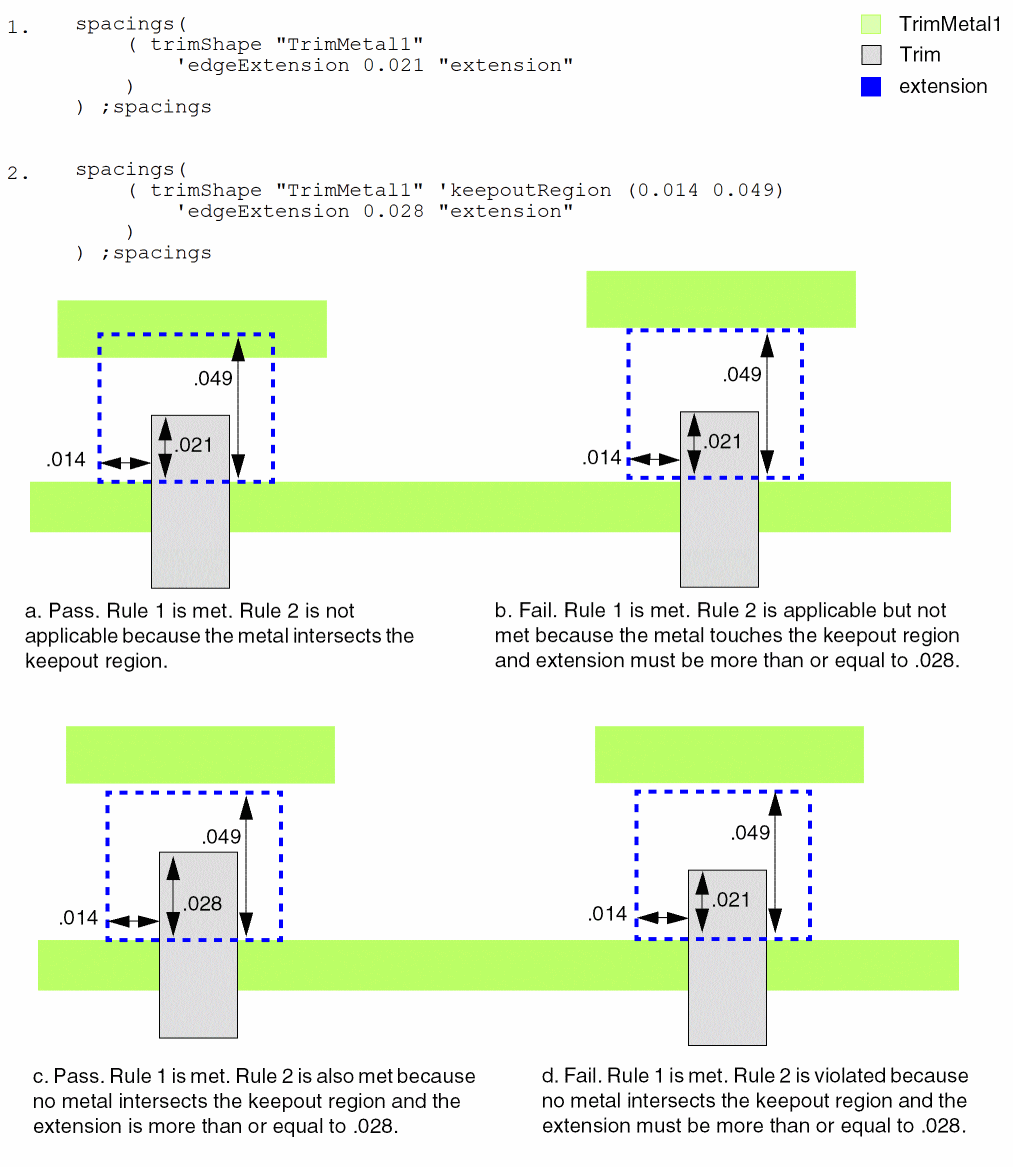
Applicable only when The f_offset1 value specifies the keepout offset in the metal direction. The f_offset2 value specifies the keepout offset in the direction perpendicular to the metal layer. If no metal shape is present in the keepout region, then the extension of the trim shape over the metal should be greater than or equal to the defined f_extension value. The metal is considered to be outside the keepout region if it only touches the keepout region and is not partly within it. |
|
|
Applicable only when |
|
Examples
- Example 1: trimShape with midTrack
- Example 2: trimShape with adjacentTrack
- Example 3: trimShape with extension
- Example 4: trimShape with extension and keepoutRegion
- Example 5: trimShape with extension and metalEdge
- Example 6: trimShape with adjacentWidthExtension
Example 1: trimShape with midTrack
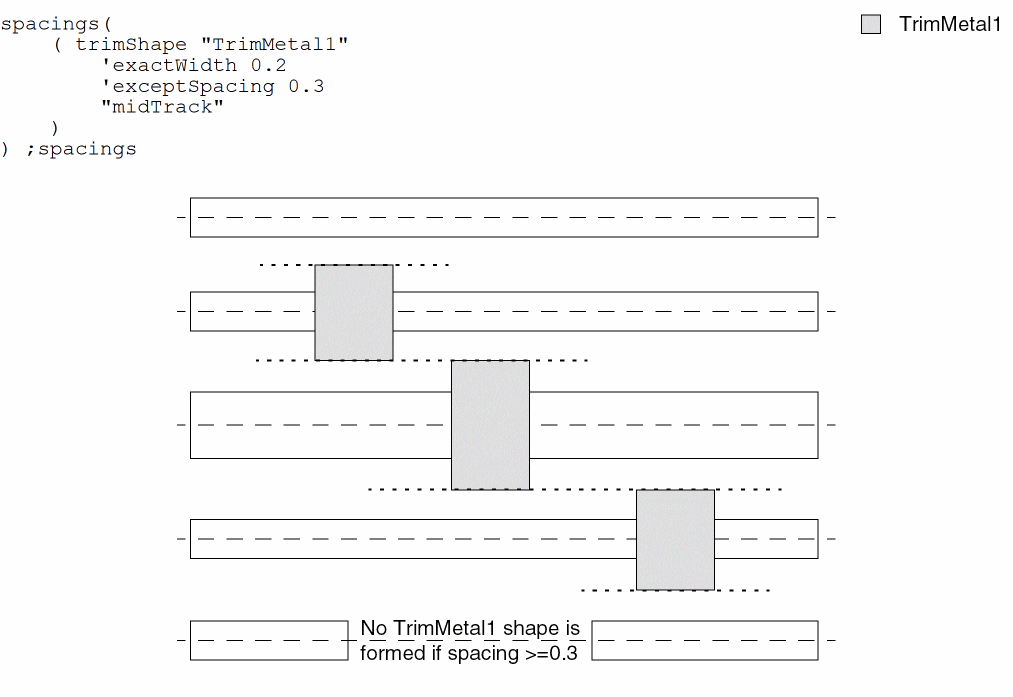
The width of the TrimMetal1 shapes must be equal to 0.2 and the TrimMetal1 shapes must extend by half of the required spacing of the wires (midTrack). No TrimMetal1 shape is formed if the spacing between line-ends of two wires is greater than or equal to 0.3.
Example 2: trimShape with adjacentTrack
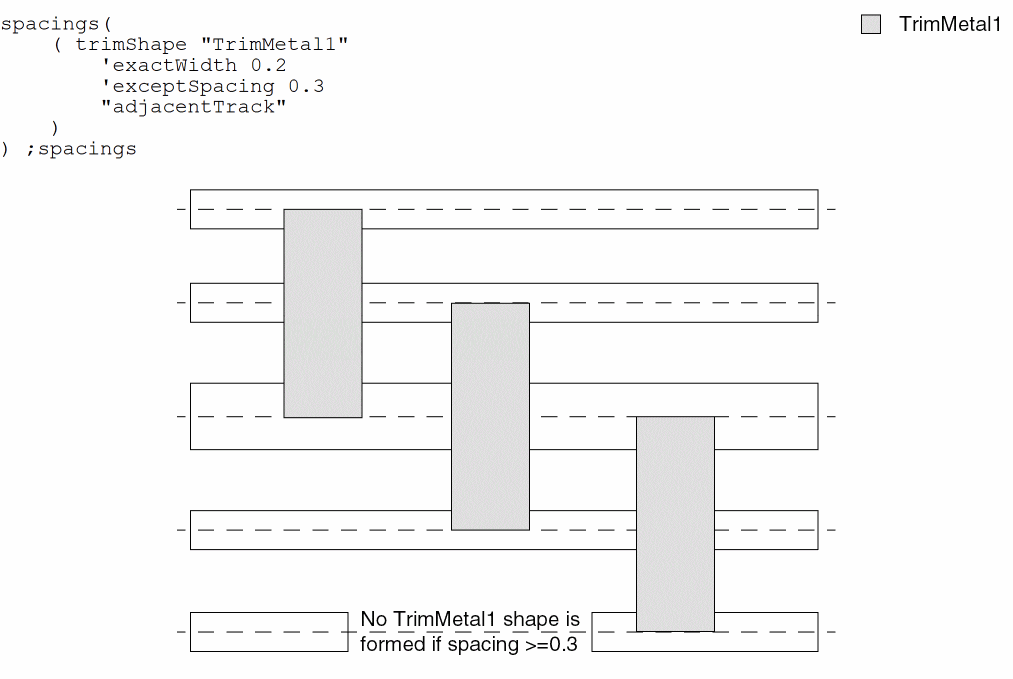
The width of each TrimMetal1 shape must be equal to 0.2 and the TrimMetal1 shapes must extend to the centerline of adjacent tracks (adjacentTrack). No TrimMetal1 shape is formed if the spacing between line-ends of two wires is greater than or equal to 0.3.
Example 3: trimShape with extension
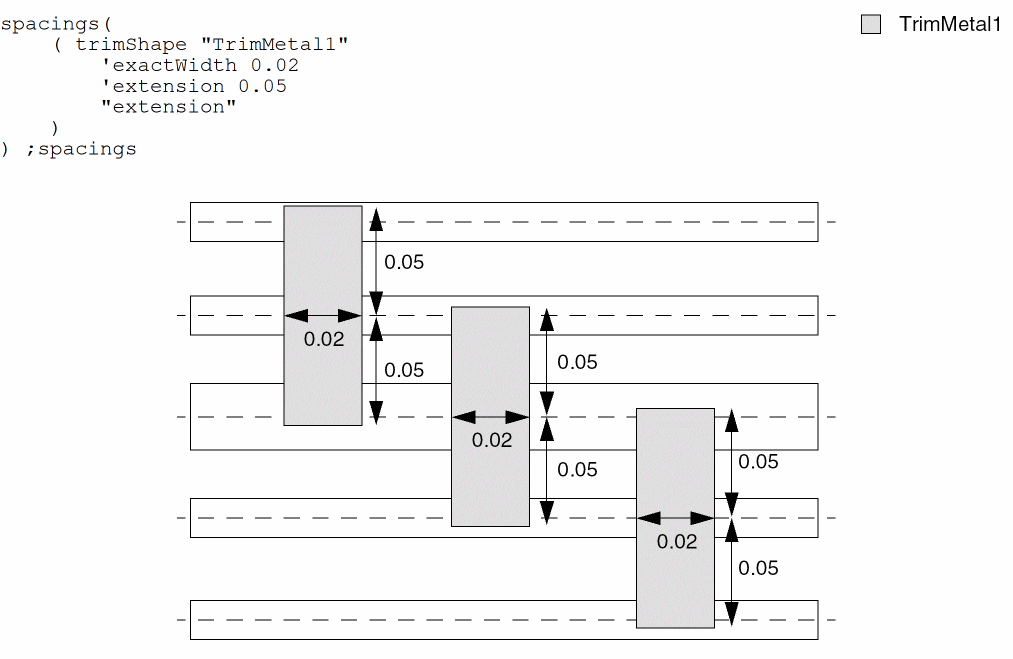
The width of each TrimMetal1 shape must be equal to 0.02 and it must extend by 0.05 on either side from the center of the metal that it trims.
Example 4: trimShape with extension and keepoutRegion
The following trimShape constraints are defined in AND groups for TrimMetal1 shapes:
Example 5: trimShape with extension and metalEdge
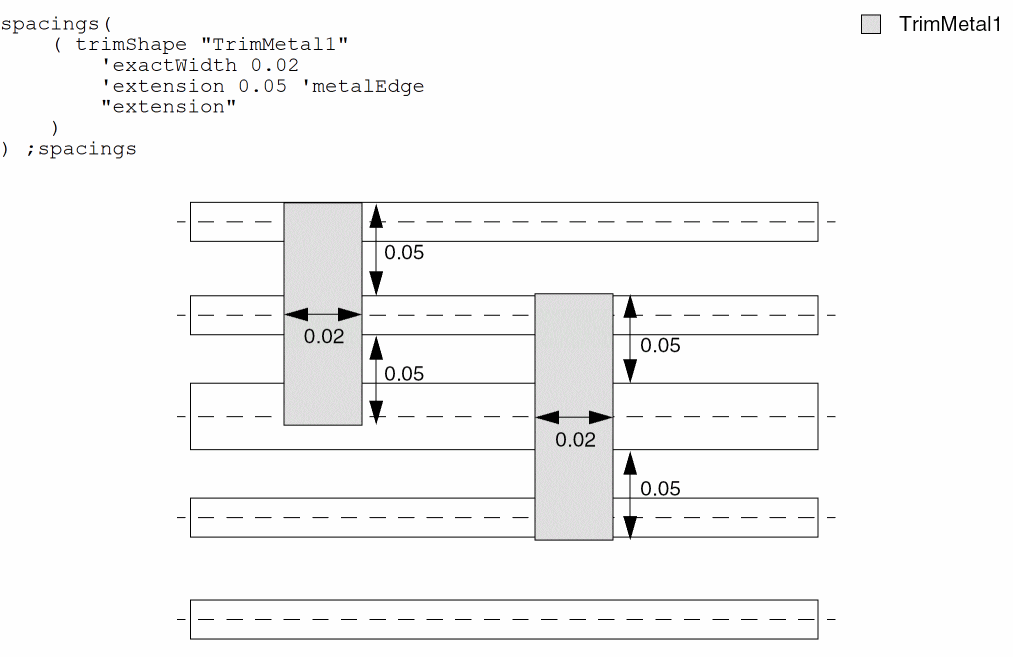
The width of each TrimMetal1 shape must be equal to 0.02 and it must extend by 0.05 on either side from the metal edges that it trims.
Example 6: trimShape with adjacentWidthExtension
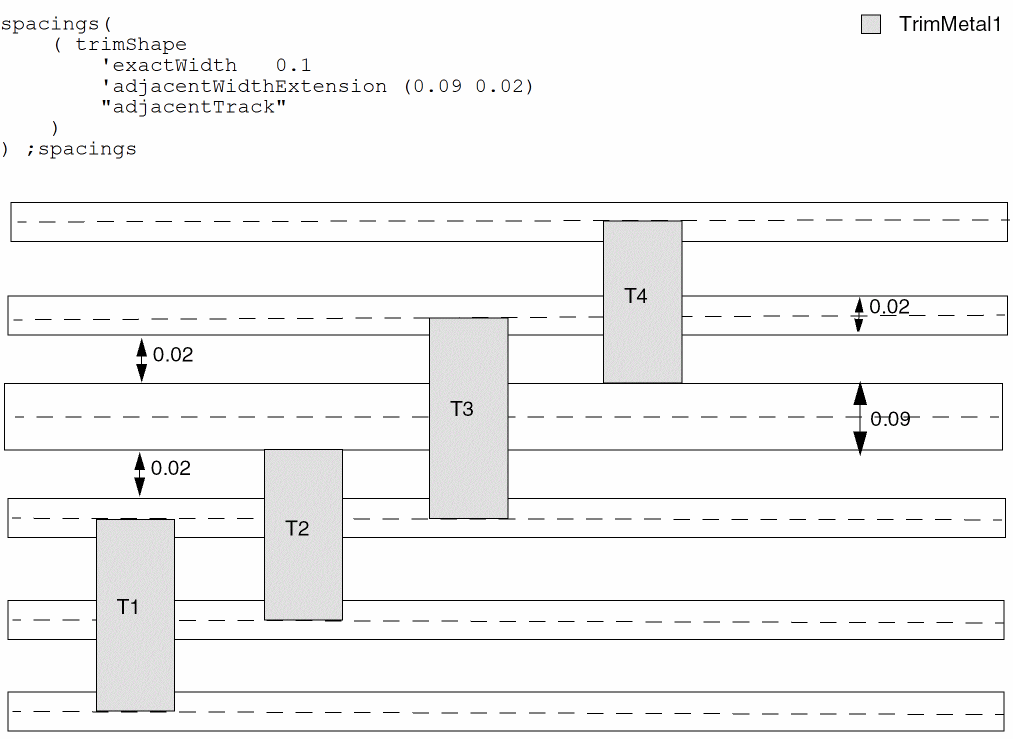
Trim T1 and T3 snap to the center of the adjacent track because the width of the adjacent track is less than 0.09. The lower edge of trim T2 snaps to the center of the adjacent track. However, the upper edge of Trim T2 extends by 0.02 because the width of the adjacent top track is >=0.09. Similarly, the lower edge of trim T4 extends by 0.02 and the upper edge snaps to the center of the adjacent track.
Return to top