
minDirectionalOverlap
orderedSpacings( ( minDirectionalOverlaptx_layer1 tx_layer2['horizontalOverlap | 'verticalOverlap] ['widthRangesg_ranges] ['otherWidthRangesg_ranges] ['sameNetOnly]f_value)
) ;orderedSpacings
(Virtuoso Advanced Node for Layout Standard) Specifies the minimum overlap required between the shapes on layer1 and layer2. The overlap is measured in the direction of the length of the layer2 shape, between the outside edge of the layer1 shape and the innermost edge of the layer2 shape.
Optionally, the constraint applies when one or more of the following conditions are met:
- The layer1 shape is within the specified width range.
- The layer2 shape is within the specified width range.
- The overlap is measured in the horizontal or vertical direction.
-
The layer1 and layer2 shapes are on the same net.
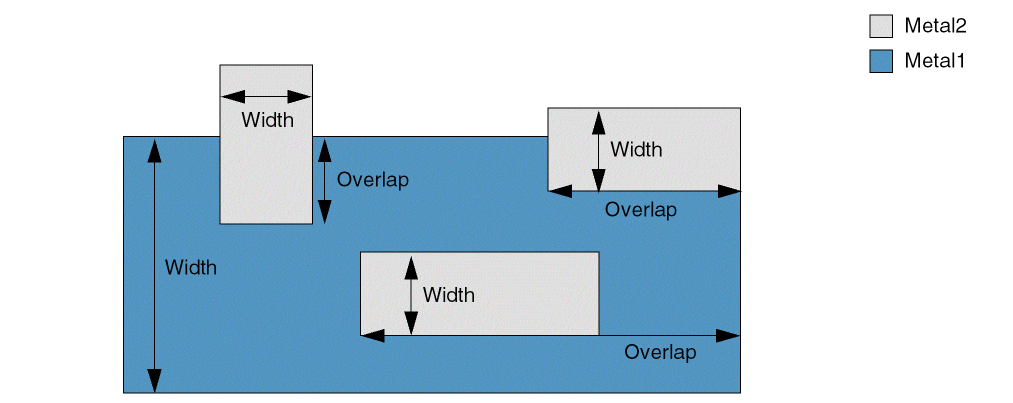
Values
Parameters
|
The direction in which the overlap is measured. By default, the constraint applies to both vertical and horizontal overlaps. |
|
|
The constraint applies only if the width of the layer1 shape falls in this range.
Type: Floating-point values specifying a |
|
|
The constraint applies only if the width of the layer2 shape falls in this range.
Type: Floating-point values specifying a |
|
|
The constraint applies only if the shapes on layer1 and layer2 are on the same net. |
|
Example
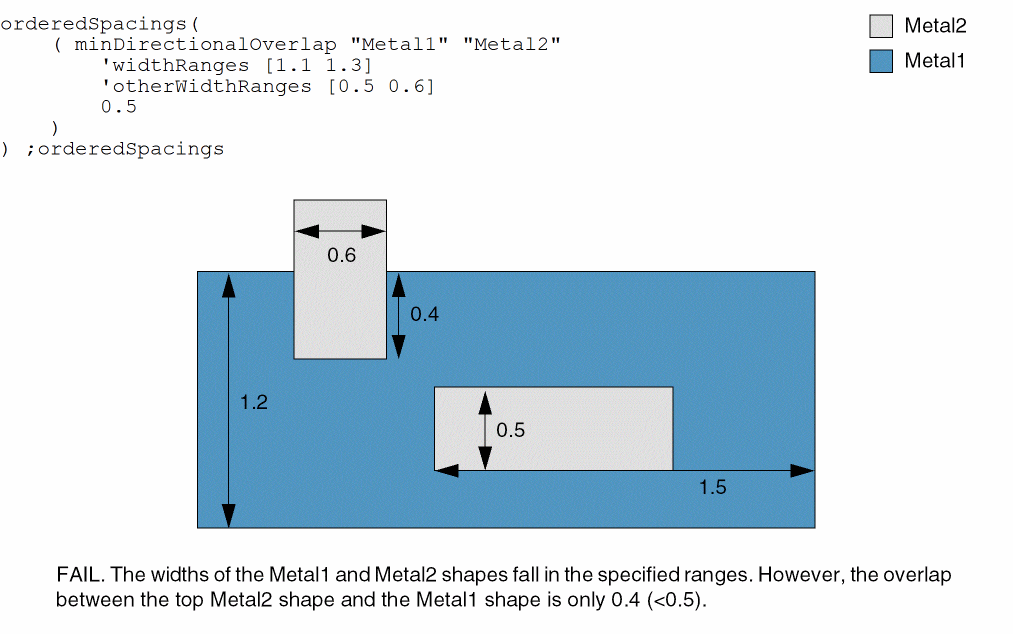
The minimum overlap between Metal1 and Metal2 shapes must be 0.5 if both of the following conditions are met:
- The width of Metal1 shapes is greater than or equal to 1.1 and less than or equal to 1.3.
-
The width of Metal2 shapes is greater than or equal to 0.5 and less than or equal to 0.6.
Return to top