
E
Frequently Asked Questions
This FAQ contains the answers to customers’ most frequently asked questions about constraints. To view the answer to any question, click the question in the list below.
Frequently Asked Questions
Question#1:
Question#2:
Question#3:
Question#1: In Virtuoso, which are the places where constraints can be set?
-
Constraint Setting
There are several places where constraints can be set in Virtuoso.-
Constraint Manager (CM)/Process Rule Editor (PRE)
The technology or process constraints are set in the constraint manager’s process rule editor. There are three options in the Process Rule Editor form.- The Tech option sets the process or foundry rules and other constraint groups stored in the technology library.
- The Design and Object options setup user-defined constraint groups on the design level or Object level. The foundry constraint group is for process rules and user-defined constraint groups are constraints for design considerations.
-
Wire Assistant
The Wire Assistant allows you to set temporary override constraints, which can now be saved. They operate on the net that is being interactively edited as an override to constraints assigned to that net or route (or the default constraint group) and are not persistent on the edited net. You can save the constraints to a constraint group and assign them to a net in the Constraint Manager. -
RIDE/VSR GUI (Sequencer)/Routing Scripts
Constraints can be set in TCL for foundry and design rules. In addition to the run script, they can also be set in the .riderc and the RIDE built-in process (rde.startup_script). If there are constraints that are supported in the Cadence technology file and you have write permission, they will be synchronized when RIDE is exited. Design and object level constraints will be stored in the view that is being edited, so you will have write permission.
For more information, refer to the Virtuoso documents. -
Constraint Manager (CM)/Process Rule Editor (PRE)
-
Constraint Usage
Once the constraints are set up, there are several menus that use the specified constraints.-
Options — Editor, Wire Editor Default constraint group
This assigns a constraint to nets which do not have a constraint group assigned to the net. -
Wire Assistant Seed Attributes From a Constraint Group
This seeds the Wire assistant form values for the constraints in the form (width, spacing, etc) from the constraint values in the selected constraint group. -
VSR GUI— Default Constraint Group
This assigns a constraint to nets which do not have an explicit constraint assigned to them. It is initially given the same value that is in the Options — Editor form.
-
Options — Editor, Wire Editor Default constraint group
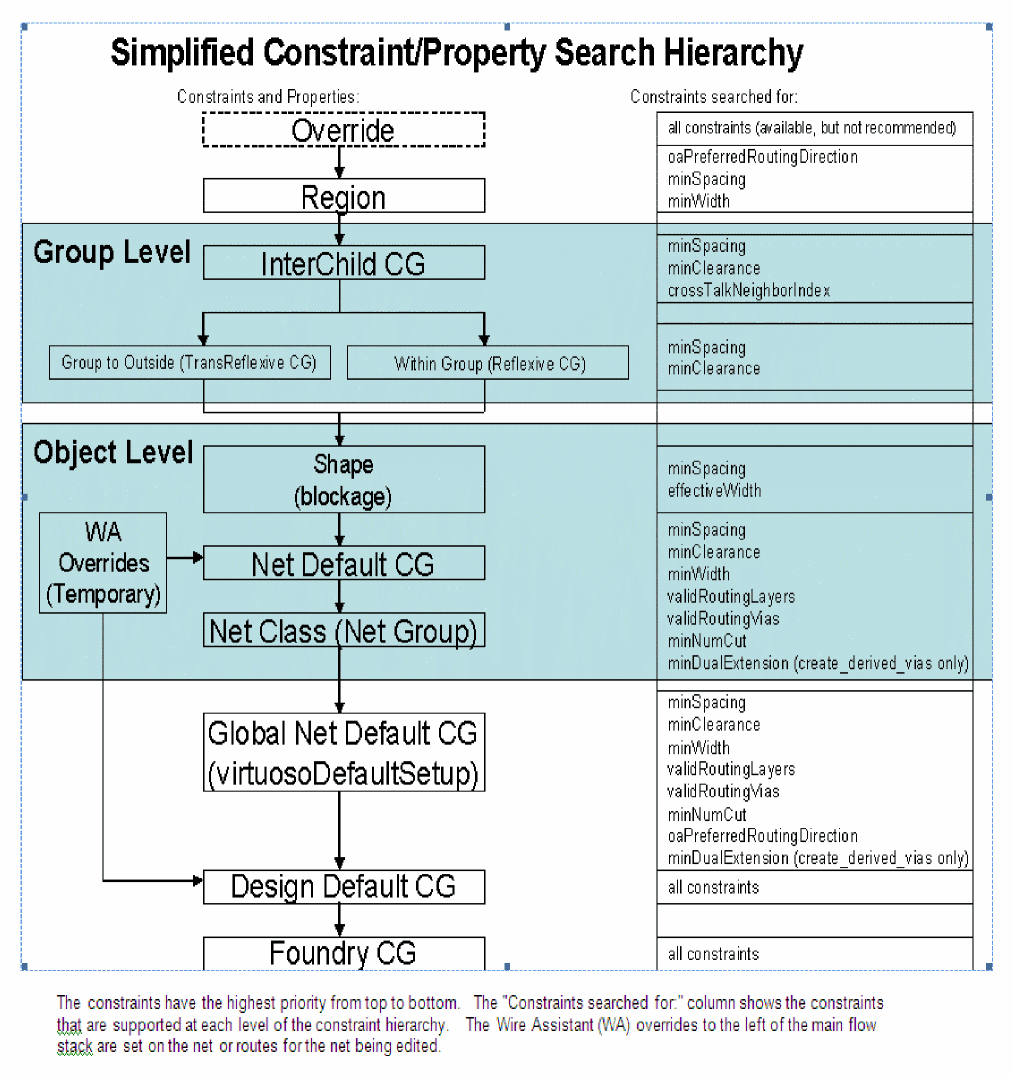
Question#2: What is the constraint lookup order and how does override work with automatic and interactive routing?
The constraints search hierarchy determines the order and which constraints the router looks at. Additionally, the interactive router can assign overrides for the net which is currently being edited which overrides the value of the constraint for any constraints set on that net. The constraint search hierarchy diagram is as shown below.
Question#3: What are the possible reasons that the router may not connect to a pin?
Possible reasons that the router may not connect to a pin are as follows:
- A layer conflict. For example, a poly pin but, poly is not in the validLayers constraint of the net, design, or application default constraint group.
- A spacing conflict. For example, the width + spacing of the net is larger than the distance between the target pin and a neighboring pin or blockage.
Return to top