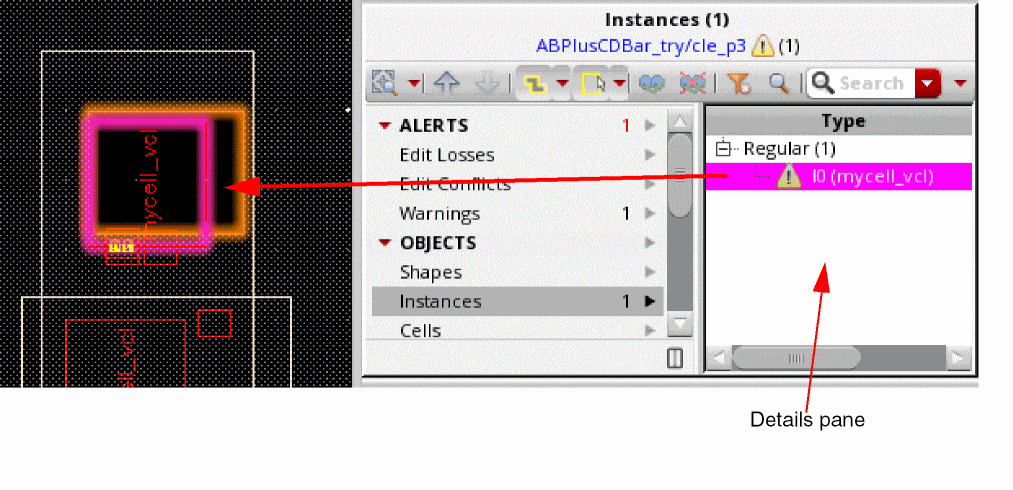
Details Pane
The Details pane shows the contents of the set selected in the Summary pane, and lets you navigate the changes individually. You may select an object and auto zoom to it in the canvas, or see additional information regarding the change on it.
The following table lists the functions of the different options in the Details pane:
|
Icon
|
Command
|
Description
|
|
Type
|
Type
|
Displays the type of object.
|
|

|
Modification
|
Shows details of the type of modification that has been done.
Valid values: Created, Deleted, Edited
|
|

|
Highlight State
|
Sets or unsets the highlight states.
Ctrl + Click on this option to sort the design partitions by highlight states.
|
|

|
Filter State
|
Sets or unsets the filter states. You can use the Remove Changes from Design Partition View command in the Design Partition View toolbar to remove the changes for which the filter state is set.
Ctrl + Click on this option to sort design partitions by filter states.
|
|

|
Sign-off State
|
Lets you sign off edit conflict alerts with the top design in red, or sign off warning/non-alert in green. You can use the Hide Signed-off Changes command on the Design Partition View toolbar to hide the green signed-off changes in all panes. You can use the Show Signed-off Changes command to show them again.
An alert stays until you either sign it off using this option or discard it by using the Remove Changes from Design Partition View command.
-
Edit loss or edit conflict with peer cannot be signed-off
-
Edit loss cannot be signed-off or removed from the design partition view.
-
All warning should be signed off before submitting a design partition view for merge.
-
Ctrl + Click on this option to sort design partitions by sign-off states.
|
|
Change
|
Select in Partition
|
Shows the type of change that was done.
This option is available only for the Modifications section.
|
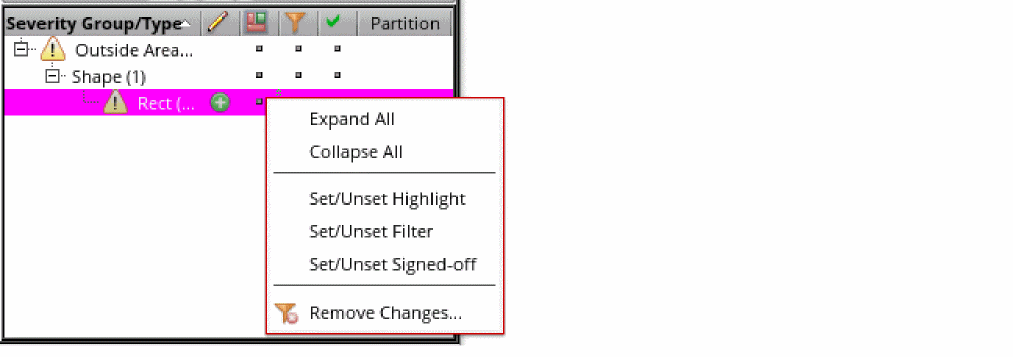
Right-click on the column header of the Details pane to view options to customize its display.
|
Command
|
Description
|
|
Expand All
|
Expands all tree nodes listed in the Details pane.
|
|
Collapse All
|
Collapses all tree nodes if they are expanded
|
|
Set/Unset Highlight
|
Sets or unsets highlights of selected objects in the canvas. The highlight is persistent in the canvas until it is unset.
|
|
Set/Unset Filter
|
Sets or unsets filter state of selected objects.
|
|
Set/Unset Signed-off
|
Sets or unsets signed-off state of selected objects.
|
|
Remove Changes
|
Displays the Remove Changes from Design Partition View form.
|
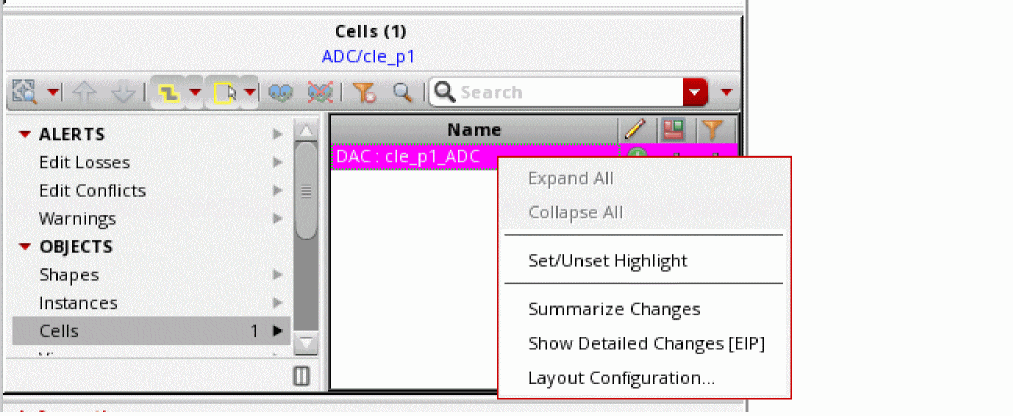
Right-click the subcell edited under iEIP to view the options related to it.
|
Command
|
Description
|
|
Expand All
|
Expands all tree nodes listed in the Details pane.
|
|
Collapse All
|
Collapses all tree nodes if they are expanded
|
|
Set/Unset Highlight
|
Sets or unsets highlights of selected objects in the canvas. The highlight is persistent in the canvas until it is unset.
|
|
Summarize Changes
|
Displays the summary of changes of a subcell in CIW without entering the subcell.
|
|
Show Detailed Changes [EIP]
|
EIP to a subcell in read-only mode to show the changes made.
|
|
Layout Configuration
|
Displays the Layout Configuration Form form that lets you load or unload layout configurations in design partition views.
|
Related Topics
Summary Pane
Design Partition View Contents Section in Designer Mode
Concurrent Layout Assistant
Return to top