Append History Form
Adds the description specified by the manager in the Description field to the History box. Managers use this form to inform designers about important changes made to the top design. For example, nets being deleted or new partitions being added.
|
Field
|
Description
|
|
History
|
This table displays information regarding the various updates.
|
|
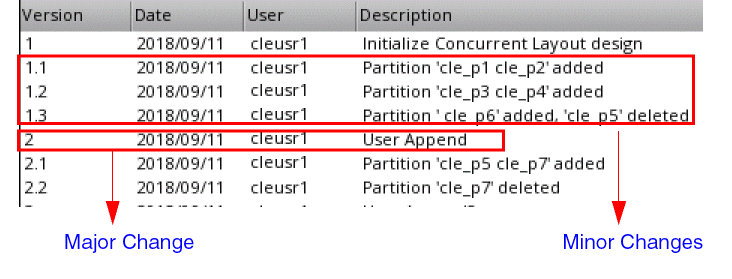
Version
|
The version number of the change consisting of major and minor revisions. For example, a major revision can be to ask a designer to verify the design partition view against the latest top design, while a minor revision is just a record of the design partition change.
|
|
|
|
Date
|
The date on which the change was made.
|
|
User
|
The user name who made the change as a manager.
|
|
Description
|
A brief description of the change that was made. The number displayed before the description depicts the version number that will be assigned to the input description when appended.
|
|
|
Managers can specify additional description of the change in the Description field. Designers can view this information in the View History form. When designers open a design after a major change, they can be asked to verify the design partition view against the top design. This is indicated by an asterisk (*) on the partition status. After the design partition view is verified, saved, and the major revision is synchronized with the top design, the designers will not be asked to repeat this activity when the design is opened the next time.
|
Related Topics
View History Form
Concurrent Layout Toolbar in Manager Mode
Return to top