
Accessing Concurrent Layout
You can access Concurrent Layout in Layout XL and Layout EXL either from the Concurrent menu in the menu bar or using the Concurrent Layout workspace:
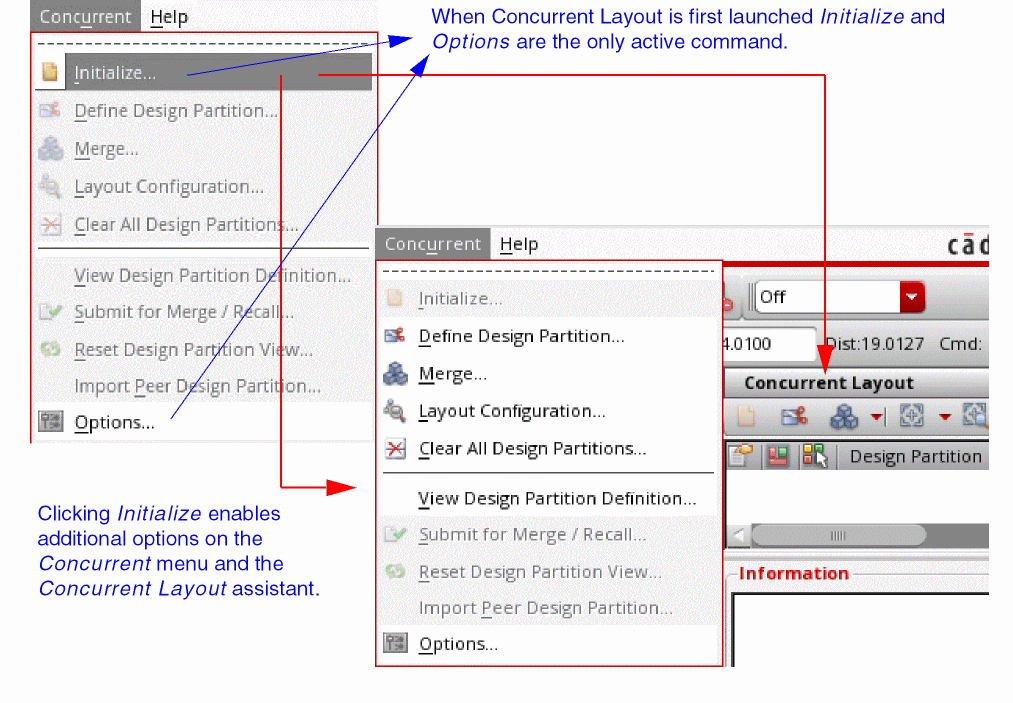
The Concurrent menu provides flow-related commands for Concurrent Layout. To get the design ready for concurrent editing:
-
Choose Concurrent - Initialize.
Displays additional commands in the Concurrent menu and embeds the Concurrent Layout assistant as a docked assistant pane within the current session window.
The workspace for Concurrent Layout is called Concurrent_Layout. To apply the Concurrent Layout workspace, do one of the following in the Layout XL or Layout EXL window:
- Choose Window – Workspaces – Concurrent_Layout.
- Select Concurrent_Layout from the drop-down list on the Workspace Configuration toolbar.
Related Topics
Terms Used in Concurrent Layout Editing
Concurrent Layout Editing in Manager Mode
Concurrent Layout Editing in Designer Mode
Return to top