
9
Extracting Parameters (LPE)
Introduction
Device and connectivity extraction creates an extracted version of the circuit layout that contains instances of devices and nets in the form of a true electrical network.
The verification system provides tools for measuring parameters of those devices, performing calculations with them, and storing the results on the extracted network as parameter properties.
A parameter is a property associated with a device which contains some information relative to that device. These properties can be accessed by application programs or SKILL routines as required. A good example is the netlister, which can annotate a transistor network listing with width and length parameters.
The verification tools measure a wide range of characteristics of devices and can associate any number of them with a single device as parameters. The measureParameter command definition gives full details of the capabilities.
The extractMOS command has built-in parameter extraction of gate width and length.
The commands available for manipulating parameters are as follows:
-
measureParameter
Measures the size of the device and the values of its relationships to other shapes. -
calculateParameter
Allows calculations to be performed on and between measured values. -
saveParameter
Saves measured or calculated values as parameter properties on devices.
Parameters are normally associated with a device via the device recognition polygon. They can also be associated with any shape derived from a device recognition polygon, providing that the shape is created by a selection command, such as geomOverlap, rather than a logical command such as geomAnd.
Measurement Process
The measurement process consists of two operations: measure and calculate.
Measure
The measurement commands associate each measurement with the object being measured. For parameter measurement, this is the device number.
The results from any measurement are given a name. This is a reference to those measurements that can be used in other processing commands.
Calculate
A calculation can be performed on a single measurement result (referenced by name), or a calculation can be performed between measurements of results. All measurement names referenced in the calculation must be associated with the same device type.
You cannot mix device measurements with parasitic measurements. Similarly, you cannot mix device measurements of one device type with those of another device type. For example, it is meaningless to calculate the W/L relationship of devices if the W comes from an nfet and the L comes from a pfet.
The best way to define how the calculation of measured values works is to show an example.
l = calculateParameter( lc - ( w * b * 0.5 ) )
In this example, the effective length of a device is calculated as the center line length minus half the width for each bend.
Measurement Commands
The measurement commands that are available are detailed in the command reference section of this manual. Some, such as area and perimeter, are obvious and need no further explanation. Others, however, do need clarification.
Length
The term length, when applied to a random polygon, is meaningless. For a rectangle, it could mean the length of the longest axis; but for any more complex shape, no simple definition is possible.
For the purposes of parameter and parasitic measurement, the definition of length of a shape on a layer is defined as the length of edges of that shape relative to shapes on other layers.
An example of this is the length of a transistor gate. In this context it is the length of the gate shape which is totally inside the polysilicon shape, divided by two. The division by two is required because the relationship defined measures both sides of the gate.
Many tools are provided to define the relationship. They are as follows:
The relationship can include up to eight layers.
Bends
The definition of bends is not simple. Consider this figure.

The first two figures are squares with a corner cut out. The first one appears to have a bend in it. Based on the first one having a bend in it, the third figure appears to have two bends in it.
Consider this figure, which represents an MOS transistor gate with source and drain diffusions.
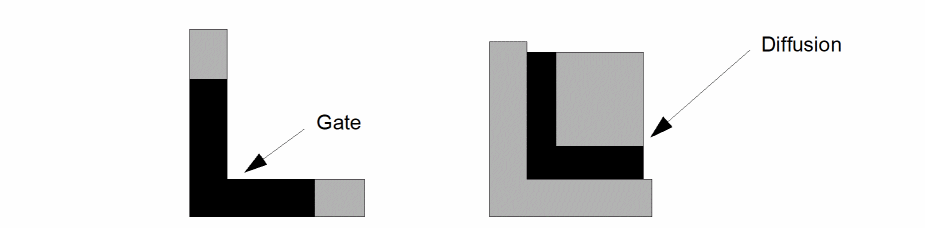
Both gates have bends in them, but one has a bend in the length of the gate and the other has a bend in the width of the gate. The bend is relative to the diffusion layer.
As in the definition of length, the definition of bends depends upon a shape’s relationship to shapes on other layers. The measurement command allows you to define this relationship to other layers as part of the bend determination.
By the program’s definition, a bend is created by an inside corner (concave corner) in a shape, so a count of bends is a count of the inside corners.
In addition to counting bends, you can also use the program for counting corners and angles. A corner is an outside corner (convex corner) in a shape, and an angle is any corner, outside or inside. Therefore, a count of angles is the same as a count of bends plus a count of corners.
NULL Measurements
The parameter and figure mode parasitic extraction measurements have these characteristics.
- If a value is measured to be 0, as is the case with bend counts, the value is treated as any other value. If there are no limits specified, the value is retained. If there are limits specified, the value is checked against them and retained if it conforms to those limits.
- If no measurement is made, as is the case of area of gate over metal when there is no metal under the gate, no measurement is created, and a value of zero is created if the limits specified request a value of zero to be retained. If the limits exclude the value of zero, no measurement value will be created.
The difference between a value of zero and no measurement is in creation of the resultant property. A value of zero can be used to create a property with a value of zero. If no measurement is made, a property cannot be created.
Measurement Optimization
For general use, the measurement capabilities of the system are designed to be flexible. As a result, the code cannot be optimized as would be the case if the measurements were made from predefined layer relationships, as in the case of MOS transistor width and length in the extractMOS command.
You can achieve some degree of run-time optimization, however, by using other techniques. These techniques can be controlled by the way you write your measurement commands.
Implied Logical Operations
Inside the measurement command, up to eight layers can be defined in a single complex relationship. For example, with five layers you can write
measureParameter( area metal over poly over cut not_over buried_cut not_over tub )
Such a relationship is processed by looking at all the layers at once. The program does not do a series of two-layer logical operations to derive the required area. This is optimal unless parts of the relationship are used multiple times, in which case it would be better to extract that area separately with logical commands. In the example, if you had a number of relationships involving poly over cut, it would be more efficient to write
pcut = geomAnd( poly cut )
measureParameter( area metal over pcut not_over buried_cut not_over tub )
measureParameter( area metal2 over pcut over well )
This optimization has to be considered with the consolidated measurements.
Consolidated Measurements
Multiple measurement commands can be processed in one pass of the data. This capability is controlled by the system command optimizer, which decides if such consolidation is worthwhile.
The optimization decision is based on the number of common layers in a command. For example, if one measurement involves layers a, b, c, and d, and another measurement involves layers b, c, d, and e, then they are consolidated, and both measurements are made at the same time.
The exact optimization criteria is not given here since it is not a simple heuristic.
Any number of measurement commands can be consolidated provided these criteria are met:
- The optimizer decides that the consolidation is worthwhile.
- The resulting number of layers does not exceed the maximum allowed.
- The measurements are contiguous in the command stream; that is, not separated by other commands.
Separate groups of measurement commands in the command stream are optimized separately.
Parameter Measurement Reference Commands
The following section contains the parameter measurement reference commands.
calculateParameter
outValue = calculateParameter( expression [limit] )
Description
This command creates new device parameter measurement values based on calculations with previously measured or calculated values derived through the measureParameter and calculateParameter commands.
Each measureParameter command allows you to make a single device parametric measurement. This command lets you manipulate one or more of these simple measurements to form more complex parameters.
Fields
The measurement results are stored in a layer that contains parameter values instead of shapes. This layer cannot be processed by any layer manipulation commands. Only commands related to parameter manipulation can reference the layer. Specifically, these are calculateParameter and saveParameter.
This is the calculation expression relating the results of previous measureParameter or calculateParameter commands with mathematical operators. The operators can be any of the following:
The precedence of the calculation operators follows normal mathematics conventions; that is, multiply and divide have higher precedence than plus or minus with left to right evaluation of operators with the same precedence. You can include parentheses to override the default evaluation order. To avoid conflict with names containing special characters (such as P+), you must use spaces to separate names from operators.
All the layer references from previous measureParameter or calculateParameter commands, used in a calculateParameter command, must be made from a device recognition layer of the same type. You cannot mix measurements made for different device types. In addition, all measurements in a calculation for a device application must be made from the same device recognition layer.
Each parameter used in a calculateParameter command references data stored in a file which has to be opened by Diva. The number of files available when Diva is running depends upon factors outside Diva’s control. To reduce the risk of exceeding the number of files available, a limit of ten parameters within a single calculateParameter command has been set (as a compile-time option). If you exceed this limit, the run does not start. If the required number of files is not available when the calculateParameter command is executed, the program recognizes the fact and stops the run.
If a calculation results in an inappropriate operation, such as dividing by zero, the program issues a warning message and aborts that particular calculation. Such situations are normally the result of a flawed calculation definition, as would be the case if a division is requested by a value that can be measured as zero or nonexistent.
If a shape of metal overlaps poly but not diff, there is no second measurement. This results in a value of 0 and the calculation fails.
This optional argument provides the ability to reject calculated values because they fall outside the specified limits. It can be used to significantly reduce the amount of data being created by rejecting all values which are insignificant.
The format of the limits specification can be one of the following:
 low_limit op keyword op high_limit
keyword op low_limit
keyword op high_limit
The limits can be integer or floating-point values or mathematical expressions defining such values.
You can use the following operators:
The keyword can be either ignore or keep.
The following examples illustrate the format:
ignore < .001
keep >= .3
1 < keep < 5
1.3e-4 <= ignore <= 2.7e-3
Example
The following example illustrates the generation of the effective gate length for a device.
av_length = measureParameter( length gate inside
  poly 0.5 )
width = measureParameter( length gate coincident poly
  0.5 )
bends = measureParameter( bends_all gate inside poly )
length = calculateParameter( av_length - ( .1 * bends ) )
The calculation formulates the effective length from the average center line length minus half the width for every bend.
measureParameter
outValue = measureParameter( operator ( layer1 [operator layer2]... ) [coeff] [limit] )
Description
This command measures devices or the relationships between devices and other shapes. Those measurements might later be applied as parameters of the devices using the saveParameter command, or contribute to calculations for subsequent parameters using the calculateParameter command.
Prerequisites
You must process the first layer with an extractDevice or extractMOS device command.
Fields
The measurement results are stored in a layer that contains parameter values instead of shapes. This layer cannot be processed by any layer manipulation commands. Only commands related to parameter manipulation can reference the layer. Specifically, these are calculateParameter and saveParameter.
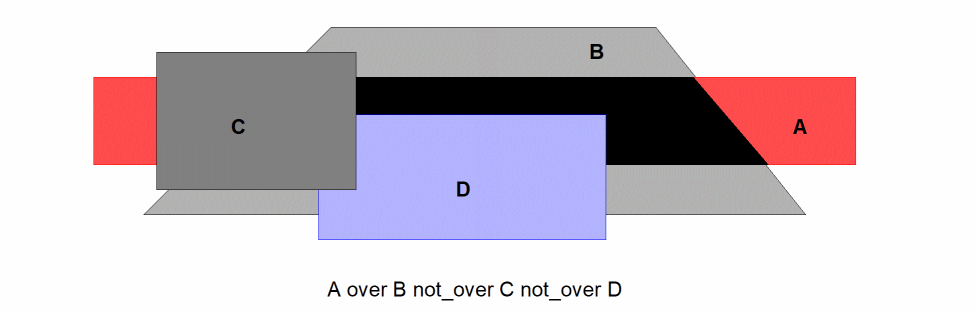
This argument defines the relationship to be measured. It consists of a single operator followed by a layer reference and optional operator-layer reference pairs.
The following are possible operators:
The following are possible operators:
Subsequent layers can be derived layer references or original layer names in quotes.
The sequence of layers and operators is read from left to right. There is a limit of eight layers total for any single measurement.
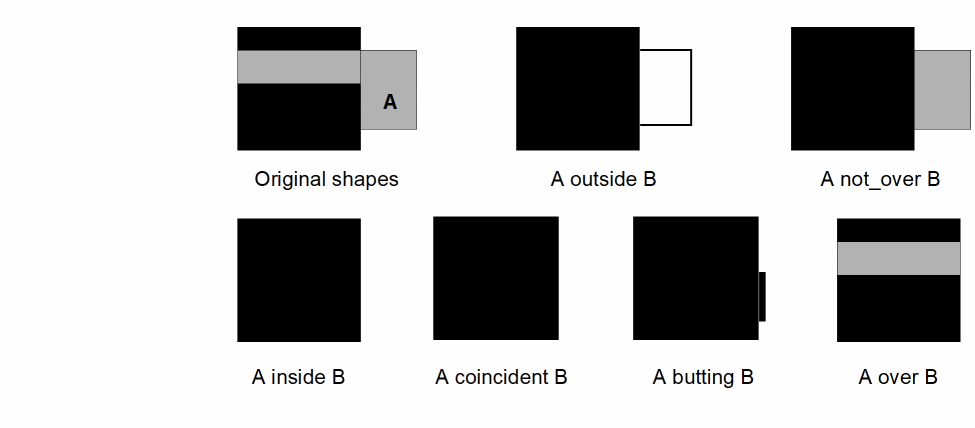
The following figure illustrates the basic operator relationships. The operators other than over and not_over define edges rather than areas.
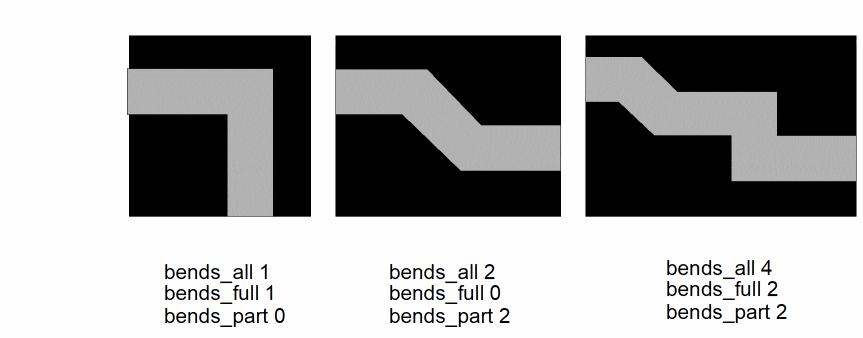
The following figure illustrates the various bend operator options. The same principles apply to the corner operator options, although the angle measurement is applied to the outside (convex) corners rather than the inside (concave) corners.
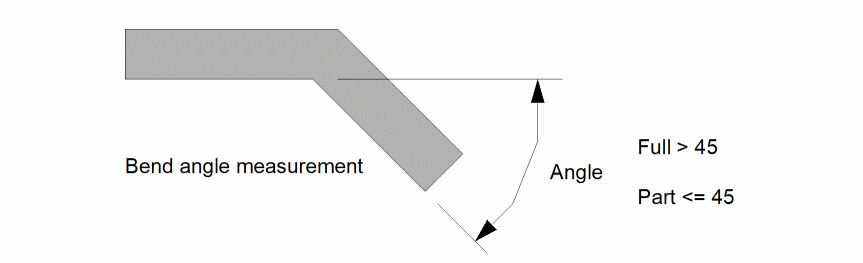
The angle of a bend is measured as the deviation of one edge of the bend from being colinear with the other edge, as illustrated in this figure.
The following figure illustrates a complete multilayer relationship.
An optional coefficient. This is a floating-point number applied as a multiplier to the measured value to change its units. For example, it can be used to change an area measurement in square microns to a capacitance in farads. The choice of the coefficient depends upon the final destination of the data. For example, SPICE™ requires area measurements to be in square meters rather than square microns.
The default value for this coefficient is 1.0.
This optional argument provides the ability to reject measured values because they fall outside the specified limits. It can be used to significantly reduce the amount of data being created by rejecting all measured values which are insignificant.
The format of the limits specification can be one of the following:
low_limit op keyword op high_limit
keyword op low_limit
keyword op high_limit
The limits can be integer or floating-point values or mathematical expressions defining such values.
Operators (op) you can use are as follows:
The keyword can be either ignore or keep.
The following examples illustrate the format.
ignore < .001
keep >= .3
1 < keep < 5
1.3e-4 <= ignore <= 2.7e-3
Examples
Since the number of permutations of this command is large, these examples illustrate some possibilities.
trans_length = measureParameter( length ( gate inside poly ) 0.5 )
trans_width = measureParameter( length ( gate
  coincident poly ) 0.5 )
trans_bends = measureParameter( bends_all ( gate inside poly ) )
poly_perim = measureParameter( perimeter( poly not_over diff ) ignore <.01 )
Data Storage
The following section discusses the commands to save parameter measurements.
nameParameter
nmaeParameter( measurement propname )
Description
Provided for rule deck compatibility with Assura, this command saves device measurements as properties on the appropriate device instances in the extracted cellview.
Prerequisites
Measurements must have been made by a measureParameter command, or derived from them using the calculateParameter command.
Fields
The layer resulting from the measureParameter or calculateParameter commands.
The name of the property, enclosed in quotes, that is created on the device and references the value of the measurement. The value type of the property is a floating-point number.
Examples
nameParameter( wl "wl" )
nameParameter( width "w" )
nameParameter( length "l" )
saveParameter
saveParameter( measurement propname )
Description
This command saves device measurements as properties on the appropriate device instances in the extracted cellview.
Prerequisites
Measurements must have been made by a measureParameter command, or derived from them using the calculateParameter command.
Fields
The layer resulting from the measureParameter or calculateParameter commands.
The name of the property, enclosed in quotes, that is created on the device and references the value of the measurement. The value type of the property is a floating-point number.
Examples
saveParameter( wl "wl" )
saveParameter( width "w" )
saveParameter( length "l" )
Return to top