
10
Extracting Parasitics (LPE)
Introduction
During device and connectivity extraction, an extracted version of the circuit layout is produced. The extracted version contains instances of devices and nets in the form of a true electrical network.
The verification system provides tools for measuring parasitics, performing calculations, and storing the results in the extracted network. Parasitic measurements are saved in the extracted network either as parameter properties on devices or as parasitic devices between nets.
Devices in a circuit which are defined by intentional mask interactions are recognized and extracted by the extractDevice and extractMOS commands. These devices usually appear in the schematic of the circuit.
Devices that exist only as side effects of the mask layout and do not normally appear in the schematic are referred to as parasitic devices. A good example of a parasitic device is the capacitance between two shapes on interconnect layers that cross over each other. The parasitic value involved is derived from measurements of the crossover interaction.
The verification tools can measure a wide range of characteristics of the circuit topology and form parasitic devices from them with a range of options as to how the devices are connected in the circuit (between two nets, one net to ground). The measureParasitic, measureFringe, and multiLevelParasitic command definitions give details of the capabilities.
The commands available for manipulating parasitics are detailed in the command reference section of this chapter. The commands are as follows:
-
measureParasitic
Measures the values of topological relationships that occur due to mask layer interaction. -
multiLevelParasitic
Measures parasitic capacitances from any or all interactions between multiple layers that are ordered by their positions relative to each other. -
measureFringe
Measures the values of topological relationships that occur when mask layers do not overlap. -
complexParasitic
Combines the lateral functionality of measureFringe, and the vertical functionality of multilevelParasitic into a single rule. This combination provides greater accuracy by allowing the measurement of more environmental factors that contribute to capacitance. -
calculateParasitic
Allows calculations to be performed on and between measured values. -
saveParasitic
Saves measured or calculated values as parasitic devices inside the extracted network. -
attachParasitic
Saves measured or calculated parasitic values as parameter properties on devices. The values were derived from measurements made of shapes and relationships outside the device and are associated with the device through some direct or indirect interaction.
Netlisting Parasitics
If your schematic view of the circuit does not contain parasitic devices and your extracted view does, you might have conflicting needs for generation of the netlist of the extracted view. For SPICE simulation, you do want to include the parasitic devices in the netlist; for LVS checking, you do not want to include them.
This is achieved by having two different views for each parasitic device. One view (called the spice view) has the netlisting control commands built in to generate the correct information in a SPICE netlist. The other view (called the lvs view) has information that causes it to be ignored by the netlister.
Two parasitic devices exist in the system library with the lvs view already defined. They are as follows:
Both have a symbol view so they can be seen in the extracted view, a spice view so they can be netlisted in SPICE format, and an lvs view so they can be ignored during netlisting for an LVS run.
Measurement
The measurement process uses the Measure and Calculate commands.
Measure
The measurement commands associate each measurement with one of the following:
- Two electrical net numbers that form the parasitic device terminals
- The measured shape’s number if the measurement is to be attached to a device as a parameter
If different measurements in the same measure command result in the same two net numbers, they are summed together into a single measurement result.
The results from any measurement are given a name. This is a reference to those measurements which can be used in other processing commands.
The measurement commands are measureParasitic, measureFringe, and multiLevelParasitic.
Calculate
A calculation can be performed on the results of a single measurement (referenced by name), between the results of multiple measurements. All the measurement names referenced in the calculation must be associated with the same object. You cannot mix device measurements with parasitic measurements.
The command for calculation is calculateParasitic.
calculateParasitic( cap1 + cap2 )
In this example, the object of both measurements is a parasitic value. Every value has two net numbers associated with it. The plus sign in the calculation says that any values in the measurement of cap1 and cap2 that have the same two net numbers are to be summed together to give a value result with the same two net numbers.
Measurement Operators
The specific measurement operators are detailed in the command reference section of this manual. Some, such as area and perimeter, are obvious and need no further explanation. Others, however, do need clarification.
Length
The term length when applied to a random polygon is meaningless. For a rectangle it could mean the length of the longest axis, but for any more complex shape, no simple definition is possible.
For the purposes of parameter and parasitic measurement, the definition of the length of a shape on a layer is defined as the length of edges of that shape relative to shapes on one or more other layers.
A simple example of this is the length of a transistor gate. In this context it is the length of the gate shape that is totally inside the polysilicon shape, divided by two. The division by two is required because the relationship defined measures both sides of the gate.
Several tools are provided to define the relationship. They are as follows:
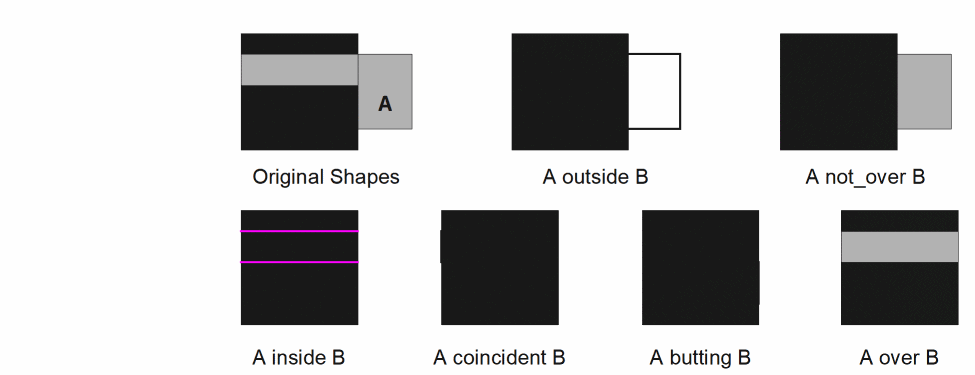
over not_over inside outside butting coincident
The relationship can include up to eight layers.
Bends
The definition of bends has problems similar to those of the definition of length.
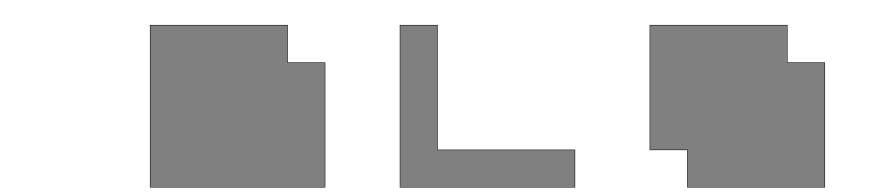
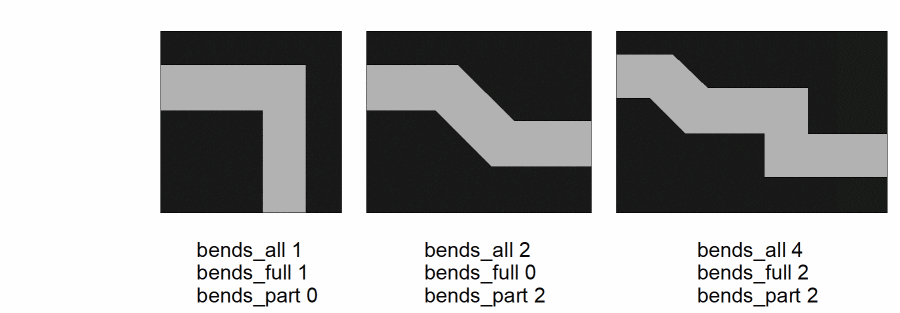
The first two figures are squares with a corner cut out. Does the first one have a bend in it? If you believe it does, consider the third figure. Does this have two bends in it?
Consider also this figure which represents an MOS transistor gate with the source and drain diffusions.
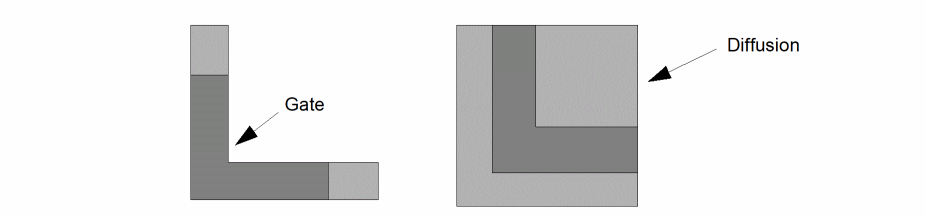
Both gates appear to have bends in them, but one has a bend in the length of the gate and the other has a bend in the width of the gate. The bend is relative to the diffusion layer.
As in the definition of length, the definition of bends depends upon a shape’s relationship to shapes on other layers. The measurement command enables you to define this relationship to other layers as part of the bend determination.
By the program’s definition, a bend is created by an inside corner (concave corner) in a shape, so a count of bends is a count of the inside corners.
In addition to counting bends, you can also use the program for counting corners and angles. A corner is an outside corner (convex corner) in a shape, and an angle is any corner, outside or inside. Therefore, a count of angles is the same as a count of bends plus a count of corners.
NULL Measurements
The parameter and figure mode parasitic extraction measurements have these characteristics.
- If a value is measured to be 0, as is the case with bend counts, the value is treated as any other value. If there are no limits specified, the value is retained. If there are limits specified, the value is checked against them and retained if it conforms to those limits.
- If no measurement is made, as is the case of area of gate over metal when there is no metal under the gate, no measurement is created, and a value of zero is created if the limits specified request a value of zero to be retained. If the limits are not specified, or they exclude the value of zero, no measurement value will be created.
The difference between a value of zero and no measurement is in creation of the resultant property. A value of zero can be used to create a property with a value of zero. If no measurement is made, a property cannot be created.
Measurement Optimization
The measurement capabilities of the system are designed to be very flexible for general use. As a result, the code cannot be optimized as would be the case if the measurements were made from predefined layer relationships, as in the case of MOS transistor width and length in the extractMOS command.
However, some degree of run-time optimization is achieved through other techniques. Since these techniques can be controlled by the way you write your measurement commands, an explanation is required.
Implied Logical Operations
Inside the measurement command, up to eight layers can be defined in a single complex relationship. For example, with five layers, you can write the following:
area metal over poly over cut not_over buried_cut
not_over tub
Such a relationship is processed by looking at all the layers at once. The program does not do a series of two-layer logical operations to derive the required area. This is optimal unless parts of the relationship are used multiple times in which case it would be better to extract that area separately with logical commands. In the previous example, if you had many relationships involving poly over cut, it would be more efficient to write the following:
pcut = geomAnd( poly cut )
area metal over pcut not over buried_cut
not_over tub
area metal2 over pcut over well
Consolidated Measurements
Multiple measurement commands might be processed in one pass of the data. This capability is controlled by the system command optimizer which decides if such consolidation is worthwhile.
The optimization decision is based on the number of common layers in a command. For example, if one measurement involves layers a, b, c and d, and another measurement involves layers b, c, d and e, then they are consolidated, and both measurements are made at the same time.
The exact optimization criterion are not given here since it is not a simple heuristic.
Any number of measurement commands can be consolidated provided the following criteria is met:
- The optimizer decides that the consolidation is worthwhile.
- The resulting number of layers does not exceed the maximum allowed.
- The measurements are contiguous in the command stream, that is, not separated by other commands.
Separate groups of measurement commands in the command stream are optimized separately.
Parasitic Measurement Commands
The following section discusses the parasitic measurement commands.
calculateParasitic
outValue=calculateParasitic( expression [limit] [ground] )
Description
This is used to create new measurement values based on calculations with previously measured or calculated values derived from the measureParasitic or calculateParasitic commands.
Each measureParasitic command enables you to make a single measurement. This command enables you to manipulate one or more of these simple measurements to form more complex parasitic values.
Fields
The measurement results are stored in a layer that contains parasitic values instead of shapes. This layer cannot be processed by any layer manipulation commands. Only commands related to parasitic manipulation can reference the layer. Specifically, these are calculateParasitic and saveParasitic.
This is the calculation expression relating the results of previous measureParasitic or calculateParasitic commands with mathematical operators. Refer to calculateParameter for the definition of available operators.
The precedence of the calculation operators follows normal mathematics conventions; that is, multiply and divide have higher precedence than plus or minus with left to right evaluation of operators with the same precedence. You can include parentheses to override the default evaluation order. The names have to be separated from the operators by spaces to avoid conflict with names containing special characters (for example, +P).
All the layer references from previous measureParasitic or calculateParasitic commands (used in a calculateParasitic command) must be of the same type. You cannot mix measurements made with the figure option of the measureParasitic command with node-based measurements made by any of the parasitic measurement commands.
Each parameter used in a calculateParasitic command references data stored in a file which has to be opened by the program. The number of files available when the program is running depends upon factors outside the program’s control. To reduce the risk of exceeding the number of files available, a limit of ten parameters within a single calculateParasitic command has been set (as a compile-time option). If you exceed this limit, the run does not start. If the required number of files is not available when the calculateParasitic command is executed, the program recognizes the fact and discontinues the run.
If a calculation results in an inappropriate operation, such as dividing by zero, the programs issues a warning message and aborts that particular calculation. Such situations are normally the result of a flawed calculation definition, as would be the case if a division is requested by a value that can be measured as zero or nonexistent.
 x = area metal over poly
y = area metal over diff
calculate x/y
If a shape/node of metal overlaps poly but not diff, there is no y measurement that results in a value of 0. This calculation then fails.
This optional argument provides the ability to reject calculated values because they fall outside the specified limits. It can be used to significantly reduce the amount of data being created by rejecting all values that are insignificant.
The format of the limits specification can be one of the following:
low_limit op keyword op high_limit
keyword op low_limit
keyword op high_limit
The limits can be integer or floating-point values or mathematical expressions defining such values.
You can use the following operators:
The keyword can be either ignore or keep.
You can use the following limit specifications:
 ignore < .001
keep >= .3
1 < keep < 5
1.3e-4 <= ignore <= 2.7e-3
This optional argument provides the ability to convert the measured parasitic value into two separate measurements between the measured nets and ground. The grounding is performed if the parasitic value meets the specified limit.
The format of the ground specification can be one of the following:
low-limit op ground op high-limit
ground op low-limit
ground op high-limit
The limits can be integer or floating-point values or mathematical expressions defining such values.
You can use the following operators:
Examples
The following examples illustrate various permutations of the command.
cap = calculateParasitic( c1 + c2 + c3 + c4 ignore < 0.1 )
cap = calculateParasitic( (log(c1) * 1.3e-6 ) + ( c2 * 0.054 ) + 1.4
     ignore < 0.1 )
cap = calculateParasitic( c1 + c2 ground < 0.0001 ignore < 0.00000001 )
complexParasitic
[outValue =] complexParasitic(
tableName
(layer list)
[grounded factor]
[lateral(layer_l1 [layer_l2])]
[vertical(layer_v1 layer_v2)]
[blocking(layer_b1 layer_b2 layer_b3)]
[model terminal1 terminal2 property]
)
Description
The complexParasitic command provides a capability for extracting parasitic capacitance that is more accurate than the multiLevelParasitic command. In addition to increasing the accuracy for total capacitance measurement in normal layouts, this command improves the accuracy for more specialized structures and for cross-coupled capacitance.
The complexParasitic command is similar in its methodology to the multiLevelParasitic command, but it measures more layout relationships and uses a look-up table for capacitance derivation rather than equations. The complexParasitic command hides the details of the extraction, which make the syntax very simple, but requires the use of the Coefficient Generator to create the capacitance look-up table.
Unlike the multiLevelParasitic command, the complexParasitic command can be self contained. One specification of this command initiates all the required capacitance extraction for all layer combinations and relationships (lateral and vertical). In addition, it can instantiate the resultant capacitances into the extracted view of the design, hence negating the need for the generation of intermediate storage files and use of the calculateParasitic and saveParasitic commands.
When you do provide the optional model, terminal, and property name information, no outValue is produced and all capacitances are instantiated into the extracted view. When you do not provide the optional model, terminal, and property name information, the outValue is produced and can be used in calculateParasitic and saveParasitic rules.
The section, Measurement Types for complexParasitic details the topological relationships being measured by this command.
Prerequisites
Each layer defined for capacitance extraction must be a connected layer or derived from a connected layer by a command that propagates connectivity. You can include resistive layers, but they cannot be derived from a connected layer.
The number of layers defined for this command must match the number of layers defined in the capacitance look-up table that the Coefficient Generator creates. You must make sure that the Coefficient Generator generated this capacitance look-up table for the same technology as the design being measured.
Fields
The measurement results are stored in a layer that contains parasitic values instead of shapes. This layer cannot be processed by any layer manipulation commands. Only commands such as calculateParasitic and saveParasitic that are related to parasitic manipulation can reference this layer.
The name, in quotes, of the capacitance look-up table for the technology of the design being processed. The Coefficient Generator must generate this capacitance table.
A list, in parentheses, of layer names separated by spaces. For example
(substrate poly metal1 metal2 metal3)
The layers must be ordered from the lowest (usually substrate) first to the highest last. The number of names must match the number of layers defined in the technology file used to create the capacitance look-up table. The names need not be the same as those in the technology file, but they must be functionally equivalent. For a resistive layer, the layer name must be the name of the layer from which resistance was extracted.
Optional keyword that converts the measured parasitic values into two separate measurements between the measured nets and ground.
Without this keyword, the tool stores each measurement between two nets as a capacitance with the two nets as its terminal connections. If you specify the grounded keyword, each measurement between two nets is converted into two capacitors. Each capacitor will have one of the original nets for one of its terminal connections, and ground as the other terminal connection.
If you specify the groundNet command, the ground net for each grounded capacitor is the net specified by the groundNet command. Otherwise, the ground net is specified as 0!.
An optional floating point number used to modify the capacitor values when the grounded option is used. Each grounded capacitance value will be multiplied by this factor. If not specified, the tool uses the default of 1.0.
An option which specifies that the tool needs to do a lateral capacitance measurement. If you have specified only layer_l1, the tool does a same layer lateral measurement for that layer. If you have specified layer_l1 and layer_l2, the tool does a two layer lateral measurement. Use of this option prevents the tool from performing the complete set of measurements that it is capable of. You can give multiple lateral and vertical options to specify the set of layers and layer pairs to be measured.
An option which specifies that the tool needs to do a vertical capacitance measurement between layer_v1 and layer_v2. Use of this option prevents the tool from performing the complete set of measurements that it is capable of. You can give multiple lateral and vertical options to specify the set of layer pairs to be measured.
An option which specifies that the tool needs to use the shapes on layer_b1 to prevent the recognition of vertical capacitance between shapes on layer_b2 and layer_b3. The layer_b1 may not be a layer specified in the layer list argument. You can give multiple blocking options. Each use of the option will only prevent vertical measurement when the pair of layers given is being measured. The option blocking(foo m1 m2) will not prevent a vertical measurement between m1 and m3. You must use a separate blocking option for each layer pair to be blocked.
The optional parasitic capacitor model name consisting of a character string enclosed in quotes. The string must define the model name and optionally the view name and the library name. If you leave out the view name, the tool defaults to symbol. If you provide this optional value, the tool creates an instance of this model in the extracted view of the design for each capacitor.
The name, in quotes, of the first terminal of the parasitic capacitor model. This argument is required if the model is specified, and invalid if the model is not specified.
The name, in quotes, of the second terminal of the parasitic capacitor model. This argument is required if the model is specified, and invalid if the model is not specified.
The name, in quotes, of the property that is created on the capacitor instance to hold the capacitor value. The value type of the property is a floating point number. This argument is required if the model is specified, and invalid if the model is not specified.
Example
complexParasitic(
   "myTable" (substrate diffusion metal1 metal2 metal3)
   grounded  0.75
   "capacitor" "plus" "minus"  "cap"
)
cp= complexParasitic(
   "mytable" (substrate diffusion metal1 metal2 metal3)
   grounded 0.75)
cp=calculateParasitic (cp * 1.0e-15)
   saveParasitic (cp "plus" "minus" "cap" "capacitor")
Measurement Types for complexParasitic
There are three different basic measurement types: vertical, single layer lateral and two layer lateral. Each measures different layer relationships. The Coefficient Generator determines the combinations of layers to be measured for each measurement type.
Vertical Measurements
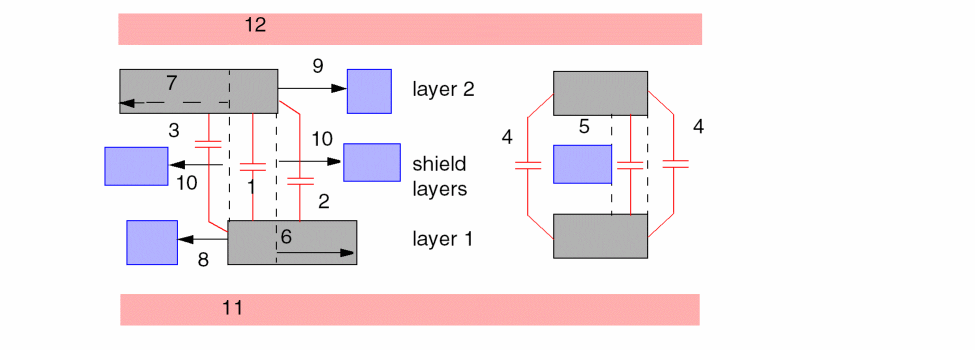
The following vertical measurements will be made between two layers based on the area of overlap of the two layers not including the area shielded by intervening layers. This overlap area is referred to as the caparea.
Figure 10-1 Vertical Measurements
Single Layer Lateral Measurements
The following lateral measurements will be made between shapes on a single layer based on the area (caparea) formed by the separation between the shapes.
Figure 10-2 Single Layer Lateral Measurements

Two Layer Lateral Measurements
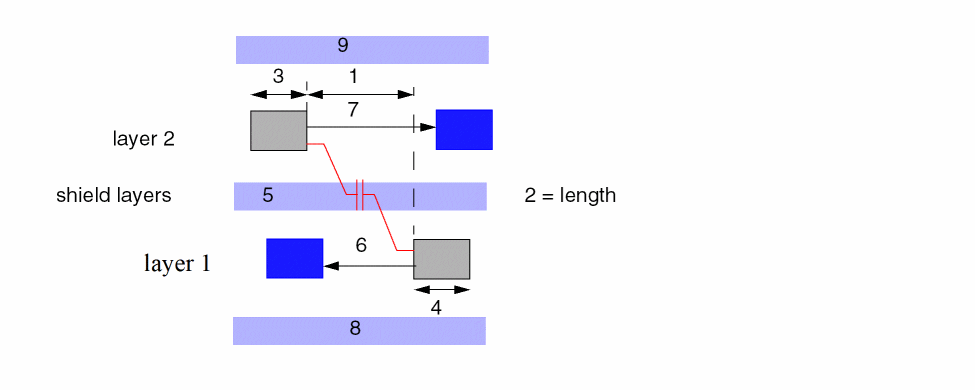
The following lateral measurements will be made between shapes on two layers based on the area (caparea) formed by the separation between the shapes.
Figure 10-3 Two Layer Lateral Measurements
measureFringe
outValue = measureFringe( layer1 [layer2] calculate
[printls "filename"] [grounded] [ML Flayer] [limit] drc_command )
Description
This command measures the relationships between shapes where the relationship can be defined with a DRC command. This means relationships that do not involve layer overlap or interaction, such as fringe or sidewall capacitance, can be measured.
The program bases its measurement on the edges of the layers that conform to the defined DRC relationship. It is limited to measuring the length and separation of those edges. Since these two parameters are available in each measurement, the measureFringe command must contain sufficient information to derive a single measurement result from them. To this end, the command contains its own formula definition.
The two shapes involved in each DRC relationship, whether they be from one or two layers, provide the net numbers that are associated with the measurement for the parasitic device result. If both net numbers are the same, no measurement is made. All measurements with the same two net numbers are summed together.
You can also use this command to pass on information about lateral shape relationships to the multiLevelParasitic command so you can adjust the vertical capacitance measurement based on the lateral capacitance configurations, or you can generate an additional lateral capacitor to compensate for the vertical capacitance configurations.
Prerequisite
The layers referenced must be connected layers.
Fields
The measurement results are stored in a layer that contains parasitic values instead of shapes. This layer cannot be processed by any layer manipulation commands. Only commands related to parasitic manipulation can reference the layer. Specifically, these are calculateParasitic and saveParasitic.
The primary layer to be measured. This must be a connected layer.
An optional second layer to be processed in the measurement. If this layer is not specified, the DRC check defined must be sep (separation) so as to be applicable to a single layer. With this second layer defined, the DRC check is applied to both layers.
The DRC command finds pairs of edges that conform to the defined relationship. Pairs of edges are measured individually to determine their length and separation. This calculate statement derives a single measurement result from these two parameters. The statement consists of the keyword calculate followed by the formula in parentheses. Within the formula, the length and separation of the edges are represented by the symbols l and s.
The allowable procedures in the formula are the same as those allowed in the calculateParameter command. Refer to calculateParameter for the definition of available operators.
The symbols s and l are the only names allowed in the calculation. Names generated by other measureParasitic and calculateParasitic commands are not allowed. Otherwise, all normal calculation capabilities are available.
The calculation is applied to each pair of edges before any summing of measurements having the same net numbers.
Typical examples of calculate commands would be
 calculate( l / s )
calculate( l / log(s) + 2.0 )
Normal mathematical order of precedence applies.
If a calculation results in an inappropriate operation, such as dividing by zero, Diva verification issues a warning message and aborts that calculation.
An optional keyword you use to request text file output of the measured length and spacing values. You use this keyword in conjunction with a file name.
The text file with the name “filename” is generated in the current directory. It has the following format:
 ;Node name to number mapping.
vdd 1
gnd 9
q* 13
q  15
;length spacing net1 net2
5.500000 1.000000 1 13
2.500000 0.500000 1 13
2.500000 0.500000 1 15
9.500000 1.000000 9 15
The file consists of two sections. Each section is introduced by a single comment line preceded by a semicolon. The first section maps the user- defined labels to the internal net numbers. The second section lists each fringe measurement in terms of its length, spacing, and the two net numbers between which the measurement was made.
This option lists the original length and spacing values measured in step 2 prior to any calculation, summation, or filtering. For any pair of net numbers, the program can create multiple entries in the file where each entry represents a different pair of edges of the shapes forming those nets.
If a file exists in the current directory with the same name as the “filename” specified with this option, that file is overwritten. To use this option with multiple measureFringe commands, you must specify a different file name for each usage; otherwise, each file generated overwrites the file generated by the previous command.
The program optimizer normally eliminates any command whose output is not used. If you specify this option in the measureFringe command, even if the outValue is not used elsewhere, the command executes and the text file is created.
Optional keyword that converts the measured parasitic value into two separate measurements between the measured nets and ground.
Without this keyword, each measurement between two nets is stored relative to those two nets. If you specify the keyword, each measurement between two nets is converted into two measurements, both having the same value as the original measurement. Each measurement is stored relative to one of the nets and ground.
If you specify the groundNet command, the ground net is the net specified in the groundNet command. If you do not specify groundNet, the ground net is specified as 0!.
The summation of all values for any given net pair remains unaffected by this keyword. However, with the keyword, all measurements for any net for a single measureFringe command are summed together because the second net is always ground. You can then use the calculateParasitic command to sum all measurements for each net into a combined value for the net.
Optional argument that lets you reject measured values because they fall outside the specified limits. It can be used to significantly reduce the amount of data being created by rejecting all measured values which are insignificant.
The check for limits is made after the measured values have been summed for the same net numbers.
The format of the limits specification can be one of the following:
 low_limit op keyword op high_limit
keyword op low_limit
keyword op high_limit
The limits can be integer or floating-point values or mathematical expressions defining such values.
You can use the following operators:
The keyword can be either ignore or keep.
You can use the following limit specifications:
 ignore < .001
keep >= .3
1 < keep < 5
1.3e-4 <= ignore <= 2.7e-3
Keyword that introduces the name of the layer, Flayer, that passes on information to the multiLevelParasitic command.
Layer that passes on information to the multiLevelParasitic command and supplies an output layer you can use as the input in subsequent multiLevelParasitic commands.
Whenever Diva finds a measureFringe layer configuration that matches the DRC specification, the relevant information on the associated edges and the spacing value are stored in the Flayer.
For further information on the use of the ML Flayer option, refer to the “multiLevelParasitic”.
The DRC check that defines the relationship to be measured. It uses the standard DRC format for specifying the check, dimensional range, and options. The only valid checks are sep, enc, and ovlp. The options diffNet and edge are always in effect. Examples of the command format are as follows:
 sep < 2 parallel opposite
1 < sep < 3 app >s 4
The following figure illustrates how the length and separation measurements are derived from the edges extracted through the DRC command. The following example shows the sep command.
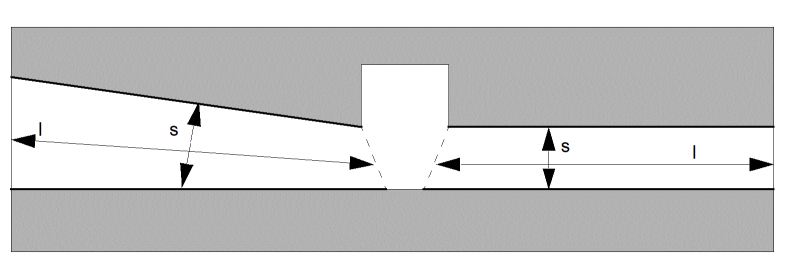
The length l is the average length of the two edges and the separation s is the average separation between them.
Whether the sep command is used for fringe or side-wall capacitance, or encl and ovlp are used for some other relationship, the result is always the measurements between two edges.
The measureFringe command operates in the following sequence:
Examples
The number of permutations of this command is large. The following examples illustrate some possibilities.
fcap = measureFringe( metal calculate ( l / s ) sep < 3
  parallel opposite )
mp = measureFringe( metal poly calculate( sqrt(l + 3) /
  log(s) ) ignore < 0.1 1 < sep <= 3 parallel )
lap = measureFringe( poly1 poly2 calculate( l * 1e-6)
  ignore < 1e-6 ovlp <= 1 )
measureParasitic
outValue = measureParasitic( operator ( layer1 [operator layer2]... ) [coeff] [application] [grounded] [polarized]] [limit] )
Description
This command measures shapes or the relationships between shapes to determine parasitic characteristics.You can later store those measurements as parasitic devices using the saveParasitic command, or you can use them in calculations using the calculateParasitic command to derive more complex values for subsequent parameters or parasitics.
Prerequisites
If the net options are used, at least the first layer referenced must have been a connected layer.
Fields
The measurement results are stored in a layer that contains parasitic values instead of shapes. This layer cannot be processed by any layer manipulation commands. Only commands related to parasitic manipulation can reference the layer. Specifically, these are calculateParasitic and saveParasitic.
This argument defines the relationship to be measured. It consists of a single operator followed by a layer reference and optional operator-layer reference pairs.
The possible operators are as follows:
Possible operators are as follows:
The following figure illustrates the basic operator relationships.
The following figure illustrates the various bend operator options. The same principles apply to the corner operator options, although the angle measurement is applied to the outside (convex) corners rather than the inside (concave) corners.
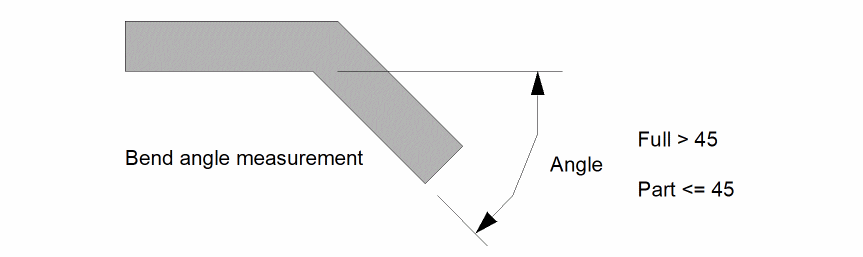
The angle of a bend is measured as the deviation of one edge of the bend from being colinear with the other edge as illustrated in this figure.
The following figure illustrates a complete multilayer relationship.
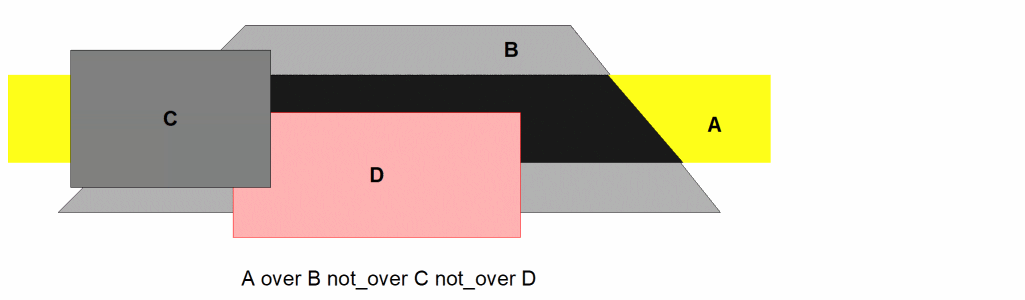
An optional coefficient. This is a floating-point number applied as a multiplier to the measured value to change its units. For example, it can be used to change an area measurement in square microns to a capacitance in farads. The choice of the coefficient depends upon the final destination of the data. For example, SPICE requires area measurements to be in square meters rather than square microns. The default value for this coefficient is 1.0.
The application is used to define how the measurements are to be processed. Primarily there are two modes; one for creating parasitic devices and one for measuring general shapes, usually used for creating parameters on devices (see the attachParasitic section in this chapter). The parasitic device application has a number of alternative modes used to define how the parasitic device terminals are to be connected.
Merged layer shapes are being measured, regardless of devices or interconnect. The results are stored per shape and can be used by the attachParasitic command to add parameters to devices measured from any directly or indirectly associated shapes.
Each parasitic measurement must be associated with two electrical nets representing the terminals of the parasitic device. The first net is derived from layer1 (the first layer referenced in the command). The second net is derived from the next layer referenced in the command, which is preceded by a operator of butting, coincident, over, or inside.
If the second net is the same as the first net, that measurement is ignored.
If you do not specify a second layer in the command, or if all subsequent layers are preceded by not_over or outside, a default second net number is allocated. The second net is the net name you specify with the groundNet command. If no groundNet is specified, the net number is 0!
The net number 0! is used because 0 is a net number that doesn’t occur during normal extraction, so it cannot conflict with any other net number. The ! adopts the convention used by the schematic editor to designate a global net.
All measurements made within a single measureParasitic command that have the same pair of nets allocated are summed together to form a single value for the net pair. If you use the polarized option, the values are only summed if the nets occur in the same order (see the polarized option). You can process the final results by specifying the calculateParasitic command or by saving them as parasitic devices using the saveParasitic command.
This application is the same as two_net except the measurement is associated only with the net specified by layer1 (the first layer referenced in the command). The second net is always defined by the groundNet command. If you do not specify groundNet, the net is named 0!, regardless of the other layers and operators referenced.
All measurements made within a single measureParasitic command that have the same net allocation are summed together to form a total value for the net.
The net numbers for this application are selected in the same way as the two_net application, with the following addition. It selects a third net number from the next layer encountered which is preceded by a operator other than not_over or outside. If the third net number is the same as the first net number, the measured value is ignored.
If you want the area of layer A over layer B, but want the parasitic device to be connected between layer A and the background layer, you would write the measurement as A over background over B, and use the two_net application. However, if the measurement doesn’t apply when layers A and B are the same net, then a spurious measurement is made. The three_net application enables you to reject the measurement in this case.
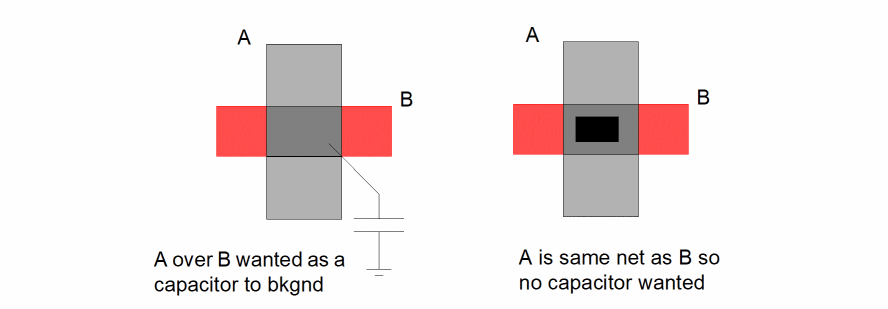
Optional keyword that converts the measured parasitic value into two separate measurements between the measured nets and ground.
Without this keyword, each measurement between two nets is stored relative to those two nets. If you specify the keyword, each measurement between two nets is converted into two measurements, both having the same value as the original measurement. Each measurement is stored relative to one of the nets and ground.
If you specify the groundNet command, the ground net is the net specified in the groundNet command. If you do not specify groundNet, the ground net is specified as 0!.
The summation of all values for any given net pair remains unaffected by this keyword. However, with the keyword, all measurements for any net for a single measureFringe command are summed together because the second net is always ground. You can then use the calculateParasitic command to sum all measurements for each net into a combined value for the net.
The polarized option is not meaningful if you use it with the grounded option. If you specify both of these options, it will be flagged as illegal.
The one_net option has the same effect as the grounded option, so you do not need to specify both. However, if you do specify both one_net and grounded, it will not be flagged as illegal.
Additional option valid only with the parasitic device applications of one_net, two_net, and three_net. Without this option, all measured values in a single measureParasitic command are summed if they have the same net numbers, regardless of which layers contributed to the numbers. For example, if you measure the area of layer A over layer B and have two results, one with layer A as net 1 and layer B as net 2, and the other with layer A as net 2 and layer B as net 1, the measurements are summed into a single value between nets 1 and 2.
With this option, the measurements are only summed if the nets are the same numbers as the same layers. In the previous example, the result is two measurements, one between nets 1 and 2 and the other between nets 2 and 1. This facilitates the creation of directional parasitic devices such as diodes. The saveParasitic command allows you to define which layer is to form which terminal of the parasitic device result.
This optional argument provides the ability to reject measured values because they fall outside the specified limits. It can be used to significantly reduce the amount of data being created by rejecting all measured values that are insignificant.
For the parasitic measurements, the check for limits is made after the measured values have been summed for the same net numbers.
The format of the limits specification can be one of the following:
 low_limit op keyword op high_limit
keyword op low_limit
keyword op high_limit
The limits can be integer or floating-point values or mathematical expressions defining such values.
You can use the following operators:
The keyword can be either ignore or keep.
You can use the following limit specifications:
 ignore < .001
keep >= .3
1 < keep < 5
1.3e-4 <= ignore <= 2.7e-3
Examples
The number of permutations of this command is large. The following examples illustrate some possibilities.
cap = measureParasitic( area ( poly over metal )
  0.03 two_net )
diode = measureParasitic( area ( ndiff over pbase
  not_over ntub ) two_net polarized )
multiLevelParasitic
outValue = multiLevelParasitic(
layers( layer1 layer2 ...)
cap( layerA layerB c1 c2 [c3[c4]]
 [shield( layerS c5)
 [fringe( layerAB layerF [vertical( ...s...)]]
[grounded]
[limit]
)
Description
The multiLevelParasitic command measures the areas and edge lengths of multilayer shape relationships in order to create parasitic capacitance. This command differs from the measureParasitic command because it can handle layer priority with shorted and intervening layers for any stack of layers.
You can use the saveParasitic command to store the measurements later as parasitic devices, or you can use the calculateParasitic command for calculations to derive more complex values for subsequent parasitics.
Prerequisites
Each layer that forms a terminal of a capacitor must be a connected layer or derived from a connected layer by a command that propagates connectivity.
Fields
The measurement results are stored in a layer that contains parasitic values instead of shapes. This layer cannot be processed by any layer manipulation commands. Only commands related to parasitic manipulation can reference the layer. Specifically, these are calculateParasitic and saveParasitic.
The results of the measurement are a separate capacitance value for each pair of electrical nets encountered during the layer-to-layer measurement process. Values are not kept separate for each pair of layers involved.
A list of the layers to be processed. This argument has the following format:
layers( layer1 layer2 .........layerN )
This command can process a maximum of 16 layers at one time. This limit includes layers specified in the layers list, plus any special layers referenced in the fringe option.
The order of the layers defines the priority. The first entry is considered the lowest layer in the layout and the last entry is considered the highest layer in the layout. The list must contain the initial keyword layers. The list must contain at least two layers. If a layer is to be used as the terminal of a capacitor, it must be a connected layer or derived from a connected layer by a command that propagates connectivity.
For those layer pairs for which you provide coefficients, the program measures the capacitance providing that
The following diagram illustrates how the layers and capacitance measurements are related.
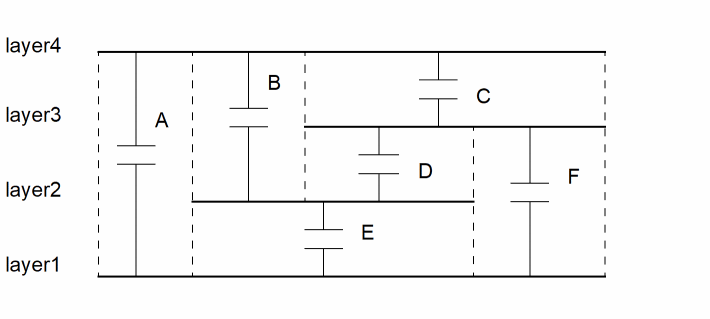
The area of capacitance between layer1 and layer4 (labelled A) is the overlap area of these two layers minus any area of the intervening layer2 and layer3. This is equivalent to
layer1 and layer4 andNot layer2 andNot layer3
If layer1 and layer4 are on the same electrical net, the capacitance labelled A is not created. The same definition applies to all other pairs of layers.
layers( Diff Poly Metal1 Metal2 )
Consists of one or more definitions of the electrical coefficients between pairs of layers. There is one definition for each pair of layers for which capacitance is to be measured. This argument has the format
cap( layerA layerB coeff1 coeff2 [coeff3 [coeff4]] [shield()] [fringe()])
You must specify the initial keyword cap. The entries layerA and layerB must be two of the layers defined in the previous layer list. The coeff entries define the values to be applied as coefficients to convert area and length measurements into true capacitance values. You must provide at least one of these coefficients for the definition to be valid. You can leave unwanted coefficients blank if they trail defined coefficients; otherwise, you must set them to zero or nil.
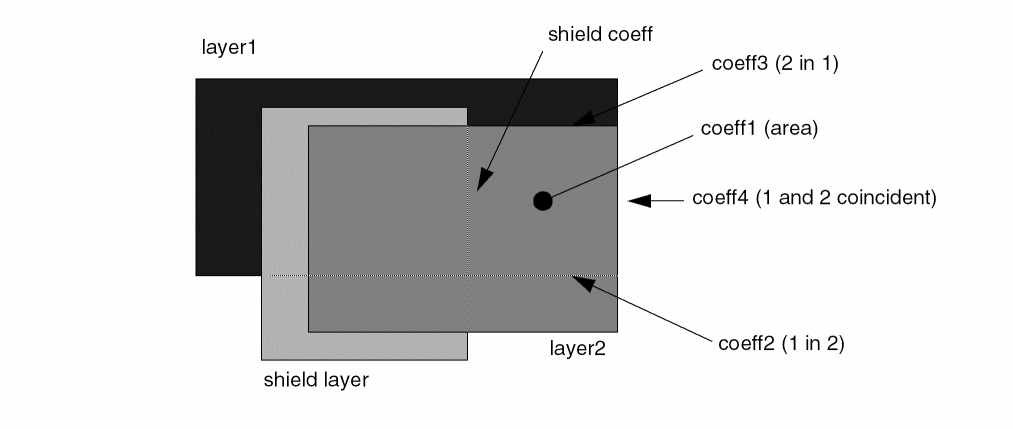
The first coefficient coeff1 applies to the area formed between layer1 and layer2. This coefficient applies regardless of how that area is formed, as shown in the following diagram.

The second and third coefficients apply when an edge of one layer forming the capacitance area is directly over the other layer, as illustrated in the following diagrams.
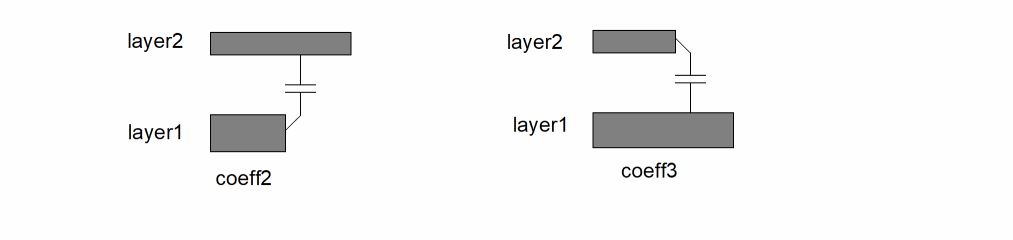
The coeff2 applies to edges of layer1 over an area of layer2. The coeff3 applies to edges of layer2 over an area of layer1. If coeff3 is left blank, the same value as coeff2 is used.
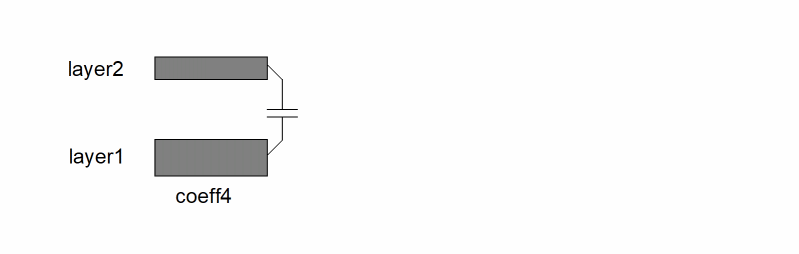
The fourth coefficient applies when the edge of a capacitance area is formed by the coincidence of the edges of the two layers, as illustrated by the following diagram.
You can use this option to adjust the total capacitance between two layers when there are intervening (or shielding) layers forming the edge of the capacitance area, as shown in the following figures.
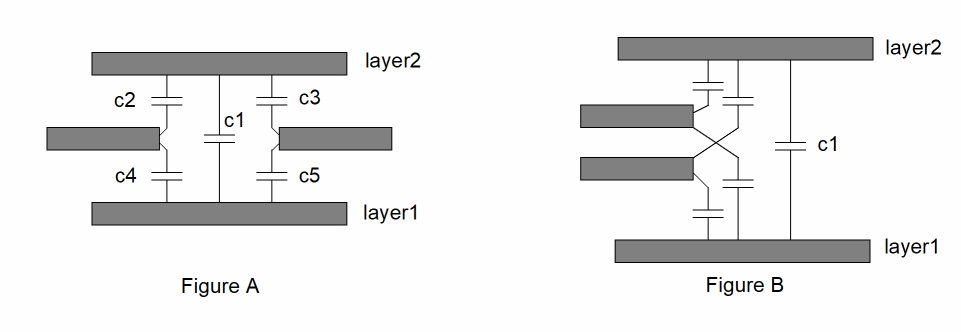
The area capacitance is shown as c1 in both figures. The value of the area capacitance should be less than if it was based on the area of overlap. The intervening edges of other layers reduce the value of c1. You can specify a negative coefficient in the shield option to obtain this effect.
The coefficient you provide must account for the effect of the shielding layer on both the upper and lower capacitance layers. In Figure A, the coefficient must provide for the adjustment of capacitors c2 + c4 or c3 + c5.
You can provide one shield option entry for each intervening layer. The effect of multiple shielding layers forming a single shielding edge, as shown in Figure B, is cumulative.
The shield option has the following syntax:
The following diagram illustrates a plan view of an overlap area with the appropriate coefficients applied.
The fringe option has the following syntax:
fringe( capLayer MLlayer vertical( ...s...) lateral( ...s...))
You can use either or both of the vertical sub-options and lateral sub-options.
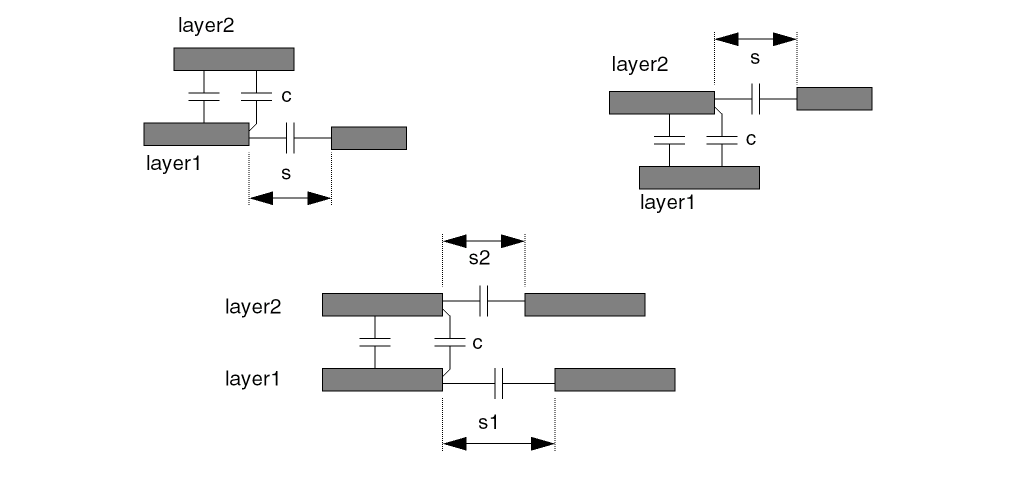
The following diagram illustrates the possible relationships.
Either layer1 or layer2 of the cap argument.
A pseudo layer generated by a prior measureFringe command referencing the capLayer. This pseudo layer passes information between the measureFringe and the multiLevelParasitic commands.
Provides a user-defined calculation based on the variable s, which Diva uses to calculate the change in coefficient to be applied to the vertical edge capacitance. This coefficient is added to any other vertical component coefficients before the final capacitance value for an edge is calculated.
Provides a user-defined calculation based on the variable s, which Diva uses to calculate a coefficient used to generate a new capacitor between the lateral shapes. This capacitance represents a change (delta) from the original capacitance derived from the measureFringe command and should be added to that value by using the calculateParasitic command.
To manually add the lateral fringe adjustment to the main fringe measurement, add the output of this multiLevelParasitic command to the output of the measureFringe command. This is done with the calculateParasitic command.
 lateralCap = measureFringe (.........
verticalCap = multiLevelParasitic (.........
totalCap = calculateParasitic ( lateralCap +
           verticalCap )
saveParasitic (totalCap .........
Diva supplies the separation value of the lateral shapes as the variable s. You can provide any calculation commands. The result is a positive value unless you explicitly apply a negative sign to one of the arguments. Because lateral-vertical relationships usually reduce the vertical and lateral capacitance, the calculations can result in a negative coefficient.
A calculation is made only when an edge of a capacitance area abutts an area that previously formed a fringe capacitor. The value of s for the calculation will be the specific spacing value used for that fringe calculation.
You can specify a separate fringe argument for each of the two layers in the cap argument.
If both layers in the cap argument have lateral relationships (and associated fringe sub-arguments with the lateral statement) and both apply to a common edge of a capacitance area, both calculations are made and both resultant coefficient values are added to the normal edge coefficient.
If the lateral spacing between shapes is equal to zero, no lateral or vertical adjustments are made. The following diagram illustrates the two scenarios where zero separation can occur.
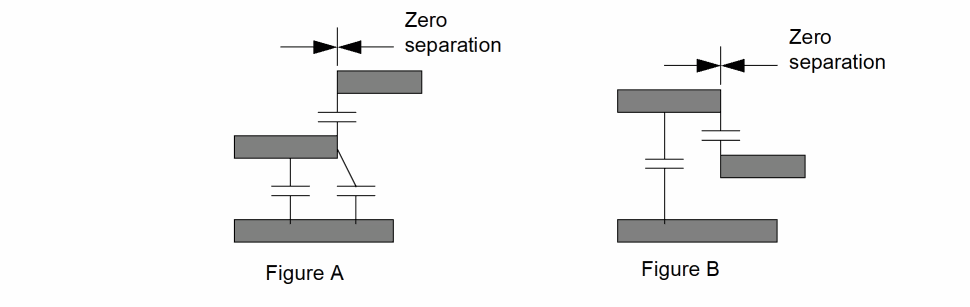
In Figure A, there is no interaction between the zero separation fringe capacitor and the vertical edge capacitor.
In Figure B, the layer forming the zero width separation is acting as a shield layer so there is no vertical edge capacitor to be adjusted, and there is no adjustment made to the zero separation fringe capacitor.
Optional keyword that converts the measured parasitic value into two separate measurements between the measured nets and ground.
Without this keyword, each measurement between two nets is stored relative to those two nets. If you specify the keyword, each measurement between two nets is converted into two measurements, both having the same value as the original measurement. Each measurement is stored relative to one of the nets and ground.
If you specify the groundNet command, the ground net is the net specified in the groundNet command. If you do not specify groundNet, the ground net is specified as 0!.
The summation of all values for any given net pair remains unaffected by this keyword. However, with the keyword, all measurements for any net for a single measureFringe command are summed together because the second net is always ground. You can then use the calculateParasitic command to sum all measurements for each net into a combined value for the net.
Optional argument that lets you reject measured values because they fall outside the specified limits. You can use it to significantly reduce the amount of data being created by rejecting all measured values that are insignificant.
The check for limits is made after the measured values have been summed for the same net numbers.
The format of the limits specification can be one of the following:
 low_limit op keyword op high_limit
keyword op low_limit
keyword op high_limit
The limits can be integer or floating-point values or mathematical expressions defining such values.
You can use the following operators:
The keyword can be either ignore or keep.
You can use the following limit specifications:
 ignore < .001
keep >= .3
1 < keep < 5
1.3e-4 <= ignore <= 2.7e-3
The following is an example of the cap option:
cap( metal1 diffusion 0.74 0.12 0.23 0.14
      shield( poly -0.05)
      fringe( metal1 Fmetal vertical( -0.15 / s )
)
Assuming that metal1 and diffusion are in the same order in the layers list
Examples
The number of permutations of this command is large. The following examples illustrate some possibilities.
cap = multiLevelParasitic(
   layers( diff poly metal )
   cap( diff poly 0.35 nil )
cap( poly metal nil 0.13 )
ignore < 0.1 )
cap = multiLevelParasitic(
   layers( diff poly metal )
   cap( diff poly 0.35 nil )
cap( diff metal 0.2 nil ))
Data Storage
attachParasitic
attachParasitic( measurement propname device_layer [attach_layer][shared] )
Description
The figure option of the measureParasitic command enables you to measure the parasitic properties of general circuit shapes other than device recognition polygons. This command attaches these measurements to devices as properties. The association of the measurement and the device is through direct interaction between them, or indirect interaction through another layer.
This command is similar to the saveParameter command in that it creates properties containing measured values on device instances. In this case, however, the measurements are parasitic values derived from the measureParasitic command using the figure option, or from the calculateParasitic command for the same figure measurements rather than direct device measurements using the measureParameter command.
The following figure illustrates various modes of association. The device figure is D, and the measured figure is F.
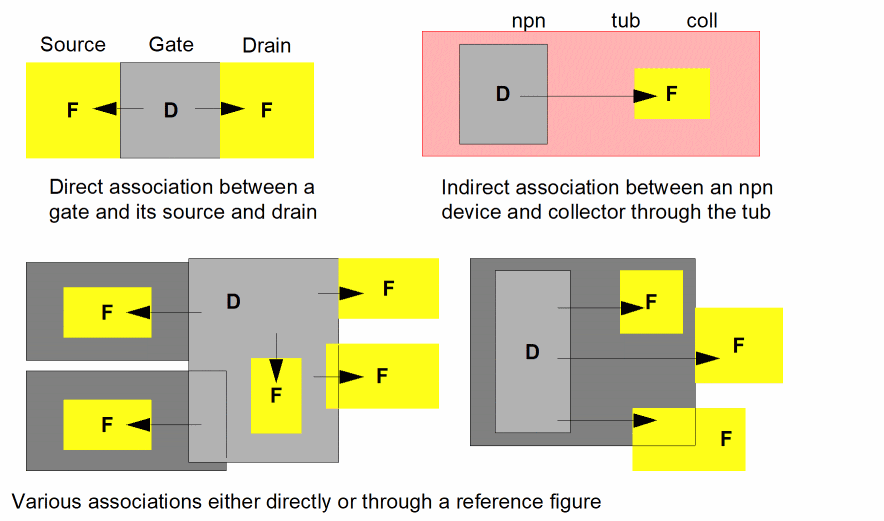
Prerequisites
Measurements must have been made by a measureParasitic command with the figure option, or derived from them using the calculateParasitic command.
Fields
The value file reference for the measurement made with the measureParasitic or calculateParasitic commands.
This argument defines the property name, which is created on the device to contain the measured value. It can have one of three forms.
The layer reference for the device recognition polygon in the extractMOS or extractDevice command used to create the devices to which this attachParasitic command is to apply.
This entry can also be a layer that is derived from a device recognition layer by a selection command such as geomInside or geomGetTexted. For each shape on this layer, the property is attached to the original device from which the shape was derived.
An optional layer reference or list of layer references enclosed in parentheses, defining the layer to be used to associate the measured figures with the device recognition figures. A measured figure is associated with the device figure if they both have some interaction with a common attach figure. Association can be by touching, lapping, or nesting. If a list of attach layers is defined, they are merged prior to the association.
If an attach layer is not defined, the measured figure must have a direct association with the device figure.
It is possible to have multiple associations with multiple attach figures, device figures, or measured figures. All such associations are broken down into single associations. If one measured figure is associated with multiple devices, its value is attached to each device. If a single measured figure is associated to a device through multiple attach figures, only one association is formed. If multiple measured figures are associated with a single device, each value is attached according to the property name definition of the command.
This optional keyword allows the value of a single measured figure to be proportioned out according to the number of devices it attaches to. The measured value is divided by the number of devices attached to it, and the value result is stored on each device.
Without this option, the complete measured value is stored on every device to which it attaches.
Examples
Attach the source-drain area to the device as a single capacitance.
attachParasitic( sdarea "sdcap" gate )
Attach the source-drain area to the device as two capacitors. Also share the value between all associated devices.
attachParasitic( sdarea "scap" "dcap" gate shared )
Attach the source-drain area to the device as two capacitors correctly ordered to correspond to two device terminals. Also share the value between all associated devices.
attachParasitic( sdarea ( "scap" "S" ) ( "dcap" "D" )
 gate shared )
Attach a collector area as a capacitance to an npn device by association through the device tub.
attachParasitic( coll_area "coll_cap" npn tub )
saveParasitic
saveParasitic( measurement terminal1 terminal2 propname model [namePrefix(string)][property(name value) ...])
Description
This command saves net measurements as parasitic device instances in the extracted cellview. The existence of a measurement between two nets causes a device to be created between those nets. The value of the measurement is stored as a property on the device.
Prerequisites
Measurements must have been made by a measureParasitic command with one of the net options, or derived from them using the calculateParasitic command.
Fields
A single value file resulting from a measureParasitic command or calculateParasitic command, or a list of these layers enclosed in parentheses. If multiple value files are defined, a single parasitic device with multiple properties is created for each pair of nets.
The name of the parasitic device first terminal, in quotes. When saving values measured with the polarized option, this terminal corresponds to the first net layer referenced in the measureParasitic command.
The name of the parasitic device second terminal, in quotes. When saving values measured with the polarized option, this terminal corresponds to the second net layer referenced in the measureParasitic command.
The name of the property, enclosed in quotes, that is created on the device and references the value of the measurement. The value type of the property is a floating-point number. If a list of measurements is being saved, this argument must be a list of property names in parentheses. This list corresponds one-to-one with the list of measurements. The first measurement is saved on the parasitic device with the first property name, the second measurement with the second property name, and so on.
The parasitic device model name consisting of a character string enclosed in quotes. The character string must define the model name and the view name, and optionally, the library name. If the view name is omitted, the default name is symbol.
The defined model must be a two terminal device and be available in a library accessible to the program so that the terminal configurations can be verified and instances of the device can be placed in the extracted view of the circuit. A typical model definition might be “capacitor symbol.” If you specify a library name, the library is searched, otherwise, the library that contains the layout cellview is searched. If that search fails, all available libraries are searched in arbitrary order.
The following example shows model definitions.
Optional argument that allows you to specify the character string to use as the prefix for the instance name. Instance names are constructed from the prefix and an integer value to create a unique name. If not provided, the default prefix of “+” is used.
The string parameter must be quoted string or an expression that evaluates to a string.
Optional argument that allows you to specify a property to be attached to each instance generated by the saveParasitic rule. More than one property option can be used in a saveParasitic rule.
The name parameter must be a quoted string or an expression that evaluates to a string.
The value parameter must be a quoted string, integer constant, real constant, or an expression that evaluates to a string, integer or real.
Examples
The first two examples illustrate the creation of a single parasitic device per net pair with a single property.
saveParasitic( cap "PLUS" "MINUS" "c" "pcapacitor" )
saveParasitic( area "ANODE" "CATHODE" "a" "pdiode" )
The following examples each produce a single parasitic device per net pair, but with multiple properties.
saveParasitic( ( length width ) "PLUS" "MINUS"
( "W" "L" ) "pcapacitor" )
saveParasitic( ( sourcec drainc ) "PLUS" "MINUS"
( "sc" "dc" ) "pcapacitor" )
Return to top