
3
DRD Support for FinFET Devices
DRD facilitates the creation and placement of FinFET devices that adhere to FinFET-specific spacing, width, and enclosure rules.
This chapter contains the following topics:
- Defining Discrete Spacing Rules
- Defining Minimum Spacing Rules
- Defining Directional and Discrete Width Rules
- Defining Directional and Discrete PR Boundary Rules
- Snapping Objects to Legal Width Values
- Defining Directional and Discrete Opposite Extension Rules
Defining Discrete Spacing Rules
The allowedSpacingRanges constraint defines a set of legal spacing rules, in the form of ranges and discrete values, between shapes on the same layer or different layers. DRD uses the following parameters of this constraint to support discrete spacing rules for FinFETs:
-
stepSize: Specifies discrete incremental spacing values between shapes on the same layer. -
overLayer: Specifies discrete incremental spacing values between shapes on a layer that are located over a shape on another layer.
An example of the technology file definition is shown below:
spacings(
    ( allowedSpacingRanges "Active"
     'vertical
  'stepSize 0.048
  'overLayer "FB1"
  (">=0.130")
 )
) ;spacings
-
Shapes on layer
Activeare located over a shape on layerFB1. - The spacing between these shapes is measured vertically and the minimum legal spacing value is 0.13 user units.
-
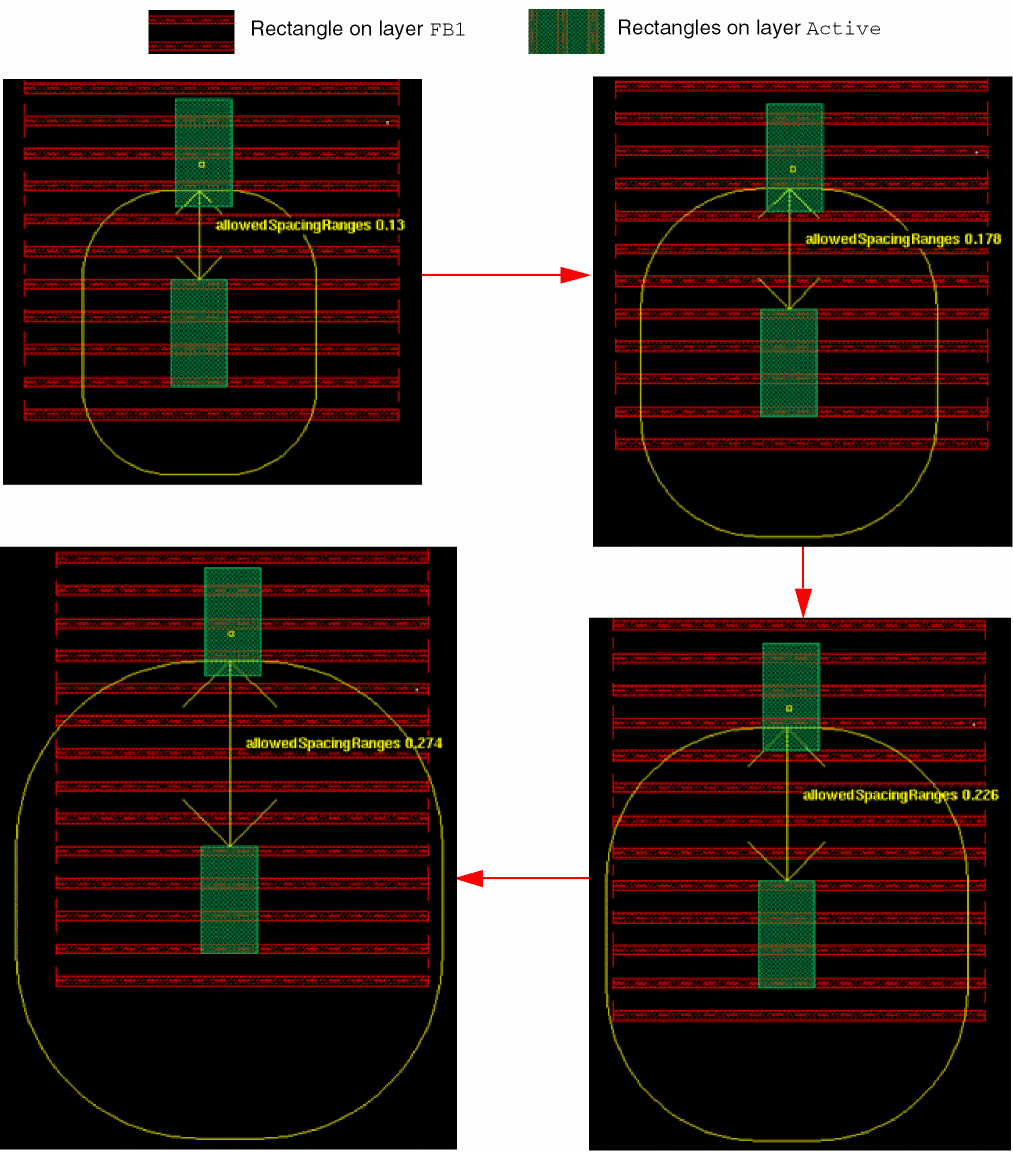
As the spacing increases, the legal spacing values are calculated as increments of 0.048 user units, as shown below.
0.130
0.130 + (1 x 0.048) = 0.178
0.130 + (2 x 0.048) = 0.226
0.130 + (3 x 0.048) = 0.274
…
The following figures illustrate this example in DRD Notify mode. As the vertical spacing between the rectangles increases, DRD displays halos and arrows (in yellow) to indicate the incremental legal spacing values.
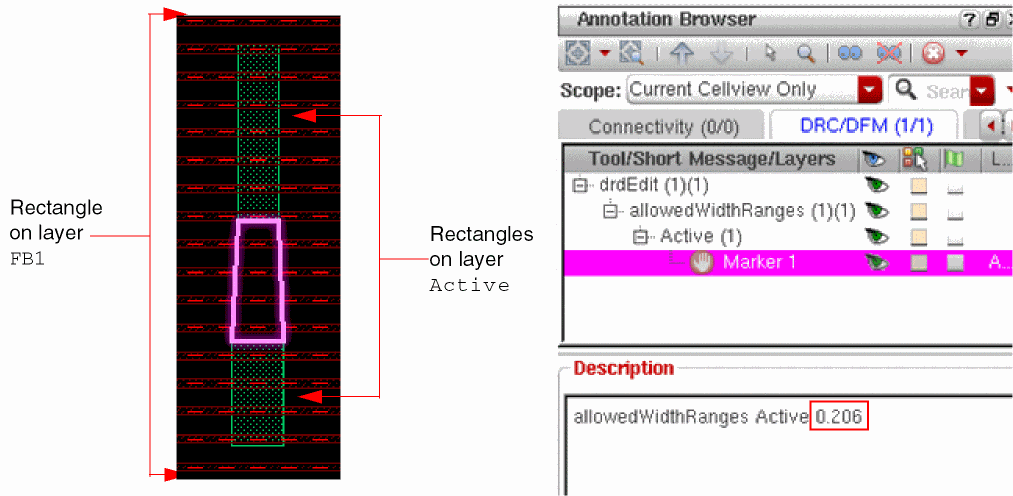
The following figure illustrates this example in DRD Post-Edit and Batch-Check modes. As shown in the Annotation Browser assistant, DRD reports an allowedSpacingRanges violation (Marker 1) because the vertical space between the rectangles does not meet the nearest legal spacing value (0.226 user units).
Defining Minimum Spacing Rules
The minSpacing constraint defines the minimum legal spacing between fin boundaries on a layer.
An example of the technology file definition is shown below:
( minSpacing "FB1" 0.130 )
where the fin boundaries are located on layer FB1 and the minimum legal spacing is 0.130 user units.
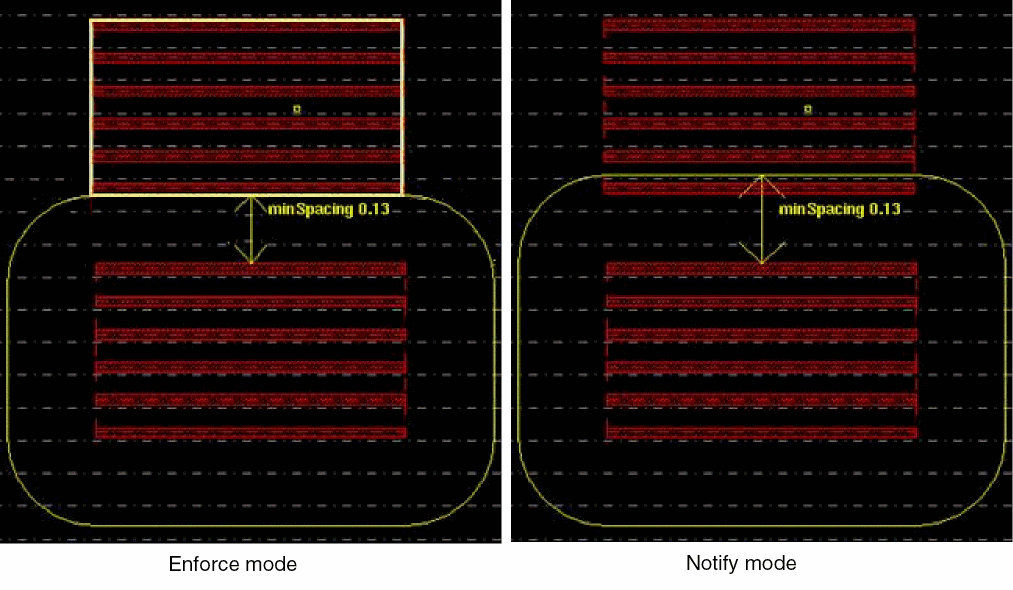
The following figures illustrate this example in DRD Enforce and Notify modes. DRD displays a halo and an arrow to indicate the minimum legal spacing value between two fin boundaries.
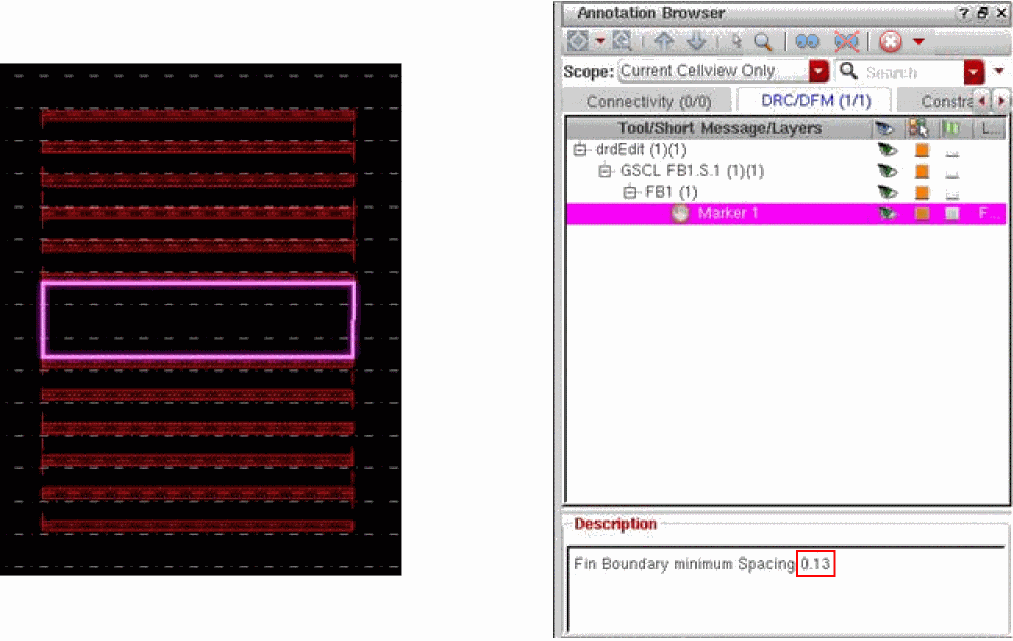
The following figure illustrates this example in DRD Post-Edit and Batch-Check modes. As shown in the Annotation Browser, DRD reports a minSpacing violation (Marker 1) because the spacing between the fin boundaries does not meet the minimum legal spacing value (0.130 user units).
Defining Directional and Discrete Width Rules
The allowedWidthRanges constraint defines a set of legal width rules, in the form of ranges and discrete values, for shapes on a layer. DRD uses the following parameters of this constraint to support directional discrete width rules for FinFETs:
-
stepSize: Specifies discrete incremental width values. -
measureVerticalandmeasureHorizontal: Specifies the directions of the discrete incremental width values.
An example of the technology file definition is shown below:
spacings(
    ( allowedSpacingRanges "Active"
     'measureVertical
  'stepSize 0.048
  (">=0.062")
 )
) ;spacings
-
Shapes are located on layer
Active. - The width is measured vertically and the minimum legal width is 0.062 user units.
-
As the shapes are stretched, the legal width values are calculated as increments of 0.048 user units, as shown below.
0.062
0.062 + 1 x 0.048 = 0.11
0.062 + 2 x 0.048 = 0.158
0.062 + 3 x 0.048 = 0.206
…
The following figures illustrate this example in DRD Notify mode. As the rectangle is stretched vertically, DRD displays arrows to indicate the incremental legal width values.
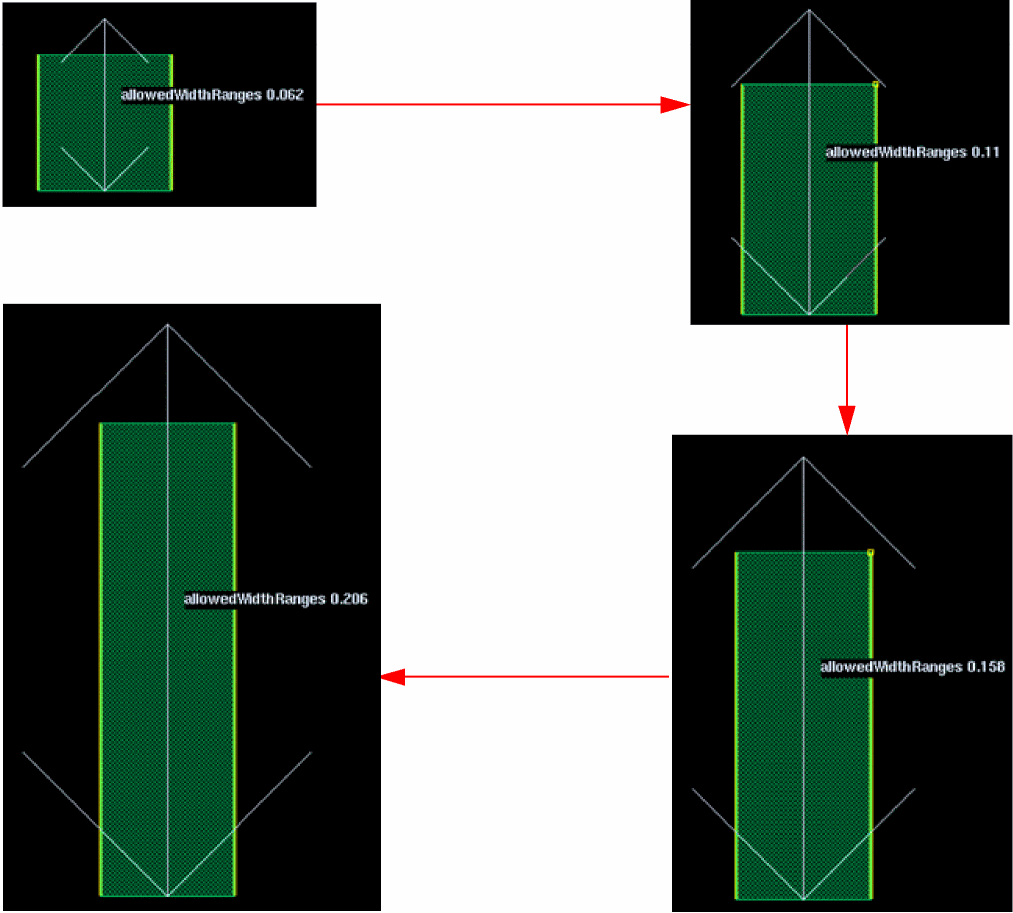
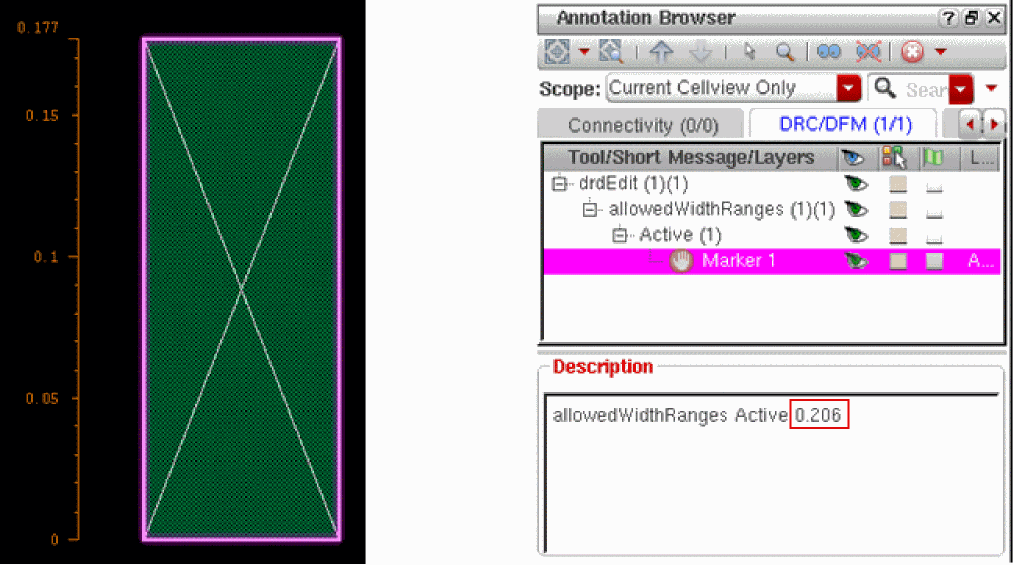
The following figure illustrates this example in DRD Post-Edit and Batch-Check modes. As shown in the Annotation Browser, DRD reports an allowedWidthRanges violation (Marker 1) because the vertical dimension of the rectangle does not conform to the nearest legal width value (0.206 user units).
Defining Directional and Discrete PR Boundary Rules
You can define PR boundary rules through the following constraints:
-
allowedPRBoundaryDimensions; see Defining Directional and Discrete PR Boundary Width Rules -
minPRBoundaryInteriorHalo; see Defining Directional and Discrete PR Boundary Spacing Rules
Defining Directional and Discrete PR Boundary Width Rules
The allowedPRBoundaryDimensions constraint defines a set of legal width rules, in the form of ranges and discrete values, for PR boundaries. DRD uses the following parameters of this constraint to support discrete width rules for FinFETs:
-
stepSize: Specifies discrete incremental width values. -
verticalandhorizontal: Specifies the horizontal or vertical discrete incremental width values.
An example of the technology file definition is shown below:
spacings(
    ( allowedPRBoundaryDimensions
     'vertical
  'stepSize 0.048
  (">=0.048")
  'ref "prBndry.h"
 )
) ;spacings
- The PR boundary width is measured vertically and the minimum legal width is 0.048 user units.
-
As the PR boundary is stretched, the legal width values are calculated as increments of 0.048 user units, as shown below.
0.048
0.048 + 1 x 0.048 = 0.096
0.048 + 2 x 0.048 = 0.144
0.048 + 3 x 0.048 = 0.192
…
The following figure illustrates this example in DRD Notify mode. As the PR boundary is stretched vertically, DRD displays arrows to indicate the nearest incremental legal width value.
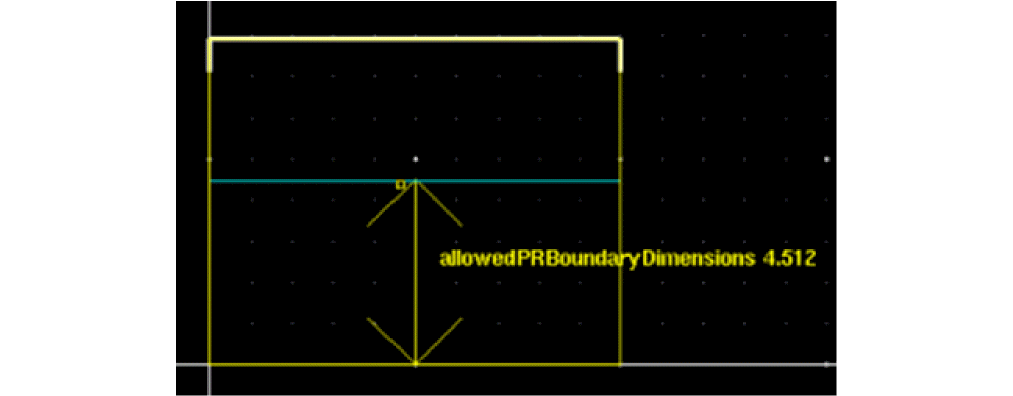
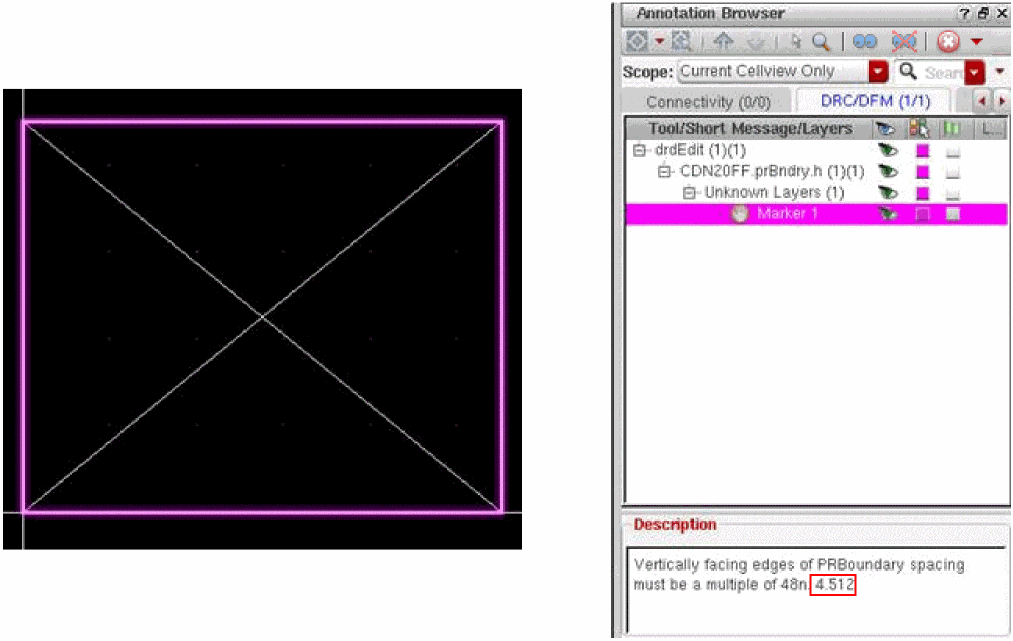
The following figure illustrates this example in DRD Post-Edit and Batch-Check modes. As shown in the Annotation Browser, DRD reports an allowedPRBoundaryDimensions violation (Marker 1) because the vertical dimension of the PR boundary does not conform to the nearest legal width value (4.512 user units).
Defining Directional and Discrete PR Boundary Spacing Rules
The minPRBoundaryInteriorHalo constraint defines a set of legal spacing values between a shape on a layer and the surrounding PR boundary. DRD uses the following parameters of this constraint to support discrete spacing rules for FinFETs:
-
stepSize: Specifies discrete incremental spacing values. -
spacingDirection: Specifies the horizontal or vertical spacing direction.
An example of the technology file definition is shown below:
spacings(
    ( minPRBoundaryInteriorHalo "Active"
     'vertical
  'stepSize 0.048  0.113
  'ref "prBndry.EN"
 )
) ;spacings
-
The spacing between the edges of shapes on layer
Activeand the surrounding PR boundary is measured vertically and the minimum legal spacing is 0.113 user units. -
As the spacing increases, the legal spacing values are calculated as increments of 0.048 user units, as shown below.
0.113
0.113 + 1 x 0.048 = 0.161
0.113 + 2 x 0.048 = 0.209
0.113 + 3 x 0.048 = 0.257
…
The following figure illustrates this example in DRD Notify mode. As the vertical spacing between the PR boundary and the enclosed rectangle increases, DRD displays arrows to indicate the incremental legal spacing values.
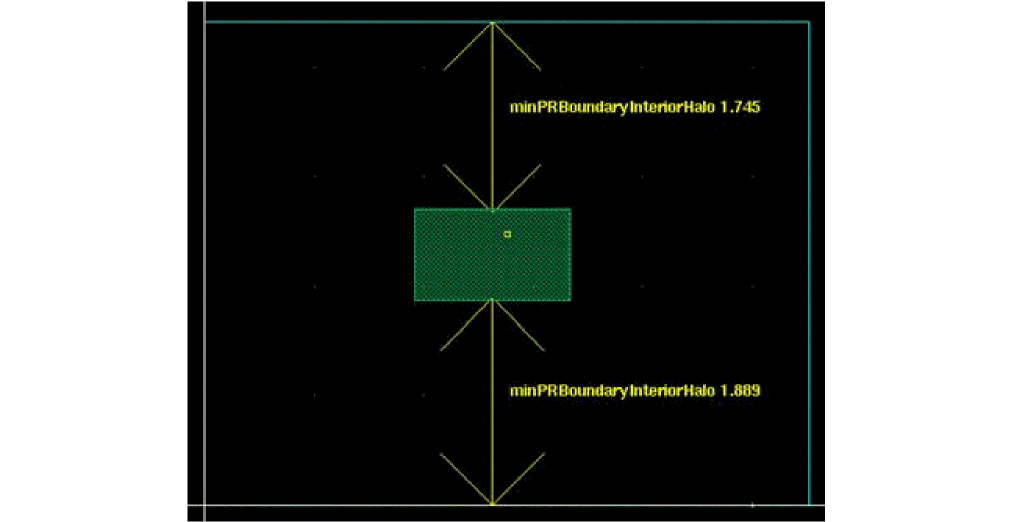
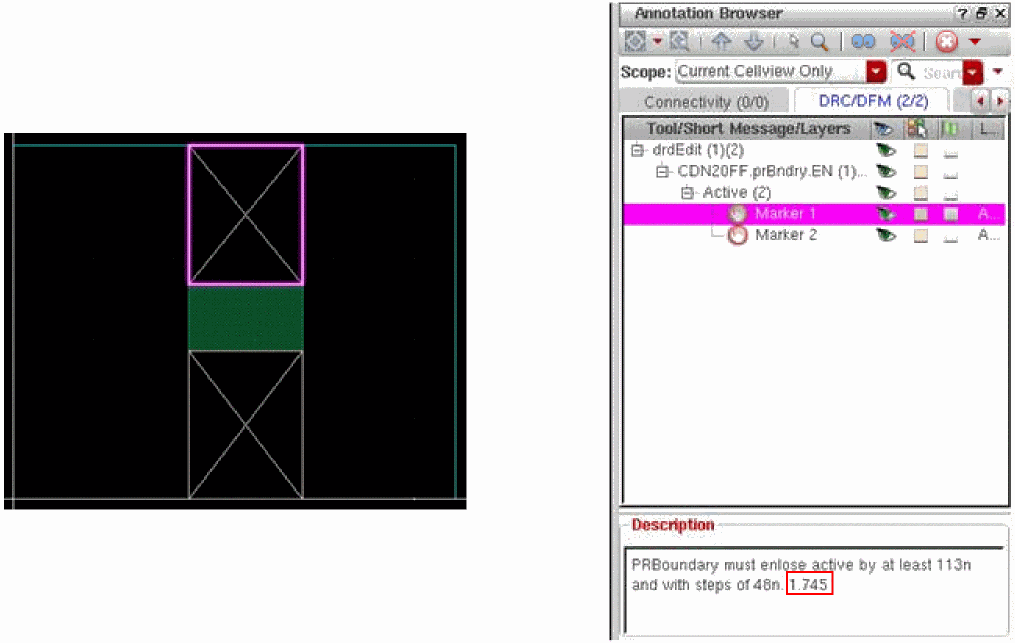
The following figure illustrates this example in DRD Post-Edit and Batch-Check modes. As shown in the Annotation Browser, DRD reports a minPRBoundaryInteriorHalo violation (Marker 1) because the vertical spacing between the PR boundary and the enclosed rectangle does not conform to the nearest legal spacing value (1.745 user units).
Snapping Objects to Legal Width Values
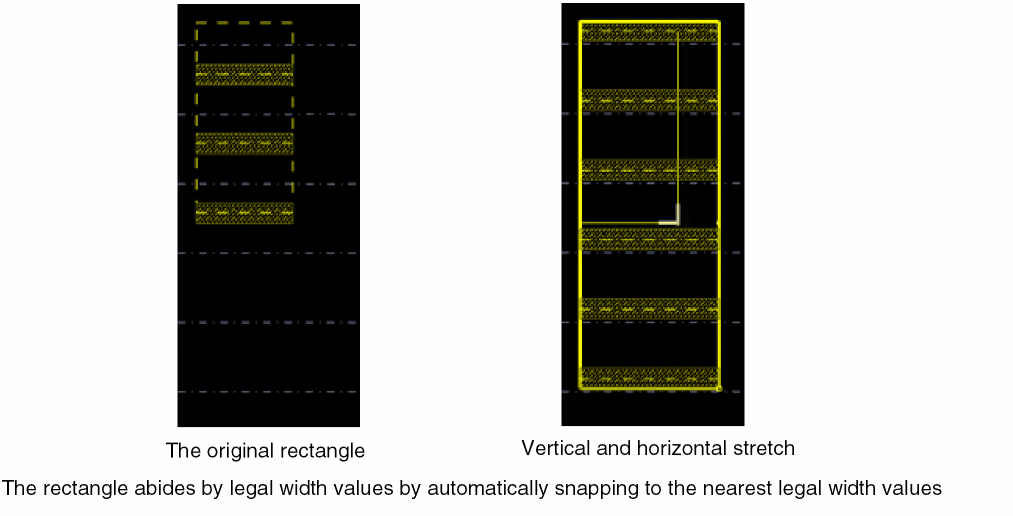
You can automatically snap specific objects to the nearest legal width value using discrete dimension gravity. This functionality supports the Create and Stretch commands in Virtuoso for the following objects:
- Rectangles and polygons; for illustrations, see Working with Shapes
- Pins; for illustrations, see Working with Pins
- Islands of shapes; for illustrations, see Working with Islands
- PR boundaries; for illustrations, see Working with PR Boundaries
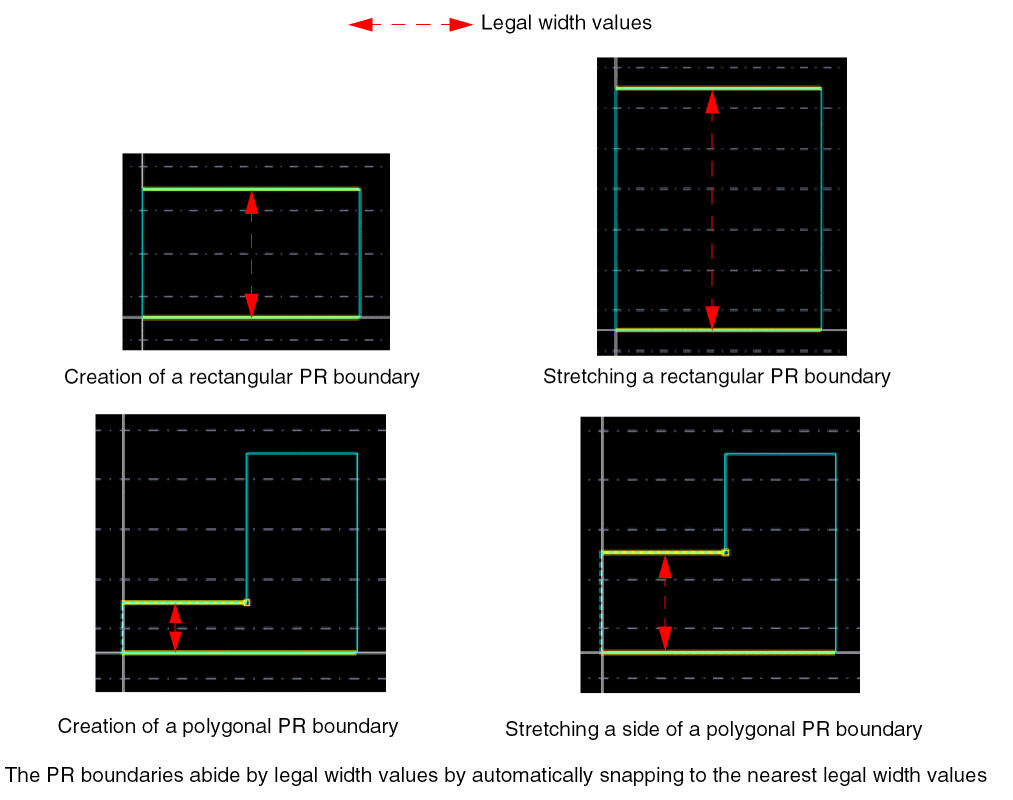
The following figure explains this functionality.
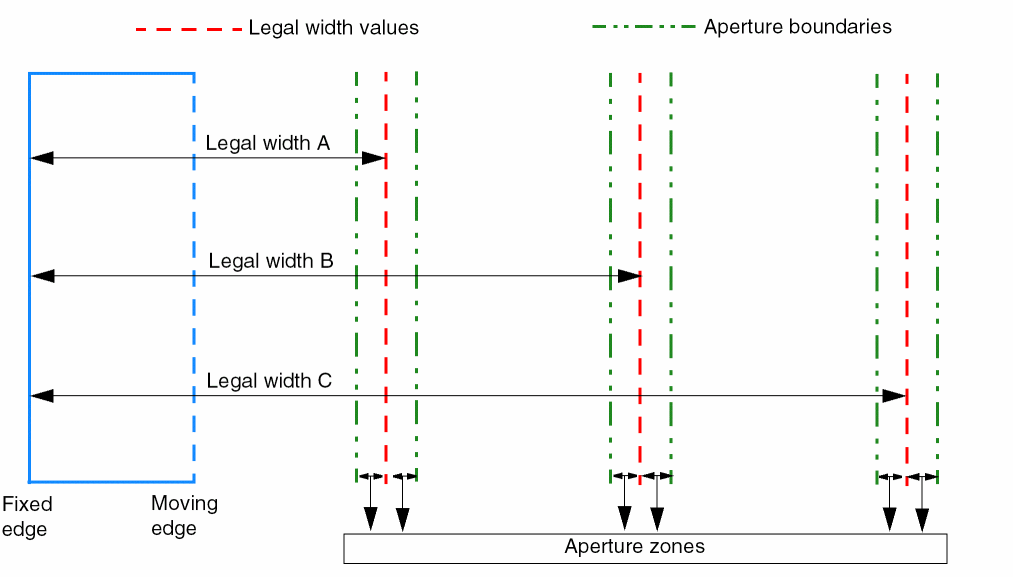
Each legal width value is surrounded by aperture boundaries, which form an aperture zone. An aperture zone is the snap distance between the pointer, or the moving edge of the rectangle, and the legal width value.
As you stretch the rectangle horizontally, the rectangle automatically snaps to legal width A as soon as the pointer enters the aperture zone surrounding legal width A. If you continue to stretch the rectangle, it snaps to legal widths B, and then to C, as soon as the pointer enters their respective aperture zones.
Discrete dimension gravity is turned on by default. To turn off discrete dimension gravity, set the drdEditSmartSnapAllowedWidthSnap environment variable to nil.
-
Add the
allowedWidthRangesconstraint for shapes. See Defining Directional and Discrete PR Boundary Width Rules. -
Add the
allowedPRBoundaryDimensionsconstraint for PR boundaries. See Defining Directional and Discrete PR Boundary Width Rules.
-
Add the
Examples of Discrete Dimension Gravity
This functionality is useful while:
Working with Shapes
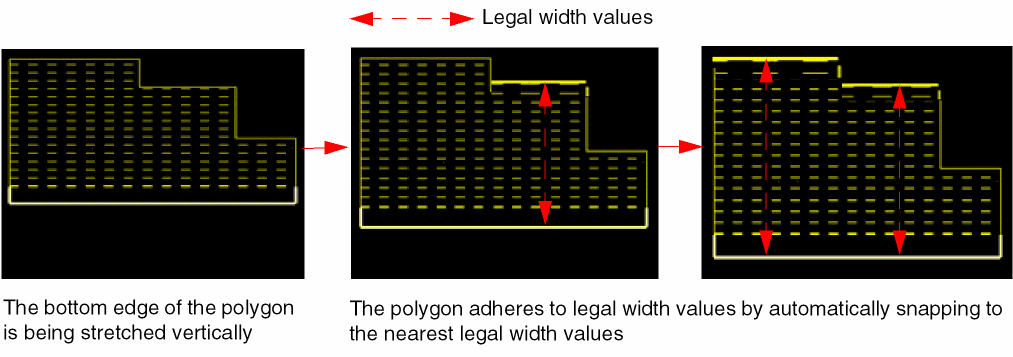
The following figure illustrates discrete dimension gravity during a single-direction polygon stretch operation:
The following figure illustrates discrete dimension gravity during a two-direction rectangle stretch operation:
Working with Pins
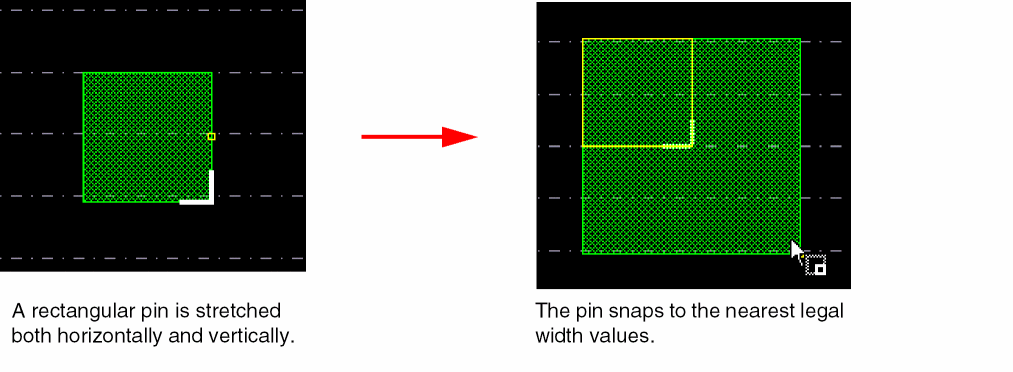
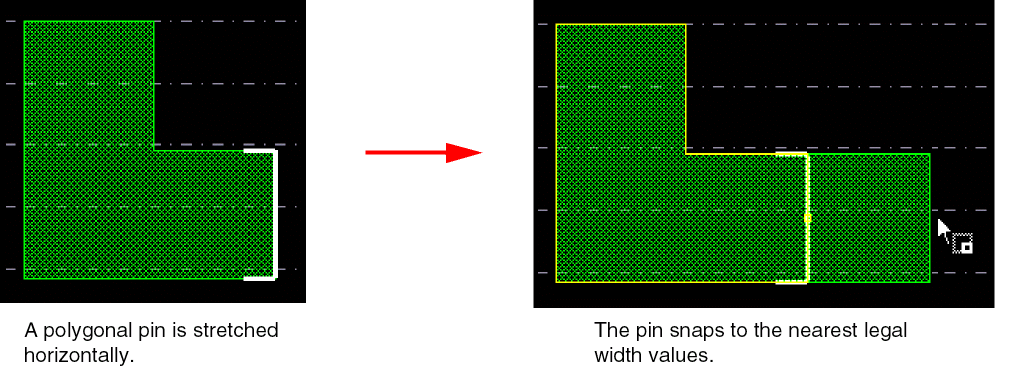
When a pin is created or stretched, it automatically snaps to the nearest legal width value using discrete dimension gravity.
The following figure illustrates how discrete dimension gravity works for pins of type rectangle:
The following figure illustrates how discrete dimension gravity works for pins of type polygon:
Working with Islands
An island is formed when multiple rectangles and polygons on a layer, belonging to the same level of layout hierarchy, overlap or abut. A hierarchical island is formed by shapes on a layer that belong to different hierarchical levels.
The following figure illustrates discrete dimension gravity while stretching a shape in an island of three rectangles.
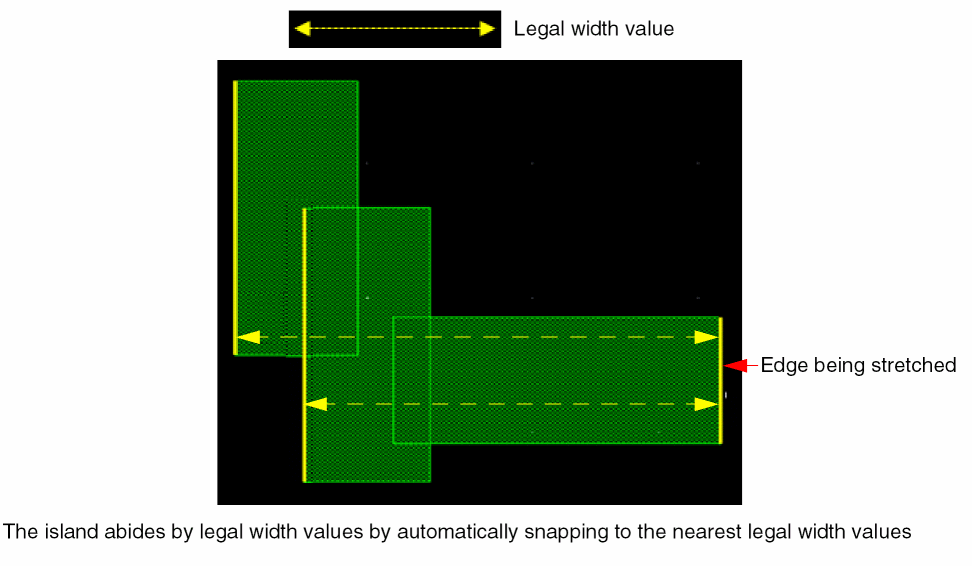
Discrete dimension gravity works in the same way while creating or stretching shapes in hierarchical islands.
Working with PR Boundaries
The following figures illustrate discrete dimension gravity while working with PR boundaries.
Defining Directional and Discrete Opposite Extension Rules
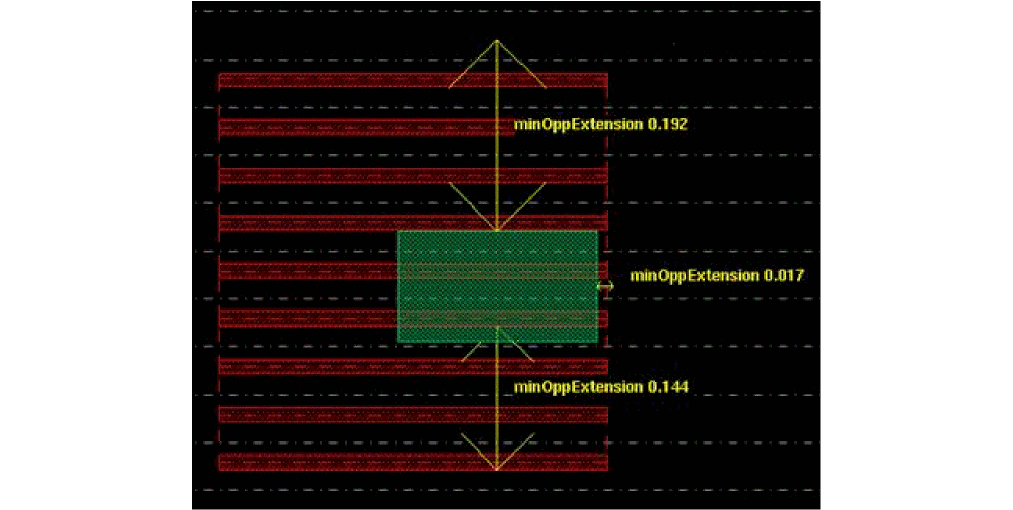
The minOppExtension constraint defines the total required enclosure between two opposite edges of overlapping shapes on two different layers. DRD uses the following parameters of this constraint to support discrete enclosure rules for FinFETs:
-
stepSizePair: Specifies discrete incremental extension values of a fin boundary over the shapes on a layer. -
spacingDirection: Specifies the horizontal or vertical discrete incremental extension values of a fin boundary over the shapes on a layer.
An example of the technology file definition is shown below:
spacings(
    ( minOppExtension "FB1" "Active"
    'vertical
    'stepSizePair (0.048  0) (0.096  0.017)
    )
) ;spacings
-
The fin boundary is located on layer
FB1and a shape is located on layerActive. - The minimum legal extension of the fin boundary over a shape, when measured vertically, is 0.096 user units.
-
The legal vertical extension values are calculated as increments of 0.048 user units, as shown below.
0.096
0.096 + 1 x 0.048 = 0.144
0.096 + 2 x 0.048 = 0.192
0.096 + 3 x 0.048 = 0.240
…
- The minimum legal extension of the fin boundary over a shape, when measured horizontally, is 0.017 user units.
The following figures illustrate this example in DRD Notify mode. As the enclosure between the rectangles on FB1 and Active increases vertically and horizontally (to the right), DRD displays arrows to indicate the incremental legal extension values on three sides of the rectangle on layer Active.
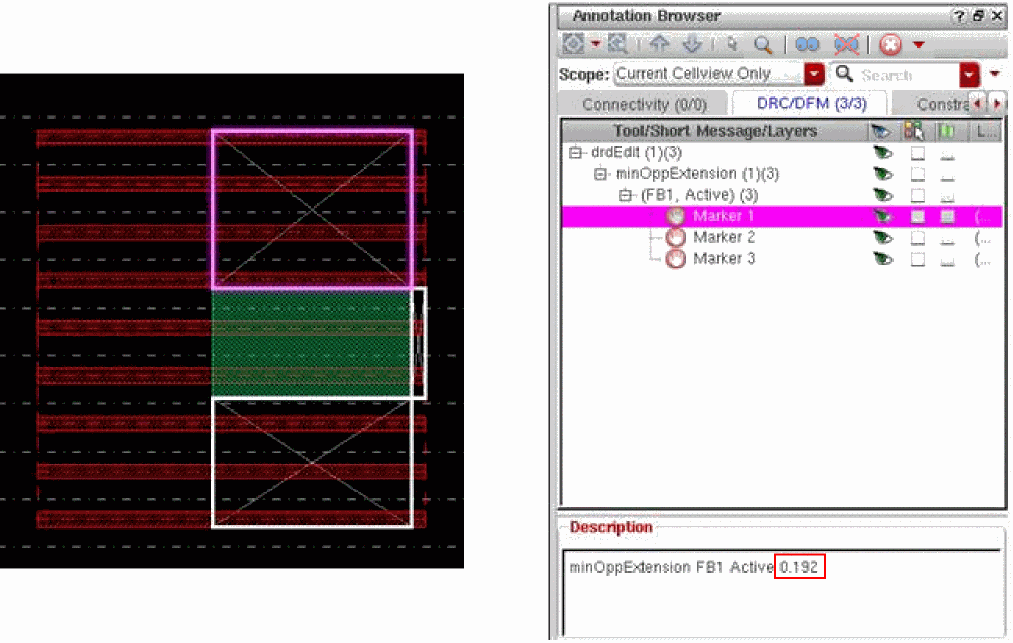
The following figure illustrates this example in DRD Post-Edit and Batch-Check modes. As shown in the Annotation Browser, DRD reports a minOppExtension violation (Marker 1) because the vertical enclosure between the rectangles on layers FB1 and Active does not conform to the nearest vertical legal enclosure value (0.192 user units).
Return to top