4
DRD Constraints Support
This chapter contains the following topics:
Supported Constraints
The tables in this section list the constraints supported by DRD. Note the following points:
-
Batch-Check mode for supported constraints is available only in VLS EXL.
-
Limited support is available for the
'or operator in DRD editing; it is used mainly to combine constraints of the type extension.
Supported Constraints and Parameters
|
Category
|
Constraint Name (ASCII Syntax)
|
Tier Level Support
|
Support Type
|
|
Antenna
|
antennaRatio
|
L, XL, GXL, and EXL
|
notify/post-edit/batch-check
|
|
cumPerLayerAntennaRatio
|
L, XL, GXL, and EXL
|
notify/post-edit/batch-check
|
|
Area
|
minArea
|
L, XL, GXL, and EXL
|
notify/post-edit/batch-check
|
|
minAreaEdgeLength
|
L, XL, GXL, and EXL
|
notify/post-edit/batch-check
|
|
minHoleArea
|
L (scalar)
XL, GXL, EXL (scalar and table)
|
notify/post-edit/batch-check
|
|
minIsolatedArea
|
L, XL, GXL, and EXL
|
notify/post-edit/batch-check
|
|
minPerimeter
|
L, XL, GXL, and EXL
|
post-edit/batch-check
|
|
minRectArea
|
L, XL, GXL, and EXL
|
notify/post-edit/batch-check
|
|
minSize
|
L, XL, GXL, and EXL
|
notify/post-edit/batch-check
|
|
Complex Spacing
|
endOfLineKeepout
|
XL, GXL, and EXL
|
notify/post-edit/batch-check
|
|
minEndOfLineCutSpacing
|
XL, GXL, and EXL
|
post-edit/batch-check
|
|
minEndOfLineExtensionSpacing
|
L, XL, GXL, and EXL
|
post-edit/batch-check
|
|
minEndofLinePerpSpacing
|
L, XL, GXL, and EXL
|
post-edit/batch-check
|
|
minEndOfLineSpacing
|
L, XL, GXL, and EXL
|
notify/post-edit/batch-check
|
|
minExtensionSpacing
|
XL, GXL, and EXL
|
notify/post-edit/batch-check
|
|
minInnerVertexSpacing
|
L, XL, GXL, and EXL
|
notify/post-edit/batch-check
|
|
sameMetalAlignedCuts
|
L, XL, GXL, and EXL
|
notify/post-edit/batch-check
|
|
|
shapeRequiredSpacing
|
XL, GXL, and EXL
|
post-edit/batch-check
|
|
Density
|
maxDensity
|
XL, GXL, and EXL
|
batch-check
|
|
maxDiffDensity
|
XL, GXL, and EXL
|
batch-check
|
|
minDensity
|
XL, GXL, and EXL
|
batch-check
|
|
Edge Length
|
maxDiagonalEdgeLength
|
L, XL, GXL, and EXL
|
notify/post-edit/batch-check
|
|
maxNumMinEdges
|
L, XL, GXL, and EXL
|
post-edit/batch-check
|
|
minDiagonalEdgeLength
|
L, XL, GXL, and EXL
|
notify/post-edit/batch-check
|
|
minEdgeAdjacentDistance
|
L, XL, GXL, and EXL
|
notify/post-edit/batch-check
|
|
minEdgeAdjacentLength
|
L, XL, GXL, and EXL
|
post-edit/batch-check
|
|
minEndOfLineAdjacentToStep
|
XL, GXL, and EXL
|
post-edit/batch-check
|
|
minInsideCornerEdgeLength
|
L, XL, GXL, and EXL
|
post-edit/batch-check
|
|
minOutsideCornerEdgeLength
|
L, XL, GXL, and EXL
|
post-edit/batch-check
|
|
minPerimeter
|
L, XL, GXL, and EXL
|
notify/post-edit/batch-check
|
|
minStepEdgeLength
|
L, XL, GXL, and EXL
|
notify/post-edit/batch-check
|
|
Extension
|
maxExtension
|
L, XL, GXL, and EXL
|
post-edit/batch-check
|
|
minCenterlineExtension
|
XL, GXL, and EXL
|
post-edit/batch-check
|
|
minEndOfLineEdgeExtension
|
L, XL, GXL, and EXL
|
post-edit/batch-check
|
|
minEndOfLineExtension
|
L, XL, GXL, and EXL
|
post-edit/batch-check
|
|
minExtensionDistance
|
L, XL, GXL, and EXL
|
notify/post-edit/batch-check
|
|
minExtensionEdge
|
L, XL, GXL, and EXL
|
post-edit/batch-check
|
|
minInsideCornerExtension
|
L, XL, GXL, and EXL
|
post-edit/batch-check
|
|
minInsideCornerOverlap
|
L, XL, GXL, and EXL
|
post-edit/batch-check
|
|
minOppEndOfLineExtension
|
L, XL, GXL, and EXL
|
notify/post-edit/batch-check
|
|
minOppExtension
|
L (scalar)
XL, GXL, and EXL (scalar and table)
|
notify/post-edit/batch-check
|
|
|
minOverlapDistance
|
L, XL, GXL, and EXL
|
notify/post-edit/batch-check
|
|
minPRBoundaryExtension
|
L, XL, GXL, and EXL
|
notify/post-edit/batch-check
|
|
minQuadrupleExtension
|
L, XL, GXL, and EXL
|
notify/post-edit/batch-check
|
|
minSideExtension
|
L, XL, GXL, and EXL
|
notify/post-edit/batch-check
|
|
minViaExtension
|
L, XL, GXL, and EXL
|
notify/post-edit/batch-check
|
|
minViaJointExtension
|
L, XL, GXL, and EXL
|
notify/post-edit/batch-check
|
|
Length
|
allowedSpanLengthRanges
|
L, XL, GXL, and EXL
|
notify/post-edit/batch-check
|
|
maxDiffusionLength
|
L, XL, GXL, and EXL
|
notify/post-edit//batch-check
|
|
maxLength
|
L, XL, GXL, and EXL
|
notify/post-edit/batch-check
|
|
minLength
|
L, XL, GXL, and EXL
|
notify/post-edit/batch-check
|
|
Misc
|
errorLayer
|
L, XL, GXL, and EXL
|
notify/post-edit/batch-check
|
|
NumCut
|
minNumCut
|
L, XL, GXL, and EXL
|
post-edit/batch-check
|
|
minProtrusionNumCut
|
L, XL, GXL, and EXL
|
post-edit/batch-check
|
|
Orientation
|
diagonalShapesAllowed
|
L, XL, GXL, and EXL
|
notify/post-edit/batch-check
|
|
rectShapeDir
|
L, XL, GXL, and EXL
|
notify/post-edit/batch-check
|
|
Spacing
|
allowedSpacingRanges (One layer)
|
L, XL, GXL, and EXL
|
notify/post-edit/batch-check
|
|
minCenterToCenterSpacing
|
L, XL, GXL, and EXL
|
notify/post-edit/batch-check
|
|
minCutClassSpacing (One layer)
|
L, XL, GXL, and EXL
|
enforce/notify/post-edit/batch-check
|
|
minCutClassSpacing (Two layers)
|
L, XL, GXL, and EXL
|
enforce/notify/post-edit/batch-check
|
|
minCutRoutingSpacing (Two layers)
|
L, XL, GXL, and EXL
|
enforce/notify/post-edit/batch-check
|
|
minDiagonalSpacing
|
L (scalar), XL (scalar), GXL (scalar), and EXL (scalar)
|
notify/post-edit/batch-check
|
|
minEndOfLineToConcaveCornerSpacing
|
L, XL, GXL, and EXL
|
notify/post-edit/batch-check
|
|
minEndOfNotchSpacing
|
L, XL, GXL, and EXL
|
notify/post-edit/batch-check
|
|
|
minFillToFillSpacing
|
L, XL, GXL, and EXL
|
post-edit/batch-check
|
|
minFillToShapeSpacing
|
L, XL, GXL, and EXL
|
post-edit/batch-check
|
|
minInfluenceSpacing
|
L, XL, GXL, and EXL
|
notify/post-edit/batch-check
|
|
minNotchSpacing
|
L, XL, GXL, and EXL
|
notify/post-edit/batch-check
|
|
minParallelViaSpacing (One layer)
|
L, XL, GXL, and EXL
|
notify/post-edit/batch-check
|
|
minParallelViaSpacing
(Two layers plus metal)
|
L, XL, GXL, and EXL
|
notify/post-edit/batch-check
|
|
minParallelWithinViaSpacing
|
XL, GXL, and EXL
|
post-edit/batch-check
|
|
minPRBoundaryInteriorHalo
|
L, XL, GXL, and EXL
|
enforce/notify/post-edit/batch-check
|
|
minSameMetalSharedEdgeViaSpacing
|
L, XL, GXL, and EXL
|
notify/post-edit/batch-check
|
|
minSameNetSpacing (One layer)
|
L, XL, GXL, and EXL
|
enforce/notify/post-edit/batch-check
|
|
minSameNetSpacing (Two layers)
|
L, XL, GXL, and EXL
|
enforce/notify/post-edit/batch-check
|
|
|
minSpacing (One layer)
|
L, XL, GXL, and EXL
|
enforce/notify/post-edit/batch-check
|
|
minSpacing (Two layers)
(width and parallel run lengths)
|
L, XL, GXL, and EXL
|
enforce/notify/post-edit/batch-check
|
|
minSpacingOver
|
L, XL, GXL, and EXL
|
post-edit/batch-check
|
|
minViaSpacing (One layer)
|
L, XL, GXL, and EXL
|
enforce/notify/post-edit/batch-check
|
|
minViaSpacing (Two layers)
|
L, XL, GXL, and EXL
|
enforce/notify/post-edit/batch-check
|
|
minVoltageSpacing (One layer)
|
XL, GXL, and EXL
|
enforce/notify/post-edit/batch-check
|
|
minVoltageSpacing (Two layers)
|
XL, GXL, and EXL
|
enforce/notify/post-edit/batch-check
|
|
viaSpacing
|
L, XL, GXL, and EXL
|
notify/post-edit/batch-check
|
|
Via
|
definedCutClassesOnly
|
L, XL, GXL, and EXL
|
notify/post-edit/batch-check
|
|
largeRectViaArrayAllowed
|
L, XL, GXL, and EXL
|
post-edit/batch-check
|
|
minLargeNeighborViaArrayCutSpacing
|
L, XL, GXL, and EXL
|
post-edit
|
|
minLargeViaArrayCutSpacing
|
L, XL, GXL, and EXL
|
post-edit/batch-check
|
|
minLargeViaArraySpacing
|
L, XL, GXL, and EXL
|
post-edit/batch-check
|
|
minLargeViaArrayWidth
|
L, XL, GXL, and EXL
|
post-edit/batch-check
|
|
minNeighborViaSpacing
|
L, XL, GXL, and EXL
|
post-edit/batch-check
|
|
minOrthogonalViaSpacing
|
L, XL, GXL, and EXL
|
post-edit/batch-check
|
|
redundantViaSetback
|
L, XL, GXL, and EXL
|
post-edit/batch-check
|
|
stackable
|
L, XL, GXL, and EXL
|
post-edit/batch-check
|
|
viaStackingLimits
|
L, XL, GXL, and EXL
|
post-edit/batch-check
|
|
Width
|
allowedWidthRanges
|
L, XL, GXL, and EXL
|
notify/post-edit/batch-check
|
|
maxWidth
|
L, XL, GXL, and EXL
|
notify/post-edit/batch-check
|
|
minCornerToCornerDistance
|
L, XL, GXL, and EXL
|
notify/post-edit/batch-check
|
|
minDiagonalWidth
|
L, XL, GXL, and EXL
|
notify/post-edit/batch-check
|
|
minWidth
|
L, XL, GXL, and EXL
|
notify/post-edit/batch-check
|
|
protrusionWidth
|
L, XL, GXL, and EXL
|
post-edit/batch-check
|
Supported Constraints and Parameters (Virtuoso Layout Suite EXL)
|
Category
|
Constraint Name (ASCII Syntax)
|
Tier Level Support
|
Support Type
|
|
Complex Spacing
|
endOfLineKeepout
Parameters: horizontal, vertical, eolSpacingRange, otherEolSpacingRange, jointAsEol, checkOtherWidth, equalRectWidth
|
XL and EXL
|
notify/post-edit/batch-check
|
|
minClusterSpacing (One layer)
Parameters: enclosingLayer, viaEdgeType
|
XL and EXL
|
notify/post-edit/batch-check
|
|
overlapViaGroup
|
XL and EXL
|
notify/post-edit/batch-check
|
|
viaGroup
Parameters: allowBend
|
XL and EXL
|
notify/post-edit/batch-check
|
|
Extension
|
minEndOfLineEdgeExtension
Parameters: minVoltage, maxVoltage
|
XL and EXL
|
notify/post-edit/batch-check
|
|
minOppExtension
Parameters: widthHorizontal | widthVertical
|
XL and EXL
|
notify/post-edit/batch-check
|
|
minQuadrupleExtension
Parameters: lineEndGapOnlyTable
|
XL and EXL
|
notify/post-edit/batch-check
|
|
Length
|
minStepEdgeLength
Parameters: adjEolSpacingRange, jogEdge, adjJogEdge, adjNotchEdge
|
XL and EXL
|
notify/post-edit/batch-check
|
|
Spacing
|
mergedViaCornerToCornerSpacing
Parameters: mergeSpacing, lengthRange, otherLengthRange, tripletCenterViaSpacingX, tripletCenterViaSpacingY, tripletCenterViaLarger,
maxNeighbors,
neighborSpacing
|
XL and EXL
|
notify/batch-check
|
|
minCutRoutingSpacing (Two layers)
Parameters: toDiffConcaveCorner
|
XL and EXL
|
notify/batch-check
|
|
minParallelWithinViaSpacing
Parameters: otherWidth
|
XL and EXL
|
notify/post-edit/batch-check
|
|
minPRBoundaryInteriorHalo
Parameters: exceptLayer, exceptWidth
|
XL and EXL
|
notify/post-edit/batch-check
|
|
minSideSpacing (One layer)
Parameters: otherLayer, cutClass, cutWithin
|
XL and EXL
|
notify/post-edit/batch-check
|
|
minViaSpacing (One layer)
Parameters: otherCutClass, otherViaEdgeType, deltaVoltage, exceptGap, exceptSameMetalOverlap, orthogonalEnclosingMetal, fixedCutClassList, otherFixedCutClassList, horizontalSpacingRange, verticalSpacingRange, farEnds
|
XL and EXL
|
notify/post-edit/batch-check
|
|
minViaSpacing (Two layers)
Parameters: deltaVoltage
|
XL and EXL
|
notify/post-edit/batch-check
|
|
requiredEndOfLineShape
|
XL and EXL
|
notify/post-edit/batch-check
|
|
Width
|
allowedWidthRanges
Parameters: exceptOverlap
|
XL and EXL
|
notify/post-edit/batch-check
|
|
minCornerToCornerDistance
Parameters: extensionLength, oppositeDirection
|
XL and EXL
|
notify/post-edit/batch-check
|
Supported Constraints and Parameters (Virtuoso Advanced Node for Layout Standard)
|
Category
|
Constraint Name (ASCII Syntax)
|
Tier Level Support
|
Support Type
|
|
Area
|
minArea
Parameters: insideLayers, outsideLayers, insidePurposes, outsidePurposes
|
XL and EXL
|
notify/post-edit/batch-check
|
|
Complex Spacing
|
forbiddenCutClassSpacingRange
|
XL and EXL
|
notify/post-edit/batch-check
|
|
forbiddenEdgePitchRange
|
XL and EXL
|
notify/post-edit/batch-check
|
|
forbiddenProximitySpacing
|
XL and EXL
|
notify/post-edit/batch-check
|
|
minClusterSpacing (One layer)
|
XL and EXL
|
notify/post-edit/batch-check
|
|
minClusterSpacing (Two layers)
|
XL and EXL
|
post-edit/batch-check
|
|
minCornerSpacing (One layer)
|
XL and EXL
|
notify/post-edit/batch-check
|
|
minCornerSpacing (Two layers)
|
XL and EXL
|
notify/post-edit/batch-check
|
|
|
minEdgeLengthSpacing
|
XL and EXL
|
notify/post-edit/batch-check
|
|
minEndOfLineExtensionSpacing
Parameters: sameMask, negativePRL
|
XL and EXL
|
post-edit/batch-check
|
|
minEndOfLineSpacing
Parameters: exceptEolWidth, exceptExactAligned, sameMask, diffMask
|
XL and EXL
|
notify/post-edit/batch-check
|
|
minSpanLengthSpacing
|
XL and EXL
|
enforce/notify/post-edit/batch-check
|
|
shapeRequiredBetweenSpacing
|
XL and EXL
|
notify/post-edit/batch-check
|
|
Edge Length
|
minEndOfLineAdjacentToStep
Parameters: adjacentLength, concaveCorner
|
XL and EXL
|
post-edit/batch-check
|
|
minStepEdgeLength
Parameters: any, horizontalEdge, verticalEdge, allCorner, concaveCorner, convexCorner, mixedCorner, exceptExactLength, exceptExactBothLength
|
XL and EXL
|
notify/post-edit/batch-check
|
|
Extension
|
minDirectionalOverlap
|
XL and EXL
|
notify/post-edit/batch-check
|
|
minEndOfLineEdgeExtension
Parameter: shortEdgeOnly
|
XL and EXL
|
post-edit/batch-check
|
|
|
minExtensionDistance
Parameters: insideLayers, outsideLayers, insidePurposes, outsidePurposes
|
XL and EXL
|
notify/post-edit/batch-check
|
|
minExtensionEdge
Parameters: insideLayers, outsideLayers, insidePurposes, outsidePurposes
|
XL and EXL
|
post-edit/batch-check
|
|
minExtensionOnLongSide
|
XL and EXL
|
notify/post-edit/batch-check
|
|
minExtensionToCenterLine
|
XL and EXL
|
post-edit/batch-check
|
|
minExtensionToCorner
|
XL and EXL
|
post-edit/batch-check
|
|
minInnerVertexProximityExtension
|
XL and EXL
|
post-edit/batch-check
|
|
minOppExtension
Parameters: insideLayers, outsideLayers, insidePurposes, outsidePurposes, alignedLayer, alignedHorizontal | alignedVertical
|
XL and EXL (scalar and table)
|
notify/post-edit/batch-check
|
|
edgeMustCoincide
|
XL and EXL
|
notify/post-edit/batch-check
|
|
edgeMustOverlap
|
XL and EXL
|
notify/post-edit/batch-check
|
|
minNeighborExtension
|
XL and EXL
|
notify/post-edit/batch-check
|
|
|
minQuadrupleExtension
Parameters: insideLayers, outsideLayers, insidePurposes, outsidePurposes
|
XL and EXL
|
notify/post-edit/batch-check
|
|
minSideExtension
Parameter: exceptEdgeLengthRanges
|
XL and EXL
|
notify/post-edit/batch-check
|
|
minWireOverlap
|
XL and EXL
|
notify/post-edit/batch-check
|
|
Length
|
allowedLengthRanges
|
XL and EXL
|
notify/post-edit/batch-check
|
|
Misc
|
maxNumCorners
|
XL and EXL
|
notify/post-edit/batch-check
|
|
Orientation
|
rectShapeDir
Parameters: exceptEdgeLength, exceptExactSize, exceptRanges, exceptViaLayer, exceptViaSize, insideLayers, insidePurposes, outsideLayers, outsidePurposes, twoSides, width
|
XL and EXL
|
notify/post-edit/batch-check
|
|
Spacing
|
allowedSpacingRanges (One layer)
Parameters: widthRanges, exceptOverLayer, overLayerPrl, overLayerWidthRanges, exceptNumShapes, numShapeDistance, numShapeWidthRanges, numShapeMaxWidth, stepSize, stepRange, overLayer
|
XL and EXL
|
notify/post-edit/batch-check
|
|
minCenterLineSpacing (Two layers)
|
XL and EXL
|
notify/post-edit/batch-check
|
|
minCutClassSpacing (One layer)
Parameters: insideLayers, outsideLayers, insidePurposes, outsidePurposes
|
XL and EXL
|
enforce/notify/post-edit/batch-check
|
|
minCutClassSpacing (Two layers)
Parameter: cutClassSizeBy
|
XL and EXL
|
enforce/notify/post-edit/batch-check
|
|
minNeighboringShapesSpacing
|
XL and EXL
|
notify/post-edit/batch-check
|
|
minEndOfLineToNotchSpacing
|
XL and EXL
|
notify/post-edit/batch-check
|
|
minNotchSpacing
Parameter: notchWidth
|
XL and EXL
|
notify/post-edit/batch-check
|
|
|
minParallelWithinViaSpacing
Parameters: cutClass, longEdgeOnly, insideLayers, outsideLayers, insidePurposes, outsidePurposes
|
XL and EXL
|
post-edit/batch-check
|
|
minSideSpacing (One layer)
|
XL and EXL
|
enforce/notify/post-edit/batch-check
|
|
minSideSpacing (Two layers)
|
XL and EXL
|
notify/post-edit/batch-check
|
|
minSpacing (One layer)
Parameter: exceptEolWidth, insideLayers, outsideLayers, insidePurposes, outsidePurposes
|
XL and EXL
|
enforce/notify/post-edit/batch-check
|
|
minStitchOverlap
|
XL and EXL
|
notify/post-edit/batch-check
|
|
minViaSpacing (One layer)
Parameters: exceptExactAligned, overLayer, overLayerWidth, exceptSameNet, exceptSameMetal
|
XL and EXL
|
enforce/notify/post-edit/batch-check
|
|
viaSpacing
Parameters: allCuts, cutSizeRanges, insideLayers, outsideLayers, insidePurposes, outsidePurposes
|
XL and EXL
|
notify/post-edit/batch-check
|
|
Via
|
allowedCutClass
|
XL and EXL
|
notify/post-edit/batch-check
|
|
minLargeViaArrayCutSpacing
Parameter: maxNumCuts
|
XL and EXL
|
post-edit/batch-check
|
|
Width
|
allowedNeighborWidthRanges (One layer)
|
XL and EXL
|
notify/post-edit/batch-check
|
|
allowedNeighborWidthRanges
(Two layers)
|
XL and EXL
|
notify/post-edit/batch-check
|
|
allowedNeighborWidthRangesOver
|
XL and EXL
|
notify/post-edit/batch-check
|
|
allowedPRBoundaryDimensions
|
XL and EXL
|
notify/post-edit/batch-check
|
|
allowedWidthRanges
Parameters: insideLayers, outsideLayers, insidePurposes, outsidePurposes
|
XL and EXL
|
notify/post-edit/batch-check
|
Supported Constraints and Parameters (Virtuoso Advanced Node for Layout Only)
|
Category
|
Constraint Name (ASCII Syntax)
|
Tier Level Support
|
Support Type
|
|
Area
|
minRectArea
Parameters: colorMask, layer, overlapType
|
XL and EXL
|
notify/post-edit/batch-check
|
|
Complex Spacing
|
bothSidesViaForbiddenSpacingRange
|
XL and EXL
|
notify/post-edit/batch-check
|
|
endOfLineKeepout
Parameters: mask1, mask2, mask3, diffMask, twoSides, forwardGap
|
XL and EXL
|
notify/post-edit/batch-check
|
|
forbiddenCutClassSpacingRange
Parameters: cutClassPrl, allCuts, layer, layerWidth, mask1, mask2, mask3, paraLength, within, sameMask, longEdge
|
XL and EXL
|
notify/post-edit/batch-check
|
|
maxViaArrayClusterSize
|
XL and EXL
|
notify/post-edit/batch-check
|
|
minAdjacentFourViaSpacing
|
XL and EXL
|
notify/post-edit/batch-check
|
|
minClusterSpacing (One layer)
Parameter: widthDirection (widthHorizontal | widthVertical)
|
XL and EXL
|
post-edit/batch-check
|
|
minCornerSpacing (One layer)
Parameters: sameMask, treatLAsJog
|
XL and EXL
|
post-edit/batch-check
|
|
minEndOfLinePerpSpacing
Parameters: negativePRL
|
XL and EXL
|
post-edit/batch-check
|
|
|
minEndOfLineSpacing
Parameter: exceptExactEolWidth, fillConcaveCorner
|
XL and EXL
|
notify/post-edit/batch-check
|
|
minSpanLengthSpacing
Parameters: minSpanForExceptEolWidth, minSpanSpacingRanges, sameMask, insideLayers, outsideLayers, insidePurposes, outsidePurposes, eolExceptionNoPrl, diffMask
|
XL and EXL
|
enforce/notify/post-edit/batch-check
|
|
minViaGroupSpacing
|
XL and EXL
|
notify/post-edit/batch-check
|
|
orthogonalSnappingLayer
|
XL and EXL
|
post-edit
|
|
sameMetalAlignedCuts
Parameters: centerToCenterSpacing | edgeToEdgeSpacing, horizontal | vertical, sameViaConnectivity
|
XL and EXL
|
notify/post-edit/batch-check
|
|
viaGroup
|
XL and EXL
|
notify/post-edit/batch-check
|
|
viaKeepoutZone
|
XL and EXL
|
post-edit/batch-check
|
|
Extension
|
minExtensionEdge
Parameters: edgeExtension, layer
|
XL and EXL
|
post-edit/batch-check
|
|
minNeighborExtension
Parameters: mask1, mask2, mask3, mask4
|
XL and EXL
|
notify/post-edit/batch-check
|
|
minOppExtension
Parameters: hollowHorizontal, hollowVertical
|
XL and EXL (scalar and table)
|
notify/post-edit/batch-check
|
|
minQuadrupleExtension
Parameter: maxLength, trimLayer
|
XL and EXL
|
notify/post-edit/batch-check
|
|
minVoltageExtension
|
XL and EXL
|
notify/post-edit/batch-check
|
|
Length
|
maxEdgeLength
|
XL and EXL
|
notify/batch-check
|
|
minStepEdgeLength
Parameters: width
|
XL and EXL
|
notify/batch-check
|
|
Miscellaneous
|
preColoredLayers
|
XL and EXL
|
notify/post-edit/batch-check
|
|
Spacing
|
allowedCutClass
Parameters: minVoltage, maxVoltage
|
XL and EXL
|
notify/batch-check
|
|
allowedSpacingRanges (One layer)
Parameters: exceptWidthEdge
|
XL and EXL
|
notify/batch-check
|
|
mergedViaCornerToCornerSpacing
|
XL and EXL
|
notify/batch-check
|
|
minCornerVoltageSpacing
|
XL and EXL
|
notify/post-edit/batch-check
|
|
minCutEdgeSpacing (Two layers)
|
XL and EXL
|
notify/post-edit/batch-check
|
|
minNestedViaSpacing
|
XL and EXL
|
notify/post-edit/batch-check
|
|
minNotchSpacing
Parameters: excludeSpacing, horizontal | vertical
|
XL and EXL
|
notify/post-edit/batch-check
|
|
minSideSpacing (One layer)
Parameters: facingEdges, sameMask, cornerEuclidian, prlRange, lengthRanges, otherLengthRanges, insideLayers, outsideLayers, insidePurposes, outsidePurposes, widthDirection (widthHorizontal | widthVertical), facingEdgeDirection, otherFacingEdgeRange
|
XL and EXL
|
enforce/notify/post-edit/batch-check
|
|
|
minSideSpacing (Two layers)
Parameters: cornerEuclidian, insideLayers, outsideLayers, insidePurposes, outsidePurposes, otherColorMask ('otherMask1 | 'otherMask2 | 'otherMask3), exceptOverlap, deltaVoltage, prlRange
|
XL and EXL
|
notify/post-edit/batch-check
|
|
minSpacingOver
Parameter: colorMask ('mask1 | 'mask2 | 'mask3)
|
XL and EXL
|
post-edit/batch-check
|
|
minStitchSize
|
XL and EXL
|
notify/post-edit/batch-check
|
|
minViaSpacing (One layer)
Parameters: diffMask, above, below, bothAboveBelow, shortSideToShortSide | shortSideToLongSide | shortSideToAnySide | longSideToLongSide | longSideToAnySide | anySideToAnySide, prlRange,viasOnSameNet | viasOnSameMetal | viasOnSameVia, exceptViasOnSameNet | exceptViasOnSameMetal | exceptViasOnSameVia
|
XL and EXL
|
enforce/notify/post-edit/batch-check
|
|
minViaSpacing (Two layers)
Parameters: exceptSameNet, exceptSameMetal
|
XL and EXL
|
enforce/notify/post-edit/batch-check
|
|
multiMaskCheck
|
XL and EXL
|
notify/post-edit/batch-check
|
|
|
orthogonalWSPGrid
|
XL and EXL
|
notify/post-edit/batch-check
|
|
trimMinSpacing (One layer)
|
XL and EXL
|
notify/post-edit/batch-check
|
|
trimShape
|
XL and EXL
|
notify/post-edit/batch-check
|
|
vertexInsideForbidden
|
XL and EXL
|
notify/post-edit/batch-check
|
|
viaSpacing
Parameters: sameMask, exceptWithin, edgeExtension, layer, extensionDirection
|
XL and EXL
|
notify/post-edit/batch-check
|
Using DRD Grid Checking
You can use the DRD grid checking capability to verify if any shapes in the layout are off the manufacturing grid specified in the mfgGridResolution section of the technology file. The DRD grid checking capability is available in Post-Edit and Batch-Check modes.
To enable DRD grid checking, select the Grid check box in Post-Edit mode of the DRC Options form. For batch checking, select the Grid check box in the Batch-Check mode of the DRC Options form or the Grid check box in the Check For group box in the Batch Checker form.
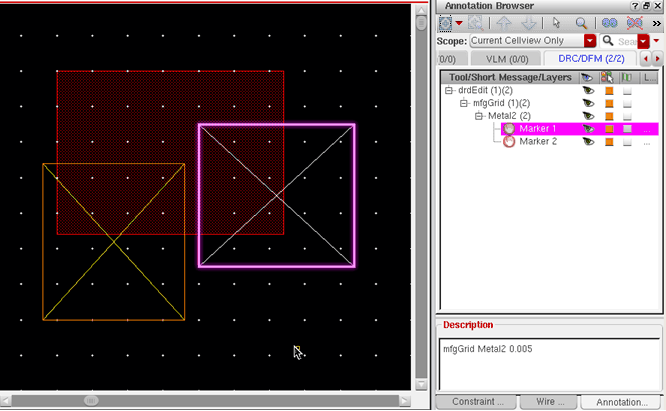
After running the grid check, violations found in the design are listed in the Annotation Browser and the corresponding violation markers are created in the layout canvas. In the figure below, you can see that the right vertical edge and the bottom horizontal edge of the Metal2 rectangle are off the grid; marker details are displayed in the Annotation Browser.
Specifying Layers in the Interconnect Section
In VLS EXL, layers that are not specified as validLayers in the interconnect section of a constraint group receive only basic checks (checks available in Virtuoso Layout Suite L); none of the following advanced constraints are applied:
|
maxNumMinEdges
|
|
minCenterToCenterSpacing
|
|
minEdgeAdjacentLength
|
|
minEndOfLineSpacing
|
|
minNumCut
|
|
minOppExtension (table)
|
|
minParallelViaSpacing
|
|
minProtrusionNumCut
|
|
minRectArea
|
|
minStepEdgeLength
|
|
minstubInfluenceSpacing
|
|
redundantViaSetback
|
|
viaSpacing
|
|
viaStackingLimits
|
Supported Derived Layers
Derived layer support in DRD helps check for DRC violations on layers derived from Boolean operations and on layers derived by sizing other layers.
Supported derived layer operators include:
-
'and -
'or -
'not -
'xor -
'select -
'avoiding -
'butting -
'touching -
'straddling -
'inside -
'outside -
'color
Sized layers can be created using the following operators:
-
'grow -
'growVertical -
'growHorizontal -
'shrink -
'shrinkVertical -
'shrinkHorizontal
Derived layers with restricted area are created using the 'area operator.
The derived layer definitions are added to the techDerivedLayers section of the layerDefinitions section of the technology file. In general, layer purposes are not supported in derived layer definitions, except with the 'select operator. Derived layer numbers start from 10000 to prevent conflict with the layer numbers assigned to “regular” layers.
For more information about these operators, see Virtuoso Technology Data ASCII Files Reference.
Supported Layer-Purpose Pair and Voltage-Dependent Constraints
Support for Layer-Purpose Pair Constraints
A few constraints can also be applied to user-defined layer-purpose pairs that are defined in the techPurposes section of the technology file. When applied to user-defined layer-purpose pairs, these constraints are checked only if they are specified in the foundry constraint group.
Table 4-1
Supported Layer-Purpose Pair Constraints
|
Constraint
|
ASCII Syntax
|
Tier Level Support
|
Support Type
|
|
Minimum spacing
|
minSpacing (One layer)
|
L, XL, GXL, and EXL
|
enforce/notify/post-edit
|
|
Minimum clearance
|
minSpacing (Two layers)
|
L, XL, GXL, and EXL
|
enforce/notify/post-edit
|
|
Minimum width
|
minWidth
|
L, XL, GXL, and EXL
|
notify/post-edit
|
To determine minimum spacing, clearance, or width for an object, the rules are applied in the following order of precedence:
-
The object’s layer-purpose pair rule
-
The object’s parent layer-purpose pair rule
-
The object’s layer rule
Example
This example sets the following conditions:
-
The minimum width for
("Metal1" "HV") shapes is 0.14, and for all other Metal1 shapes, it is 0.12. -
The minimum spacing for
("Metal1" "LV") shapes is 0.4. -
The minimum spacing for
("Metal1" "logic") shapes is 0.5. -
The minimum spacing for
("Metal1" "HV") shapes is 1.0. -
The minimum clearance between a
("Metal1" "HV") shape and a ("Metal1" "LV") shape is 0.5. -
The minimum clearance between a
("Metal1" "HV") shape and a ("Metal1" "logic") shape is 0.7. -
The minimum clearance between a
("Metal1" "HV") shape and a V1 shape is 0.8.
The user-defined logic, HV, and LV purposes are specified in the techPurposes section of the technology file.
techPurposes(
;( PurposeName Purpose#   Abbreviation   [Attributes] )
;( ----------- --------   ------------   ------------ )
;User-Defined Purposes:
 ( logic       2000       LGC       )
 ( HV          2010       HV        'sigType "digital" 'parent "drawing")
 ( LV          2020       LV        'sigType "digital" 'parent "drawing")
) ;techPurposes
In the foundry constraint group, the minimum width, spacing, and clearance constraints are specified as follows:
spacings(
  ( minWidth    "Metal1"                          0.12 )
  ( minWidth   ("Metal1" "HV")                    0.14 )
  ( minSpacing ("Metal1" "LV")                    0.4  )
  ( minSpacing ("Metal1" "logic")                 0.5  )
  ( minSpacing ("Metal1" "HV")                    1.0  )
  ( minSpacing ("Metal1" "HV") ("Metal1" "LV")    0.5  )
  ( minSpacing ("Metal1" "HV") ("Metal1" "logic") 0.7  )
) ;spacings
spacings(
  ( minSpacing ("Metal1" "HV")  "V1"              0.8  )
) ;spacings
Support for Voltage-Dependent Constraints
In process nodes of 45nm and below, voltage-specific spacing rules are defined by the foundry. These constraints, listed in Table 4-2, are supported in VLS EXL, and can be layer-purpose-pair-based or net-based as described in the following sections:
Table 4-2
Supported Voltage Dependent Rule Constraints
Layer-Purpose Pair–based VDR Support
Voltage-dependent rules can be applied to user-defined layer-purpose pairs that are defined in the techPurposes section of the technology file. The voltage-dependent minimum spacing (minVoltageSpacing (One layer)) and clearance (minVoltageSpacing (Two layers)) constraints are set by layer. A voltage swing must be specified for each layer-purpose pair on which the constraint is defined. When applied to user-defined layer-purpose pairs, these constraints are checked only if they are specified in the foundry constraint group.
Example
This example sets the following conditions:
-
("Metal1" "HV") shapes have a voltage swing between 0.0 and 3.3. -
("Metal1" "LV") shapes have a voltage swing between 0.0 and 1.5. -
The minimum spacing between
Metal1 shapes whose maximum voltage swing is less than 1.5 is 0.06. -
The minimum spacing between
Metal1 shapes whose maximum voltage swing is greater than or equal to 1.5 and less than 3.3 is 0.08. -
The minimum spacing between
Metal1 shapes whose maximum voltage swing is greater than or equal to 3.3 is 0.1.
The user-defined HV and LV purposes are specified in the techPurposes section of the technology file with their associated voltage ranges.
techPurposes(
;(PurposeName Purpose# Abbreviation)
;(---------------------------------)
;User-defined Purposes:
(HV 13 HV 'sigType "digital" 'parent "drawing" voltageRange (0.0 3.3))
(LV 14 LV 'sigType "digital" 'parent "drawing" voltageRange (0.0 1.5))
)
In the foundry constraint group, the voltage-dependent minimum spacing between two shapes on the Metal1 layer (minVoltageSpacing) is described as:
spacingTables(
  ( minVoltageSpacing "Metal1"
   ( "voltage" nil nil )
   ( 0.0 0.06
     1.5 0.08
     3.3 0.10
   )
  )
) ;spacingTables
To determine the minimum spacing from the spacing table, the voltage swing between shapes is calculated as follows:
Vswing = max(maximum voltage of each shape) - min(minimum voltage of each shape)
This voltage swing is compared with the "voltage" index in the spacing table to determine the first value that is less than the calculated voltage swing. The corresponding minimum spacing applies. In this example:
-
For a voltage swing >= 0.0 and < 1.5, the minimum spacing is 0.06.
-
For a voltage swing >= 1.5 and < 3.3, the minimum spacing is 0.08.
-
For a voltage swing >= 3.3, the minimum spacing is 0.1.
Net-based VDR Support
The minimum and maximum voltages on nets can be set from the Property Editor assistant. For more information about the prerequisites for VDR flows and an explanation of how DRD checks voltage-dependent spacing violations, see Virtuoso Voltage Dependent Rules Flow Guide.
Using Density Constraints
Density is calculated as a percentage of the design area that metal on a layer occupies. It is calculated as follows:
Density = Metal area / Total area
The density check performed by DRD in Batch-Check mode relies on the minDensity and maxDensity constraints defined in the technology file, similar to the examples given below for Metal1:
( minDensity "Metal1"
  (( "step" nil nil ))
  (
    60.0 20.0
  )'ref "METAL1.D.1" 'description "Minimum Metal1 Density"
)
( maxDensity "Metal1"
  (( "step" nil nil ))
  (
    60.0  65.0
  ) 'ref "METAL1.D.1" 'description "Maximum Metal1 Density"
)
The second value (20.0) in the minDensity constraint listed above is the minimum density required for Metal1. The second value (65.0) in the maxDensity constraint represents the maximum density allowed for Metal1.
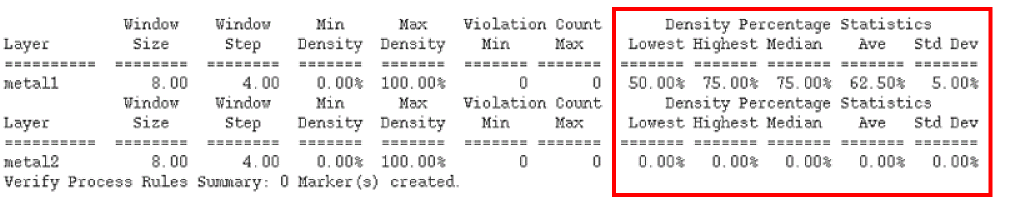
When you run DRD with the Density check option, the values for minDensity and maxDensity constraints are listed in the Min Density and Max Density columns, respectively, in the report displayed in CIW. Density is calculated for each specified window and step size and these results too are displayed in CIW, as shown below:
The Density Percentage Statistics figures provide the lowest and the highest area occupied on a metal layer as a percentage of the design. To better understand the significance of the various statistical terms, consider the following example:
Average (Ave)
In the example above, the lowest density value for metal1 is 50%, and the highest density value for metal1 is 75%. Therefore, the average density value is 62.5%.
Average (Ave) = ( Lowest + Highest ) / 2 = 62.5
Median
The median value is obtained after sorting all density values in the ascending order. If the number of density check windows is odd, the median is equal to the value that lies in the 'middle' of the sorted list, and if the number of density check windows is even, the median is calculated as an average of the two 'middle' values.
Standard Deviation (Std Dev)
The standard deviation measures how close the density value for each density check window is to the mean value. A small standard deviation value of 5% indicates that the values are concentrated close to the mean value, which in this case is 62.5%.
Viewing Density Violations in Annotation Browser
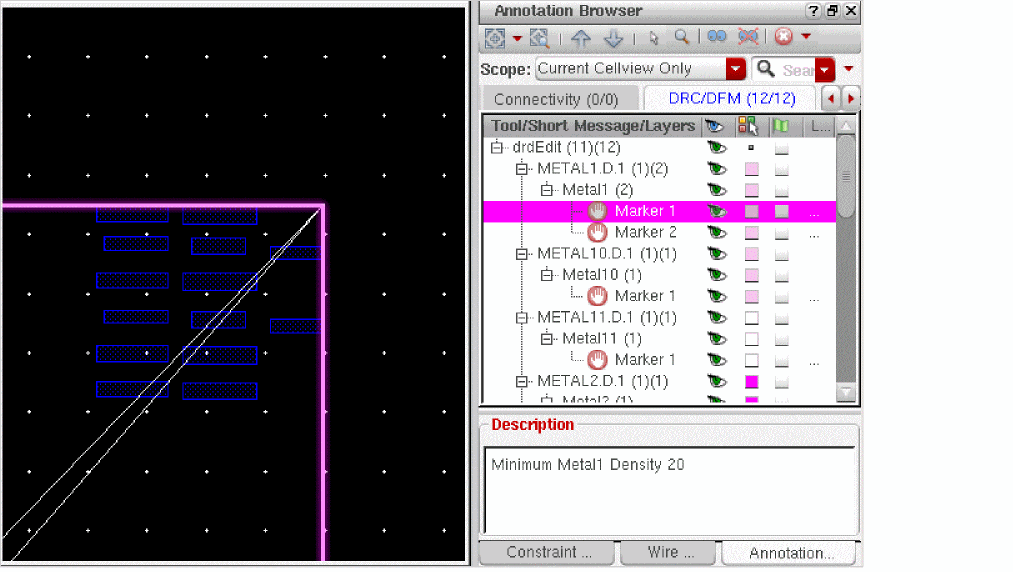
When a minDensity constraint is violated, DRD batch checker (Verify – Design) reports it as follows:
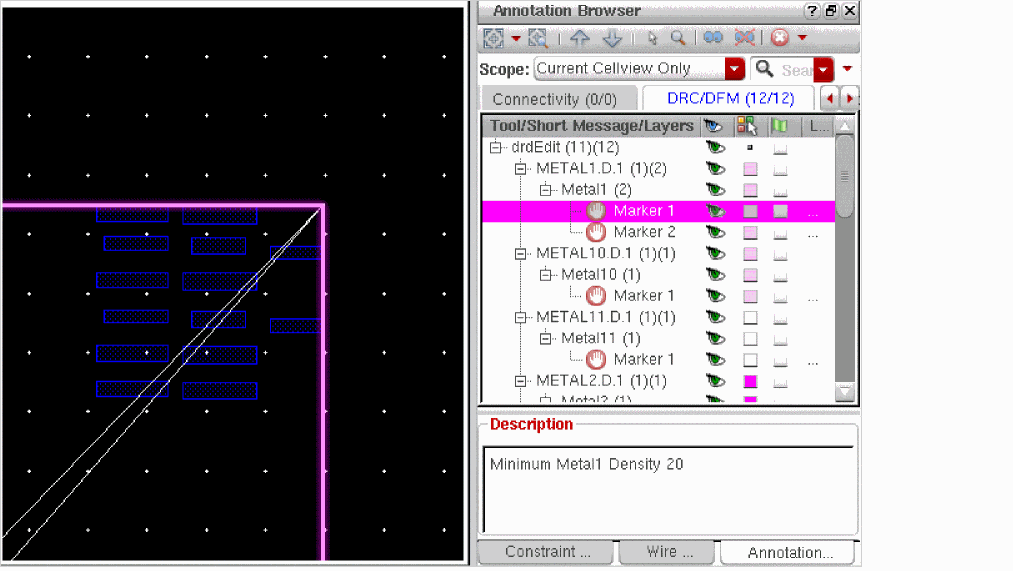
When a maxDensity constraint is violated, DRD batch checker (Verify – Design) reports it as follows:
Using Alternate Foundry Constraint Group
If an alternate foundry constraint group (AFCG) is defined in the .cdsenv file, DRD replaces the foundry constraint group and uses the specified AFCG instead.
You can specify an AFCG by setting the following environment variable in your .cdsenv file:
cdba.layout AlternateFoundryCG string "AFCG_name"
Return to top