
4
Develop and Define a Fluid Guard Ring Device
Customizing an FGR involves more than one step depending on its design: extending the classes and their methods provided in VFO infrastructure, defining the device and its properties in technology file, adding or updating CDF parameters.
This chapter covers these aspects in detail in the following sections:
- Extending the VFO Infrastructure
- Defining Fluid Guard Ring Devices
- Adding or Modifying CDF Parameters
Extending the VFO Infrastructure
The implementation, filling, and protocol classes in the VFO infrastructure are extendible as explained in the sections below.
Extending the Implementation Class
While writing code for a customized FGR device, a PDK developer extends a class from the vfoAdvGuardRing implementation class. This extended class inherits the slots from base classes and new slots can be defined in it. The examples below illustrate how to do this.
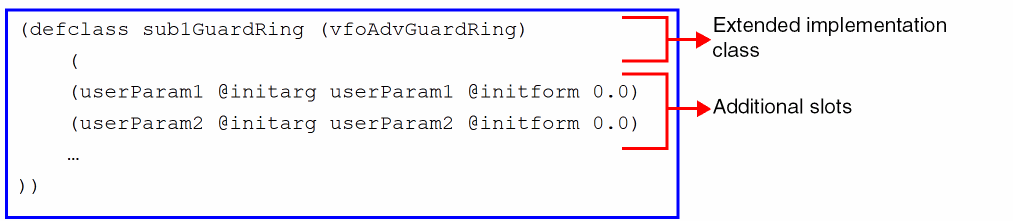
To specify the drawing method for a new FGR device, override the vfoGRGeometry() method and/or its relevant sub-methods by passing an object of the custom class, as shown below. The example below also shows how to override vfoGRGeometry() and vfoSfDraw() methods.
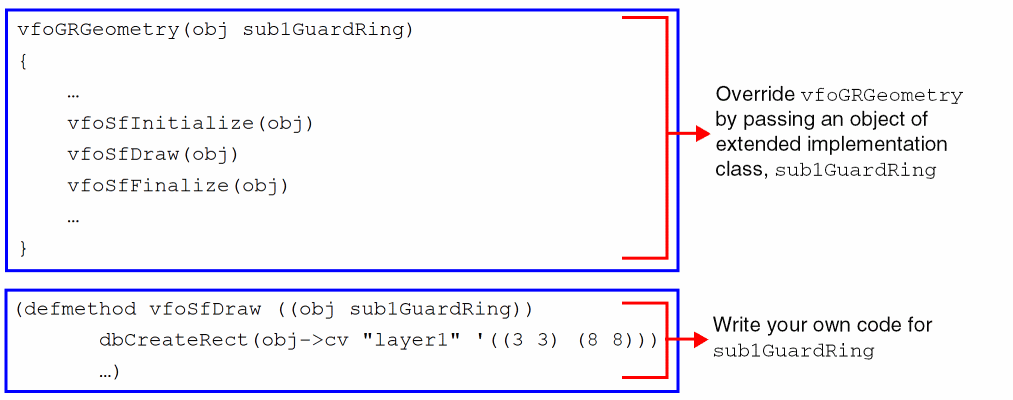
vfoGuardRing class.Extending the Filling Class
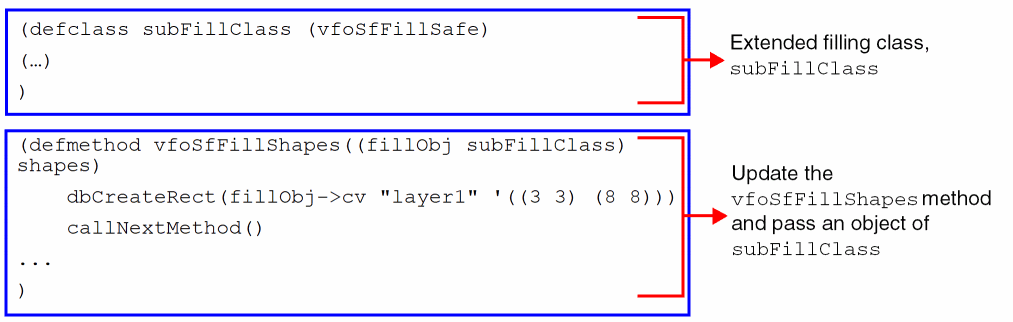
To customize the filling of the contacts in an FGR, extend the vfoSfFillSafe filling class and override the relevant methods.
In the example below, subFillClass is the extended filling class and the vfoSfFillShapes() method is overridden to contain the custom contact filling code.
Defining Fluid Guard Ring Devices
The process of defining FGR devices requires definition of the device class, declaration of the device, and specification of the device properties in the technology file. The updated FGR device definitions are reflected after you save and reload the edited technology file.
Defining the Device Class
While developing a customized FGR device, the tcCreateDeviceClass class in the technology file acts as a template for device definition. Add the new formal parameters to this device class, as shown below.
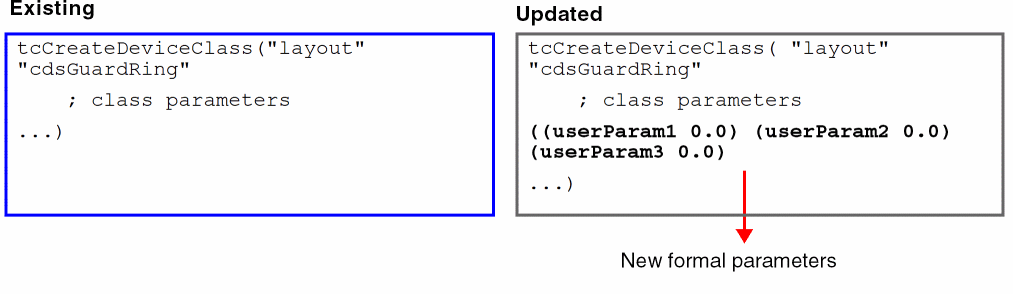
You can define multiple such device definitions. In this case, the class parameter is a union of all parameters belonging to different devices of the same device class.
myNewParam, also create a CDF parameter named myNewParam. Refer to the Defining Fluid Guard Ring Devices section for details.Example Device Class Definition
Following is an example of a complete device class definition:
tcCreateDeviceClass( "layout" "cdsGuardRing"
; class parameters
( (pinName "B1")
(defComplementaryDevice nil)
(classVersion nil)
(vfoGRImpl "vfoAdvGuardRing")
(enclosureClass "vfoSfEnclosureClass")
(vfoProtocolClass "vfoAdvSfImplClass")
(hilightLpp (quote ("annotate" "drawing")))
(mainLpp (quote ("y2" "drawing")))
(modelLpp (quote ("y0" "drawing")))
(metalLayer nil)
(contLayer nil)
(tmpLpp (quote ("instance" "drawing")))
(diffLayer nil)
(guardRingType nil)
(termName "B")
)
; formal parameters
( (contAlignment "")
(xDiffEnclCont 0.0)
(yDiffEnclCont 0.0)
(xMetEnclCont 0.0)
(yMetEnclCont 0.0)
(xContSpacing 0.0)
(yContSpacing 0.0)
(xContWidth 0.0)
(yContWidth 0.0)
(enclosingLayers "nil")
(shapeData "nil")
(shapeType "none")
(decompositionMode (if (getShellEnvVar "FGR_USE_ALIGNCUTS") "alignCuts" "fill45-path-poly"))
(hide_keepouts t)
(fillStyle "distribute")
(fillClass "vfoSfFillSafe")
(debug 0)
(do_something t)
(formalVersion 0)
(keepOuts nil)
(removeCornerContacts nil)
(horizontalSegWidth 0.0)
(verticalSegWidth 0.0)
(verticalPitch 0.0)
(horizontalPitch 0.0)
)
; IL codes specifying geometry
(eval
(quote
(if
(vfoIsSuperMaster tcCellView)
(progn
(dbCreateLabel tcCellView modelLpp
(range 0 0) "superMaster"
"lowerLeft" "R0" "roman" 1.0
)
(vfoSetProtocolClassName tcCellView
(concat vfoProtocolClass)
)
)
(let
((result
(errset
(when
t
(vfoGRGeometry
(makeInstance
(or
(findClass
(concat vfoGRImpl "_ver_" formalVersion)
)
(error "SKILL Class %L does not exist:"
(concat vfoGRImpl "_ver_" formalVersion)
)
)
?cv tcCellView ?keepOuts keepOuts ?formalVersion formalVersion ?do_something do_something
?debug debug ?fillClass fillClass ?fillStyle fillStyle ?hide_keepouts hide_keepouts ?decompositionMode decompositionMode
?shapeType shapeType ?shapeData shapeData ?enclosingLayers enclosingLayers
?xContWidth xContWidth ?yContWidth yContWidth ?xContSpacing xContSpacing ?yContSpacing yContSpacing
?xMetEnclCont xMetEnclCont ?yMetEnclCont yMetEnclCont ?xDiffEnclCont xDiffEnclCont
?yDiffEnclCont yDiffEnclCont ?contAlignment contAlignment ?removeCornerContacts removeCornerContacts
?vfoGRImpl vfoGRImpl ?modelLpp modelLpp ?tmpLpp tmpLpp ?hilightLpp hilightLpp
?mainLpp mainLpp ?vfoProtocolClass vfoProtocolClass ?enclosureClass enclosureClass
?termName termName ?pinName pinName ?metalLayer metalLayer ?contLayer contLayer ?diffLayer diffLayer
?defComplementaryDevice defComplementaryDevice ?guardRingType guardRingType ?classVersion classVersion
?horizontalSegWidth horizontalSegWidth ?verticalSegWidth verticalSegWidth ?verticalPitch verticalPitch ?horizontalPitch horizontalPitch
)
)
) t
)
) msg
)
(setq msg
(getqq errset errset)
)
(unless result
(dbCreateLabel tcCellView
(quote
("marker" "error")
)
(range 0 0)
(sprintf nil "%L" msg)
"lowerLeft" "R0" "roman" 1.0
)
(error "%L/%L"
(getSGq tcCellView cellName) msg
)
)
)
)
)
)
)
Declaring the Device
The FGR device declaration exists in the tcDeclareDevice construct within the technology file. For example:
tcDeclareDevice( "layout" "cdsGuardRing" "NGR"
( (classVersion 1)
(enclosureClass "vfoSfEnclosureClass")
(vfoProtocolClass "vfoAdvSfImplClass")
(hilightLpp (quote ("annotate" "drawing")))
(vfoGRImpl "sub1GuardRing")
(mainLpp (quote ("Active" "drawing")))
(modelLpp (quote ("y0" "drawing")))
(tmpLpp (quote ("instance" "drawing")))
(guardRingType "N")
(termName "FGRTerm")
(pinName "FGRPin")
(defComplementaryDevice "")
)
( (shapeData "nil")
(shapeType "none")
(decompositionMode "fill45-path-poly")
(hide_keepouts t)
(fillStyle "distribute")
(fillClass "vfoSfFillSafe")
(debug 0)
(do_something t)
(formalVersion 0)
(keepOuts (quote nil))
(horizontalSegWidth 0.048)
(verticalSegWidth 0.172)
(verticalPitch 0.048)
(horizontalPitch 0.086)
)
)
Here, replace the names of the implementation, protocol, and filling classes with the names of corresponding new classes that you have extended for the custom FGR. Then, add the new formal parameters in this device declaration construct.
Therefore, if we continue with the examples of class extendibility given in the sections above, the tcDeclareDevice construct will need to be updated as shown below.
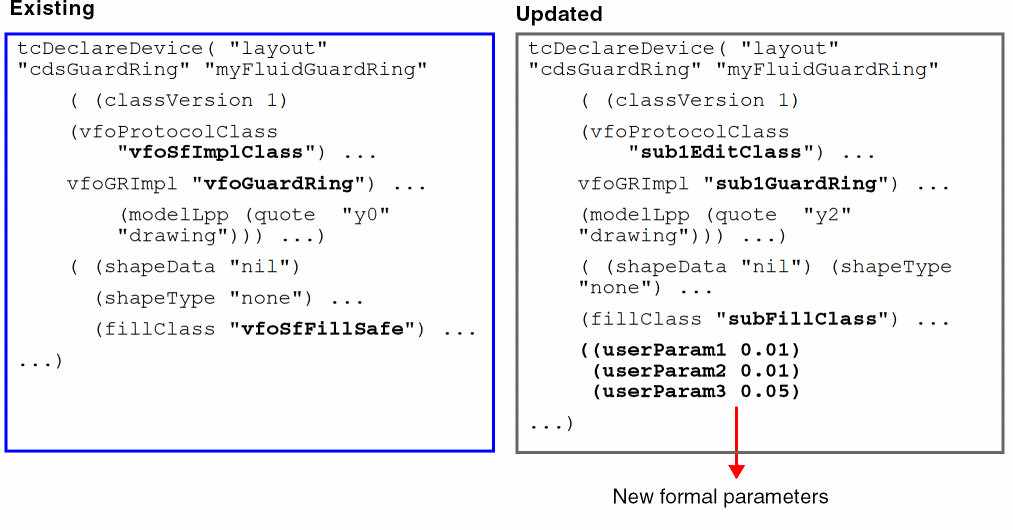
Specifying Device Properties
The tfcDefineDeviceProp construct of the technology file defines the device properties. Following is an example of this construct:
tfcDefineDeviceProp(
; (viewName deviceName propName propValue)
(layout "myFluidGuardRing" vfoProtocolClass "vfoSfImplClass")
)
Within this construct, the following properties are available for handling customized FGR devices:
For example, the following tfcDefineDeviceProp construct shows how to define custom protocol class, sub1EditClass, and hide the device named myFluidGuardRing from the Install Guard Ring form:
tfcDefineDeviceProp(
; (viewName deviceName propName propValue)
(layout "myFluidGuardRing" vfoProtocolClass "sub1EditClass")
(layout "myFluidGuardRing" vfoGRHideDeviceInForms "installForm")
)
Adding or Modifying CDF Parameters
To manage the geometries of the customized FGR device, you can modify the existing component description format (CDF) parameters and attributes, or add new ones by following the steps mentioned below.
-
Create or define new formal parameters for the customized FGR device as given below.
- Dump the ASCII technology file.
- Search for the definition of the FGR device class in the technology file.
-
Add the new formal parameters to the FGR device class,
tcCreateDeviceClass, and add a list of the same parameters in thevfoGRGeometrymethod. -
Search for the FGR device declaration in the technology file that needs to be customized and replace the name of the implementation class,
vfoAdvGuardRing, with the name of your new implementation class. - Add the new formal parameters in the updated FGR device declaration construct.
- Save and load the edited ASCII technology file to update the FGR device definition in the technology database.
-
Extend the new FGR implementation class from the
vfoAdvGuardRingclass and define the new formal parameters in the following format:defclass (
subImplClass(vfoAdvGuardRing)(
(
newParam1@initargnewParam1@initformvalue)(
newParam2@initargnewParam2@initformvalue))
)
-
Add or update CDF parameters for the customized FGR device as given below.
-
Write a procedure that defines the
vfoUpdateCDF(lib cell view)trigger that helps to add new CDF parameters and update the existing ones. When the implementation class of a device is other thanvfoAdvGuardRing, this trigger gets called while loading the technology file. -
Make sure you assign read and write access rights to the new CDF parameters using the
readerandwriterproperties with thecdfIdSKILL variable. For detailed information aboutcdfId, refer to the Modifying Simulation Information chapter in Component Description Format User Guide. -
Use the
cdfCreateParamSKILL function to define the attributes of the new CDF parameters. For detailed information aboutcdfCreateParam, refer to the CDF SKILL Summary chapter in Component Description Format User Guide. - Define a callback for your CDF parameter, if needed. Each user-defined CDF parameter should have a corresponding callback definition.
-
Save the CDF definition using the
cdfSaveCDFfunction. If the CDF description already exists, the old one gets overwritten by the new description.
-
Write a procedure that defines the
For detailed information about the triggers, SKILL functions, steps listed above, and related example, refer to the
Following example code provides a snapshot of adding new CDF parameter userDefinedParam, updating the existing CDF parameter shapeData, and saving them:
procedure(vfoUpdateCDF(libName cellName viewName)
prog((cellId cdfId)
cellId = ddGetObj(libName cellName)
unless(cellId return())
cdfId = cdfGetBaseCellCDF(cellId)
unless(cdfId
cdfId = cdfCreateBaseCellCDF(cellId)
);;unless
;;Adding new CDF
cdfCreateParam(cdfId
?name "userDefinedParam"
?prompt "user CDF"
?type "boolean"
?defValue t
?callback "userDefinedParam_CdfCB()"
)
;;Associating reader and writer properties with the new parameters
fromcdf='(lambda (x) x)
tocdf='(lambda (x) x)
;;Adding readers
putprop(cdfId->readers fromcdf (concat "userDefinedParam"))
;;Adding writers
putprop(cdfId->writers tocdf (concat " userDefinedParam"))
;;Updating existing CDF attribute
foreach(param cdfId~>parameters
when(param~>name == "shapeData"
param~>display="nil"
param~>callback="myShapeData_CdfCB()"
)
)
;;Defining the myShapeData_CdfCB()callback:
procedure(myShapeData_CdfCB()
let(
printf("myShapeData Callback \n")
)
)
cdfSaveCDF(cdfId)
Return to top